
DarkRavenz
New member
- Local time
- 11:46 PM
- Messages
- 2
Hello im from from malaysia.. after i buy new laptop i get window 7.. and i been using for 1 year after that im having a error to connect wifi and play internet.. the error is DHCP is not running and try to solve with run as administrator but fail also.. After that i decide to install new window 7 and now im using new windows 7 on C:
Now i have 2 window 7 on laptop which is C: is im using it now and D: is old windows 7 that corrupt.. now the problem is when i opened "disk management"
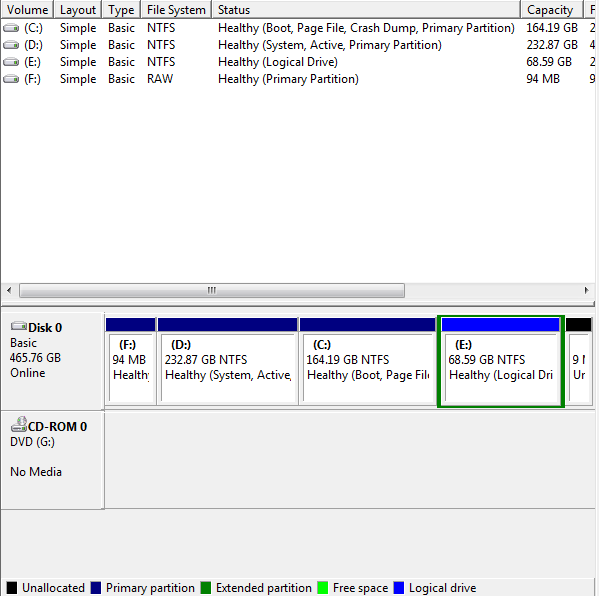
The D: partition is System,active but C: is just boot,page file,crashdumped .. i open msconfig and deleted boot D: but window boot manager still come up.. how to delete window 7 on D: partition? im scare that if i format D: and my window will not startup because D: is system file and active.. and in D: have a "bootmgr" file.. how do i make my C: as System and actived Partition.. and make sure the is no "window boot manager" if i open my laptop..
p/s:sorry for my broken english im from malaysia
Now i have 2 window 7 on laptop which is C: is im using it now and D: is old windows 7 that corrupt.. now the problem is when i opened "disk management"
The D: partition is System,active but C: is just boot,page file,crashdumped .. i open msconfig and deleted boot D: but window boot manager still come up.. how to delete window 7 on D: partition? im scare that if i format D: and my window will not startup because D: is system file and active.. and in D: have a "bootmgr" file.. how do i make my C: as System and actived Partition.. and make sure the is no "window boot manager" if i open my laptop..
p/s:sorry for my broken english im from malaysia
My Computer
At a glance
Window 7 Home Premium 32bit
- OS
- Window 7 Home Premium 32bit


