How to disable edit boot on start up windows 7?

Siminea

New member
I just try to use windows 7 but now my laptop always edit boot before windows start. I want to disable it as windows XP, how can i disable it? Please help to guide me on this.
 

My Computer

Computer Manufacturer/Model Number
Toshiba Satellite L100
OS
Windows 7
CPU
1.86
Memory
1GB
Graphics Card(s)
128
Monitor(s) Displays
Intel
Hard Drives
60GB, Toshiba
so how to use program EasyBCD? i really don't know anything of this. can you guide me more on this. Thank you in advance
 

My Computer

Computer Manufacturer/Model Number
Toshiba Satellite L100
OS
Windows 7
CPU
1.86
Memory
1GB
Graphics Card(s)
128
Monitor(s) Displays
Intel
Hard Drives
60GB, Toshiba
Looks like EasyBCD 2.0 is a beta version. I would just use EasyBCD 1.7.2. I do. Works PERFECT!
Download from Download EasyBCD 1.7.2 - NeoSmart Technologies Here is what you do....
1. Click link above and download it.
2. Install the program.
3. Run the program.
4. Click on "Change Settings"

That should be it. Just save the settings and it should work perfect for you. I have used this in XP, and Windows 7.

Good luck.
Malibu.
 

My Computer

OS
Windows 7
Thanks for all of you to guide me.
 

My Computer

Computer Manufacturer/Model Number
Toshiba Satellite L100
OS
Windows 7
CPU
1.86
Memory
1GB
Graphics Card(s)
128
Monitor(s) Displays
Intel
Hard Drives
60GB, Toshiba
How to edit windows boot? when my laptop start up in the black screen, it write down "edit windows boot...."
Partision1,....[NONEXCUT: OPTION]. So what should i do with it now?
 

My Computer

Computer Manufacturer/Model Number
Toshiba Satellite L100
OS
Windows 7
CPU
1.86
Memory
1GB
Graphics Card(s)
128
Monitor(s) Displays
Intel
Hard Drives
60GB, Toshiba
i have tried to do as you told me many times but i still can't fix it. what should i do next?
 

My Computer

Computer Manufacturer/Model Number
Toshiba Satellite L100
OS
Windows 7
CPU
1.86
Memory
1GB
Graphics Card(s)
128
Monitor(s) Displays
Intel
Hard Drives
60GB, Toshiba

My Computer

Computer Manufacturer/Model Number
Apple Macbook Pro (April 2009)
OS
W7 Ult. x64 | OS X
CPU
Intel Mobile Core 2 Duo 2.93Ghz [T9800 Penryn]
Motherboard
NVIDIA nForce 730i Rev. B1 [Mac-F2268EC8 (U2E1)]
Memory
4096MB Samsung DDR3 Dual Channel [PC3-8500F 1066Mhz]
Graphics Card(s)
NVIDIA GeForce 9600M GT 512MB [G96M Rev. C1]
Sound Card
SB X-Fi Surround 5.1 USB | Onboard Realtek (Disabled)
Monitor(s) Displays
Acer x223wbd 22" | Apple Anti-Glare 17" (Disabled)
Screen Resolution
{Current} 1440x900 {Acer} 1680x1050 {Apple} 1920x1200
Hard Drives
{Internal}
Seagate Momentus 320GB 2.5" 7200RPM [ST9320421AS]

{Externals}
LaCie 320GB USB 2.0 HDD [301284UR]
LaCie 750GB USB 2.0 FW400 eSATA HDD [301314U]
LaCie 1TB USB 2.0 HDD [301304UR]
PSU
Magsafe
Case
Aluminum/Unibody (MBP52)
Cooling
2 x 6000 RPM Fans
Keyboard
Logitech G-15v2 [PN 920-000379]
Mouse
Logitech G-9 [PN 910-000338]
Internet Speed
12Mbps/2.5Mbps w/ 24Mbps Speed Boost [Comcast]
Other Info
Logitech X-540 Speakers [PN 970223-0122]
Sennheiser PC-151 Headset
Looks like EasyBCD 2.0 is a beta version. I would just use EasyBCD 1.7.2. I do. Works PERFECT!
Download from Download EasyBCD 1.7.2 - NeoSmart Technologies Here is what you do....
1. Click link above and download it.
2. Install the program.
3. Run the program.
4. Click on "Change Settings"

That should be it. Just save the settings and it should work perfect for you. I have used this in XP, and Windows 7.

Good luck.
Malibu.

EasyBCD 2.0 is only technically beta because the developer adds stuff to it so often that he doesnt see the point of doing a final release then 2 weeks later putting another Beta out 2.0 is the way to go for Win 7 as it actually uses the Win 7 BCD 1.7.9 is Vista based, and although it will work with 7 (as the BCD's are basically the same) you get the ugly Vista green scroll bar thing rather than the pretty shiny flying windows.

Oh and it screws up if you try and restore Win 7's MBR in 1.7.9
 

My Computer

Computer type
PC/Desktop
Computer Manufacturer/Model Number
Medion Erazer (note to self: insert model number) - with custom additions
OS
Windows 10 Pro x64
CPU
Intel Core i5 7400 @ 3.00GHz
Motherboard
OEM supllied with PC
Memory
8GB 2133Mhz DDR4 (OEM supplied)
Graphics Card(s)
Gygabyte Windforce GTX 1050Ti (Factory Overclocked)
Sound Card
Realtek
Monitor(s) Displays
Acer Al1980 + HKC
Screen Resolution
1360*768(HKC) / 1280*1024(Acer)
Hard Drives
1TB Toshiba
1TB WD Caviar Green
120GB Samsung Evo 840
PSU
OEM supplied (no power rating on case)
Case
OEM Supplied
Cooling
Stock
Keyboard
Logitech Wireless
Mouse
Logitect Wireless
Internet Speed
40Mb/s Down 10Mb/s Up
Antivirus
Defender
Browser
Firefox
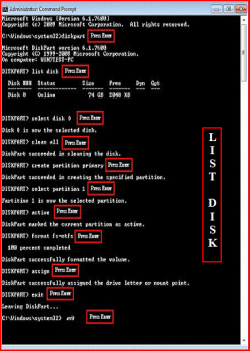
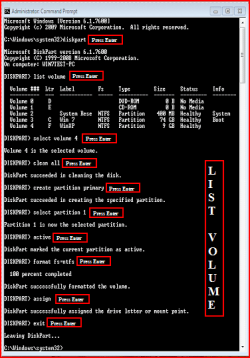
Thanks you again. Now i have formate all drive and install only Windows 7 on my laptop but the problem of boot edition on start up in black screen the same so could you tell me more. I have try to repair on start up and use EasyBCD for help but the problem still can't fix.
My English is not well but i hope you can understand.
 

My Computer

Computer Manufacturer/Model Number
Toshiba Satellite L100
OS
Windows 7
CPU
1.86
Memory
1GB
Graphics Card(s)
128
Monitor(s) Displays
Intel
Hard Drives
60GB, Toshiba

Attachments

  • List Disk.PNG
    List Disk.PNG
    188.5 KB · Views: 5
  • List Volume.PNG
    List Volume.PNG
    79.5 KB · Views: 3

My Computer

OS
ME/XP/Vista/Win7
Back
Top