Solved How to export iPhone contacts to Windows Live Mail?

Rodbo

New member
Local time
11:21 PM
Messages
2
Hi,

Please note that this is not Windows Live (Hotmail) but the offline Windows application with that name. I find Windows Live Mail as a great way to manage my email, I want to manage my contacts there too. However, all my contacts are currently loaded on my iPhone (I have the contacts manually created on the phone a long time ago).

Thanks for your suggestions.
 

My Computer My Computer

At a glance

Windows 7
OS
Windows 7
If you want to directly export the contacts use a small application intended to run on your PC called CopyTrans Contacts.

1. Run the tool on your computer and connect your iPhone. You can download the program from here: export iPhone contacts

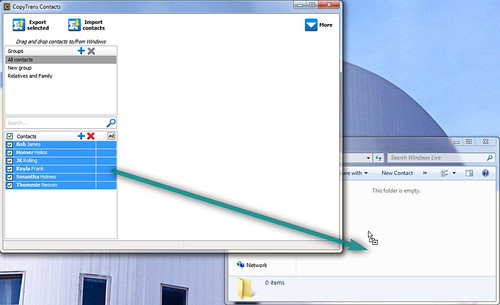
2. Once your iPhone contacts appear, drag and drop a selection to a folder on your PC

7455255860_a7066c0199.jpg


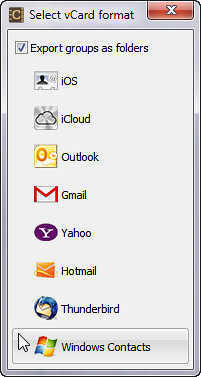
3. Select the type of contact files you wish your iPhone contacts to get exported in. Windows Live Mail recognizes Windows Contacts, so select that format

7455255320_2233208a84.jpg


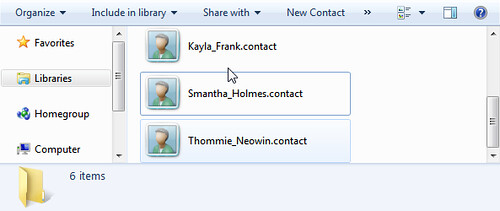
4. Your iPhone contacts will be saved to your PC. Now go to your Windows Live Mail application and import the contacts from the folder on your PC where you saved them in

7455256006_3eefe3d37e.jpg
 

My Computer My Computer

At a glance

Windows 7
OS
Windows 7
Cheers, mate! That did the job. Thanks for the quick reply.
 

My Computer My Computer

At a glance

Windows 7
OS
Windows 7
You are welcome, glad this was of use. Here is the above steps depicted on video:


My Computer My Computer

At a glance

Windows 7
OS
Windows 7
Back
Top