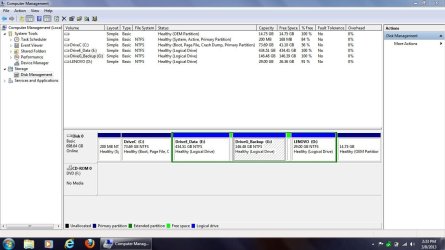
How to extend an Extended Partition; leave logical volumes intact

With Paragon:

1) Shrink c drive - you will then have unallocated space on the left of the extended partition.

2.) Resize the extended partition to the left to incorportae the unallocated space.

3) You now have free space inside the extended partition. It will be on the left of the lenovo logical drive.

4) Create partitions from that free space.

View attachment 258451

View attachment 258452

NOTE - you need to select the extended partition - NOT the logical drive inside it. You should see it go gold around the edge:

View attachment 258453

View attachment 258454
Thanks much, SIW2. And yes, I think what happened the last time I tried this with my older V570 is that I got confused between the logical D drive inside, and the extended partition that was housing it, and that's where things went south. And JUST to be sure, since in your photo examples you were choosing a primary partition on which to work, and not an extended partition -- it won't make any difference in Paragon whether it's an extended partition or a primary partition in order to make the change, AND...it will keep the "D" logical drive intact, correct?
 

My Computer My Computer

At a glance

Windows 7 Pro 32-bitIntel I-7 2nd gen8GB
OS
Windows 7 Pro 32-bit
CPU
Intel I-7 2nd gen
Memory
8GB

My Computer My Computer

At a glance

Windows 7 Pro 32-bitIntel I-7 2nd gen8GB
OS
Windows 7 Pro 32-bit
CPU
Intel I-7 2nd gen
Memory
8GB
since in your photo examples you were choosing a primary partition on which to work, and not an extended partition

:confused:

If you look at my pics - C is Primary, D is inside an extended. Quite similar to yours.

Anyway ,

it won't make any difference in Paragon whether it's an extended partition or a primary partition in order to make the change, AND...it will keep the "D" logical drive intact, correct?

Yes, you will be fine. :D
 

My Computers My Computers

  • At a glance

    7 X64i5 84002x8gb 3200mhz
    Computer type
    PC/Desktop
    OS
    7 X64
    CPU
    i5 8400
    Motherboard
    gigabyte b365m ds3h
    Memory
    2x8gb 3200mhz
    Hard Drives
    various
    PSU
    pure power 11 400w cm
    Case
    Coolermaster
    Cooling
    cryorig m9i
  • At a glance

    7x64g54008gb ddr4 2400
    Computer type
    PC/Desktop
    OS
    7x64
    CPU
    g5400
    Motherboard
    ga b365m ds3h
    Memory
    8gb ddr4 2400
    PSU
    xfx pro 450w
If you look at my pics - C is Primary, D is inside an extended. Quite similar to yours.
Hmmmmmmmm....it looks like D & E are inside an extended partition, but they both have the dark blue color which usually means primary, vs the green which usually means logical.

I'll give it a shot and report back. It might be a day or so, but I'll definitely update on the results. Thanks again.
 

My Computer My Computer

At a glance

Windows 7 Pro 32-bitIntel I-7 2nd gen8GB
OS
Windows 7 Pro 32-bit
CPU
Intel I-7 2nd gen
Memory
8GB
You're welcome.

The dark blue indicates NTFS - a file system - not a partition type.

I think your Paragon will look similar. MS Diskmgt has a slightly different legend.
 

My Computers My Computers

  • At a glance

    7 X64i5 84002x8gb 3200mhz
    Computer type
    PC/Desktop
    OS
    7 X64
    CPU
    i5 8400
    Motherboard
    gigabyte b365m ds3h
    Memory
    2x8gb 3200mhz
    Hard Drives
    various
    PSU
    pure power 11 400w cm
    Case
    Coolermaster
    Cooling
    cryorig m9i
  • At a glance

    7x64g54008gb ddr4 2400
    Computer type
    PC/Desktop
    OS
    7x64
    CPU
    g5400
    Motherboard
    ga b365m ds3h
    Memory
    8gb ddr4 2400
    PSU
    xfx pro 450w
Thanks Johan. It sounds like this should work. But like I said to gregrocker, IF SIW2 responds and tells me that Paragon 11 will do what I want, I'd prefer to use that program since I already have it burned to a CD and know some of its particulars.

And just to make sure...I just burned an .iso of the latest GParted LIVE onto a CD. Is that the right version to use to boot into the program pre-Windows?

Hey the last sentence was added later, I think. GParted can be downloaded from
GParted -- About or more specifically from
GParted -- Download

Best is to download from sourceforge.net anyhow. There could be other sites offering to download GParted but I would not trust them.

The latest Live CD/USB version is: gparted-live-0.14.1-6-i486.iso

If booting from a CD is too slow, as was in my case, you could boot GParted from an USB flash drive.

GParted offers particular flexibility like shifting the end-cap of a partition into unallocated area and reclaim only partially some of that unallocated area while leaving the rest of that unallocated area for other future use.

I am not sure if Paragon and PW can do the same, it could be they just snap up all the unallocated area, leaving you with no unallocated area left.

j
 

My Computer My Computer

At a glance

Window 7 Home Premium 64-bit
OS
Window 7 Home Premium 64-bit
Both PW and Paragon let you select how big the partition is - the rest remains unallocated - so you can make another , and so on. I think they all do that.
 

My Computers My Computers

  • At a glance

    7 X64i5 84002x8gb 3200mhz
    Computer type
    PC/Desktop
    OS
    7 X64
    CPU
    i5 8400
    Motherboard
    gigabyte b365m ds3h
    Memory
    2x8gb 3200mhz
    Hard Drives
    various
    PSU
    pure power 11 400w cm
    Case
    Coolermaster
    Cooling
    cryorig m9i
  • At a glance

    7x64g54008gb ddr4 2400
    Computer type
    PC/Desktop
    OS
    7x64
    CPU
    g5400
    Motherboard
    ga b365m ds3h
    Memory
    8gb ddr4 2400
    PSU
    xfx pro 450w
Ok thanks for the info SIW2. Looks like Paragon and PW have improved their products a lot in just a year time. PW even has a freeware version. BTW, what is the exact product name and version from which you took the screen shots in #37?
j
 

My Computer My Computer

At a glance

Window 7 Home Premium 64-bit
OS
Window 7 Home Premium 64-bit
You're welcome.

The dark blue indicates NTFS - a file system - not a partition type.

I think your Paragon will look similar. MS Diskmgt has a slightly different legend.
LOL. That's hysterical. I'm working with Paragon now and have everything just about done thanks to your help. I JUST noticed that the blue inside, according to Paragon's legend, means NTFS, and I was about to post when I read yours. Thanks a million, man!! I really appreciate it. And once I reboot and make sure everything is working the way it should, I'll post on the Lenovo Community forum and let them know that there is finally a solution to this most annoying problem. I do want to point out that it's a bit tricky when selecting the extended partition vs the logical D drive inside it. One time I almost blew it. Initially I'd clicked the partition, but when it came time to right click and resize, I accidentally must have touched the Logical D drive my mistake. I saw Lenovo D come up instead of Extended Partition, so I went back and re-did it. Now everything is almost done; I just need to create the last logical drive and I'll be finished.
 

My Computer My Computer

At a glance

Windows 7 Pro 32-bitIntel I-7 2nd gen8GB
OS
Windows 7 Pro 32-bit
CPU
Intel I-7 2nd gen
Memory
8GB
And here we have it...the NEW partitioning of the HDD:
 

Attachments

  • Lenovo V570 hard drive partitions New.JPG
    Lenovo V570 hard drive partitions New.JPG
    106.8 KB · Views: 14

My Computer My Computer

At a glance

Windows 7 Pro 32-bitIntel I-7 2nd gen8GB
OS
Windows 7 Pro 32-bit
CPU
Intel I-7 2nd gen
Memory
8GB
skbaltimore, why is there some light-green narrow area between the 3 logical partitions? Is that unallocated area?
j
 

My Computer My Computer

At a glance

Window 7 Home Premium 64-bit
OS
Window 7 Home Premium 64-bit
skbaltimore, why is there some light-green narrow area between the 3 logical partitions? Is that unallocated area?
j
Good question. I'm not sure. Maybe it's just how Windows doesn't use space efficiently, I'm not sure. But whatever it is, it's so marginal that I don't think it's going to make any difference. Maybe someone else could explain it better, though.
 

My Computer My Computer

At a glance

Windows 7 Pro 32-bitIntel I-7 2nd gen8GB
OS
Windows 7 Pro 32-bit
CPU
Intel I-7 2nd gen
Memory
8GB
Window 7 sometimes does leave some space between partition. I the particular case I had it was each time 1MiB. GParted does not do that, so I partitioned my drives using GParted. Maybe you could delete your logical partitions - except for the D partition - and re-create the 2 new logical partitions using Paragon.
j
 

My Computer My Computer

At a glance

Window 7 Home Premium 64-bit
OS
Window 7 Home Premium 64-bit
Now I noticed the green area's are uneven in width!! Very strange. Maybe, in DM, you could right-click the two new logical partitions and try to extend them. If that works, it'll fill up the gaps.
j
 

My Computer My Computer

At a glance

Window 7 Home Premium 64-bit
OS
Window 7 Home Premium 64-bit
Honestly, I'm satisfied with the way everything is now. Those little gaps will never become an issue, as far as I'm concerned, as long as it's just a tiny bit of space that we're talking about.
 

My Computer My Computer

At a glance

Windows 7 Pro 32-bitIntel I-7 2nd gen8GB
OS
Windows 7 Pro 32-bit
CPU
Intel I-7 2nd gen
Memory
8GB
Ok, good that you got it all solved.
j
 

My Computer My Computer

At a glance

Window 7 Home Premium 64-bit
OS
Window 7 Home Premium 64-bit
Ok, good that you got it all solved.
j
Thanks. And thanks for your input about the GParted program.

(Dearly, GParted...we gather here...)

j/k

Now that I know what can be done with Paragon 11, I might check out what GParted can do. I just wanted to make sure that the program I'd used before and trusted could get the job done here. What I'm sure I did wrong a year ago was not focus on the unnamed/unlettered extended partition, but rather on the logical Lenovo D drive. IIRC, I kept getting messages that said there wasn't enough space to extend it. And that was correct. I was trying to expand that logical drive in a space that could not handle it, rather than trying t expand the extended partition in which it was housed. Once I got that straight, it was a really easy solution.
 

My Computer My Computer

At a glance

Windows 7 Pro 32-bitIntel I-7 2nd gen8GB
OS
Windows 7 Pro 32-bit
CPU
Intel I-7 2nd gen
Memory
8GB
Yes, you can check out things, try things out, experiment, what ever, but please don't do it on your main laptop. Best is to use some old hard drive that you put into an external USB enclosure, and try out the utilities then on that old hard drive. In case of serious failure you'll loose just a few dollars.
Alternatively you could also use simply an old USB Flash Drive (thumb drive) for your trials. GParted Live CD is linux based, which entails you can create a normal MSDOS partition scheme (with primary, extended and logical partitions) onto an USB Flash Drive. I've just done the test a few minutes ago and I've shifted the front of an extended partition forward, claimed part of the unallocated area into the extended partition, created a new logical partition; all that on a 6-dollar 8GB USB flash drive.

Good luck,
j
 

My Computer My Computer

At a glance

Window 7 Home Premium 64-bit
OS
Window 7 Home Premium 64-bit
Yes, you can check out things, try things out, experiment, what ever, but please don't do it on your main laptop. Best is to use some old hard drive that you put into an external USB enclosure, and try out the utilities then on that old hard drive. In case of serious failure you'll loose just a few dollars.
Alternatively you could also use simply an old USB Flash Drive (thumb drive) for your trials. GParted Live CD is linux based, which entails you can create a normal MSDOS partition scheme (with primary, extended and logical partitions) onto an USB Flash Drive. I've just done the test a few minutes ago and I've shifted the front of an extended partition forward, claimed part of the unallocated area into the extended partition, created a new logical partition; all that on a 6-dollar 8GB USB flash drive.

Good luck,
j
Cool. Thanks again.
 

My Computer My Computer

At a glance

Windows 7 Pro 32-bitIntel I-7 2nd gen8GB
OS
Windows 7 Pro 32-bit
CPU
Intel I-7 2nd gen
Memory
8GB
And what you're saying is that PW will then create one new logical drive/partition consisting of the space created by shrinking C INSIDE the extended partition that's currently housing the Lenovo "D" logical drive? After that, can I then split THAT logical drive into 2 -- one 500 GB, and the other 90 GB?

Finally, does PW leave the existing Lenovo "D" logical drive intact?

I said to simply shrink C in Disk Mgmt, then in the shrink space create a new Logical partition with Partition Wizard Create Partition - Video Help. There is zero risk and PW handles Logical partitions as separate contiguous partitions rather than as part of a container.

This is posted for others who are finding this thread on Google, who appreciate advice directly from those who handle tens of thousands of these cases in Win7 alone, and don't presume to tell us how to deliver our advice.
 
Back
Top