
I recently intended to divide an unpartitioned HD OF 195 Gbts into a PRIMARY Partition of , say , 50Gbts , containing WIN 7 only , and have the remainder divided as an Extended Partition sub-divided into two Logical Drives which would contain Applications and Data respectively.
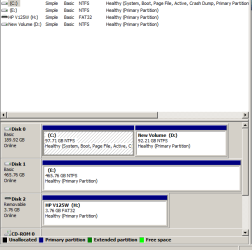
In attempting to do this I began by shrinking the drive , which was Active and already contained WIN 7 , and then created what turned out to be another Primary Partition of some 94 Gbts , thus leaving WIN 7 installed on its C drive which was now just under 100 Gbts.
This result is shown in the attached file. There is also another H/D of some 450 Gbts.
This newly created C: Partition is too big for my purposes as WIN 7 only takes up some 22Gbts but I was not allowed to shrink it below this size by the procedures employed in the PWBD. I also did not need the remainder to be in the form of a Primary Partition but want it to be an Extended Partition able to be subdivided into Logical drives.
Is it possible to to divide this 195 Gbte HD into a Primary of 50 gbts and have the remaining space changed into an Extended Partion ?
Could you explain how to do this , please as I can't seem to find such instruction in this Forum ?
I want to state here that this is not a complaint of the advice I was given here in my previous post as that went without any problems . The fact that I did not achieve what I had intended was entirely my fault in not giving enough detail as to my aims. I was also somewhat surprised by the limitation imposed by the PWBD on the amount of shrinkage allowed as I did not expect this .
In attempting to do this I began by shrinking the drive , which was Active and already contained WIN 7 , and then created what turned out to be another Primary Partition of some 94 Gbts , thus leaving WIN 7 installed on its C drive which was now just under 100 Gbts.
This result is shown in the attached file. There is also another H/D of some 450 Gbts.
This newly created C: Partition is too big for my purposes as WIN 7 only takes up some 22Gbts but I was not allowed to shrink it below this size by the procedures employed in the PWBD. I also did not need the remainder to be in the form of a Primary Partition but want it to be an Extended Partition able to be subdivided into Logical drives.
Is it possible to to divide this 195 Gbte HD into a Primary of 50 gbts and have the remaining space changed into an Extended Partion ?
Could you explain how to do this , please as I can't seem to find such instruction in this Forum ?
I want to state here that this is not a complaint of the advice I was given here in my previous post as that went without any problems . The fact that I did not achieve what I had intended was entirely my fault in not giving enough detail as to my aims. I was also somewhat surprised by the limitation imposed by the PWBD on the amount of shrinkage allowed as I did not expect this .
Attachments
My Computer
At a glance
Windows 7 Home Premium x64AMD 3000+ 2.00gHZ2048 MbsRAEDON 9800 PRO
- Computer Manufacturer/Model Number
- Home Built
- OS
- Windows 7 Home Premium x64
- CPU
- AMD 3000+ 2.00gHZ
- Motherboard
- ASUSTeK k8vsedx
- Memory
- 2048 Mbs
- Graphics Card(s)
- RAEDON 9800 PRO
- Monitor(s) Displays
- Sony SDM-HS95P 19.1"vis
- Hard Drives
- 2x500 Gbts


