How to get a program to start up before anything else?

jgray152

New member
Local time
10:38 AM
Messages
17
I have a small program that changes the Start menu to something I like. Unfortunately I need to wait till that program starts up for the start menu to change. Now is there a way to make it have high priority or have it start before everything else?
 

My Computer My Computer

Computer Manufacturer/Model Number
Hewlet Packard. HP G71 Notebook PC
OS
Windows 7 Home Premium
CPU
Intel Pentium Dual Core T4300
Memory
4 GB
Last edited by a moderator:

My Computer My Computer

Computer Manufacturer/Model Number
Micro-Star International/MS-7529
OS
Windows 7 Ultimate x32
CPU
DualCore Intel Pentium E2200, 2218 MHz (11 x 202)
Motherboard
MSI G31M3 V2 (MS-7529) (2 PCI, 1 PCI-E x16,2 DDR2 DIMM)
Memory
2 GB DDR2-800 DDR2 SDRAM
Graphics Card(s)
nVIDIA GeForce 9500GT 1GB
Sound Card
Realtek ALC888/1200 @ Intel 82801GB ICH7
Monitor(s) Displays
Samsung SyncMaster 2253BW (Digital) 22'' LCD
Screen Resolution
1680x1050
Hard Drives
SAMSUNG HD322IJ ATA Device (298 GB , IDE)

My Computer My Computer

Computer Manufacturer/Model Number
Dell Inspiron 530s
OS
Windows 7 Ultimate x64
CPU
Core2Duo E4600
Motherboard
Dell
Memory
4GB
Graphics Card(s)
Intel G33 (Integrated)
Sound Card
Internal
Monitor(s) Displays
Compaq FS7600
Hard Drives
WD 350GB
WD 250 GB (External)
Hello jgray152, welcome to Seven Forums!


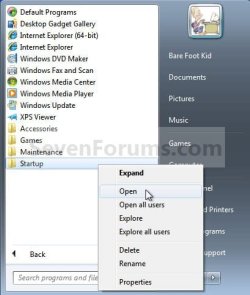
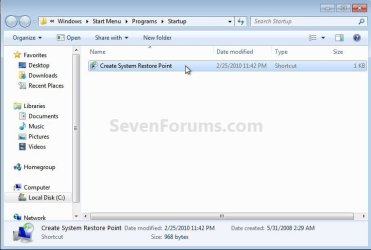
If it'll run from the start menu, startup file that may do what you want, r click the startup file to open it.

Start.jpg
Startup.jpg
 

My Computer My Computer

Computer Manufacturer/Model Number
* BFK Customs *
OS
W 7 64-bit Ultimate
CPU
Intel Q9550 Yorkfield
Motherboard
ASUS P5Q Pro
Memory
8GB Dominator 8500C5D
Graphics Card(s)
ATI : XFX 5870
Sound Card
Realtek HD Audio 7-1
Monitor(s) Displays
1x 47" LCD HDMI & 3x 26" LCD HDMI
Screen Resolution
1920x1080P & 1920x1200
Hard Drives
1x 80GB Intel X25-M G2 SSD : 1x 500GB & 1x 640GB WD Caviar Black(s)
PSU
Corsair 620HX
Case
Cooler Master RC-690
Cooling
Tuniq Tower 120, 2x 140mm and 3x 120mm case fans
Keyboard
Microsoft 500
Mouse
Razer Diamondback 3G
Internet Speed
14 Mb/s
Other Info
1x Koutech 3Gb/s SATA HDD Hot Swap Rack
I don't think that'll work because the things listed in the registry get's loaded before the start-up menu items. Start-Q should do the trick.
 

My Computer My Computer

Computer Manufacturer/Model Number
Dell Inspiron 530s
OS
Windows 7 Ultimate x64
CPU
Core2Duo E4600
Motherboard
Dell
Memory
4GB
Graphics Card(s)
Intel G33 (Integrated)
Sound Card
Internal
Monitor(s) Displays
Compaq FS7600
Hard Drives
WD 350GB
WD 250 GB (External)
Hello Stargazer, welcome to Seven Forums!


Maybe I'll have a look at that program, are you associated with it?
 

My Computer My Computer

Computer Manufacturer/Model Number
* BFK Customs *
OS
W 7 64-bit Ultimate
CPU
Intel Q9550 Yorkfield
Motherboard
ASUS P5Q Pro
Memory
8GB Dominator 8500C5D
Graphics Card(s)
ATI : XFX 5870
Sound Card
Realtek HD Audio 7-1
Monitor(s) Displays
1x 47" LCD HDMI & 3x 26" LCD HDMI
Screen Resolution
1920x1080P & 1920x1200
Hard Drives
1x 80GB Intel X25-M G2 SSD : 1x 500GB & 1x 640GB WD Caviar Black(s)
PSU
Corsair 620HX
Case
Cooler Master RC-690
Cooling
Tuniq Tower 120, 2x 140mm and 3x 120mm case fans
Keyboard
Microsoft 500
Mouse
Razer Diamondback 3G
Internet Speed
14 Mb/s
Other Info
1x Koutech 3Gb/s SATA HDD Hot Swap Rack
No, I'm not associated with it. I do a lot of computer repair work and I have needed to change the start-up order before and it was recommended to me. You can do it manually, but that requires editing the registry and for most people, that would be an undertaking. I found that Start-Q works quite well.
 

My Computer My Computer

Computer Manufacturer/Model Number
Dell Inspiron 530s
OS
Windows 7 Ultimate x64
CPU
Core2Duo E4600
Motherboard
Dell
Memory
4GB
Graphics Card(s)
Intel G33 (Integrated)
Sound Card
Internal
Monitor(s) Displays
Compaq FS7600
Hard Drives
WD 350GB
WD 250 GB (External)
No, I'm not associated with it. I do a lot of computer repair work and I have needed to change the start-up order before and it was recommended to me. You can do it manually, but that requires editing the registry and for most people, that would be an undertaking. I found this works quite well.


Thanks!
 

My Computer My Computer

Computer Manufacturer/Model Number
* BFK Customs *
OS
W 7 64-bit Ultimate
CPU
Intel Q9550 Yorkfield
Motherboard
ASUS P5Q Pro
Memory
8GB Dominator 8500C5D
Graphics Card(s)
ATI : XFX 5870
Sound Card
Realtek HD Audio 7-1
Monitor(s) Displays
1x 47" LCD HDMI & 3x 26" LCD HDMI
Screen Resolution
1920x1080P & 1920x1200
Hard Drives
1x 80GB Intel X25-M G2 SSD : 1x 500GB & 1x 640GB WD Caviar Black(s)
PSU
Corsair 620HX
Case
Cooler Master RC-690
Cooling
Tuniq Tower 120, 2x 140mm and 3x 120mm case fans
Keyboard
Microsoft 500
Mouse
Razer Diamondback 3G
Internet Speed
14 Mb/s
Other Info
1x Koutech 3Gb/s SATA HDD Hot Swap Rack
No prob
 

My Computer My Computer

Computer Manufacturer/Model Number
Dell Inspiron 530s
OS
Windows 7 Ultimate x64
CPU
Core2Duo E4600
Motherboard
Dell
Memory
4GB
Graphics Card(s)
Intel G33 (Integrated)
Sound Card
Internal
Monitor(s) Displays
Compaq FS7600
Hard Drives
WD 350GB
WD 250 GB (External)
Back
Top