
Solved How to merge two Unallocated partitions!

DaYiM

New member
Member
VIP
Local time
9:03 PM
Messages
130
Hello,
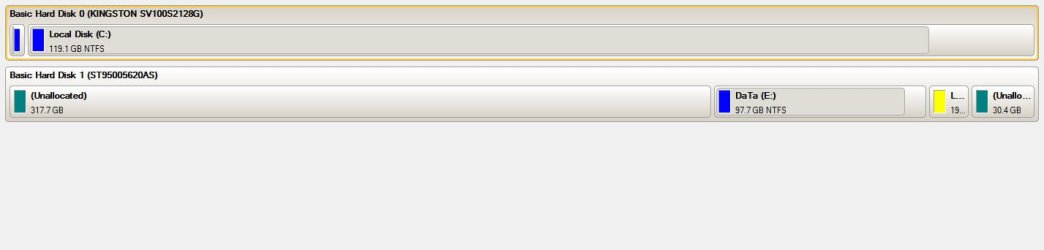
i have two Unallocated partitions in the same hard disk!
How to merge both of them to make one partition?

PS: i can't open "Create and format hard disk partitions"
from windows, i don't know WHY?! so i'am using PARAGON
Partition Manger; please recommend any other good program!

Thanks & Best REGARDS
 

Attachments
  • sd.jpg
    sd.jpg
    26.1 KB · Views: 978

My Computer My Computer

At a glance

Windows 7, 64BitIntel Mobile Core 2 Duo T9600 @ 2.80GHz8.0GB Dual-Channel DDR3 @ 531MHz1024MB GeForce 9800M GTX (Toshiba)
Computer Manufacturer/Model Number
Qosmio X300-13O
OS
Windows 7, 64Bit
CPU
Intel Mobile Core 2 Duo T9600 @ 2.80GHz
Motherboard
TOSHIBA KSRAA (U2E1)
Memory
8.0GB Dual-Channel DDR3 @ 531MHz
Graphics Card(s)
1024MB GeForce 9800M GTX (Toshiba)
Sound Card
Realtek High Definition Audio
Monitor(s) Displays
Generic PnP Monitor on NVIDIA GeForce 9800M GTX
Screen Resolution
Generic PnP Monitor @ 1440x900
Hard Drives
125GB KINGSTON SV100S2128G ATA Device (SATA)
488GB Seagate ST95005620AS ATA Device (SATA)
You can't merge them as they are separated by your E partition.

You need to backup the data on the E partition then delete it.

Once you've done that you an create a new partition on the resultant blank space.

Macrium seems a popular disk manager with people on these forums.
 

My Computer My Computer

At a glance

Windows 7 Ultimate SP1 64-BitIntel Core i7 870 @ 2.93GHz8Gb Dual-Channel DDR3 @ 664MHznVidia GeForce GTX 460 1024MB dedicated RAM
Computer Manufacturer/Model Number
HP Pavilion Elite 495UK
OS
Windows 7 Ultimate SP1 64-Bit
CPU
Intel Core i7 870 @ 2.93GHz
Motherboard
MSI 2A9C (CPU1)
Memory
8Gb Dual-Channel DDR3 @ 664MHz
Graphics Card(s)
nVidia GeForce GTX 460 1024MB dedicated RAM
Sound Card
Realtek HD Audio
Monitor(s) Displays
HP2310i
Screen Resolution
1920 x 1080
Hard Drives
1x1954GB Hitachi HDS22020ALA 330 (RAID), 1x1954GB Hitachi External for backup and storage
PSU
460W
Case
HP Elite
Cooling
Air cooled
Keyboard
Logitech K750 solar-powered keyboard
Mouse
Logitech Wireless M180 mouse
Internet Speed
2Mb
Other Info
Pure Avanti Flow Internet Radio with iPod Dock, 64Gb iPod, HP USB Speakers, Sony MDR-V500 Headphones, Sony Vaio F-Series Laptop
I've heard people saying that doing it with a 3rd Party Software is more safer (Its only what I've heard). Good Luck. :D
 

My Computer My Computer

At a glance

Windows 7 Ultimate SP1 x64/Ubuntu 11
OS
Windows 7 Ultimate SP1 x64/Ubuntu 11

My Computer My Computer

At a glance

Windows 7 Ultimate SP1 64-BitIntel Core i7 870 @ 2.93GHz8Gb Dual-Channel DDR3 @ 664MHznVidia GeForce GTX 460 1024MB dedicated RAM
Computer Manufacturer/Model Number
HP Pavilion Elite 495UK
OS
Windows 7 Ultimate SP1 64-Bit
CPU
Intel Core i7 870 @ 2.93GHz
Motherboard
MSI 2A9C (CPU1)
Memory
8Gb Dual-Channel DDR3 @ 664MHz
Graphics Card(s)
nVidia GeForce GTX 460 1024MB dedicated RAM
Sound Card
Realtek HD Audio
Monitor(s) Displays
HP2310i
Screen Resolution
1920 x 1080
Hard Drives
1x1954GB Hitachi HDS22020ALA 330 (RAID), 1x1954GB Hitachi External for backup and storage
PSU
460W
Case
HP Elite
Cooling
Air cooled
Keyboard
Logitech K750 solar-powered keyboard
Mouse
Logitech Wireless M180 mouse
Internet Speed
2Mb
Other Info
Pure Avanti Flow Internet Radio with iPod Dock, 64Gb iPod, HP USB Speakers, Sony MDR-V500 Headphones, Sony Vaio F-Series Laptop
thanks alot, but:-
1. how can i merge the partitions using Macrium?
2. Notice in the picture; that the displayed size for
the free space for any new partitions is 362GB!!!!!
that means Macrium included Linux partition also! see 1st post pic.
 

Attachments

  • s.jpg
    s.jpg
    31 KB · Views: 752

My Computer My Computer

At a glance

Windows 7, 64BitIntel Mobile Core 2 Duo T9600 @ 2.80GHz8.0GB Dual-Channel DDR3 @ 531MHz1024MB GeForce 9800M GTX (Toshiba)
Computer Manufacturer/Model Number
Qosmio X300-13O
OS
Windows 7, 64Bit
CPU
Intel Mobile Core 2 Duo T9600 @ 2.80GHz
Motherboard
TOSHIBA KSRAA (U2E1)
Memory
8.0GB Dual-Channel DDR3 @ 531MHz
Graphics Card(s)
1024MB GeForce 9800M GTX (Toshiba)
Sound Card
Realtek High Definition Audio
Monitor(s) Displays
Generic PnP Monitor on NVIDIA GeForce 9800M GTX
Screen Resolution
Generic PnP Monitor @ 1440x900
Hard Drives
125GB KINGSTON SV100S2128G ATA Device (SATA)
488GB Seagate ST95005620AS ATA Device (SATA)
Try using EASEUS Partition Master Home Edition (free for home use). Use it to MOVE your "E:\" to the head of the drive thus moving the unallocated space behind "E:\" but in front of your Linux partitions. Then you can increase the size of "E:\" to take up the unallocated space "behind" it.

The software will respect your Linux and works in Win7.

Regards,
GEWB
 

My Computer My Computer

At a glance

Linux Mint / XP / Win7 Home, Pro, Ultimate / ...
Computer type
PC/Desktop
Computer Manufacturer/Model Number
(7 different computers booting up to 10 systems)
OS
Linux Mint / XP / Win7 Home, Pro, Ultimate / Win8.1 / Win10
Other Info
Four desktops, two laptops, one notebook and one tablet
thank you,
would you please describe how to move the partition E!
 

My Computer My Computer

At a glance

Windows 7, 64BitIntel Mobile Core 2 Duo T9600 @ 2.80GHz8.0GB Dual-Channel DDR3 @ 531MHz1024MB GeForce 9800M GTX (Toshiba)
Computer Manufacturer/Model Number
Qosmio X300-13O
OS
Windows 7, 64Bit
CPU
Intel Mobile Core 2 Duo T9600 @ 2.80GHz
Motherboard
TOSHIBA KSRAA (U2E1)
Memory
8.0GB Dual-Channel DDR3 @ 531MHz
Graphics Card(s)
1024MB GeForce 9800M GTX (Toshiba)
Sound Card
Realtek High Definition Audio
Monitor(s) Displays
Generic PnP Monitor on NVIDIA GeForce 9800M GTX
Screen Resolution
Generic PnP Monitor @ 1440x900
Hard Drives
125GB KINGSTON SV100S2128G ATA Device (SATA)
488GB Seagate ST95005620AS ATA Device (SATA)
thank you,
would you please describe how to move the partition E!

In EASEUS Partition Master you would select (click on) your "E:\" partition - the cursor turns into a four-headed arrow. Next, click-hold-drag "E:\" to the far left (beginning of the drive), release.

To then add the unallocated space to the moved "E:\" drive, hover over the right boundary of the partition; when you see the double-headed arrow click and drag the boundary to the right and take up all of the unallocated space then release.

In the lower left corner of EASEUS Partition Master click the APPLY button and follow the prompts.

Regards,
GEWB
 

My Computer My Computer

At a glance

Linux Mint / XP / Win7 Home, Pro, Ultimate / ...
Computer type
PC/Desktop
Computer Manufacturer/Model Number
(7 different computers booting up to 10 systems)
OS
Linux Mint / XP / Win7 Home, Pro, Ultimate / Win8.1 / Win10
Other Info
Four desktops, two laptops, one notebook and one tablet
Back
Top