How to overclock Pentium 4

negrostmthws

New member
Local time
8:28 AM
Messages
12
Location
Buenos Aires, Argentina
Hello to you all :).
I was wondering if anybody knows how to Overclock my Pentium 4 2.66GHz Processor under an Asus p5kpl-am SE Motherboard.
Im using 1GB Kingston Ram Memory. Memory Type: DDR2, Speed 400MHz (DDR2 800). It supports 200.0 MHz, 266.7 MHz and 400MHz.
Motherboard Always at 40ºC, and Processor at 39ºC. I have a 750W PSU(very good one), with one big fan and another normal size fan. and another extra fan at the back of the case.
I really don't know how to set anything, such as the voltages, FSB(i think), core, etc..
Please guide me with this :)
Thanks to u all.
 

My Computer

OS
Windows 7 Professional
CPU
Intel Pentium 4 2.66 GHz
Motherboard
Asus P5KPL-AM SE
Memory
1GB RAM :(
Graphics Card(s)
NVidia Geforce 7100GS 128MB
Sound Card
Onboard
Monitor(s) Displays
LG FLATRON L1942S
Screen Resolution
1280x1024
Hard Drives
Western Digital 120 GB
PSU
Thermaltake 700W
Case
I'm Using an old Compaq 1997 Case XD
Cooling
3 Cooling Fans + processor + PSU
Keyboard
Genius
Mouse
Genius
Internet Speed
2 MBps
Hello to you all :).
I was wondering if anybody knows how to Overclock my Pentium 4 2.66GHz Processor under an Asus p5kpl-am SE Motherboard.
Im using 1GB Kingston Ram Memory. Memory Type: DDR2, Speed 400MHz (DDR2 800). It supports 200.0 MHz, 266.7 MHz and 400MHz.
Motherboard Always at 40ºC, and Processor at 39ºC. I have a 750W PSU(very good one), with one big fan and another normal size fan. and another extra fan at the back of the case.
I really don't know how to set anything, such as the voltages, FSB(i think), core, etc..
Please guide me with this :)
Thanks to u all.


To be honest, it isnt worth it. You have minimun ram, an older cpu, and probably an older BIOS.

I would be careful about overclocking as it can kill your computer. I have a dell P-IV and in my attempts to OC I managed to ruin a ram slot in the mobo, leaving it crippled.


ken
 

My Computer

Computer Manufacturer/Model Number
HP Pavillion dv-7 1005 Tx
OS
Win 8 Release candidate 8400
CPU
[email protected]
Memory
4 gigs
Graphics Card(s)
Nvidia 9600M
Sound Card
HD built-in
Monitor(s) Displays
17" Wxga
Screen Resolution
1440x900
Cooling
none
Internet Speed
45Mb down 5Mb up

My Computer

OS
window's 7
CPU
core 2 quad
Motherboard
gigabyte
Memory
2gb corsair
Graphics Card(s)
ati hd4850
Monitor(s) Displays
lg
Screen Resolution
1600 X 900
Case
power logic
Other Info
none of the spec above is accurate
Oh Well, thanks for the information :).. I will reconsider it now :P..
Thank You Very Much :D.
 

My Computer

OS
Windows 7 Professional
CPU
Intel Pentium 4 2.66 GHz
Motherboard
Asus P5KPL-AM SE
Memory
1GB RAM :(
Graphics Card(s)
NVidia Geforce 7100GS 128MB
Sound Card
Onboard
Monitor(s) Displays
LG FLATRON L1942S
Screen Resolution
1280x1024
Hard Drives
Western Digital 120 GB
PSU
Thermaltake 700W
Case
I'm Using an old Compaq 1997 Case XD
Cooling
3 Cooling Fans + processor + PSU
Keyboard
Genius
Mouse
Genius
Internet Speed
2 MBps
your welcome.. overclocking isn't the same as you customize your theme or icon since you're playing with the hardware itself. Unless you have much knowledge about overclocking and you know what are you doing. then you can try it :).
 

My Computer

OS
window's 7
CPU
core 2 quad
Motherboard
gigabyte
Memory
2gb corsair
Graphics Card(s)
ati hd4850
Monitor(s) Displays
lg
Screen Resolution
1600 X 900
Case
power logic
Other Info
none of the spec above is accurate
My old Asus P4P800-SE motherboard had a built in Overclocking area in the BIOS where you choose the amount of overclock you want.
I ended up running my Prescott P4 2.8Ghz at 3.65Ghz. Ran stable 24/7 but 1 game did not like the overclock, Battlefield 2 would crash to the Desktop at 3.65Ghz.
 

My Computer

Computer Manufacturer/Model Number
HAL-9000
OS
Windows 7 Ultimate 64bit
CPU
Intel i7 3770K
Motherboard
Asus Sabertooth Z77
Memory
16GB DDR3 1333 Corsair XMS3
Graphics Card(s)
XFX HD6950 2GB EyeFinity
Sound Card
Logitech G35 & Sennheiser PC135 & VIA HD
Monitor(s) Displays
23" HP 2310e, 23" Samsung B2230, 21.5" Viewsonic
Screen Resolution
5760x1080
Hard Drives
16TB of Storage
128GB & 256GB Crucial M4 SSD's, 2X 1TB WD Black, 3x 2TB WD, 3x 2TB Samsung F4, 1.5TB Seagate, WD 500GB,
PSU
Antec True Power New 650watt
Case
Cooler Master HAF-932
Cooling
Corsair H60 Hydro Cooler, 3x 230mm Fans, 2x120mm Fan
Keyboard
Logitech G15 and G13
Mouse
Logitech G700 Gaming Mouse
Internet Speed
50/10 Mbit
Other Info
Speakers : Alesis M1 Active Mk2 Studio Monitors , APC RS 1200 UPS, HP 4500DN Color Laser, HP P1006 mono Laser, Kodak 8500 Dye-Sub, Epson 1280 inkjet, Epson Worforce 610 MFC
yes certain mobo comes with built in overclocking. I have my Gigabyte mobo with cpu and gpu overclocking built in but i never use it since i didn't find any reason to do so :)
 

My Computer

OS
window's 7
CPU
core 2 quad
Motherboard
gigabyte
Memory
2gb corsair
Graphics Card(s)
ati hd4850
Monitor(s) Displays
lg
Screen Resolution
1600 X 900
Case
power logic
Other Info
none of the spec above is accurate

My Computer

OS
7 Ultimate x64
CPU
i5-2500k
Motherboard
Asus P8P67 Pro
Memory
8GB G.Skill Ripjaws X F3-12800CL7D-8GBXH 1866MHz 8-9-8-24
Graphics Card(s)
EVGA GTX 570 SC
Sound Card
X-Fi Titanium Fatality
Monitor(s) Displays
Samsung S27A550H 27" LED
Screen Resolution
1920x1080
Hard Drives
OCZ Vertex 3 120GB.
1TB Samsung F3.
2TB Samsung F4.
PSU
PC Power & Cooling Silencer 760
Case
Lian Li Lancool K62
Cooling
Thermalright Venomous X Black/Scythe S-Flex/Shin-Etsu X23
Keyboard
MS Natural Elite 4000 Ergonomic
Mouse
Logitech G500
Internet Speed
6MB/768
Other Info
Logitech Z-5500 505 watts.
D-Link DGL-4500.
Tripp-Lite Smart Pro 1500.
yes certain mobo comes with built in overclocking. I have my Gigabyte mobo with cpu and gpu overclocking built in but i never use it since i didn't find any reason to do so :)

the main reason to OC is for money saving. Buy a cheaper slower CPU and OC it to match or exceed the more expensive CPU.

When I bought my Q6600 it was $185 and the Q9550 was $350.
OC'd from 2.4 to 3.06Ghz and it is now equal or faster than the Q9550 @ 2.83Ghz and is $135 cheaper. I used that $135 I saved to upgrade from a 9800GT to a GTX260.
 

My Computer

Computer Manufacturer/Model Number
HAL-9000
OS
Windows 7 Ultimate 64bit
CPU
Intel i7 3770K
Motherboard
Asus Sabertooth Z77
Memory
16GB DDR3 1333 Corsair XMS3
Graphics Card(s)
XFX HD6950 2GB EyeFinity
Sound Card
Logitech G35 & Sennheiser PC135 & VIA HD
Monitor(s) Displays
23" HP 2310e, 23" Samsung B2230, 21.5" Viewsonic
Screen Resolution
5760x1080
Hard Drives
16TB of Storage
128GB & 256GB Crucial M4 SSD's, 2X 1TB WD Black, 3x 2TB WD, 3x 2TB Samsung F4, 1.5TB Seagate, WD 500GB,
PSU
Antec True Power New 650watt
Case
Cooler Master HAF-932
Cooling
Corsair H60 Hydro Cooler, 3x 230mm Fans, 2x120mm Fan
Keyboard
Logitech G15 and G13
Mouse
Logitech G700 Gaming Mouse
Internet Speed
50/10 Mbit
Other Info
Speakers : Alesis M1 Active Mk2 Studio Monitors , APC RS 1200 UPS, HP 4500DN Color Laser, HP P1006 mono Laser, Kodak 8500 Dye-Sub, Epson 1280 inkjet, Epson Worforce 610 MFC
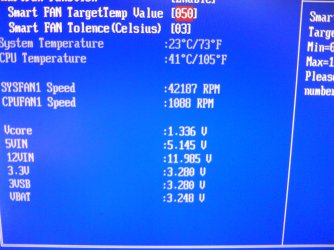
I checked my Bios JumpFree Settings and i have:
AI Overclocking:
-MANUAL:
-Set CPU Frecuency from 133 to 600

-AUTO:
-It's set Automatically(DEFAULT)
-Overclock Profile:
-Overclock 5%
-Overclock 10%
-Overclock 15%
-Overclock 20%
-Overclock 30%
-Test Mode:
-(Dunno what it is)
DRAM Frecuency:
-AUTO
-533MHz
1.8V Dual Over Voltage:
(AUTO, 1.80v, 2.00v, 2.25v)
VTT_CPU Over Voltage:(AUTO, 1.2v, 1.3v)
1.25 Over Voltage:(AUTO, 1.25v, 1.4v)
1.5 Over Voltage:(AUTO, 1.5v, 1.6v)

HARDWARE MONITOR:
tempv.jpg


Now.. What Do You Say? :)
Thanks In Advance. (Remember it's a 2.66 GHz, not a 3.2GHz or other)
 

My Computer

OS
Windows 7 Professional
CPU
Intel Pentium 4 2.66 GHz
Motherboard
Asus P5KPL-AM SE
Memory
1GB RAM :(
Graphics Card(s)
NVidia Geforce 7100GS 128MB
Sound Card
Onboard
Monitor(s) Displays
LG FLATRON L1942S
Screen Resolution
1280x1024
Hard Drives
Western Digital 120 GB
PSU
Thermaltake 700W
Case
I'm Using an old Compaq 1997 Case XD
Cooling
3 Cooling Fans + processor + PSU
Keyboard
Genius
Mouse
Genius
Internet Speed
2 MBps
I checked my Bios JumpFree Settings and i have:
AI Overclocking:
-MANUAL:
-Set CPU Frecuency from 133 to 600

-AUTO:
-It's set Automatically(DEFAULT)
-Overclock Profile:
-Overclock 5%
-Overclock 10%
-Overclock 15%
-Overclock 20%
-Overclock 30%
-Test Mode:
-(Dunno what it is)
DRAM Frecuency:
-AUTO
-533MHz
1.8V Dual Over Voltage:
(AUTO, 1.80v, 2.00v, 2.25v)
VTT_CPU Over Voltage:(AUTO, 1.2v, 1.3v)
1.25 Over Voltage:(AUTO, 1.25v, 1.4v)
1.5 Over Voltage:(AUTO, 1.5v, 1.6v)

HARDWARE MONITOR:
tempv.jpg


Now.. What Do You Say? :)
Thanks In Advance. (Remember it's a 2.66 GHz, not a 3.2GHz or other)


bad quality pics i know, but what do you say (pics may be in wrong order (from highest temp to lowest temp is correct order))


EDIT: yep... pics are in wrong order
 

Attachments

  • DSC00401.JPG
    DSC00401.JPG
    214.3 KB · Views: 12
  • DSC00402.JPG
    DSC00402.JPG
    148.9 KB · Views: 7
  • DSC00403.JPG
    DSC00403.JPG
    228.1 KB · Views: 8

My Computer

Computer Manufacturer/Model Number
Sh*tBox 2.0.0.18
OS
Windows 7 Enterprise X64
CPU
Intel Core I3 550 @ 3.6 GHz
Motherboard
Gigabyte S-series H55M-S2
Memory
4GB DDR3 @ 1333MHz
Graphics Card(s)
ATI Radeon HD 5670
Sound Card
Realtek High Definition Audio ?
Monitor(s) Displays
BENQ FP93G S
Screen Resolution
1280x1024
Hard Drives
1TB SAMSUNG HD103SJ ATA Device
PSU
havent checked
Case
Xigmatek Asgard
Cooling
Stock something
Keyboard
Logitech Internet 350 Keyboard
Mouse
Logitech
Internet Speed
schools ISP @ 300 kbit/s - 100 mbit/s
Other Info
«And on the eighth day, god created Intel Core i3.»
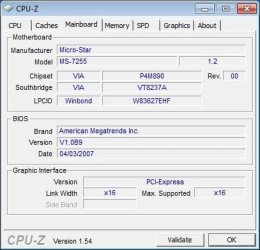
Rixto003, do you have a p5kpl-am SE?? what version of BIOS do you have? You can check it at the first boot screen, where it checks The drives, the RAM memory, and when it tells you to hit DEL or F8..
 

My Computer

OS
Windows 7 Professional
CPU
Intel Pentium 4 2.66 GHz
Motherboard
Asus P5KPL-AM SE
Memory
1GB RAM :(
Graphics Card(s)
NVidia Geforce 7100GS 128MB
Sound Card
Onboard
Monitor(s) Displays
LG FLATRON L1942S
Screen Resolution
1280x1024
Hard Drives
Western Digital 120 GB
PSU
Thermaltake 700W
Case
I'm Using an old Compaq 1997 Case XD
Cooling
3 Cooling Fans + processor + PSU
Keyboard
Genius
Mouse
Genius
Internet Speed
2 MBps
Rixto003, do you have a p5kpl-am SE?? what version of BIOS do you have? You can check it at the first boot screen, where it checks The drives, the RAM memory, and when it tells you to hit DEL or F8..

or i can check it with CPU-Z
 

Attachments

  • CPU-Z mobo.jpg
    CPU-Z mobo.jpg
    27.2 KB · Views: 6

My Computer

Computer Manufacturer/Model Number
Sh*tBox 2.0.0.18
OS
Windows 7 Enterprise X64
CPU
Intel Core I3 550 @ 3.6 GHz
Motherboard
Gigabyte S-series H55M-S2
Memory
4GB DDR3 @ 1333MHz
Graphics Card(s)
ATI Radeon HD 5670
Sound Card
Realtek High Definition Audio ?
Monitor(s) Displays
BENQ FP93G S
Screen Resolution
1280x1024
Hard Drives
1TB SAMSUNG HD103SJ ATA Device
PSU
havent checked
Case
Xigmatek Asgard
Cooling
Stock something
Keyboard
Logitech Internet 350 Keyboard
Mouse
Logitech
Internet Speed
schools ISP @ 300 kbit/s - 100 mbit/s
Other Info
«And on the eighth day, god created Intel Core i3.»
Back
Top