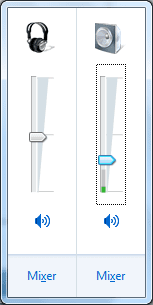
How to play in other playback device?

tgckpg

New member
Local time
1:39 AM
Messages
11
I'd like to play to both device and I want to set different vol to them.
But now I can just play in speakers.
Alternatively, can I set different application to play in playback device individually ?
 

Attachments

  • Untitled.png
    Untitled.png
    4.3 KB · Views: 550

My Computer My Computer

At a glance

7
OS
7
I'm actually running into this same issue. I have 1 sound card, the internal sound, and sound through the HDMI port of my video card, but the internal audio overrides everything as long as something is plugged into it. If I unplug my speakers, then the audio jumps to my TV (through the HDMI).

So I would also like to know about choosing the audio output, or if you can choose to have the audio go out to all devices simultaneously.

 

My Computer My Computer

At a glance

Windows 7 Professional 64-bitIntel Core2 Quad 2.5Ghz8GBGalaxy GTX 660 GC 2GB
Computer Manufacturer/Model Number
Dell XPS430
OS
Windows 7 Professional 64-bit
CPU
Intel Core2 Quad 2.5Ghz
Memory
8GB
Graphics Card(s)
Galaxy GTX 660 GC 2GB
Monitor(s) Displays
Dell 19"
Screen Resolution
1920x1080
Hard Drives
Hitachi 750GB

Western Digital 500GB
Cooling
Heat Sink + Fans
Mouse
N/A
Internet Speed
14 Mb/s
Back
Top