How to Rescue Windows 7 in the Event of SSD Failure

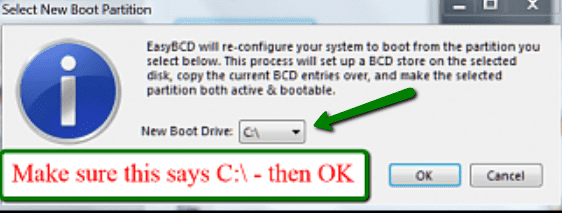
OK Martin, no problem. I think you need the drive letter because else you cannot select the partition here (see green arrow). In your case it would of course NOT be C:\.
 

Attachments

  • 2012-01-31_2228.png
    2012-01-31_2228.png
    35.7 KB · Views: 4

My Computer My Computer

At a glance

Vista, Windows7, Mint Mate, Zorin, Windows 8from 1.6GHz Duo to i7
Computer Manufacturer/Model Number
HP, Dell, Gateway, Toshiba - 4 laptops and 2 desktops
OS
Vista, Windows7, Mint Mate, Zorin, Windows 8
CPU
from 1.6GHz Duo to i7
Monitor(s) Displays
2x HP w2207
Hard Drives
5x HDD, 7x SSD, 12x Externals
Keyboard
with trackball - no mices
Mouse
Trackball mice
Internet Speed
DSL 6000
Hi,

As soon as I moved the bootmgr to the C drive, Windows started taking much longer to boot up - about one minute now instead of just a few seconds - timed from when the 'Windows is Starting' message appears. So I've tried to move bootmgr back to the reserved partition, as it was, using EasyBCD - but although EasyBCD says it has 'successfully made drive Z the new boot partition', when I open the Disk Management window, it is still the C drive that is shown as the active boot partition, and booting still takes much longer. If I search the Reserved Partition, the file bootmgr is there - but if I perform the same search in the C drive, there is a bootmgr file there too.

How do I get things back to how they were? Any ideas why EasyBCD moved the boot files from the reserved partition to C:\ OK, but won't move them back again - it just seems to have copied them? (I did assign a drive letter to the reserved partition of course). I don't want to do anything that is going to prevent Windows from booting at all: if I somehow remove the boot files from C but the reserved partition is not shown as the active boot partition I am sure there will be disaster.

Wish I'd left this alone now!! I knew I was tempting fate...

Thanks,

Martin

 
Last edited:

My Computer My Computer

At a glance

Windows 7 Home Premium SP1 64-bitIntel Core i7-4790K CPU @ 4.5GHz16GB KINGSTON HYPER-X FURY DUAL-DDR3 1600MHz8GB NVIDIA GEFORCE GTX 1070
Computer type
PC/Desktop
Computer Manufacturer/Model Number
Custom Build
OS
Windows 7 Home Premium SP1 64-bit
CPU
Intel Core i7-4790K CPU @ 4.5GHz
Motherboard
Asus H97I-PLUS
Memory
16GB KINGSTON HYPER-X FURY DUAL-DDR3 1600MHz
Graphics Card(s)
8GB NVIDIA GEFORCE GTX 1070
Monitor(s) Displays
HannsG 28" & Dell 24"
Screen Resolution
1920x1200
Hard Drives
1 x 2TB Samsung Evo 860 SSD
2 x 500GB Samsung Evo 850 SSD
PSU
CORSAIR 650W CS SERIES
Case
Thermaltake Core V1 Mini ITX Cube
Cooling
NOCTUA NH-L12
Browser
Firefox
Other Info
Custom PC used for X-Plane 11
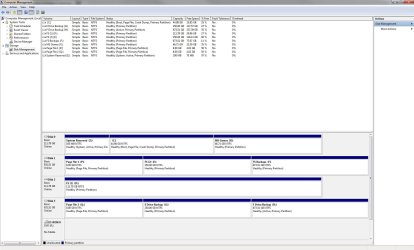
Here's a screenshot of Disk management - after running EasyBCD the Reserved Partition (temporarily Z:\) is marked as System and Active, but not Boot (that's still C). EasyBCD won't move the boot partition to Z again...

(No idea why drive H is marked as 'Active' either - it's just a backup partition. How do I remove this attribute?).

Also see this link, which says that the Reserved Partition MUST be the boot partition in Windows 7, not the C drive. I read it too late:

Windows 7 System Reserved Partition (100mb) Active, not C:\ drive

Tried running the boot repair from the Windows 7 disc, but it reports that it can't find anything wrong.

M.
 

Attachments

  • Discs.jpg
    Discs.jpg
    149.5 KB · Views: 12
Last edited:

My Computer My Computer

At a glance

Windows 7 Home Premium SP1 64-bitIntel Core i7-4790K CPU @ 4.5GHz16GB KINGSTON HYPER-X FURY DUAL-DDR3 1600MHz8GB NVIDIA GEFORCE GTX 1070
Computer type
PC/Desktop
Computer Manufacturer/Model Number
Custom Build
OS
Windows 7 Home Premium SP1 64-bit
CPU
Intel Core i7-4790K CPU @ 4.5GHz
Motherboard
Asus H97I-PLUS
Memory
16GB KINGSTON HYPER-X FURY DUAL-DDR3 1600MHz
Graphics Card(s)
8GB NVIDIA GEFORCE GTX 1070
Monitor(s) Displays
HannsG 28" & Dell 24"
Screen Resolution
1920x1200
Hard Drives
1 x 2TB Samsung Evo 860 SSD
2 x 500GB Samsung Evo 850 SSD
PSU
CORSAIR 650W CS SERIES
Case
Thermaltake Core V1 Mini ITX Cube
Cooling
NOCTUA NH-L12
Browser
Firefox
Other Info
Custom PC used for X-Plane 11
Well, I don't know what you did. But I have moved the bootmgr many times from the little partition to C and it always worked. You must have made some mistake.

As far as 'F' is concerned. I can only guess. Maybe there was an OS installed at one time or still is
 

My Computer My Computer

At a glance

Vista, Windows7, Mint Mate, Zorin, Windows 8from 1.6GHz Duo to i7
Computer Manufacturer/Model Number
HP, Dell, Gateway, Toshiba - 4 laptops and 2 desktops
OS
Vista, Windows7, Mint Mate, Zorin, Windows 8
CPU
from 1.6GHz Duo to i7
Monitor(s) Displays
2x HP w2207
Hard Drives
5x HDD, 7x SSD, 12x Externals
Keyboard
with trackball - no mices
Mouse
Trackball mice
Internet Speed
DSL 6000
Well I just did exactly the same as I did to move the boot partition to the C drive, only I chose 'Z' this time, the System Reserved partition. Can't see there's much room for making a mistake.

Whatever, my system now takes ten times as long to boot and I don't seem to be able to fix it. Certainly turns out, according to all other posts I have now read that you should not move bootmgr from the system partition to the C drive in Windows 7. maybe you don't agree with that though..

Martin
 

My Computer My Computer

At a glance

Windows 7 Home Premium SP1 64-bitIntel Core i7-4790K CPU @ 4.5GHz16GB KINGSTON HYPER-X FURY DUAL-DDR3 1600MHz8GB NVIDIA GEFORCE GTX 1070
Computer type
PC/Desktop
Computer Manufacturer/Model Number
Custom Build
OS
Windows 7 Home Premium SP1 64-bit
CPU
Intel Core i7-4790K CPU @ 4.5GHz
Motherboard
Asus H97I-PLUS
Memory
16GB KINGSTON HYPER-X FURY DUAL-DDR3 1600MHz
Graphics Card(s)
8GB NVIDIA GEFORCE GTX 1070
Monitor(s) Displays
HannsG 28" & Dell 24"
Screen Resolution
1920x1200
Hard Drives
1 x 2TB Samsung Evo 860 SSD
2 x 500GB Samsung Evo 850 SSD
PSU
CORSAIR 650W CS SERIES
Case
Thermaltake Core V1 Mini ITX Cube
Cooling
NOCTUA NH-L12
Browser
Firefox
Other Info
Custom PC used for X-Plane 11
Martin, I am really sorry for your mishap. I feel a bit responsible because I am the author of the tutorial. But I never make a tutorial unless I have tried things myself.

I moved the bootmgr on my new Dell and on my new Toshiba laptop (both systems are on SSDs) and on a friends laptop. I also teach a Win7 class at the local computer club where disk management is a subject. 3 or 4 people had 4 primary partitions. We moved the bootmgr from the 100MB partitions to the C partitions and deleted the 100MB partitions. In all the above cases there were no incidents. So your situation puzzles me.
 

My Computer My Computer

At a glance

Vista, Windows7, Mint Mate, Zorin, Windows 8from 1.6GHz Duo to i7
Computer Manufacturer/Model Number
HP, Dell, Gateway, Toshiba - 4 laptops and 2 desktops
OS
Vista, Windows7, Mint Mate, Zorin, Windows 8
CPU
from 1.6GHz Duo to i7
Monitor(s) Displays
2x HP w2207
Hard Drives
5x HDD, 7x SSD, 12x Externals
Keyboard
with trackball - no mices
Mouse
Trackball mice
Internet Speed
DSL 6000
Well, I gave up on this and used a Windows 7 image (C drive + System Partition) I made a few days before I installed Macrium, so presumably my PC should back to how it was.

But it isn't - it still takes about a minute to boot from when the 'Windows is starting' message appears, much longer than before. If the C drive and System Partition were restored properly (and that certainly seems to be the case when I check - the confirmation at the end of restore showed 'successful' too) why still so slow? I don't understand it. I will probably have to troubleshoot this separately, see what is taking so long now compared to before.

Well, at least I know that the Windows 7 image file restores with no problem. Macrium of course has disappeared after the image restore, so I think I'll leave this as it is now. All that time wasted and I my PC is worse off than before... don't see what else I can do at this stage.

Martin
 

My Computer My Computer

At a glance

Windows 7 Home Premium SP1 64-bitIntel Core i7-4790K CPU @ 4.5GHz16GB KINGSTON HYPER-X FURY DUAL-DDR3 1600MHz8GB NVIDIA GEFORCE GTX 1070
Computer type
PC/Desktop
Computer Manufacturer/Model Number
Custom Build
OS
Windows 7 Home Premium SP1 64-bit
CPU
Intel Core i7-4790K CPU @ 4.5GHz
Motherboard
Asus H97I-PLUS
Memory
16GB KINGSTON HYPER-X FURY DUAL-DDR3 1600MHz
Graphics Card(s)
8GB NVIDIA GEFORCE GTX 1070
Monitor(s) Displays
HannsG 28" & Dell 24"
Screen Resolution
1920x1200
Hard Drives
1 x 2TB Samsung Evo 860 SSD
2 x 500GB Samsung Evo 850 SSD
PSU
CORSAIR 650W CS SERIES
Case
Thermaltake Core V1 Mini ITX Cube
Cooling
NOCTUA NH-L12
Browser
Firefox
Other Info
Custom PC used for X-Plane 11

My Computer My Computer

At a glance

Windows 7 Home Premium SP1 64-bitIntel Core i7-4790K CPU @ 4.5GHz16GB KINGSTON HYPER-X FURY DUAL-DDR3 1600MHz8GB NVIDIA GEFORCE GTX 1070
Computer type
PC/Desktop
Computer Manufacturer/Model Number
Custom Build
OS
Windows 7 Home Premium SP1 64-bit
CPU
Intel Core i7-4790K CPU @ 4.5GHz
Motherboard
Asus H97I-PLUS
Memory
16GB KINGSTON HYPER-X FURY DUAL-DDR3 1600MHz
Graphics Card(s)
8GB NVIDIA GEFORCE GTX 1070
Monitor(s) Displays
HannsG 28" & Dell 24"
Screen Resolution
1920x1200
Hard Drives
1 x 2TB Samsung Evo 860 SSD
2 x 500GB Samsung Evo 850 SSD
PSU
CORSAIR 650W CS SERIES
Case
Thermaltake Core V1 Mini ITX Cube
Cooling
NOCTUA NH-L12
Browser
Firefox
Other Info
Custom PC used for X-Plane 11
Macrium is the way to go works well, I back up my C drive with it a couple of times a week, when I restore from Macrium I unplug every other Drive apart from the optical and obviously the C: drive, 8 minutes and its all done.

Ive found that the restore only works from a cold boot too, for some reason. a stock keyboard has to be plugged in, cause I run a Bluetooth normally.
 

My Computer My Computer

At a glance

Window pro 8 64bitAMD PHENON 1090T 6 core16.00 GB mushkin 1333mhzATI RADEON HD 6850 1GB DDR5
Computer type
PC/Desktop
Computer Manufacturer/Model Number
Home Built Media Center PC
OS
Window pro 8 64bit
CPU
AMD PHENON 1090T 6 core
Motherboard
Gigabyte GA-890GPA-UD3H
Memory
16.00 GB mushkin 1333mhz
Graphics Card(s)
ATI RADEON HD 6850 1GB DDR5
Sound Card
On Board Realtec ALC880
Monitor(s) Displays
Samsung 27Inch IPS LED & LG 42 Inch Plasma
Screen Resolution
1920 - 1080
Hard Drives
C:/Windows Drive = Corsair Force III Series Solid State Drive, 240GB

2 X Hitachi 1TB Deskstar 7K1000.C SATA II Internal Drive Kit w/ 32MB Cache
2 X Hitachi 2TB Deskstar 7K1000.C SATA II Internal Drive Kit w/ 64MB Cache
LG Super-Multi 22x DVD Wri
PSU
Corsair 650
Case
Full Tower Antec ARMOR
Cooling
3 x 120 Fans
Keyboard
Microsoft Curve Keyboard
Mouse
Logitec T650 Touch pad
Internet Speed
Shaw 50 Mbs
Antivirus
Microsoft security Essentials
Browser
Crome
Other Info
A few updates March 2013
My advise or my two-penny bit on this is to begin right. The two right ways to begin are with or without the System Reserved Partition. For no particular reason I prefer the first way.

To follow my way, the only thing one has to do before starting the Windows 7 installation DVD is to partition the hard disk with the C Drive in such a way that there is no unallocated space remaining on it. If one goes the other way then one can let the Windows 7 installation DVD manage the partitioning.

But whichever path you choose, please don't tinker with it later in an attempt to change it to the other way and you shall never go wrong. After the OS is in place one can take the first image and then keep updating it after more programs get installed.

As they say, "Well begun is half done".


I wonder, when you have a moment, if you could read the thread I started re. slow boot times and let mke know if you have any advice?

http://www.sevenforums.com/performa...-boot-times-how-best-analyse.html#post1781673

Thanks in advance!

Martin
 

My Computer My Computer

At a glance

Windows 7 Pro with SP1 32bit2 gigs of RAMIntel(R) 82845G/GL/GE/PE/GV Graphics Controller
Computer Manufacturer/Model Number
Custom Built
OS
Windows 7 Pro with SP1 32bit
Motherboard
Intel D845GVS1 X86-based PC
Memory
2 gigs of RAM
Graphics Card(s)
Intel(R) 82845G/GL/GE/PE/GV Graphics Controller
Sound Card
Realtek AC'97 Audio
Monitor(s) Displays
Samsung SyncMaster 931BF Black 19" LCD Monitor
Screen Resolution
1280X960
Hard Drives
1. SAMSUNG SP0822N ATA Device ~ 80 GigaBytes

2. Seagate FreeAgent Go USB Device ~ 500 GigaBytes
Keyboard
COMPAQ Standard PS/2 Keyboard
Mouse
iBall Laser Precise Speedster
Internet Speed
4 mb/sec
Hi,

Just a note to say (now that I am wiser) that even though some people may not have had any problems, the general advice out there is not to move the bootmgr from the reserved partition. My O/S now takes four minutes to boot instead of 20 seconds and nothing I do helps. Looks like I may have to reformat and reinstall Windows. I have spent almost all the past week Googling the problem but as I say, nothing has helped: hours and hours of frustration going from one forum to another.

WHS, I know you meant well and I do appreciate your trying to help, but what I did has pretty much ruined my PC setup (at least in respect of boot times - seems to operate normally once I'm at the desktop). If I have to reinstall Windows - I have quite a complex setup with gaming and so on, lots of online key validation for payware etc, to re-do - I shall be at it for two weeks to get things back to how they were. All for the sake of an easier backup. BIG mistake.

Martin :cry:
 
Last edited:

My Computer My Computer

At a glance

Windows 7 Home Premium SP1 64-bitIntel Core i7-4790K CPU @ 4.5GHz16GB KINGSTON HYPER-X FURY DUAL-DDR3 1600MHz8GB NVIDIA GEFORCE GTX 1070
Computer type
PC/Desktop
Computer Manufacturer/Model Number
Custom Build
OS
Windows 7 Home Premium SP1 64-bit
CPU
Intel Core i7-4790K CPU @ 4.5GHz
Motherboard
Asus H97I-PLUS
Memory
16GB KINGSTON HYPER-X FURY DUAL-DDR3 1600MHz
Graphics Card(s)
8GB NVIDIA GEFORCE GTX 1070
Monitor(s) Displays
HannsG 28" & Dell 24"
Screen Resolution
1920x1200
Hard Drives
1 x 2TB Samsung Evo 860 SSD
2 x 500GB Samsung Evo 850 SSD
PSU
CORSAIR 650W CS SERIES
Case
Thermaltake Core V1 Mini ITX Cube
Cooling
NOCTUA NH-L12
Browser
Firefox
Other Info
Custom PC used for X-Plane 11
Back
Top