How to search

George1

New member
Power User
Local time
5:24 AM
Messages
130
I downloaded a file but can't find where it is. I would like to search for all files in a time frame but can't find the option.
Any ideas?
 

My Computer

Computer Manufacturer/Model Number
Personal Build
OS
Windows 7 Home Premium 64 bit (OEM) SP1
CPU
i7-875K (No Overclock)
Motherboard
GA-P55-USB3 Rev. 2, F9 bios
Memory
4GB G.SKILL Ripjaws Series 1600 7-8-7-24-2t 1.65V
Graphics Card(s)
XFX HD-577X-ZNFC 5770 1GB
Sound Card
Onboard
Monitor(s) Displays
Asus VH222H Black 21.5
Screen Resolution
1920X1080 @60 Hz
Hard Drives
SAMSUNG Spinpoint F3 HD103SJ 1TB
PSU
CORSAIR CMPSU-650TX 650W
Case
COOLER MASTER RC-692-KKN2 CM690 II Advanced
Cooling
COOLER MASTER Hyper 212+
Keyboard
Microsoft Comfort Curve Keyboard 2000
Mouse
Microsoft IntelliMouse Optical 1.1A
Internet Speed
3 Mb/s
Other Info
ASUS DRW-24B1ST/BLK/B/AS

Browser:
IE9
Open Windows Explorer and click the Search icon in the upper corner. That should open a dialog box like this:

search.png

Use the approriate filter(s) to narrow your search. I'm not sure if it will search multiple days (eg: datemodified:1/1/2011 - 1/15/2011).
 

My Computer

Computer type
Laptop
Computer Manufacturer/Model Number
Sony Vaio VPCEB47GM Laptop
OS
Win 7 Pro 64-bit
CPU
Intel i5 2.4 Ghz
Memory
8GB DDR3
Graphics Card(s)
Intel HD 3000
Sound Card
IDT High Definition
Monitor(s) Displays
15.6 WGXA Anti-Glare LED
Screen Resolution
1280x800
Hard Drives
640Gb 7200rpm
Antivirus
MSE
Browser
Opera (primary) with IE9 backup
I just don't understand why even suggest using a bunch of third party apps to do a job that is incredibly simple to do with Windows' own features?

George, here's how. Just type the search parameters as described below to Explorer's search field.

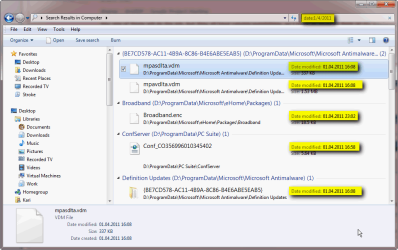
1. If you know the exact date you downloaded the file:
Code:
date:1/4/2011

Search_Date_1.png

This would find all files saved or modified yesterday, April 1st. Please notice the date format must be the same used by your computer, in my case European D/M/Y, in USA for instance it would be M/D/Y so instead 1/4/2011 you would need 4/1/2011.

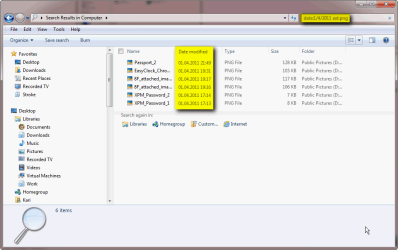
The more information you give to the search, the more you can narrow the search. For instance you can add file type to search parameters; the following would find all PNG image files saved or modified yesterday (add ext:XXX to search where XXX is the file extension you are looking for):
Code:
date:1/4/2011 ext:png

Search_Date_4.png


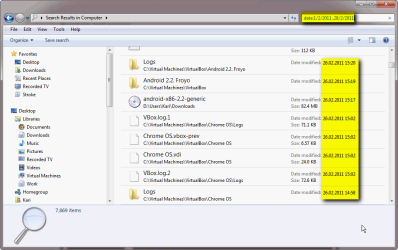
2. If you do not know the exact date but you know the time frame:
Code:
date:1/2/2011..28/2/2011

Search_Date_3.png

This would find all files saved or modified between 1st and 28th of February this year, both dates included. You can also exclude dates:
Code:
date:>1/2/2011<28/2/2011
This would find all files saved or modified between 1st and 28th of February this year, both dates excluded.

3. Using search parameter datemodified: you can select time frame with mouse using a calendar:
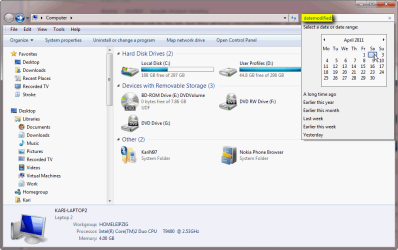
Search_Date_2.png

Please notice that Windows searches on that location where you are and downwards i.e. if you open Users folder and do a search, the search looks only the Users folder and its subfolders, or if you open drive D: and do a search, it looks only the drive D: and its subfolders. Therefore, if you want to search whole computer, you need to open Computer in Explorer.

Also worth to notice is that searching from Start Menu > Search only searches indexed locations, whereas Explorer search also searches non-indexed locations.

There really is no need to use any third party search tools in Seven, although I have to admit that using this extremely simple and powerful tool (Windows Search) seems to be too difficult to some ;)

More about Windows Search:

Kari
 
Last edited:

My Computer

Computer type
Laptop
Computer Manufacturer/Model Number
HP ENVY 17-1150eg
OS
Windows 10 Pro x64 EN-GB
CPU
1.6 GHz Intel Core i7-720QM Processor
Memory
6 GB
Graphics Card(s)
ATI Mobility Radeon HD 5850 Graphics
Sound Card
Beats sound system with integrated subwoofer
Monitor(s) Displays
17" laptop display, 22" LED and 32" Full HD TV through HDMI
Screen Resolution
1600*900 (1), 1920*1080 (2&3)
Hard Drives
Internal: 2 x 500 GB SATA Hard Disk Drive 7200 rpm
External: 2TB for backups, 3TB USB3 network drive for media
Cooling
As Envy runs a bit warm, I have it on a Cooler Master pad
Keyboard
Logitech diNovo Media Desktop Laser (bluetooth)
Mouse
Logitech Performance Mouse MX
Internet Speed
50/10 Mbps VDSL
Antivirus
Windows Defender 4.3.9431.0
Browser
Maxthon 3.5.2., IE11
I just don't understand why even suggest using a bunch of third party apps to do a job that is incredibly simple to do with Windows' own features?


Kari

The third party applications do things that windows search can't do, and easily. dNgrep gives previews of documents found etc. among a lot of other things.

In my experience most users do not have windows search set up properly, and it doesn't work for them. Also, few users can get to grips with the syntax.

Considering how "incredibly simple" it is, why do so many people have problems with it?

Man muss nicht unbedingt ALLES wissen oder verstehen, Man muss aber akzeptieren das manche Dinge einfach sind wie sie sind.

Translation: It is not absolutely necessary to know EVERYTHING, or understand everything, but one must accept that some things are as they are.

Regards....Mike Connor
 

My Computer

OS
Several, including Windows 7 x64 Ultimate
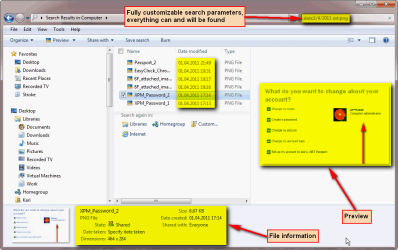
Mike, the search method I described in my previous post does not need to be set up. Just open the Explorer and search. It's native in Windows Seven. Nothing to set up, no need to install any third party apps. And, of course, you also get the preview, you can turn it on with single mouse click:

Search_Date_5.png

Windows Search is a lot easier than user interface on some of these third party search tools. Here's a challenge: Please give me just one example of a search that you can do with any of your third party tools, and I'll show you how easy and simple it is to do with Windows Search.

Windows Search has evolved as any other part of Windows GUI. Some "I don't like Seven, please give my XP back" users do not like Windows Search as it today is simply because it's different than what they are used to. But it really is simple and powerful, easy to learn once you get over of that "why have they changed this?" mentality.

Waiting for your challenge. If not, I consider this conversation concluded.

:) Kari
 

My Computer

Computer type
Laptop
Computer Manufacturer/Model Number
HP ENVY 17-1150eg
OS
Windows 10 Pro x64 EN-GB
CPU
1.6 GHz Intel Core i7-720QM Processor
Memory
6 GB
Graphics Card(s)
ATI Mobility Radeon HD 5850 Graphics
Sound Card
Beats sound system with integrated subwoofer
Monitor(s) Displays
17" laptop display, 22" LED and 32" Full HD TV through HDMI
Screen Resolution
1600*900 (1), 1920*1080 (2&3)
Hard Drives
Internal: 2 x 500 GB SATA Hard Disk Drive 7200 rpm
External: 2TB for backups, 3TB USB3 network drive for media
Cooling
As Envy runs a bit warm, I have it on a Cooler Master pad
Keyboard
Logitech diNovo Media Desktop Laser (bluetooth)
Mouse
Logitech Performance Mouse MX
Internet Speed
50/10 Mbps VDSL
Antivirus
Windows Defender 4.3.9431.0
Browser
Maxthon 3.5.2., IE11
I am not here to challenge anybody, or to accept any challenges, merely to help if I can. "Challenges" and other suchlike nonsense are merely a total waste of time.

I don't want to force anybody to do anything at all, or even read my posts if they don't want to.

Some things which are doubtless "incredibly simple" for you, may not be quite so "incredibly simple" for others. People also like to try alternatives.

You are perfectly entitled to your opinions, as I am to mine, but you are not entitled to stuff them down other people's throats in an ill-mannered and bombastic fashion.

Courtesy costs nothing, but is in fact priceless.

You might have lasted about ten seconds on my customer support team.

Have a nice day.

Mike Connor
 

My Computer

OS
Several, including Windows 7 x64 Ultimate
Mike, please how can you say I have used ill manners?

Only thing I have said is that I really do not understand the need to use some third party apps when Windows can natively do the task so easily. With my playful challenge I just wanted to show that IMO there simply is nothing you can do with third party search tools that you can not do with Windows Search. Really.

Between the lines in my first post in this thread you can also read my frustration. I admit that. This is a Windows 7 forum, about Windows 7 and how to use it. I find it a bit comical that a solution offered to a member asking help with an issue completely bypasses built-in native Windows 7 features. Especially when the issue is something where the native tools and features really offer a simple solution.

Keep it simple, that's what I mean. OP asked something which could be done with a few key strokes, or installing some obscure third party app and then learning how to use it. It's of course up to OP to decide what and how to do.

I'm sorry my opinion heart your feelings.

Kari
 

My Computer

Computer type
Laptop
Computer Manufacturer/Model Number
HP ENVY 17-1150eg
OS
Windows 10 Pro x64 EN-GB
CPU
1.6 GHz Intel Core i7-720QM Processor
Memory
6 GB
Graphics Card(s)
ATI Mobility Radeon HD 5850 Graphics
Sound Card
Beats sound system with integrated subwoofer
Monitor(s) Displays
17" laptop display, 22" LED and 32" Full HD TV through HDMI
Screen Resolution
1600*900 (1), 1920*1080 (2&3)
Hard Drives
Internal: 2 x 500 GB SATA Hard Disk Drive 7200 rpm
External: 2TB for backups, 3TB USB3 network drive for media
Cooling
As Envy runs a bit warm, I have it on a Cooler Master pad
Keyboard
Logitech diNovo Media Desktop Laser (bluetooth)
Mouse
Logitech Performance Mouse MX
Internet Speed
50/10 Mbps VDSL
Antivirus
Windows Defender 4.3.9431.0
Browser
Maxthon 3.5.2., IE11
Mike, please how can you say I have used ill manners?

Only thing I have said is that I really do not understand the need to use some third party apps when Windows can natively do the task so easily. With my playful challenge I just wanted to show that IMO there simply is nothing you can do with third party search tools that you can not do with Windows Search. Really.

Between the lines in my first post in this thread you can also read my frustration. I admit that. This is a Windows 7 forum, about Windows 7 and how to use it. I find it a bit comical that a solution offered to a member asking help with an issue completely bypasses built-in native Windows 7 features. Especially when the issue is something where the native tools and features really offer a simple solution.

Keep it simple, that's what I mean. OP asked something which could be done with a few key strokes, or installing some obscure third party app and then learning how to use it. It's of course up to OP to decide what and how to do.

I'm sorry my opinion heart your feelings.

Kari

Your opinion did not hurt my feelings, very difficult indeed to hurt my feelings.

What you do or do not understand is not germane to the issue. I happen to agree with you that learning to use windows functions is the best way to go, but most users don't do it. They prefer third party applications that make things look easier.

I don't disagree at all with what you wrote, I disagree most emphatically with how you wrote it and the general tone you used.

"Challenging" people is also a remarkably silly thing to do on a help forum.

They are already challenged enough trying to find answers to problems they often find insuperable. Quite regardless of how "incredibly simple" the solution to those problems might appear to somebody else.

As I wrote, have a nice day.

Mike Connor
 

My Computer

OS
Several, including Windows 7 x64 Ultimate
Before signing out from this thread, I really need to say this:

I read my two first responses in this thread once more, trying to find what made you to take them so personally. I found nothing. In my first post I told the truth, there's no need to download and install any third party tools for a task so simple as this, giving valid examples with screenshots. Nothing personal, no wrong information, nothing that is not true. And, if I may add, I did it quite politely. Period.

My second response was to correct some wrong information readers could get from your response to my first post. Windows Search really needs no setting up, when used from Explorer. And the one example you gave what extra you get with third party search tools, the preview, I just showed that it is native in Windows Search. Last but not least I told my opinion in answering you question why do so many people find Windows Search difficult.

One more time, after typing the above, I read my responses through. I really do not understand why you took this so personally?

Over and out, issue solved. Unsubscribing.

Kari
 

My Computer

Computer type
Laptop
Computer Manufacturer/Model Number
HP ENVY 17-1150eg
OS
Windows 10 Pro x64 EN-GB
CPU
1.6 GHz Intel Core i7-720QM Processor
Memory
6 GB
Graphics Card(s)
ATI Mobility Radeon HD 5850 Graphics
Sound Card
Beats sound system with integrated subwoofer
Monitor(s) Displays
17" laptop display, 22" LED and 32" Full HD TV through HDMI
Screen Resolution
1600*900 (1), 1920*1080 (2&3)
Hard Drives
Internal: 2 x 500 GB SATA Hard Disk Drive 7200 rpm
External: 2TB for backups, 3TB USB3 network drive for media
Cooling
As Envy runs a bit warm, I have it on a Cooler Master pad
Keyboard
Logitech diNovo Media Desktop Laser (bluetooth)
Mouse
Logitech Performance Mouse MX
Internet Speed
50/10 Mbps VDSL
Antivirus
Windows Defender 4.3.9431.0
Browser
Maxthon 3.5.2., IE11
Before signing out from this thread, I really need to say this:

I read my two first responses in this thread once more, trying to find what made you to take them so personally. I found nothing. In my first post I told the truth, there's no need to download and install any third party tools for a task so simple as this, giving valid examples with screenshots. Nothing personal, no wrong information, nothing that is not true. And, if I may add, I did it quite politely. Period.

My second response was to correct some wrong information readers could get from your response to my first post. Windows Search really needs no setting up, when used from Explorer. And the one example you gave what extra you get with third party search tools, the preview, I just showed that it is native in Windows Search. Last but not least I told my opinion in answering you question why do so many people find Windows Search difficult.

One more time, after typing the above, I read my responses through. I really do not understand why you took this so personally?

Over and out, issue solved. Unsubscribing.

Kari

I did not take it personally, and neither should you. Getting emotionally involved in these things is not a good idea.

I don't mind anybody disagreeing with my opinions, and I am not always right in any case. I just don't like bad manners.

Mike Connor
 

My Computer

OS
Several, including Windows 7 x64 Ultimate
I'd rather ask this privately but you have disabled both VM and PM and I do not have your email, so I have to say this publicly.

You are accusing me of bad manners in this thread. Please provide an example. I am working quite hard at the moment with myself, not wanting to start personally insulting you as you are insulting me. Please at least be a man enough to show me which part of my responses in this thread you consider being "bad manners".

So, to finish this in a civilized way and clear the air, I ask you to show me which part of my words can be taken as you told earlier:
You are perfectly entitled to your opinions, as I am to mine, but you are not entitled to stuff them down other people's throats in an ill-mannered and bombastic fashion.

Kari
 

My Computer

Computer type
Laptop
Computer Manufacturer/Model Number
HP ENVY 17-1150eg
OS
Windows 10 Pro x64 EN-GB
CPU
1.6 GHz Intel Core i7-720QM Processor
Memory
6 GB
Graphics Card(s)
ATI Mobility Radeon HD 5850 Graphics
Sound Card
Beats sound system with integrated subwoofer
Monitor(s) Displays
17" laptop display, 22" LED and 32" Full HD TV through HDMI
Screen Resolution
1600*900 (1), 1920*1080 (2&3)
Hard Drives
Internal: 2 x 500 GB SATA Hard Disk Drive 7200 rpm
External: 2TB for backups, 3TB USB3 network drive for media
Cooling
As Envy runs a bit warm, I have it on a Cooler Master pad
Keyboard
Logitech diNovo Media Desktop Laser (bluetooth)
Mouse
Logitech Performance Mouse MX
Internet Speed
50/10 Mbps VDSL
Antivirus
Windows Defender 4.3.9431.0
Browser
Maxthon 3.5.2., IE11
I'd rather ask this privately but you have disabled both VM and PM and I do not have your email, so I have to say this publicly.

You are accusing me of bad manners in this thread. Please provide an example. I am working quite hard at the moment with myself, not wanting to start personally insulting you as you are insulting me. Please at least be a man enough to show me which part of my responses in this thread you consider being "bad manners".

So, to finish this in a civilized way and clear the air, I ask you to show me which part of my words can be taken as you told earlier:
You are perfectly entitled to your opinions, as I am to mine, but you are not entitled to stuff them down other people's throats in an ill-mannered and bombastic fashion.

Kari

I don't think this is going anywhere useful.

What I am or am not "man enough" to do is also not germane to the issue. That is another example of inappropriate language. You seem to like all sorts of "challenges". It is not appropriate to publicly challenge somebody's manhood or honour in this fashion.

I told you why I did not like how you wrote what you wrote, it was arrogant and ill-mannered. You are obviously very passionate about some things, which is fair enough, but it apparently colours your judgement and your language usage. Indeed, it comes across as sneering.

Some of this is doubtless due to your not being a native speaker.

However this may be, in my opinion it would be silly for you to unsubscribe, you obviously enjoy what you do, and you help a lot of people.

Can we please simply drop the issue now? It isn't helping anybody.

Regards....Mike Connor
 

My Computer

OS
Several, including Windows 7 x64 Ultimate
As mentioned, I would rather have this conversation privately but you have disabled PM's so it's a no go.

That language thing was a punch below the belt. My English is good enough to understand that in my responses to OP and you I have been quite polite, offering valid and simple solutions and not insulted you personally as you insult me all the time.

I am really sorry about this. I could not even think you would feel so offended only because I offered OP a more elegant and simple solution, or that I told my honest opinion about unnecessary steps in solving a minor issue.

Amazed, very sincere

Kari
 

My Computer

Computer type
Laptop
Computer Manufacturer/Model Number
HP ENVY 17-1150eg
OS
Windows 10 Pro x64 EN-GB
CPU
1.6 GHz Intel Core i7-720QM Processor
Memory
6 GB
Graphics Card(s)
ATI Mobility Radeon HD 5850 Graphics
Sound Card
Beats sound system with integrated subwoofer
Monitor(s) Displays
17" laptop display, 22" LED and 32" Full HD TV through HDMI
Screen Resolution
1600*900 (1), 1920*1080 (2&3)
Hard Drives
Internal: 2 x 500 GB SATA Hard Disk Drive 7200 rpm
External: 2TB for backups, 3TB USB3 network drive for media
Cooling
As Envy runs a bit warm, I have it on a Cooler Master pad
Keyboard
Logitech diNovo Media Desktop Laser (bluetooth)
Mouse
Logitech Performance Mouse MX
Internet Speed
50/10 Mbps VDSL
Antivirus
Windows Defender 4.3.9431.0
Browser
Maxthon 3.5.2., IE11
As mentioned, I would rather have this conversation privately but you have disabled PM's so it's a no go.

That language thing was a punch below the belt. My English is good enough to understand that in my responses to OP and you I have been quite polite, offering valid and simple solutions and not insulted you personally as you insult me all the time.

I am really sorry about this. I could not even think you would feel so offended only because I offered OP a more elegant and simple solution, or that I told my honest opinion about unnecessary steps in solving a minor issue.

Amazed, very sincere

Kari

If you are determined to interpret everything I write as an insult, while apparently remaining completely oblivious of your own insulting manner, there is nothing at all I can do about it.

I was not attempting to "punch" you anywhere, or insult you in any way. I was merely trying to explain what you asked me to explain. If you don't like the explanation, there is nothing I can do about that either.

Your own apparently emotionally coloured interpretation of things is skewing your perception.

I wont answer any further posts, because it is simply a waste of time.

If you want my advice, which you almost certainly don't, then just calm down and forget the whole thing.

Regards....Mike Connor
 

My Computer

OS
Several, including Windows 7 x64 Ultimate
Thanks to all for the help.
I'm sure one or more of the solutions will be of value.
 

My Computer

Computer Manufacturer/Model Number
Personal Build
OS
Windows 7 Home Premium 64 bit (OEM) SP1
CPU
i7-875K (No Overclock)
Motherboard
GA-P55-USB3 Rev. 2, F9 bios
Memory
4GB G.SKILL Ripjaws Series 1600 7-8-7-24-2t 1.65V
Graphics Card(s)
XFX HD-577X-ZNFC 5770 1GB
Sound Card
Onboard
Monitor(s) Displays
Asus VH222H Black 21.5
Screen Resolution
1920X1080 @60 Hz
Hard Drives
SAMSUNG Spinpoint F3 HD103SJ 1TB
PSU
CORSAIR CMPSU-650TX 650W
Case
COOLER MASTER RC-692-KKN2 CM690 II Advanced
Cooling
COOLER MASTER Hyper 212+
Keyboard
Microsoft Comfort Curve Keyboard 2000
Mouse
Microsoft IntelliMouse Optical 1.1A
Internet Speed
3 Mb/s
Other Info
ASUS DRW-24B1ST/BLK/B/AS

Browser:
IE9
Thanks to all for the help.
I'm sure one or more of the solutions will be of value.

A pleasure George, hope you got sorted out. My apologies for the little public spat.

Regards....Mike Connor
 

My Computer

OS
Several, including Windows 7 x64 Ultimate
Guys I am very new here but have been reading a lot of useful threads, and here is my opinion with this one.

After the first 2 useful replies this thread became a game of getting one up on each other which really gets boring fast...Chill out and drop the ego chasing intellectual showcasing and stick to helping people out, which members on this forum do well...Cheers
 

My Computer

OS
Windows 7 Ultimate x64
CPU
Intel Core2 Duo CPU E8500 @ 3.16GHz
Motherboard
Asus P5KPL-CM
Memory
4096 MB DDR2-SDRAM
Graphics Card(s)
NVIDIA GeForce 9500 GT
Monitor(s) Displays
BenQ BenQ T2200HD and LG Electronics L192WS
Screen Resolution
1920x1080 pixels at 60 Hz in True Colors 32-bit
Hard Drives
WDC (1000 GB)
ST3500320AS (500 GB)
WDC (160 GB)
Case
Generic
Cooling
Fan cooled
Keyboard
Logitech wireless EX100
Mouse
Logitech HID-compliant Cordless Mouse
Internet Speed
8000 x 356
Back
Top