how two partitions can be system ? surprise help

quiclslvr

Banned
Local time
9:09 PM
Messages
42
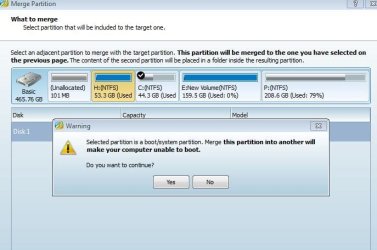
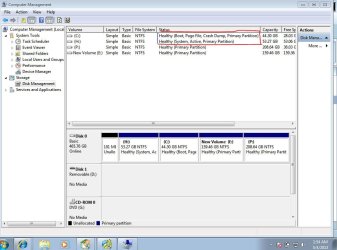
as shown in the pic ...c drive contains windows 7 cause i have installed in it and at that time H drive was empty and still empty cause i have formatted it during the installation of win 7 in c drive, but when i open disk management then it shows it is the system partition. the main problem is ,,,when i want to extend the partition c drive adding this empty H drive using third party partition tool then dialog box appears saying''selected partition is boot system partition....'' you can see in the image i have attached.

so my question is how to make this drive not having system ?
or is there any method to extend c drive adding this H drive to make c drive large?

waiting for the solutionboot.JPG
boot2.JPG
 

My Computer My Computer

OS
win 7
Looks like one is a EFI partition;
Cant really tell you might have to run diskpart;

Chris
 

My Computer My Computer

Computer type
PC/Desktop
OS
Windows 7 Utlimate x64
The terminology is somewhat confusing.
The H: drive (labeled as system) actually contains the boot files while the C: drive (labeled as boot) contains Windows. Both are needed. You could probably make H: smaller and resize C: to fill the space but you would need third party software to do this. Be sure you have a backup of everything on C: before attempting this.
 

My Computer My Computer

Computer type
PC/Desktop
Computer Manufacturer/Model Number
HP
OS
Windows 7 Pro 64 bit
CPU
Xeon W3520
Memory
8 GB
Graphics Card(s)
Nvidia Geforce 210
The partitioning has been played around with, H: was C: at one time & 101mb partition was the ACTIVE System Reserved.
 

My Computer My Computer

OS
ME/XP/Vista/Win7
The partitioning has been played around with, H: was C: at one time & 101mb partition was the ACTIVE System Reserved.

You may be some what right . wait i will tell the story. once there was one c drive then i shrink the c drive to H drive , that is a new drive. when i installed the window then i formatted both drive and rejected c drive for the windows 7 . so how H drive became a system? now what is the solution for me. can i merge both there two drive even after the warning? please provide of the solution so that i can merge there two drives.
 

My Computer My Computer

OS
win 7
The partitioning has been played around with, H: was C: at one time & 101mb partition was the ACTIVE System Reserved.

may be i am disturbing you,,,but please respond my reply,,,,what if i merge H drive with the C drive...?

thanks
 

My Computer My Computer

OS
win 7
Merging those drives is asking for trouble. Read my previous post.
 

My Computer My Computer

Computer type
PC/Desktop
Computer Manufacturer/Model Number
HP
OS
Windows 7 Pro 64 bit
CPU
Xeon W3520
Memory
8 GB
Graphics Card(s)
Nvidia Geforce 210
What are the :

1. Contents of H:?
2. Contents of C:?

Please provide screen capture images from Windows Explorer to show this clearly.

Do NOT attempt to merge partitions yet.

If I am correct, you can copy the bootmanger from H: to C: using EASYBCD as explained in this tutorial:

http://www.sevenforums.com/tutorials/209885-bootmgr-move-c-easybcd.html

If that works, then you can remove H: if it is no longer needed.

However, you MUST first backup all information on C: before doing this as an insurance policy. A better option would be to image the entire disk using something like Macrium.

http://www.sevenforums.com/tutorials/73828-imaging-free-macrium.html

Regards,
Golden
 

My Computer My Computer

Computer type
PC/Desktop
Computer Manufacturer/Model Number
Golden Mk. I.4
OS
Windows 10 Pro x64 ; Xubuntu x64
CPU
Intel i7 860 @ 2.80 GHz O/C'ed to 4.0GHz
Motherboard
Gigabyte P55A-UD3R Rev.1. Award BIOS F13
Memory
16GB Corsair Vengance DDR3 @ 661 MHz Dual Channel (9-9-9-24)
Graphics Card(s)
EVGA NVidia GTX 560 1024MB
Sound Card
Realtek Integrated
Monitor(s) Displays
Dual Samsung SyncMaster 2494HS
Screen Resolution
1920*1080 and 1920*1080
Hard Drives
1*Samsung 840 EVO 120GB SSD;
1*OCZ Vertex 2 60GB SSD;
2*Samsung F3 SpinPoint 1TB in RAID0;
1*Samsung F1 SpinPoint 1TB;
2*Western Digital 1TB External USB 3.0
1*Western Digital 500GB External USB 3.0
1*Seagate 500GB External USB 2.0
PSU
Thermaltake ToughPower QFan 750W
Case
Thermaltake Element S VK60001W2Z
Cooling
Corsair H60 Water Cooling, 2*230mm and 2*80mm case fans
Keyboard
Logitech G110
Mouse
Logitech MX518
Back
Top