How Windows 7 defrag schedule work

pominator

New member
Member
Local time
9:33 PM
Messages
51
I was playing around with the default Windows 7 defrag schedule and still can't figure how it work exactly.

The default schedule is set to start at 1h am wednesday with 3 minutes idle condition. Their is also a settings that set the defrag to start as soon as it can if a schedule is missed. If my understanding is right, if the computer is close in the night of wednesday to thursday, it will start to defrag next time it will be open and idle for 3 minutes. But what happen if you open your computer on friday, do some work and let it idle 3 mins. The defrag start but then you start back using your computer before the end of the defrag. Do the defrag stop completly and the next scheduled start is next wednesday ? Do it only put itself in pause until you idle again ? Do it put iself in pause until you idle again or stop automatically if too many changes are made to the filesystem ?

Anyway thanks if you have any info regarding this.

Edit : You can see the details of the schedule like this : http://www.addictivetips.com/window...weak-automatic-disk-defragmentation-in-vista/
 

My Computer

OS
Windows 7 build 7127 x64
CPU
Intel Core-i7 2600k 3.4 GHz
Motherboard
Onboard audio (Realtek ALC662 codec)
Memory
Patriot Extreme Performance 4GB PC2-6400 4-4-4-12
Graphics Card(s)
Intel G31
Sound Card
Creative Sound Blaster Audigy 2
Monitor(s) Displays
Viewsonic Professional Series P95f+
Screen Resolution
1280x1024 @ 85Hz
Hard Drives
Western Digital Raptor, 74GB 10000RPM (system drive)
Maxtor DiamondMax 10, 200GB 7200RPM
Seagate Barracuda 7200.10, 500GB 7200RPM
PSU
Antec Truepower 430watt
Case
Cooler Master TAC-T01 WaveMaster
Cooling
Intel & Nvidia stock cooller + 3 80mm case fans
Keyboard
Logitech Internet Navigator
Mouse
Logitech MX-518
Internet Speed
8/1MBPS
Is there any particular reason you are using Task Scheduler or the idle setting??

I just use the built-in Windows 7 settings, without Task Scheduler. It runs once a week completely in the background. I never notice it at all.

I haven't manually defragged in several years. Both of my hard drives are shown as 0 percent fragmented.
 

My Computer

Computer type
PC/Desktop
Computer Manufacturer/Model Number
Ignatz Special; 4 speed manual gearbox; factory air conditioning; one of one
OS
Windows 7 Home Premium SP1, 64-bit
CPU
Intel Skylake i5-6600K, not overclocked
Motherboard
AsRock Z170M Extreme 4, micro ATX
Memory
8 GB HyperX DDR4-2666 (2 x 4 GB)
Graphics Card(s)
none; graphics are integrated on CPU
Sound Card
onboard: Realtek ALC1150; external: USB Behringer UF0-202
Monitor(s) Displays
Dell S2340M 23 inch IPS
Screen Resolution
1600 x 900
Hard Drives
System: Crucial MX100 series SSD, 128 GB;
Data: Samsung Spinpoint 103SJ, 1 TB;
Backup: WD Caviar Green WD30EZRX-00D8PB0, 3 TB
PSU
Rosewill SilentNight 500 watt fanless, semi-modular
Case
Antec Solo II
Cooling
Noctua NH-U12S; Noctua F12 intake, Noctua S12A exhaust
Keyboard
Microsoft 200 6JH-00001 USB
Mouse
Dell or Microsoft optical wired; USB
Antivirus
Microsoft Security Essentials and Malwarebytes Premium
Browser
Pale Moon
Other Info
All fans PWM; speeds at idle: CPU circa 500 rpm; intake circa 600 rpm; exhaust circa 600 rpm; CPU temps 27 idle and 47 C load in a warm room (27 C/81 F) when running Intel Extreme Tuning Utility stress test.
Same here; I just use the built-in Win 7 defragger without the task scheduler. I have it set to run at 2AM every Wednesday. Even if I am up at the time and using the computer, I can't tell it's operating but, every time I've checked, it had been working just fine. If I manually check the day before it is scheduled to defrag, I've never had any more than 3% defragmentation; 1-2% is the norm. Can't beat that with a big stick.
 

My Computer

Computer type
PC/Desktop
Computer Manufacturer/Model Number
Custom Build
OS
Win 7 Ultimate 64 bit
CPU
Intel i7-3930K
Motherboard
ASUS P9X79 WS
Memory
Kingston HyperX Genesis 32GB Kit (8x4GB Modules) 1600MHz DDR
Graphics Card(s)
MSI R7850 Twin Frozr 2GD5/OC Radeon HD 7850 2GB 256-bit GDDR
Sound Card
Asus Xonar Essence STX
Monitor(s) Displays
3x Asus VG248QE 24", Vizio 32" TV
Screen Resolution
1920 x 1080, ?
Hard Drives
Samsung 128GB 840 Pro SSD (1),
Samsung 4TB 850 EVO SSDs (4)
Samsung 4TB 850 EVO SSDs (16) external backup drives used in 2.5" hot swap bays in the computer.
PSU
Corsair HX750w
Case
Antec Two Hundred v2 (modified)
Cooling
Cooler Master GeminII S524 120mm (fan replaced with a 140mm)
Keyboard
Logitech G510s
Mouse
Logitech M525 (two in use)
Internet Speed
=< 32Mbps down, 8Mbps up
Antivirus
AVAST!, MBAM, SAS, Spybot S&D (all but MBAM free) Glary Util
Browser
IE11
Other Info
LSI 9211-8i HBA card (8 SATA III ports), 2.5" & 3.5" Hot Swap Bays, HooToo HT-CR001 PCI-E to USB 3.0 Internal Hub + 6 Slot Card Reader, and LG Model CH12LS28 BD-ROM Optical Drive. Also, ScanSnap S1500 ADF duplexing scanner, Canon 9000F flat bed scanner, Corsair SP2500 2.1 speakers, Samsung CLP 415nw laser color printer, Cyberpower PP2200SW UPS
Yup, I leave it at default too, works great. Do you turn your PC off on Wednesday, or is that a rhetorical scenario?
 

My Computer

Computer type
PC/Desktop
Computer Manufacturer/Model Number
Home Built Desktop By DataTech
OS
Windows 7 Ultimate X64 SP1
CPU
Intel i5-2550K, Differing ~4.4-4.8GHz No built in GPU
Motherboard
ASUS P8Z68-V PRO/GEN3
Memory
16GB G.Skill Sniper 1866MHz @ 2133MHz 2x8GB
Graphics Card(s)
ASUS GTX650TIB-DC2OC-2GD5, (650TI Boost)
Sound Card
Onboard Realtek 5-1
Monitor(s) Displays
Samsung P2570HD
Screen Resolution
1920x1080
Hard Drives
Samsung 840 Pro 256GB SSD for OS, 500GB Seagate Constellation (Enterprise drive) for Data
PSU
Corsair HX650W
Case
Inwin Dragon Rider
Cooling
Hyper 212 EVO w/two Noctua fans, push-pull, @1300 RPM
Keyboard
E-Z Eyes, bright yellow keys with large characters
Mouse
steelseries SENSEI Laser Pro Gaming
Internet Speed
48-51Mbs Mbs down, 11 Mbs up Xfinity Cable
Antivirus
Norton Internet Security 2013
Browser
IE 10, Opera, Pale Moon if needed
Other Info
4 case fans, LG BluRay-RE, ASUS DVD-RW, Mr. Fusion power supply, 1.21 gigawatts.
Yup, I leave it at default too, works great. Do you turn your PC off on Wednesday, or is that a rhetorical scenario?

Nope and that is the schedule. My PC stays on 24/7 with occasional reboots, roughly one a week. There is no need to do a shutdown just to do a defrag.

Edit: Just for excrement and merriment, I checked my HDDs and both are at 0% fragmentation.
 

My Computer

Computer type
PC/Desktop
Computer Manufacturer/Model Number
Custom Build
OS
Win 7 Ultimate 64 bit
CPU
Intel i7-3930K
Motherboard
ASUS P9X79 WS
Memory
Kingston HyperX Genesis 32GB Kit (8x4GB Modules) 1600MHz DDR
Graphics Card(s)
MSI R7850 Twin Frozr 2GD5/OC Radeon HD 7850 2GB 256-bit GDDR
Sound Card
Asus Xonar Essence STX
Monitor(s) Displays
3x Asus VG248QE 24", Vizio 32" TV
Screen Resolution
1920 x 1080, ?
Hard Drives
Samsung 128GB 840 Pro SSD (1),
Samsung 4TB 850 EVO SSDs (4)
Samsung 4TB 850 EVO SSDs (16) external backup drives used in 2.5" hot swap bays in the computer.
PSU
Corsair HX750w
Case
Antec Two Hundred v2 (modified)
Cooling
Cooler Master GeminII S524 120mm (fan replaced with a 140mm)
Keyboard
Logitech G510s
Mouse
Logitech M525 (two in use)
Internet Speed
=< 32Mbps down, 8Mbps up
Antivirus
AVAST!, MBAM, SAS, Spybot S&D (all but MBAM free) Glary Util
Browser
IE11
Other Info
LSI 9211-8i HBA card (8 SATA III ports), 2.5" & 3.5" Hot Swap Bays, HooToo HT-CR001 PCI-E to USB 3.0 Internal Hub + 6 Slot Card Reader, and LG Model CH12LS28 BD-ROM Optical Drive. Also, ScanSnap S1500 ADF duplexing scanner, Canon 9000F flat bed scanner, Corsair SP2500 2.1 speakers, Samsung CLP 415nw laser color printer, Cyberpower PP2200SW UPS
Jeannie, I was referring to the OP saying if "computer is close in the night of wednesday to Thursday".
 

My Computer

Computer type
PC/Desktop
Computer Manufacturer/Model Number
Home Built Desktop By DataTech
OS
Windows 7 Ultimate X64 SP1
CPU
Intel i5-2550K, Differing ~4.4-4.8GHz No built in GPU
Motherboard
ASUS P8Z68-V PRO/GEN3
Memory
16GB G.Skill Sniper 1866MHz @ 2133MHz 2x8GB
Graphics Card(s)
ASUS GTX650TIB-DC2OC-2GD5, (650TI Boost)
Sound Card
Onboard Realtek 5-1
Monitor(s) Displays
Samsung P2570HD
Screen Resolution
1920x1080
Hard Drives
Samsung 840 Pro 256GB SSD for OS, 500GB Seagate Constellation (Enterprise drive) for Data
PSU
Corsair HX650W
Case
Inwin Dragon Rider
Cooling
Hyper 212 EVO w/two Noctua fans, push-pull, @1300 RPM
Keyboard
E-Z Eyes, bright yellow keys with large characters
Mouse
steelseries SENSEI Laser Pro Gaming
Internet Speed
48-51Mbs Mbs down, 11 Mbs up Xfinity Cable
Antivirus
Norton Internet Security 2013
Browser
IE 10, Opera, Pale Moon if needed
Other Info
4 case fans, LG BluRay-RE, ASUS DVD-RW, Mr. Fusion power supply, 1.21 gigawatts.

My Computer

Computer type
PC/Desktop
Computer Manufacturer/Model Number
Custom Build
OS
Win 7 Ultimate 64 bit
CPU
Intel i7-3930K
Motherboard
ASUS P9X79 WS
Memory
Kingston HyperX Genesis 32GB Kit (8x4GB Modules) 1600MHz DDR
Graphics Card(s)
MSI R7850 Twin Frozr 2GD5/OC Radeon HD 7850 2GB 256-bit GDDR
Sound Card
Asus Xonar Essence STX
Monitor(s) Displays
3x Asus VG248QE 24", Vizio 32" TV
Screen Resolution
1920 x 1080, ?
Hard Drives
Samsung 128GB 840 Pro SSD (1),
Samsung 4TB 850 EVO SSDs (4)
Samsung 4TB 850 EVO SSDs (16) external backup drives used in 2.5" hot swap bays in the computer.
PSU
Corsair HX750w
Case
Antec Two Hundred v2 (modified)
Cooling
Cooler Master GeminII S524 120mm (fan replaced with a 140mm)
Keyboard
Logitech G510s
Mouse
Logitech M525 (two in use)
Internet Speed
=< 32Mbps down, 8Mbps up
Antivirus
AVAST!, MBAM, SAS, Spybot S&D (all but MBAM free) Glary Util
Browser
IE11
Other Info
LSI 9211-8i HBA card (8 SATA III ports), 2.5" & 3.5" Hot Swap Bays, HooToo HT-CR001 PCI-E to USB 3.0 Internal Hub + 6 Slot Card Reader, and LG Model CH12LS28 BD-ROM Optical Drive. Also, ScanSnap S1500 ADF duplexing scanner, Canon 9000F flat bed scanner, Corsair SP2500 2.1 speakers, Samsung CLP 415nw laser color printer, Cyberpower PP2200SW UPS
Is there any particular reason you are using Task Scheduler or the idle setting??

I just use the built-in Windows 7 settings, without Task Scheduler. It runs once a week completely in the background. I never notice it at all.

I haven't manually defragged in several years. Both of my hard drives are shown as 0 percent fragmented.

Yup, I leave it at default too, works great. Do you turn your PC off on Wednesday, or is that a rhetorical scenario?

The task scheduler settings are not a custom one but the fine tuning options of the default defrag in Windows 7. It explain the logical behind the schedule within the task scheduler, yet I do not fully understanding it.

It start defrag at wednesday 1 am if it is idle since at least 3 minutes. If the computer is close or in use, it will start the defrag next time it can, so the next time the computer will be idle 3 minutes. Like I said in my first post, what happen if one idle 3 minutes, the defrag start, then start using the computer again, way before the defrag have ended ? I don't have problem with fragmentation, I just want to understand how it works.
 

My Computer

OS
Windows 7 build 7127 x64
CPU
Intel Core-i7 2600k 3.4 GHz
Motherboard
Onboard audio (Realtek ALC662 codec)
Memory
Patriot Extreme Performance 4GB PC2-6400 4-4-4-12
Graphics Card(s)
Intel G31
Sound Card
Creative Sound Blaster Audigy 2
Monitor(s) Displays
Viewsonic Professional Series P95f+
Screen Resolution
1280x1024 @ 85Hz
Hard Drives
Western Digital Raptor, 74GB 10000RPM (system drive)
Maxtor DiamondMax 10, 200GB 7200RPM
Seagate Barracuda 7200.10, 500GB 7200RPM
PSU
Antec Truepower 430watt
Case
Cooler Master TAC-T01 WaveMaster
Cooling
Intel & Nvidia stock cooller + 3 80mm case fans
Keyboard
Logitech Internet Navigator
Mouse
Logitech MX-518
Internet Speed
8/1MBPS
Is there any particular reason you are using Task Scheduler or the idle setting??

I just use the built-in Windows 7 settings, without Task Scheduler. It runs once a week completely in the background. I never notice it at all.

I haven't manually defragged in several years. Both of my hard drives are shown as 0 percent fragmented.

Yup, I leave it at default too, works great. Do you turn your PC off on Wednesday, or is that a rhetorical scenario?

The task scheduler settings are not a custom one but the fine tuning options of the default defrag in Windows 7. It explain the logical behind the schedule within the task scheduler, yet I do not fully understanding it.

It start defrag at wednesday 1 am if it is idle since at least 3 minutes. If the computer is close or in use, it will start the defrag next time it can, so the next time the computer will be idle 3 minutes. Like I said in my first post, what happen if one idle 3 minutes, the defrag start, then start using the computer again, way before the defrag have ended ? I don't have problem with fragmentation, I just want to understand how it works.

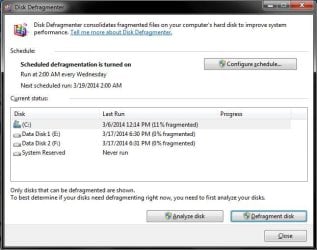
Where are you finding these fine tuning options? I'm unable to find them in my Win 7 defragger. This is the screen I get when I hit the Windows key and type defrag:

defrag 1.jpg

The reason the C: drive is showing such a high defragmentation is it is a SSD and I do not defrag it; defragging a SSD can shorten the life of it with excessive writes. SSDs can handle defragmentation just fine with no loss of performance.

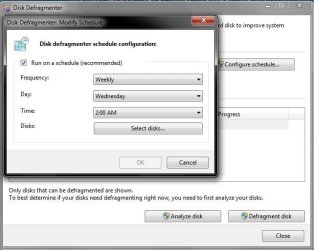
Clicking on the Configure Schedule button gives me this:

defrag 2.jpg

Clicking on Frequency just gives me a choice of Daily, Weekly, or Monthly. Clicking on Day gives me a choice of any one day Sunday through Saturday. clicking on Time just gives me a choice of any one hour of the day. Clicking on Disks gives me this:

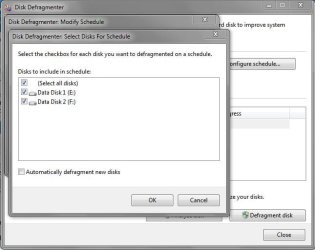
defrag 3.jpg

Note only my spinners are shown and the C: drive has been excluded. Win 7 will automagically exclude SSDs as long as the Automatically Defragment New Disks box is left unchecked. Curiously enough, checking just both of the spinner's boxes will cause the Select all Disks box to automagically be selected.

Clicking OK closes the Select Disks for Schedule and Modify Schedule windows. Clicking Close in the Disk Defragmenter window will close the window and finish the scheduling process. Nowhere did I see anything about three minute delays, etc.
 

My Computer

Computer type
PC/Desktop
Computer Manufacturer/Model Number
Custom Build
OS
Win 7 Ultimate 64 bit
CPU
Intel i7-3930K
Motherboard
ASUS P9X79 WS
Memory
Kingston HyperX Genesis 32GB Kit (8x4GB Modules) 1600MHz DDR
Graphics Card(s)
MSI R7850 Twin Frozr 2GD5/OC Radeon HD 7850 2GB 256-bit GDDR
Sound Card
Asus Xonar Essence STX
Monitor(s) Displays
3x Asus VG248QE 24", Vizio 32" TV
Screen Resolution
1920 x 1080, ?
Hard Drives
Samsung 128GB 840 Pro SSD (1),
Samsung 4TB 850 EVO SSDs (4)
Samsung 4TB 850 EVO SSDs (16) external backup drives used in 2.5" hot swap bays in the computer.
PSU
Corsair HX750w
Case
Antec Two Hundred v2 (modified)
Cooling
Cooler Master GeminII S524 120mm (fan replaced with a 140mm)
Keyboard
Logitech G510s
Mouse
Logitech M525 (two in use)
Internet Speed
=< 32Mbps down, 8Mbps up
Antivirus
AVAST!, MBAM, SAS, Spybot S&D (all but MBAM free) Glary Util
Browser
IE11
Other Info
LSI 9211-8i HBA card (8 SATA III ports), 2.5" & 3.5" Hot Swap Bays, HooToo HT-CR001 PCI-E to USB 3.0 Internal Hub + 6 Slot Card Reader, and LG Model CH12LS28 BD-ROM Optical Drive. Also, ScanSnap S1500 ADF duplexing scanner, Canon 9000F flat bed scanner, Corsair SP2500 2.1 speakers, Samsung CLP 415nw laser color printer, Cyberpower PP2200SW UPS
Windows defrag doesn't do it's own scheduling but uses the system task scheduler. Only the most basic functions are available from the defrag dialog. For full control you have to go into the task scheduler.

It start defrag at wednesday 1 am if it is idle since at least 3 minutes. If the computer is close or in use, it will start the defrag next time it can, so the next time the computer will be idle 3 minutes. Like I said in my first post, what happen if one idle 3 minutes, the defrag start, then start using the computer again, way before the defrag have ended ? I don't have problem with fragmentation, I just want to understand how it works.

The task scheduler provides control over what happens when the computer comes out of the idle state while a task is running. Open the properties for the task and select the "conditions" tab.

Note the second checkbox labeled "Stop if the computer ceases to be idle". Quite clear.
Note the third checkbox labeled "Restart if the idle state resumkes". Also quite clear.

Or have I misunderstood the question?
 

My Computer

Computer type
PC/Desktop
Computer Manufacturer/Model Number
HP
OS
Windows 7 Pro 64 bit
CPU
Xeon W3520
Memory
8 GB
Graphics Card(s)
Nvidia Geforce 210
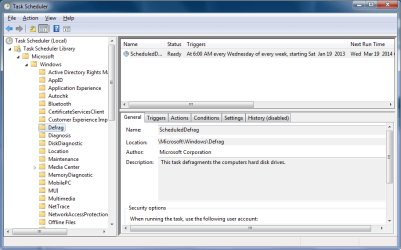
Curious. I looked in Task Scheduler and didn't find any entries related to defragging.
 

My Computer

Computer type
PC/Desktop
Computer Manufacturer/Model Number
Custom Build
OS
Win 7 Ultimate 64 bit
CPU
Intel i7-3930K
Motherboard
ASUS P9X79 WS
Memory
Kingston HyperX Genesis 32GB Kit (8x4GB Modules) 1600MHz DDR
Graphics Card(s)
MSI R7850 Twin Frozr 2GD5/OC Radeon HD 7850 2GB 256-bit GDDR
Sound Card
Asus Xonar Essence STX
Monitor(s) Displays
3x Asus VG248QE 24", Vizio 32" TV
Screen Resolution
1920 x 1080, ?
Hard Drives
Samsung 128GB 840 Pro SSD (1),
Samsung 4TB 850 EVO SSDs (4)
Samsung 4TB 850 EVO SSDs (16) external backup drives used in 2.5" hot swap bays in the computer.
PSU
Corsair HX750w
Case
Antec Two Hundred v2 (modified)
Cooling
Cooler Master GeminII S524 120mm (fan replaced with a 140mm)
Keyboard
Logitech G510s
Mouse
Logitech M525 (two in use)
Internet Speed
=< 32Mbps down, 8Mbps up
Antivirus
AVAST!, MBAM, SAS, Spybot S&D (all but MBAM free) Glary Util
Browser
IE11
Other Info
LSI 9211-8i HBA card (8 SATA III ports), 2.5" & 3.5" Hot Swap Bays, HooToo HT-CR001 PCI-E to USB 3.0 Internal Hub + 6 Slot Card Reader, and LG Model CH12LS28 BD-ROM Optical Drive. Also, ScanSnap S1500 ADF duplexing scanner, Canon 9000F flat bed scanner, Corsair SP2500 2.1 speakers, Samsung CLP 415nw laser color printer, Cyberpower PP2200SW UPS
I found it here Jeannie.
Tasks.png
 

My Computer

Computer type
PC/Desktop
Computer Manufacturer/Model Number
Home Built Desktop By DataTech
OS
Windows 7 Ultimate X64 SP1
CPU
Intel i5-2550K, Differing ~4.4-4.8GHz No built in GPU
Motherboard
ASUS P8Z68-V PRO/GEN3
Memory
16GB G.Skill Sniper 1866MHz @ 2133MHz 2x8GB
Graphics Card(s)
ASUS GTX650TIB-DC2OC-2GD5, (650TI Boost)
Sound Card
Onboard Realtek 5-1
Monitor(s) Displays
Samsung P2570HD
Screen Resolution
1920x1080
Hard Drives
Samsung 840 Pro 256GB SSD for OS, 500GB Seagate Constellation (Enterprise drive) for Data
PSU
Corsair HX650W
Case
Inwin Dragon Rider
Cooling
Hyper 212 EVO w/two Noctua fans, push-pull, @1300 RPM
Keyboard
E-Z Eyes, bright yellow keys with large characters
Mouse
steelseries SENSEI Laser Pro Gaming
Internet Speed
48-51Mbs Mbs down, 11 Mbs up Xfinity Cable
Antivirus
Norton Internet Security 2013
Browser
IE 10, Opera, Pale Moon if needed
Other Info
4 case fans, LG BluRay-RE, ASUS DVD-RW, Mr. Fusion power supply, 1.21 gigawatts.
Ok, found it. Apparently, defrag will run just fine with the default settings (no three minute delay, etc.) because all of that is disabled (grayed out) on mine and, when ever I checked the fragmentation levels of the spinners on Thursday, they have been at zero. It is possible to overthink things.
 

My Computer

Computer type
PC/Desktop
Computer Manufacturer/Model Number
Custom Build
OS
Win 7 Ultimate 64 bit
CPU
Intel i7-3930K
Motherboard
ASUS P9X79 WS
Memory
Kingston HyperX Genesis 32GB Kit (8x4GB Modules) 1600MHz DDR
Graphics Card(s)
MSI R7850 Twin Frozr 2GD5/OC Radeon HD 7850 2GB 256-bit GDDR
Sound Card
Asus Xonar Essence STX
Monitor(s) Displays
3x Asus VG248QE 24", Vizio 32" TV
Screen Resolution
1920 x 1080, ?
Hard Drives
Samsung 128GB 840 Pro SSD (1),
Samsung 4TB 850 EVO SSDs (4)
Samsung 4TB 850 EVO SSDs (16) external backup drives used in 2.5" hot swap bays in the computer.
PSU
Corsair HX750w
Case
Antec Two Hundred v2 (modified)
Cooling
Cooler Master GeminII S524 120mm (fan replaced with a 140mm)
Keyboard
Logitech G510s
Mouse
Logitech M525 (two in use)
Internet Speed
=< 32Mbps down, 8Mbps up
Antivirus
AVAST!, MBAM, SAS, Spybot S&D (all but MBAM free) Glary Util
Browser
IE11
Other Info
LSI 9211-8i HBA card (8 SATA III ports), 2.5" & 3.5" Hot Swap Bays, HooToo HT-CR001 PCI-E to USB 3.0 Internal Hub + 6 Slot Card Reader, and LG Model CH12LS28 BD-ROM Optical Drive. Also, ScanSnap S1500 ADF duplexing scanner, Canon 9000F flat bed scanner, Corsair SP2500 2.1 speakers, Samsung CLP 415nw laser color printer, Cyberpower PP2200SW UPS
Ok, found it. Apparently, defrag will run just fine with the default settings (no three minute delay, etc.) because all of that is disabled (grayed out) on mine and, when ever I checked the fragmentation levels of the spinners on Thursday, they have been at zero. It is possible to overthink things.
I've never done that. :o
 

My Computer

Computer type
PC/Desktop
Computer Manufacturer/Model Number
Home Built Desktop By DataTech
OS
Windows 7 Ultimate X64 SP1
CPU
Intel i5-2550K, Differing ~4.4-4.8GHz No built in GPU
Motherboard
ASUS P8Z68-V PRO/GEN3
Memory
16GB G.Skill Sniper 1866MHz @ 2133MHz 2x8GB
Graphics Card(s)
ASUS GTX650TIB-DC2OC-2GD5, (650TI Boost)
Sound Card
Onboard Realtek 5-1
Monitor(s) Displays
Samsung P2570HD
Screen Resolution
1920x1080
Hard Drives
Samsung 840 Pro 256GB SSD for OS, 500GB Seagate Constellation (Enterprise drive) for Data
PSU
Corsair HX650W
Case
Inwin Dragon Rider
Cooling
Hyper 212 EVO w/two Noctua fans, push-pull, @1300 RPM
Keyboard
E-Z Eyes, bright yellow keys with large characters
Mouse
steelseries SENSEI Laser Pro Gaming
Internet Speed
48-51Mbs Mbs down, 11 Mbs up Xfinity Cable
Antivirus
Norton Internet Security 2013
Browser
IE 10, Opera, Pale Moon if needed
Other Info
4 case fans, LG BluRay-RE, ASUS DVD-RW, Mr. Fusion power supply, 1.21 gigawatts.
Ok, found it. Apparently, defrag will run just fine with the default settings (no three minute delay, etc.) because all of that is disabled (grayed out) on mine and, when ever I checked the fragmentation levels of the spinners on Thursday, they have been at zero. It is possible to overthink things.
I've never done that. :o

LOL! Just like I never have. ;)
 

My Computer

Computer type
PC/Desktop
Computer Manufacturer/Model Number
Custom Build
OS
Win 7 Ultimate 64 bit
CPU
Intel i7-3930K
Motherboard
ASUS P9X79 WS
Memory
Kingston HyperX Genesis 32GB Kit (8x4GB Modules) 1600MHz DDR
Graphics Card(s)
MSI R7850 Twin Frozr 2GD5/OC Radeon HD 7850 2GB 256-bit GDDR
Sound Card
Asus Xonar Essence STX
Monitor(s) Displays
3x Asus VG248QE 24", Vizio 32" TV
Screen Resolution
1920 x 1080, ?
Hard Drives
Samsung 128GB 840 Pro SSD (1),
Samsung 4TB 850 EVO SSDs (4)
Samsung 4TB 850 EVO SSDs (16) external backup drives used in 2.5" hot swap bays in the computer.
PSU
Corsair HX750w
Case
Antec Two Hundred v2 (modified)
Cooling
Cooler Master GeminII S524 120mm (fan replaced with a 140mm)
Keyboard
Logitech G510s
Mouse
Logitech M525 (two in use)
Internet Speed
=< 32Mbps down, 8Mbps up
Antivirus
AVAST!, MBAM, SAS, Spybot S&D (all but MBAM free) Glary Util
Browser
IE11
Other Info
LSI 9211-8i HBA card (8 SATA III ports), 2.5" & 3.5" Hot Swap Bays, HooToo HT-CR001 PCI-E to USB 3.0 Internal Hub + 6 Slot Card Reader, and LG Model CH12LS28 BD-ROM Optical Drive. Also, ScanSnap S1500 ADF duplexing scanner, Canon 9000F flat bed scanner, Corsair SP2500 2.1 speakers, Samsung CLP 415nw laser color printer, Cyberpower PP2200SW UPS
The task scheduler provides control over what happens when the computer comes out of the idle state while a task is running. Open the properties for the task and select the "conditions" tab.

Note the second checkbox labeled "Stop if the computer ceases to be idle". Quite clear.
Note the third checkbox labeled "Restart if the idle state resumkes". Also quite clear.

Or have I misunderstood the question?

I did not saw thos options, it is quite clear indeed. The only case where a disk is not defragmented is when a user always close his computer as soon as he don't use it anymore. Thanks for clearing this up. Always good to let his computer idle at least one day per week.
 

My Computer

OS
Windows 7 build 7127 x64
CPU
Intel Core-i7 2600k 3.4 GHz
Motherboard
Onboard audio (Realtek ALC662 codec)
Memory
Patriot Extreme Performance 4GB PC2-6400 4-4-4-12
Graphics Card(s)
Intel G31
Sound Card
Creative Sound Blaster Audigy 2
Monitor(s) Displays
Viewsonic Professional Series P95f+
Screen Resolution
1280x1024 @ 85Hz
Hard Drives
Western Digital Raptor, 74GB 10000RPM (system drive)
Maxtor DiamondMax 10, 200GB 7200RPM
Seagate Barracuda 7200.10, 500GB 7200RPM
PSU
Antec Truepower 430watt
Case
Cooler Master TAC-T01 WaveMaster
Cooling
Intel & Nvidia stock cooller + 3 80mm case fans
Keyboard
Logitech Internet Navigator
Mouse
Logitech MX-518
Internet Speed
8/1MBPS
Will the task scheduler method allow the defrag to run when the PC is in a logged off state? I scheduled defrag through the standard interface, but it wouldn't run until the next time a user logged in. On the other hand my AV's scheduled scan ran just fine while logged off.

EDIT: I looked at it in task scheduler, and the logged on/off section was greyed out (although there was a check on the "run whether user is logged on or not" box). Why is it greyed out?
 
Last edited:

My Computer

OS
Windows 7 x64 Home Premium
EDIT: I looked at it in task scheduler, and the logged on/off section was greyed out (although there was a check on the "run whether user is logged on or not" box). Why is it greyed out?

That section will be disabled unless you select a user account other than the default of "SYSTEM". The SYSTEM account is always logged on while Windows is running so the the question is meaningless. It is common practice for programs to disable options that have no relevance in the current context.
 

My Computer

Computer type
PC/Desktop
Computer Manufacturer/Model Number
HP
OS
Windows 7 Pro 64 bit
CPU
Xeon W3520
Memory
8 GB
Graphics Card(s)
Nvidia Geforce 210
I was playing around with the default Windows 7 defrag schedule and still can't figure how it work exactly.

The default schedule is set to start at 1h am wednesday with 3 minutes idle condition. Their is also a settings that set the defrag to start as soon as it can if a schedule is missed. If my understanding is right, if the computer is close in the night of wednesday to thursday, it will start to defrag next time it will be open and idle for 3 minutes. But what happen if you open your computer on friday, do some work and let it idle 3 mins. The defrag start but then you start back using your computer before the end of the defrag. Do the defrag stop completly and the next scheduled start is next wednesday ? Do it only put itself in pause until you idle again ? Do it put iself in pause until you idle again or stop automatically if too many changes are made to the filesystem ?

Anyway thanks if you have any info regarding this.

Edit : You can see the details of the schedule like this : Use Task Scheduler To Tweak Automatic Disk Defragmentation In Windows 7/Vista

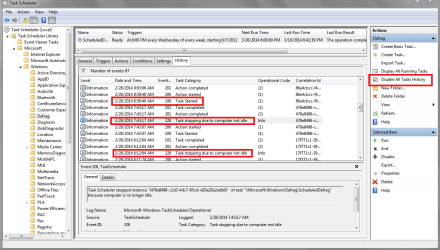
I was curious about this so I looked at my History for this task.
On 2/28/2014 I see a defrag started, stopped for "not idle", started later, ...
Eventually it re-started and completed :)

In Task Scheduler I now use "Enable All Tasks History" all the time, on all my systems.
From what I found it does not impact system performance or disk usage in any noticeable way.
The W7 default setting is to have History disabled, for whatever reason ...
Enabling History allows looking back if I ever want to...

I don't normally turn off my PCs.
I use Hybrid Sleep, usually sleep is set at 30 minutes ...

I've noticed sometimes it doesn't sleep "at the expected scheduled time" ...
I found some programs prevent Auto Sleep while they are running.
Maybe defrag is one of these programs?

You could at least turn on "Enable History" temporarily to see what it shows for your scenario/question.
If you don't want it on all the time, turn it off after your testing.

TSSP01.PNG
 

My Computer

Computer type
PC/Desktop
Computer Manufacturer/Model Number
home built
OS
Multi-Boot W7_Pro_x64 W8.1_Pro_x64 W10_Pro_x64 +Linux_VMs +Chromium_VM
CPU
AMD Athlon II x4 620
Motherboard
Gigabyte GA-MA785G-UD3H
Memory
6GB GSkill DDR2 800
Graphics Card(s)
AMD 4670 GPU + AMD 4200 IGP
Sound Card
on board Realtek ALC889A
Monitor(s) Displays
RCA 40" LCD TV, Insignia 32" LCD TV, HP 15" LCD monitor
Screen Resolution
1680 x 1050
Hard Drives
OCZ Vertex 3 120GB,
Samsung F3 1TB (3),
Several others - WD, Seagate, Hitachi, ...
PSU
Corsair 500 W
Case
Rosewill mid tower
Cooling
CM 90mm rifle
Keyboard
Gyration wireless, Logitech wireless, Dell USB wired
Mouse
Gyration wireless, Logitech wireless, V7 USB wired
Internet Speed
Spectrum - 100Mbps D / 10Mbps U
Antivirus
Avast, MBAM3, EMET, WinPatrol
Browser
Pale Moon, Firefox, IE
Other Info
2 multi-boot PC's
Mainly HTPC/Office/Gen purpose (no gaming).
Trendnet USB KVM.
LG DVD burner/Blue Ray Player.
Tray system for removable SATA backup drives.

Not currently OCd, under-volted.
I use Hybrid sleep, rarely re-boot or shutdown.

Hauppauge HD-PVR, Avermedia PCIe TV Tuner, Hauppauge PCI TV Tuner.
EDIT: I looked at it in task scheduler, and the logged on/off section was greyed out (although there was a check on the "run whether user is logged on or not" box). Why is it greyed out?

That section will be disabled unless you select a user account other than the default of "SYSTEM". The SYSTEM account is always logged on while Windows is running so the the question is meaningless. It is common practice.

OK. But if it's being run by 'system', and 'system' is always logged on, then why did it delay my sceduled 3am defrag until a 9am when a user was logged on?
 

My Computer

OS
Windows 7 x64 Home Premium
Back
Top