
How would I move my Windows 7 partition?

Freelancer852

New member
Pro User
Local time
5:30 PM
Messages
138
So I recently got a couple more hard drives to put in a RAID 1 and replace my old storage drive, and I would like to move my Windows 7 partition onto the old drive. My current HDD setup is as follows:
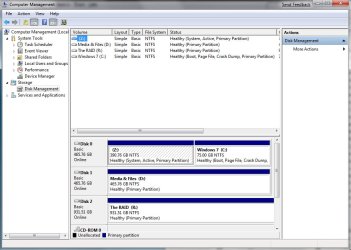
HDD_Setup.jpg

I'm going to move all of the data that's currently on the "Media & Files" hard disk to my new RAID array. Then I'd like to move my current "Windows 7" partition to the empty "Media & Files" disk and have it use the entire disk. Then I'd like to get rid of the old "Windows 7" partition on my other 500GB drive and have my Windows Vista installation take over the whole disk again.

Hope the above makes sense... Anyone know of a program that could do this? I own a copy of Acronis Disk Director, but it takes FOREVER to do anything...
 

My Computer My Computer

Computer type
PC/Desktop
Computer Manufacturer/Model Number
Me
OS
Windows 7 Professional SP1 64-bit
CPU
Intel Core i7-4930k @ 4.2GHz
Motherboard
ASUS Rampage IV Black Edition
Memory
16GB Corsair Dominator Platinum 1866MHz CL9 (4 x 4GB)
Graphics Card(s)
2x eVGA GeForce GTX TITAN 6GB in SLI
Sound Card
Onboard ASUS SupremeFX
Monitor(s) Displays
3x 24" ASUS PA248Q IPS in Nvidia Surround, Samsung 58" 3DTV
Screen Resolution
5760x1200, 1080p
Hard Drives
2x 256GB Samsung 840 Pro's (RAID 0)
2x Seagate 4TB ST4000DM000 (RAID 1)
PSU
Corsair AX1200i PSU
Case
Corsair 900D
Cooling
Corsair H100i w/4x 120mm, 3x 120mm front, 1x 140mm rear
Keyboard
Razer BlackWidow Ultimate 2013
Mouse
Razer DeathAdder 2013
Internet Speed
250Mbit/s Download, 15 Mbit/s Upload
Symantec Ghost Suite 2.0 does a full ghost image of your partition to another partition or drive.

This one is compatible with Vista, because other versions and other software failed to create a successful ghost image of Vista, due to some bits needing to be written to the new image afterwards. It should work with Windows 7 too.
 

My Computer My Computer

Computer Manufacturer/Model Number
ENIAC
OS
Windows 7 RC 7100 32bit/64bit
CPU
Intel Core2Duo E4500 2.20 GHz
Motherboard
ASUS P5LD2-X/1333
Memory
2x1GB Kinsgston DDR2 800MHz
Graphics Card(s)
Nvidia 8500GT
Sound Card
Onboard High Definition Audio Device
Monitor(s) Displays
Sony Bravia 42"
Case
LINKW 2222
Cooling
Standard Intel
Keyboard
Some cheap one
Mouse
Microsoft Intellimouse something
Internet Speed
24MBps ADSL
Symantec Ghost Suite 2.0 does a full ghost image of your partition to another partition or drive.

This one is compatible with Vista, because other versions and other software failed to create a successful ghost image of Vista, due to some bits needing to be written to the new image afterwards. It should work with Windows 7 too.
After it's moved I assume that I would have to either use Vista Boot Pro or the Windows installation disk to "repair" the Windows 7 installation so that the paths lead to the new hard drive right?
 

My Computer My Computer

Computer type
PC/Desktop
Computer Manufacturer/Model Number
Me
OS
Windows 7 Professional SP1 64-bit
CPU
Intel Core i7-4930k @ 4.2GHz
Motherboard
ASUS Rampage IV Black Edition
Memory
16GB Corsair Dominator Platinum 1866MHz CL9 (4 x 4GB)
Graphics Card(s)
2x eVGA GeForce GTX TITAN 6GB in SLI
Sound Card
Onboard ASUS SupremeFX
Monitor(s) Displays
3x 24" ASUS PA248Q IPS in Nvidia Surround, Samsung 58" 3DTV
Screen Resolution
5760x1200, 1080p
Hard Drives
2x 256GB Samsung 840 Pro's (RAID 0)
2x Seagate 4TB ST4000DM000 (RAID 1)
PSU
Corsair AX1200i PSU
Case
Corsair 900D
Cooling
Corsair H100i w/4x 120mm, 3x 120mm front, 1x 140mm rear
Keyboard
Razer BlackWidow Ultimate 2013
Mouse
Razer DeathAdder 2013
Internet Speed
250Mbit/s Download, 15 Mbit/s Upload
My advice would be to first determine which drive in your configuration is the fastest. I use hdtach which can be found here; http://www.pcworld.com/downloads/file/fid,69656/description.html It's probably going to be a partition in your raid, particularly if it's a raid 0. Once that has been ascertained then setup partitions on that drive (virtual drive). I set my partitions at 50 Gig (could be bigger) and use three. Every time I install a new OS I just rotate out the oldest OS. Remember, there will be more versions of Windows 7.
 

My Computer My Computer

OS
Windows 7
Hey Freelancer,

I think it would be really easy to just create an image backup of Seven now, delete it, and copy it in the new partition where you want it. Done. :D

~Lordbob
 

My Computer My Computer

Computer Manufacturer/Model Number
Hera
OS
Windows 7 Ultimate x64, Mint 9
CPU
Intel i5-2500k
Motherboard
ASUS P8P67 Pro
Memory
2x 4Gb Corsair VENGEANCE DDR3-1600
Graphics Card(s)
NVidia GeForce N260GTX Twin Frozr
Sound Card
Realtek HD OnBoard Audio
Monitor(s) Displays
ASUS 24" Monitor
Screen Resolution
1920x1080
Hard Drives
G.SKILL Phoenix Series 60GB SATA II MLC Internal Solid State Drive (SSD)
SAMSUNG Spinpoint F3R 1TB 7200 RPM 32MB Cache SATA II
PSU
Cooler Master Real Power Pro 750W
Case
Cooler Master Haf 932
Cooling
Fans
Keyboard
Razer Tarantula
Mouse
Razer Lachesis
Internet Speed
not fast enough
Hey Freelancer,

I think it would be really easy to just create an image backup of Seven now, delete it, and copy it in the new partition where you want it. Done. :D

~Lordbob
And then use my Vista installation (and Vista Boot Pro) to change the Windows 7 drive paths and such?

What program would you recommend to make this hard drive image? I've never imaged a hard drive before so I'm looking for all the info I can get!

Edit: None of my programs would work if I moved my installation though would they? I may just reinstall a newer version of Windows 7 (I'm running 7000 still) on my second 500 gig and just plain out remove my current installation.
 

My Computer My Computer

Computer type
PC/Desktop
Computer Manufacturer/Model Number
Me
OS
Windows 7 Professional SP1 64-bit
CPU
Intel Core i7-4930k @ 4.2GHz
Motherboard
ASUS Rampage IV Black Edition
Memory
16GB Corsair Dominator Platinum 1866MHz CL9 (4 x 4GB)
Graphics Card(s)
2x eVGA GeForce GTX TITAN 6GB in SLI
Sound Card
Onboard ASUS SupremeFX
Monitor(s) Displays
3x 24" ASUS PA248Q IPS in Nvidia Surround, Samsung 58" 3DTV
Screen Resolution
5760x1200, 1080p
Hard Drives
2x 256GB Samsung 840 Pro's (RAID 0)
2x Seagate 4TB ST4000DM000 (RAID 1)
PSU
Corsair AX1200i PSU
Case
Corsair 900D
Cooling
Corsair H100i w/4x 120mm, 3x 120mm front, 1x 140mm rear
Keyboard
Razer BlackWidow Ultimate 2013
Mouse
Razer DeathAdder 2013
Internet Speed
250Mbit/s Download, 15 Mbit/s Upload
You can use the built in backup. I used it myself, and it works GREAT! Actually, you could just back it up to a new partition (like I did) and install in the new one, and then restore to the backup. ~Lordbob
 

My Computer My Computer

Computer Manufacturer/Model Number
Hera
OS
Windows 7 Ultimate x64, Mint 9
CPU
Intel i5-2500k
Motherboard
ASUS P8P67 Pro
Memory
2x 4Gb Corsair VENGEANCE DDR3-1600
Graphics Card(s)
NVidia GeForce N260GTX Twin Frozr
Sound Card
Realtek HD OnBoard Audio
Monitor(s) Displays
ASUS 24" Monitor
Screen Resolution
1920x1080
Hard Drives
G.SKILL Phoenix Series 60GB SATA II MLC Internal Solid State Drive (SSD)
SAMSUNG Spinpoint F3R 1TB 7200 RPM 32MB Cache SATA II
PSU
Cooler Master Real Power Pro 750W
Case
Cooler Master Haf 932
Cooling
Fans
Keyboard
Razer Tarantula
Mouse
Razer Lachesis
Internet Speed
not fast enough
Ah. I'm thinking I may just wait for the moment and do a clean install of RC1 when it's made public. Unless I can track down a build that's 7022 or newer in 64-bit.
 

My Computer My Computer

Computer type
PC/Desktop
Computer Manufacturer/Model Number
Me
OS
Windows 7 Professional SP1 64-bit
CPU
Intel Core i7-4930k @ 4.2GHz
Motherboard
ASUS Rampage IV Black Edition
Memory
16GB Corsair Dominator Platinum 1866MHz CL9 (4 x 4GB)
Graphics Card(s)
2x eVGA GeForce GTX TITAN 6GB in SLI
Sound Card
Onboard ASUS SupremeFX
Monitor(s) Displays
3x 24" ASUS PA248Q IPS in Nvidia Surround, Samsung 58" 3DTV
Screen Resolution
5760x1200, 1080p
Hard Drives
2x 256GB Samsung 840 Pro's (RAID 0)
2x Seagate 4TB ST4000DM000 (RAID 1)
PSU
Corsair AX1200i PSU
Case
Corsair 900D
Cooling
Corsair H100i w/4x 120mm, 3x 120mm front, 1x 140mm rear
Keyboard
Razer BlackWidow Ultimate 2013
Mouse
Razer DeathAdder 2013
Internet Speed
250Mbit/s Download, 15 Mbit/s Upload
Well good luck.

~Lordbob
 

My Computer My Computer

Computer Manufacturer/Model Number
Hera
OS
Windows 7 Ultimate x64, Mint 9
CPU
Intel i5-2500k
Motherboard
ASUS P8P67 Pro
Memory
2x 4Gb Corsair VENGEANCE DDR3-1600
Graphics Card(s)
NVidia GeForce N260GTX Twin Frozr
Sound Card
Realtek HD OnBoard Audio
Monitor(s) Displays
ASUS 24" Monitor
Screen Resolution
1920x1080
Hard Drives
G.SKILL Phoenix Series 60GB SATA II MLC Internal Solid State Drive (SSD)
SAMSUNG Spinpoint F3R 1TB 7200 RPM 32MB Cache SATA II
PSU
Cooler Master Real Power Pro 750W
Case
Cooler Master Haf 932
Cooling
Fans
Keyboard
Razer Tarantula
Mouse
Razer Lachesis
Internet Speed
not fast enough
You can use the built in backup. I used it myself, and it works GREAT! Actually, you could just back it up to a new partition (like I did) and install in the new one, and then restore to the backup. ~Lordbob

I need to move a win7 RC1 install from a partition to a new drive that is already installed and empty. System is muliboot, winxp,win7, vista. Not sure I understand exactly what you are saying here. I understand that i can use win7 backup to backup but then what? Any help would be appreciated.
 
Last edited:

My Computer My Computer

OS
xp, vista, win 7
Hi,

If you are talking about restoring the image to another partition - you can - then add the new entry to bcd so you have the option to boot into it.

Alternatively, use the "Copy" partition fuction of Paragon partition Manager. Copy the existing 7 partition to unallocated space and you can select the partition size on the fly, and it will update bcd for you.

What Lordbob did ( I think) was install 7 to the new drive, then overwrite the installation by restoring the backup image to that same partition.

That is assuming you still want to keep the first HD as the drive you boot thru. If you wish to change it to make the second HD the one to boot thru ( or have the choice of booting thru either, by changing the HD boot order in the Bios ), you need additional steps.

Hope it helps
 

My Computers My Computers

System One System Two

  • Computer type
    PC/Desktop
    OS
    7 X64
    CPU
    i5 8400
    Motherboard
    gigabyte b365m ds3h
    Memory
    2x8gb 3200mhz
    Hard Drives
    various
    PSU
    pure power 11 400w cm
    Case
    Coolermaster
    Cooling
    cryorig m9i
  • Computer type
    PC/Desktop
    OS
    7x64
    CPU
    g5400
    Motherboard
    ga b365m ds3h
    Memory
    8gb ddr4 2400
    PSU
    xfx pro 450w
What Lordbob did ( I think) was install 7 to the new drive, then overwrite the installation by restoring the backup image to that same partition.
I don't remember, but I think I meant that just the backup worked great. For him, he could do the backup, then restore from a new install.

~Lordbob
 

My Computer My Computer

Computer Manufacturer/Model Number
Hera
OS
Windows 7 Ultimate x64, Mint 9
CPU
Intel i5-2500k
Motherboard
ASUS P8P67 Pro
Memory
2x 4Gb Corsair VENGEANCE DDR3-1600
Graphics Card(s)
NVidia GeForce N260GTX Twin Frozr
Sound Card
Realtek HD OnBoard Audio
Monitor(s) Displays
ASUS 24" Monitor
Screen Resolution
1920x1080
Hard Drives
G.SKILL Phoenix Series 60GB SATA II MLC Internal Solid State Drive (SSD)
SAMSUNG Spinpoint F3R 1TB 7200 RPM 32MB Cache SATA II
PSU
Cooler Master Real Power Pro 750W
Case
Cooler Master Haf 932
Cooling
Fans
Keyboard
Razer Tarantula
Mouse
Razer Lachesis
Internet Speed
not fast enough
i ended up just cloning the entire drive then deleting win7 from one and vista from the other. used win 7 dvd to repair startup/boot then i expanded the partitions. now each os is on a seperate drive. only problem is that my dvd burner has disappeared from xp, not in device manager or disk management.
 

My Computer My Computer

OS
xp, vista, win 7
Hi all

Best FREE partition manipulation software is GPARTED

download from here

GParted -- Welcome

cheers
jimbo
 

My Computer My Computer

Computer type
PC/Desktop
Computer Manufacturer/Model Number
Custom built, several laptops HP/ASUS
OS
Linux CENTOS 7 / various Windows OS'es and servers
CPU
Intel i7 Intel i5
Memory
8GB, 16GB
Graphics Card(s)
On Motherboard
Sound Card
Realtek HD audio
Monitor(s) Displays
Apple Cinema display, Samsung LCD
Screen Resolution
1920 X 1080
Hard Drives
4 X 1TB SATA
Mouse
Toshiba wireless laser
Internet Speed
> 20MB up
Back
Top