Solved HP 2009m speakers not working

flowerygirl51

New member
Local time
11:47 PM
Messages
4
Ugh, I switched from Vista to 7 and now my built-in monitor speakers aren't working. I've tried drivers for the sound. I've tried reinstalling the monitor drivers. I have checked and rechecked that I'm plugged into the right jack, cables are connected, etc. They were working in Vista (still work if I boot into it), just not in 7. :(

I think the problem is the speakers just aren't even listed in playback devices. The HP support site is no help (leading me in circles).

Please help, I'm going a little batty. :confused:
 

My Computer My Computer

OS
Windows 7 64bit
Welcome to Seven Forums flowerygirl51. Try this:

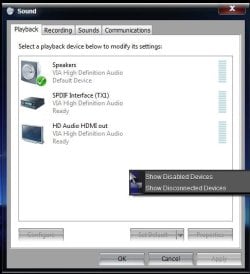
Start> Control panel (Category view)> Hardware and sound> Sound> Right click a blank area and choose Show disabled devices

Sound.jpg

See if the speakers are listed there.

A Guy
 

My Computer My Computer

Computer type
PC/Desktop
OS
Windows 10 Home x64
CPU
INTEL Core i5-750 Quad-Core 3.37GHz
Motherboard
ASUS P7P55D
Memory
HyperX Fury Black Series 8GB (2 x 4GB) 1866Mhz
Graphics Card(s)
EVGA GeForce GTX 750 Superclocked 1GB 128-Bit GDDR5
Monitor(s) Displays
LG 32MA68HY 32" IPS
Screen Resolution
1920 x 1080
Hard Drives
Samsung 840 Evo 120GB, SEAGATE 500GB Barracuda® 7200.12, SATA 3 Gb/s, 7200 RPM, 16MB cache
PSU
ANTEC TruePower New TP-550, 80 PLUS, 550W
Case
ANTEC Three Hundred Illusion
Cooling
COOLER MASTER Hyper 212 Plus, 4 x 120mm 1 x 140mm Noctua's
Internet Speed
85 + Mbps
Antivirus
Avast
Browser
Vivaldi
Yes, disabled devices are showing. The speakers just aren't there. I keep scanning for hardware changes and there just seems to be no way to force windows to pick them up.
 

My Computer My Computer

OS
Windows 7 64bit

My Computer My Computer

Computer type
PC/Desktop
OS
Windows 10 Home x64
CPU
INTEL Core i5-750 Quad-Core 3.37GHz
Motherboard
ASUS P7P55D
Memory
HyperX Fury Black Series 8GB (2 x 4GB) 1866Mhz
Graphics Card(s)
EVGA GeForce GTX 750 Superclocked 1GB 128-Bit GDDR5
Monitor(s) Displays
LG 32MA68HY 32" IPS
Screen Resolution
1920 x 1080
Hard Drives
Samsung 840 Evo 120GB, SEAGATE 500GB Barracuda® 7200.12, SATA 3 Gb/s, 7200 RPM, 16MB cache
PSU
ANTEC TruePower New TP-550, 80 PLUS, 550W
Case
ANTEC Three Hundred Illusion
Cooling
COOLER MASTER Hyper 212 Plus, 4 x 120mm 1 x 140mm Noctua's
Internet Speed
85 + Mbps
Antivirus
Avast
Browser
Vivaldi
What kind of connection does the monitor speakers have? Is that connection fully seated on both ends - from the monitor to the back of the PC. I know on my old HP 19 inch monitor it has a 3.5mm speaker jack and for the speakers on the monitor to work I had to use the green 3.5mm cable. Again, it plugs into the back of PC.
 

My Computer My Computer

Computer Manufacturer/Model Number
Custom built
OS
Windows 7 Ultimate 64 bit
CPU
AMD Phenom II X4 965 Black Edition
Motherboard
Gigabyte GA-MA790X-DS4
Memory
GSkill 4 X 2 GB PC 8500
Graphics Card(s)
XFX Radeon HD 6790 D
Sound Card
On board RealTek HD
Monitor(s) Displays
Dual monitors:Samsung SyncMaster S20B300
Screen Resolution
1600 X 900
Hard Drives
Seagate Barracuda 1TB (primary)
Seagate Barracuda 2 X 320 GB
PSU
Ultra X4 750 watt fully modular
Case
Thermaltake Overseer RX 1 full tower
Cooling
Core-Contact 92 mm CPU Cooler
Keyboard
Logitech G510
Mouse
Razor DeathAdder
Internet Speed
50/5 Mbps UL/DL
Other Info
Optical: Super Muliti DVD burner w/lightscribe, Hauppauge WinTV HVR-1800
thanks, bassfisher, yes - the 3.5mm cable is properly connected to both the speaker and the back of the pc.

A Guy - that tool was really helpful. Helped me see that the computer was thinking my sound card was a manufactured by Microsoft. I knew that wasn't right so I booted back into Vista and checked the properties there. I found out the sound card is by Via Technologies so now I'm grabbing drivers from there and hoping that works. I was assuming it was Realtek, should have checked first. :P
 

My Computer My Computer

OS
Windows 7 64bit
Well, THAT's embarrassing. That was the problem - I have speakers again.

thanks for your help.
 

My Computer My Computer

OS
Windows 7 64bit
Well great, alls well...

The 1st thought was update drivers, but you said you had done that. Glad we could help, good job :thumbsup:

A Guy
 

My Computer My Computer

Computer type
PC/Desktop
OS
Windows 10 Home x64
CPU
INTEL Core i5-750 Quad-Core 3.37GHz
Motherboard
ASUS P7P55D
Memory
HyperX Fury Black Series 8GB (2 x 4GB) 1866Mhz
Graphics Card(s)
EVGA GeForce GTX 750 Superclocked 1GB 128-Bit GDDR5
Monitor(s) Displays
LG 32MA68HY 32" IPS
Screen Resolution
1920 x 1080
Hard Drives
Samsung 840 Evo 120GB, SEAGATE 500GB Barracuda® 7200.12, SATA 3 Gb/s, 7200 RPM, 16MB cache
PSU
ANTEC TruePower New TP-550, 80 PLUS, 550W
Case
ANTEC Three Hundred Illusion
Cooling
COOLER MASTER Hyper 212 Plus, 4 x 120mm 1 x 140mm Noctua's
Internet Speed
85 + Mbps
Antivirus
Avast
Browser
Vivaldi
Back
Top