Solved HP Bloatware, or useful system utilities?

x BlueRobot

Closed by request
Local time
1:09 PM
Messages
6,784
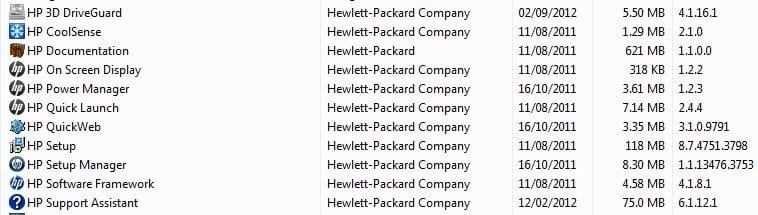
Have found a few remaining HP programs, which I'm not sure are bloatware or useful system utilities which add to the functionality of my system?

I believe that the HP Support Assistant, gave me a BIOS update at one point; well, that's what it said anyway :p

Any help would be appreciated.

Bloat..JPG

Thanks,

Harry
 

My Computer My Computer

Computer type
Laptop
Other than Documentation, definitely Bloatware.
 

My Computer My Computer

Computer type
PC/Desktop
Computer Manufacturer/Model Number
Lenovo IdeaCenter 450
OS
Windows 10 Pro X64
CPU
Intel Quad Core i7-4770 @ 3.4Ghz
Memory
16.0GB PC3-12800 DDR3 SDRAM 1600 MHz
Graphics Card(s)
Intel Integrated HD Graphics
Sound Card
Realtek HD Audio
Monitor(s) Displays
HP 22" LCD
Screen Resolution
1680 x 1050
Hard Drives
250GB Samsung EVO SATA-3 SSD
2TB Seagate ST2000DM001 SATA-2
1.5TB Seagate ST3150041AS SATA
Keyboard
Dell USB
Mouse
Lenovo USB
Internet Speed
Cable via Road Runner 3MB Upload, 30MB Download
Antivirus
Windows Defender, MBAM Pro, MBAE
Browser
Seamonkey
Other Info
UEFI/GPT
PLDS DVD-RW DH16AERSH
If you use it and you think it`s good, well then it`s just that. The choice is yours :)
Some of the apps are useful, some are garbage.
 

My Computer My Computer

Computer type
PC/Desktop
Computer Manufacturer/Model Number
Skylake Special #666
OS
Windows 10 Pro x64
CPU
Intel Core i7 6700K
Motherboard
Asus Sabertooth Z170 Mark 1
Memory
GSkill TridentZ RGB 16GB 3600 16-16-16-36
Graphics Card(s)
EVGA GTX 980 Ti SC x2
Sound Card
Realtek High Definition
Monitor(s) Displays
AOC G2460PG
Screen Resolution
1920 x 1080 144Hz
Hard Drives
Samsung 860 Pro 256GB, Seagate Barracuda 4TB x2
PSU
EVGA 1000 P2, EVGA White Custom Braided Cables
Case
Corsair Vengeance C70 Gunmetal Black
Cooling
Corsair H100i v2, Corsair ML120 x2, Thermal Grizzly Kryonaut
Keyboard
Logitech G910 Orion Spectrum
Mouse
Logitech G700s
Internet Speed
Verizon Fios Quantum Gateway 75/75
Antivirus
Windows Defender, Malwarebytes Free 3.8.3
Browser
Chrome
Other Info
Corsair SP120 x4, LG Blu-ray Drive, Durabrand HT-395 100 Watt Dolby Digital Amp, Corsair H2100 Wireless 7.1 Headset
Didn't see anything I'd want on my machine.
 

My Computer My Computer

Computer type
Laptop
Computer Manufacturer/Model Number
MSI GE72VR Apache Pro-416
OS
Windows 10x64 Build 1709
CPU
Intel i7 7700HQ Kaby Lake
Motherboard
Micro-Star Intl. MS-179B (U3C1)
Memory
16 GB DDR4 @2400
Graphics Card(s)
Nvidia Geforce GTX 1060
Screen Resolution
1920x1080 120Hz
Hard Drives
256 GB Nvme M.2 SSD

1TB HDD@7200
Cooling
Cooler Blast 4
Keyboard
Steel Series
Antivirus
Bit Defender Free
Browser
Edge
That HP Support assistant is a must :confused:
 

My Computer My Computer

Computer type
PC/Desktop
Computer Manufacturer/Model Number
Skylake Special #666
OS
Windows 10 Pro x64
CPU
Intel Core i7 6700K
Motherboard
Asus Sabertooth Z170 Mark 1
Memory
GSkill TridentZ RGB 16GB 3600 16-16-16-36
Graphics Card(s)
EVGA GTX 980 Ti SC x2
Sound Card
Realtek High Definition
Monitor(s) Displays
AOC G2460PG
Screen Resolution
1920 x 1080 144Hz
Hard Drives
Samsung 860 Pro 256GB, Seagate Barracuda 4TB x2
PSU
EVGA 1000 P2, EVGA White Custom Braided Cables
Case
Corsair Vengeance C70 Gunmetal Black
Cooling
Corsair H100i v2, Corsair ML120 x2, Thermal Grizzly Kryonaut
Keyboard
Logitech G910 Orion Spectrum
Mouse
Logitech G700s
Internet Speed
Verizon Fios Quantum Gateway 75/75
Antivirus
Windows Defender, Malwarebytes Free 3.8.3
Browser
Chrome
Other Info
Corsair SP120 x4, LG Blu-ray Drive, Durabrand HT-395 100 Watt Dolby Digital Amp, Corsair H2100 Wireless 7.1 Headset
As a long term HP user, both laptops and desktops as well as servers, I have my opinion of those.

HP QuickWeb is for me a must. It is a Linux based lightweight mini-OS on supported HP models that starts in a second or two when you are busy and do not want to boot all the way to Windows.

Another HP tool I always keep on laptops is HP 3D DriveGuard. It protects HDD for drops, vibrations etc.

HP CoolSense really makes a big difference on supporting laptops, keeping them cooler.

Everything else is rubbish, whatever you hear. Quick Launch is the biggest problem, it can totally screw the keyboard mapping regarding special keys. Support Assistance comes in second place in useless, heavy applications of HP.

Kari
 

My Computer My Computer

Computer type
Laptop
Computer Manufacturer/Model Number
HP ENVY 17-1150eg
OS
Windows 10 Pro x64 EN-GB
CPU
1.6 GHz Intel Core i7-720QM Processor
Memory
6 GB
Graphics Card(s)
ATI Mobility Radeon HD 5850 Graphics
Sound Card
Beats sound system with integrated subwoofer
Monitor(s) Displays
17" laptop display, 22" LED and 32" Full HD TV through HDMI
Screen Resolution
1600*900 (1), 1920*1080 (2&3)
Hard Drives
Internal: 2 x 500 GB SATA Hard Disk Drive 7200 rpm
External: 2TB for backups, 3TB USB3 network drive for media
Cooling
As Envy runs a bit warm, I have it on a Cooler Master pad
Keyboard
Logitech diNovo Media Desktop Laser (bluetooth)
Mouse
Logitech Performance Mouse MX
Internet Speed
50/10 Mbps VDSL
Antivirus
Windows Defender 4.3.9431.0
Browser
Maxthon 3.5.2., IE11
It's great to hear other's conception of these programs. Win7 doesn't need any of them to run of course, but if there is an OEM feature that truly provides better monitoring or utility than Win7 native features then this is valuable information for users.

I will link this thread to Clean Reinstall - Factory OEM Windows 7
and Clean Up Factory Bloatware so owners have more information to help decide.
 
Win7 doesn't need any of them to run of course, but if there is an OEM feature that truly provides better monitoring or utility than Win7 native features then this is valuable information for users.
+1. Very true.

I would like to recommend to do a clean install on a new HP. I do it always. Get a naked (= not HP's with bloatware) Windows ISO or DVD and do a clean install, alternatively on newer models use the HP Factory Recovery selecting Windows Only (the latest HP models allow user to select factory recovery to complete HP Setup (Windows & Bloatware) or Windows Only which according to my experience and notions is as close to real, fresh and clean install as possible).

Later do not install HP tools you think you need from any media delivered with your PC. Instead, go to HP Support & Drivers, select correct country and language and using the product number from COA sticker search Drivers and Software for the tools for your model. Notice that if the tool is not listed there it's not supported by your model.

Something not recommended by HP but wholeheartedly recommended by a user (me) who sets up at least a few HPs every year: Let Windows take care of your general device drivers. Last few years now since Windows 7 every HP PC I have set up, the Windows installation has found all the drivers itself. I do not remember when I have last time needed to download and install drivers from HP. If you feel you must have Catalyst Control Center or controls for Beats Audio or whatnot get them from respective device manufactures site, not from HP.

Another thing is the special drivers for system enhancements not needed for Windows to function, not shown as missing drivers in Device Manager because although the device exists it is only shown when device (or rather enhancement) driver is installed as Windows works perfectly also without it. I get two of this type drivers always from HP's Support page for respective models if they are supported: Intel RapidStorage and Intel TurboBoost.

Bloatware and crapware are a bit too general terms. One man's crap is other man's gold. For me the three tools I mentioned in my previous post are if not gold but copper at least ;).

Kari
 
Last edited:

My Computer My Computer

Computer type
Laptop
Computer Manufacturer/Model Number
HP ENVY 17-1150eg
OS
Windows 10 Pro x64 EN-GB
CPU
1.6 GHz Intel Core i7-720QM Processor
Memory
6 GB
Graphics Card(s)
ATI Mobility Radeon HD 5850 Graphics
Sound Card
Beats sound system with integrated subwoofer
Monitor(s) Displays
17" laptop display, 22" LED and 32" Full HD TV through HDMI
Screen Resolution
1600*900 (1), 1920*1080 (2&3)
Hard Drives
Internal: 2 x 500 GB SATA Hard Disk Drive 7200 rpm
External: 2TB for backups, 3TB USB3 network drive for media
Cooling
As Envy runs a bit warm, I have it on a Cooler Master pad
Keyboard
Logitech diNovo Media Desktop Laser (bluetooth)
Mouse
Logitech Performance Mouse MX
Internet Speed
50/10 Mbps VDSL
Antivirus
Windows Defender 4.3.9431.0
Browser
Maxthon 3.5.2., IE11
Does this just pertain to HP PC's or also to HP printers on an eMachine PC?

Thanks.
 

My Computer My Computer

Computer type
PC/Desktop
Computer Manufacturer/Model Number
emachines
OS
Microsoft Windows 7 Home Premium 64-bit 7601 Multiprocessor Free Service Pack 1
CPU
AMD Athlon(tm) II X2 220 Processor
Motherboard
eMachines EL1358G
Memory
3.00 GB
Graphics Card(s)
NVIDIA GeForce 6150SE nForce 430
Sound Card
Realtek High Definition Audio
Screen Resolution
1280 x 1024 x 32 bits (4294967296 colors) @ 60 Hz
Hard Drives
(1) WDC WD10 EADX-22TDHB0 SCSI Disk Device (2) Generic- Multi-Card USB Device
Keyboard
came with PC
Mouse
came with PC
Antivirus
Avast
Browser
IE 9
Other Info
don't know how to get info for the other 5 areas
With HP printer you need to ask yourself if you want to scan from the printer. If so then you may need the full software package to do this from the printer, otherwise with only the driver you'll need to use the Windows 7 Scan utility from Start:orb:button>Devices and Printers, when you right click on the Printer.
If you only want to print then you can use only the driver Windows will load when you plug in the printer, or after enabling Automatically get recommended drivers and updates for your hardware (Step 3). In some cases you'll need to import the driver from the HP Support Downloads webpage for the model, but I'd stay away from the full software package unless you need to scan from the printer - and then I'd Custom install only the core program, OCR for editing scanned documents, but not Updater, Customer Improvement or any Pictures program bloatware you don't need.

If an HP printer's full software package causes problems when set to start with Windows, then what I'd do is disable it in msconfig>Startup and initiate scans using HP Solutions Center link on Desktop. Or uninstall it all except for the driver and use Windows Scan utility.
 
Last edited:
With HP printer you need to ask yourself if you want to scan from the printer. If so then you'll need the full software package to do this from the printer, otherwise with only the driver you'll need to use the Windows 7 Scan utility in Start>Devices and Printers when you right click on the Printer.
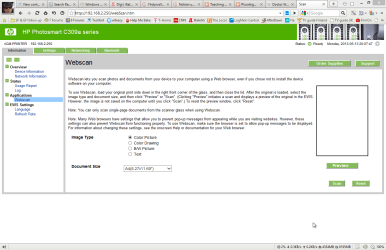
A good alternative to scan without HP software is to use printer as a network printer. Most HP printers today have either WiFi, Ethernet or both connections.

For example I have no HP printer and scanner software installed. To scan I simply connect to my printer using a web browser and select Webscan:

Scan - Maxthon Browser 3.5.2.1000.png

Kari
 
Last edited:

My Computer My Computer

Computer type
Laptop
Computer Manufacturer/Model Number
HP ENVY 17-1150eg
OS
Windows 10 Pro x64 EN-GB
CPU
1.6 GHz Intel Core i7-720QM Processor
Memory
6 GB
Graphics Card(s)
ATI Mobility Radeon HD 5850 Graphics
Sound Card
Beats sound system with integrated subwoofer
Monitor(s) Displays
17" laptop display, 22" LED and 32" Full HD TV through HDMI
Screen Resolution
1600*900 (1), 1920*1080 (2&3)
Hard Drives
Internal: 2 x 500 GB SATA Hard Disk Drive 7200 rpm
External: 2TB for backups, 3TB USB3 network drive for media
Cooling
As Envy runs a bit warm, I have it on a Cooler Master pad
Keyboard
Logitech diNovo Media Desktop Laser (bluetooth)
Mouse
Logitech Performance Mouse MX
Internet Speed
50/10 Mbps VDSL
Antivirus
Windows Defender 4.3.9431.0
Browser
Maxthon 3.5.2., IE11
I use Windows Fax and Scan on my laptop. I don't want any stupid "uber convenience" suite bogging down my computer. And it took forever to stop ALL of the components and apps from running all the time
 

My Computer My Computer

Computer type
PC/Desktop
Computer Manufacturer/Model Number
Apple 17" iMac MA199LL (Early 2006)
OS
Windows 8 Pro (32-bit)
CPU
1.83GHz Intel Core Duo
Memory
2GB 667MHz DDR2 SDRAM (PC2-5300) (upgrade)
Graphics Card(s)
ATI Radeon X1600 with 128MB GDDR3 memory
Monitor(s) Displays
17-inch TFT active-matrix LCD, millions of colors
Screen Resolution
1440 x 900
Hard Drives
Hitachi 320GB HDT721032SLA360 7200RPM SATA II (upgrade)
Keyboard
Microsoft Wired Keyboard 600
Mouse
Microsoft Basic Optical Mouse v2.0
Internet Speed
4 Mbps
Antivirus
Microsoft Security Essentials
Browser
Google Chrome
Other Info
WEI:
Base Score: 3.9 Processor: 4.4 Memory 4.7
Graphics: 3.9 Gaming Graphics: 4.1 Primary HD: 5.9
HP is the King of Bloatware. HP's only runs perfectly if you dodge all of it. The fact that it's not as buggy as it used to be isn't enough.

I have an HP 510 business laptop my uncle wouldn't use because it was so bogged down with bloatware. So I wiped it, upped the RAM to 1gb max and installed Win7. It's now nearly ten years old and runs great. Five other friends and relatives have HP's which run fine without any bloatware. I only got help calls from them until we rooted it all out.
 
And nowadays if you get a HP they don't even list the drivers for all their computers online anymore! instead they direct you to their SystemCare installer which installs the drivers along with other "complementary" software. :mad:
 

My Computer My Computer

Computer type
PC/Desktop
Computer Manufacturer/Model Number
Apple 17" iMac MA199LL (Early 2006)
OS
Windows 8 Pro (32-bit)
CPU
1.83GHz Intel Core Duo
Memory
2GB 667MHz DDR2 SDRAM (PC2-5300) (upgrade)
Graphics Card(s)
ATI Radeon X1600 with 128MB GDDR3 memory
Monitor(s) Displays
17-inch TFT active-matrix LCD, millions of colors
Screen Resolution
1440 x 900
Hard Drives
Hitachi 320GB HDT721032SLA360 7200RPM SATA II (upgrade)
Keyboard
Microsoft Wired Keyboard 600
Mouse
Microsoft Basic Optical Mouse v2.0
Internet Speed
4 Mbps
Antivirus
Microsoft Security Essentials
Browser
Google Chrome
Other Info
WEI:
Base Score: 3.9 Processor: 4.4 Memory 4.7
Graphics: 3.9 Gaming Graphics: 4.1 Primary HD: 5.9
Uh Oh, that spammer is back.
 

My Computer My Computer

Computer type
PC/Desktop
Computer Manufacturer/Model Number
Skylake Special #666
OS
Windows 10 Pro x64
CPU
Intel Core i7 6700K
Motherboard
Asus Sabertooth Z170 Mark 1
Memory
GSkill TridentZ RGB 16GB 3600 16-16-16-36
Graphics Card(s)
EVGA GTX 980 Ti SC x2
Sound Card
Realtek High Definition
Monitor(s) Displays
AOC G2460PG
Screen Resolution
1920 x 1080 144Hz
Hard Drives
Samsung 860 Pro 256GB, Seagate Barracuda 4TB x2
PSU
EVGA 1000 P2, EVGA White Custom Braided Cables
Case
Corsair Vengeance C70 Gunmetal Black
Cooling
Corsair H100i v2, Corsair ML120 x2, Thermal Grizzly Kryonaut
Keyboard
Logitech G910 Orion Spectrum
Mouse
Logitech G700s
Internet Speed
Verizon Fios Quantum Gateway 75/75
Antivirus
Windows Defender, Malwarebytes Free 3.8.3
Browser
Chrome
Other Info
Corsair SP120 x4, LG Blu-ray Drive, Durabrand HT-395 100 Watt Dolby Digital Amp, Corsair H2100 Wireless 7.1 Headset
I like the "HP ProtectTools Security Manager". Use it with One-Step-LogOn and Pre-boot for fingerprint validation instead of typing password.
"HP Software Framework" is also required for One-Step-LogOn to work. Just swipe my finger at boot and it will automatically log in to Windows.

Also the "HP SoftPaq Download Manager" is great for finding updates for your HP programs incl. drivers and BIOS updates. That program was not pre-installed. Downloaded from: Client Management Solutions - Drivers and BIOS | HP® Official Site
 

My Computer My Computer

Computer type
Laptop
Computer Manufacturer/Model Number
HP Elitebook 8540p
OS
Windows 7 Pro 32
CPU
Intel(R) Core(TM) i5 CPU M 540 @ 2.53GHz
Motherboard
Hewlett-Packard 1521
Memory
4,00 GB (Usable 2,98)
Graphics Card(s)
NVIDIA NVS 5100M
Sound Card
NVIDIA High Definition Audio
Screen Resolution
1600x900
Hard Drives
INTEL SSDSA2CW120G3
Antivirus
F-Secure Internet Security
Browser
IE, Firefox, Opera
Other Info
Sandboxie,
SRP (Software Restriction Policy),
EMET (Enhanced Mitigation Experience Toolkit),
WFC (Windows Firewall Control by BiniSoft),
Malwarebytes Premium
Pre-installed, no clean install. I've uninstalled many HP programs but I meant these are my favorites to keep. So I guess your other questions become irrelevant in this case, sorry.

Can't recall "HP SoftPaq Download Manager" have brought me drivers, only programs and BIOS updates. Last critical BIOS update was only a few months ago. Without the SoftPaq Manager(that was NOT pre-installed) I don't think I've been aware of any updates at all. Maybe I uninstalled some other pre-installed HP program that checked for updates. Don't remember.

HP Elitebook 8540p (but I'm sure Google's already picked that up from my specs in the page source)
 

My Computer My Computer

Computer type
Laptop
Computer Manufacturer/Model Number
HP Elitebook 8540p
OS
Windows 7 Pro 32
CPU
Intel(R) Core(TM) i5 CPU M 540 @ 2.53GHz
Motherboard
Hewlett-Packard 1521
Memory
4,00 GB (Usable 2,98)
Graphics Card(s)
NVIDIA NVS 5100M
Sound Card
NVIDIA High Definition Audio
Screen Resolution
1600x900
Hard Drives
INTEL SSDSA2CW120G3
Antivirus
F-Secure Internet Security
Browser
IE, Firefox, Opera
Other Info
Sandboxie,
SRP (Software Restriction Policy),
EMET (Enhanced Mitigation Experience Toolkit),
WFC (Windows Firewall Control by BiniSoft),
Malwarebytes Premium
Google doesn't really go into Specs just the thread text.

I do hope for you that someday you get to experience native perfect Win7 performance on your Elitebook which comes from doing a http://www.sevenforums.com/tutorials/219487-clean-reinstall-factory-oem-windows-7-a.html#post1839164, like a million others who have followed it without a single complaint.

HP's often have a Minimal Recovery option on http://h10025.www1.hp.com/ewfrf/wc/document?cc=us&lc=en&docname=c01867418#N452 that is nearly the same as clean. Just uninstall the HP Wireless manager bloatware which adds 30 seconds to start, default to Win7's superior wireless manager.
 
Thank your for the advice. I'll keep it for future PCs. I'm an advanced user so I've already uninstalled most "crap" and tweaked my system a lot and it runs perfectly. As good as other clean installed machines I think :D

Well, one thing I can mention here since it's HP related is that Sleep doesn't work with the latest version of the "HP Software Framework" which I need for the One-Step-LogOn, its service hangs and crashes and I couldn't find a fix from HP so I made a batch file that stops the service and uses psshutdown from Sysinternals to sleep the computer:

@echo off
sc query hpqWmiEx | find "STATE"
sc stop hpqWmiEx
timeout /T 3
sc query hpqWmiEx | find "STATE"
pause
psshutdown -d -t 00

The pause is just to verify that the service changed from running to stopped. Maybe this helps someone else too :)
 

My Computer My Computer

Computer type
Laptop
Computer Manufacturer/Model Number
HP Elitebook 8540p
OS
Windows 7 Pro 32
CPU
Intel(R) Core(TM) i5 CPU M 540 @ 2.53GHz
Motherboard
Hewlett-Packard 1521
Memory
4,00 GB (Usable 2,98)
Graphics Card(s)
NVIDIA NVS 5100M
Sound Card
NVIDIA High Definition Audio
Screen Resolution
1600x900
Hard Drives
INTEL SSDSA2CW120G3
Antivirus
F-Secure Internet Security
Browser
IE, Firefox, Opera
Other Info
Sandboxie,
SRP (Software Restriction Policy),
EMET (Enhanced Mitigation Experience Toolkit),
WFC (Windows Firewall Control by BiniSoft),
Malwarebytes Premium
Back
Top