
OS: Win 7 Home Premium x64
Printer: HP Deskjet 1050 J410a
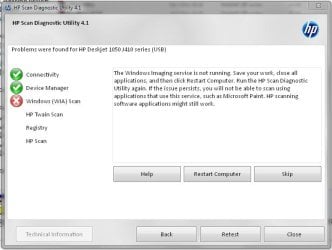
Hello! I bought this printer few months ago, installed, connected etc. Everything worked fine until today. I wanted scan some photos, so i clicked on shortcut for HPscan and...nothing happend. And when I say nothing I mean nothing. Soft utillity didn't loaded, no error window...like doubleclick in empty space. I tried to run directly HPscan.exe. Nothing. With admin rights. Nothing. In compatibilty mode. Nothing. Reinstaled drivers & soft. Still nothing. Then I found HP Scan Diagnostic Utility. It fails at the Windows (WIA) scan. Tried everything they mention, but still nothing. Printing and copying works fine...just scanning is immposible (even in other progrmas like Paint etc.) .
Has anybody such problem? Or solution
Printer: HP Deskjet 1050 J410a
Hello! I bought this printer few months ago, installed, connected etc. Everything worked fine until today. I wanted scan some photos, so i clicked on shortcut for HPscan and...nothing happend. And when I say nothing I mean nothing. Soft utillity didn't loaded, no error window...like doubleclick in empty space. I tried to run directly HPscan.exe. Nothing. With admin rights. Nothing. In compatibilty mode. Nothing. Reinstaled drivers & soft. Still nothing. Then I found HP Scan Diagnostic Utility. It fails at the Windows (WIA) scan. Tried everything they mention, but still nothing. Printing and copying works fine...just scanning is immposible (even in other progrmas like Paint etc.) .
Has anybody such problem? Or solution
Attachments
My Computer
- OS
- Windows 7 Home Premium 64 bt
- CPU
- AMD Phenom II x4 955 /3.20 GHz
- Motherboard
- MB Asus M4A87TD EVO - AMD 870, DDR3, s. AM3, ATX
- Memory
- 4 GB
- Graphics Card(s)
- ATI Sapphire Radeon HD 5770, 1GB GDDR5, DVI, HDMI, PCI-E
- Monitor(s) Displays
- Acer AL2206W
- Screen Resolution
- 1680 x 1050 @ 60Hz
- Hard Drives
- HDD Samsung SpinPoint F3, HD502HJ, SATA II, 16MB - 500GB
- Case
- Thermaltake Element T
- Cooling
- CoolerMaster Hyper TX3 + On case (x2)


