Solved huge physical memory usage

midobatsu

New member
Local time
6:10 PM
Messages
37
hey....its me again =/

well the java thing did work since the last time(i installed the latest version as of recently) fresh from the site), but it didnt actually fix completely...

what ive noticed is when i open some programs like battle.net.exe for example it will not open and not show up in task manager...well sorta, it does show up in processes but only using about 108-116k or memory and the task cant be ended, after a bit of time after that the whole right click anything resulting in windows explorer to stop responding... but this time i noticed something this time it did it, my physical memory in task manager was completely used up and slightly over the available amount.. im pretty sure thats whats causing windows explorer to not respond and everything to go down hill..

im sorry for bugging you guys again... really thought i had it solved last time since it was acting normal..

also, ive done a disk drive check and it says its perfectly fine.
 

My Computer

Computer type
PC/Desktop
Computer Manufacturer/Model Number
gateway
OS
windows 7 home premium x64
Antivirus
avast 2015
Browser
firefox
Post a screenshot of Task manager - Performance tab when this occurs. This provides important information not found elsewhere.
 

My Computer

Computer type
PC/Desktop
Computer Manufacturer/Model Number
HP
OS
Windows 7 Pro 64 bit
CPU
Xeon W3520
Memory
8 GB
Graphics Card(s)
Nvidia Geforce 210
Post a screenshot of Task manager - Performance tab when this occurs. This provides important information not found elsewhere.

im not sure if this means anything but i noticed svchost is stupidly high, im the only user of this computer and the only account on it, yet when i go to look at processes used by other users svchost is there and there are around 9 of them
 

Attachments

  • qq.png
    qq.png
    82 KB · Views: 0

My Computer

Computer type
PC/Desktop
Computer Manufacturer/Model Number
gateway
OS
windows 7 home premium x64
Antivirus
avast 2015
Browser
firefox
unfortunately i cant show you screenshots of when it happens, as i cant open anything when i does, what i see in resourse monitor under cpu is explorer.exe stopped responding, has 30 threads,cpu 0, average cpu is 0.10

3% cpu usage with a 79% maximum frequency

best thing i can do is take pics with my phone, put them on my laptop and show you that way

one way i know its going to do it is when i go to open something like steam.exe and the program does not open at all and does not show up in applications in control panel, but shows up in processes with the memory usage of 116k or lowest of 108k, its guaranteed that explorer.exe will stop responding if i try to do anything afterwards (right clicking things,trying to open other things)
 
Last edited:

My Computer

Computer type
PC/Desktop
Computer Manufacturer/Model Number
gateway
OS
windows 7 home premium x64
Antivirus
avast 2015
Browser
firefox

My Computer

Computer type
PC/Desktop
Computer Manufacturer/Model Number
Custom Build
OS
Windows 7 Ultimate x64 SP1
CPU
AMD Phenom 2 1090T
Motherboard
Gigabyte GA-890FXA-UD5
Memory
2x8GB Kingston HyperX Fury Black 1600Mhz Unganged
Graphics Card(s)
MSI GTX 970 Gaming 4G
Sound Card
Realtek On-Board HD 7.1 Audio / Logitech G35
Monitor(s) Displays
3xAcer GD245HQ
Screen Resolution
1920x1080
Hard Drives
Samsung 850 Pro 512GB SSD - OS /
WD Caviar Black SATA 3 - 1 TBx2 - Dynamic RAID 0 /
WD Caviar Green SATA 2 - 640GBx2 - Dynamic RAID 0 /
WD Caviar Green SATA 2 - 640GB - Internal Backup /
Seagate Barracude SATA 3 - 3TB - External Backup/ Sync
PSU
HighPower 1000W
Case
Cooler Master HAF 932
Cooling
Noctua NH-D14
Keyboard
Logitech G19
Mouse
Logitech G500
Internet Speed
100/4 Mbit Cable (100GB quota)
Antivirus
ZoneAlarm Extreme Security / MBAM Pro / MBAE Free / SAS Free
Browser
IE 11 - Firefox - Chrome
Other Info
Logitech F710/ G27/ G940/ Z5500 // TrackIR 5 // Nvidia 3D Surround Vision

My Computer

Computer type
PC/Desktop
Computer Manufacturer/Model Number
gateway
OS
windows 7 home premium x64
Antivirus
avast 2015
Browser
firefox
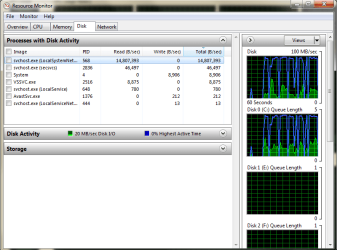
Note that I asked for a screenshot of Task Manager - Performance tab. Nothing in the current screenshot is of use. It shows svchost.exe doing 14,807,393 bytes disk read / second. On a modern disk drive that isn't particularly high. There are multiple legitimate reasons for this. It is normal to see 9 or more instances of svchost.exe. I currently have 13.

I am currently not interested in anything in Resource Monitor or a process listing.
 

My Computer

Computer type
PC/Desktop
Computer Manufacturer/Model Number
HP
OS
Windows 7 Pro 64 bit
CPU
Xeon W3520
Memory
8 GB
Graphics Card(s)
Nvidia Geforce 210
I will add to LMiller's request, post a screenshot of Resource Monitor with Memory tab open.

Another user account is for diagnostic purposes, you can delete it later.
 

My Computer

Computer type
PC/Desktop
Computer Manufacturer/Model Number
Custom Build
OS
Windows 7 Ultimate x64 SP1
CPU
AMD Phenom 2 1090T
Motherboard
Gigabyte GA-890FXA-UD5
Memory
2x8GB Kingston HyperX Fury Black 1600Mhz Unganged
Graphics Card(s)
MSI GTX 970 Gaming 4G
Sound Card
Realtek On-Board HD 7.1 Audio / Logitech G35
Monitor(s) Displays
3xAcer GD245HQ
Screen Resolution
1920x1080
Hard Drives
Samsung 850 Pro 512GB SSD - OS /
WD Caviar Black SATA 3 - 1 TBx2 - Dynamic RAID 0 /
WD Caviar Green SATA 2 - 640GBx2 - Dynamic RAID 0 /
WD Caviar Green SATA 2 - 640GB - Internal Backup /
Seagate Barracude SATA 3 - 3TB - External Backup/ Sync
PSU
HighPower 1000W
Case
Cooler Master HAF 932
Cooling
Noctua NH-D14
Keyboard
Logitech G19
Mouse
Logitech G500
Internet Speed
100/4 Mbit Cable (100GB quota)
Antivirus
ZoneAlarm Extreme Security / MBAM Pro / MBAE Free / SAS Free
Browser
IE 11 - Firefox - Chrome
Other Info
Logitech F710/ G27/ G940/ Z5500 // TrackIR 5 // Nvidia 3D Surround Vision
I will add to LMiller's request, post a screenshot of Resource Monitor with Memory tab open.

Another user account is for diagnostic purposes, you can delete it later.

well here is your request and LMiller's (note that for the preformance thing, it jumped the highest of 21% in idle)

im not 100% sure if its a physical memory thing...its just last time it happened the memory was all used up.. all i know is if i try to open something, sometimes it will open and others it will load into nothing, with nothing in the task manager's application section but i will be in processes with 108k memory use and will not end task when you try. i not doing anything after that happens that's not already open like right clicking or trying to open ms paint for example will cause explorer.exe to stop responding..the only things it seems to do this on is battle.net and the league of legends launcher...sometimes steam

so im not sure if the tittle is right..im sorry if it inst but i thank you for helping me through this, and i how we can fix this for good
 

Attachments

  • mem.png
    mem.png
    263 KB · Views: 4
  • pref.png
    pref.png
    111 KB · Views: 2

My Computer

Computer type
PC/Desktop
Computer Manufacturer/Model Number
gateway
OS
windows 7 home premium x64
Antivirus
avast 2015
Browser
firefox
just noticed this after posting this and closing everything so that only task manager was open, if i wiggled my mouse around this would happen..seems to be fine now that i look at it now while writing this, its back at 1-12% with fire fox open
 

Attachments

  • wut.png
    wut.png
    104.8 KB · Views: 0

My Computer

Computer type
PC/Desktop
Computer Manufacturer/Model Number
gateway
OS
windows 7 home premium x64
Antivirus
avast 2015
Browser
firefox
I see nothing unusual in the screenshots.

but this time i noticed something this time it did it, my physical memory in task manager was completely used up and slightly over the available amount.

What did you see that lead you to believe that memory was all used up? A low value for "free" memory does not show this. This value should be ignored unless you really understand how things work.
 

My Computer

Computer type
PC/Desktop
Computer Manufacturer/Model Number
HP
OS
Windows 7 Pro 64 bit
CPU
Xeon W3520
Memory
8 GB
Graphics Card(s)
Nvidia Geforce 210
sorry... i dont understand this stuff and i dont know anything regarding how computers tick,or at least whats normal and whats not... i just would like to figure out whats wrong with my computer and how to fix it.. and regarding that first question i said the last time it stopped responding hard i had task manager up and all the memory was cashed and over the available amount with 0 free, just thought it had a connection due to it never doing that and doing it while explorer.exe was not responding..sorry if i was wrong and mis titled this thread..

so far all i got is some files being corrupted and unable to fix them via a sfc /scannow, but was told they where KB3068708 and KB3022345 and could be ignored

a drive error check showed up nothing

im grasping at straws =/
 

My Computer

Computer type
PC/Desktop
Computer Manufacturer/Model Number
gateway
OS
windows 7 home premium x64
Antivirus
avast 2015
Browser
firefox
Having a high value for "Cached" memory is a good thing and may at times exceed the value for "Available". This does not indicate that anything is wrong. The only thing that would indicate a memory shortage is a low value for "Available". The values for "Cached" and "Free" should generally be ignored unless you really understand how things work. This is not simple.
 

My Computer

Computer type
PC/Desktop
Computer Manufacturer/Model Number
HP
OS
Windows 7 Pro 64 bit
CPU
Xeon W3520
Memory
8 GB
Graphics Card(s)
Nvidia Geforce 210
I guess you are being hit by the svchost.exe (netsvcs) bug. It crawls the systems affected to a stop. It shouldn't be consuming that much RAM.

See this post
http://www.sevenforums.com/general-...-netsvcs-using-datastore-edb.html#post3098225

As a diagnostic stop these 2 services and see if the problem will go (this is not the solution though!):
- open services.msc
- stop Windows Update
- stop background Intelligent Transfer Service (BITS)

If this corrects the issue, then follow the above link to try fix the issue and start the services back.
 

My Computer

Computer type
PC/Desktop
Computer Manufacturer/Model Number
Custom Build
OS
Windows 7 Ultimate x64 SP1
CPU
AMD Phenom 2 1090T
Motherboard
Gigabyte GA-890FXA-UD5
Memory
2x8GB Kingston HyperX Fury Black 1600Mhz Unganged
Graphics Card(s)
MSI GTX 970 Gaming 4G
Sound Card
Realtek On-Board HD 7.1 Audio / Logitech G35
Monitor(s) Displays
3xAcer GD245HQ
Screen Resolution
1920x1080
Hard Drives
Samsung 850 Pro 512GB SSD - OS /
WD Caviar Black SATA 3 - 1 TBx2 - Dynamic RAID 0 /
WD Caviar Green SATA 2 - 640GBx2 - Dynamic RAID 0 /
WD Caviar Green SATA 2 - 640GB - Internal Backup /
Seagate Barracude SATA 3 - 3TB - External Backup/ Sync
PSU
HighPower 1000W
Case
Cooler Master HAF 932
Cooling
Noctua NH-D14
Keyboard
Logitech G19
Mouse
Logitech G500
Internet Speed
100/4 Mbit Cable (100GB quota)
Antivirus
ZoneAlarm Extreme Security / MBAM Pro / MBAE Free / SAS Free
Browser
IE 11 - Firefox - Chrome
Other Info
Logitech F710/ G27/ G940/ Z5500 // TrackIR 5 // Nvidia 3D Surround Vision
I guess you are being hit by the svchost.exe (netsvcs) bug. It crawls the systems affected to a stop. It shouldn't be consuming that much RAM.

See this post
http://www.sevenforums.com/general-...-netsvcs-using-datastore-edb.html#post3098225

As a diagnostic stop these 2 services and see if the problem will go (this is not the solution though!):
- open services.msc
- stop Windows Update
- stop background Intelligent Transfer Service (BITS)

If this corrects the issue, then follow the above link to try fix the issue and start the services back.

ok ill give that a shot, i was talking to a friend about this and he asked if i tried cleaning and fixing the registry, and recommended using ccleaner, do you think it could be a registry error?

also i could try and record the error and let you watch it happen if that would help figure out whats wrong
 

My Computer

Computer type
PC/Desktop
Computer Manufacturer/Model Number
gateway
OS
windows 7 home premium x64
Antivirus
avast 2015
Browser
firefox
Don't go into registry, diagnose the problem as I said, and if it turns out to be true then follow Callender's advice in the link.
 

My Computer

Computer type
PC/Desktop
Computer Manufacturer/Model Number
Custom Build
OS
Windows 7 Ultimate x64 SP1
CPU
AMD Phenom 2 1090T
Motherboard
Gigabyte GA-890FXA-UD5
Memory
2x8GB Kingston HyperX Fury Black 1600Mhz Unganged
Graphics Card(s)
MSI GTX 970 Gaming 4G
Sound Card
Realtek On-Board HD 7.1 Audio / Logitech G35
Monitor(s) Displays
3xAcer GD245HQ
Screen Resolution
1920x1080
Hard Drives
Samsung 850 Pro 512GB SSD - OS /
WD Caviar Black SATA 3 - 1 TBx2 - Dynamic RAID 0 /
WD Caviar Green SATA 2 - 640GBx2 - Dynamic RAID 0 /
WD Caviar Green SATA 2 - 640GB - Internal Backup /
Seagate Barracude SATA 3 - 3TB - External Backup/ Sync
PSU
HighPower 1000W
Case
Cooler Master HAF 932
Cooling
Noctua NH-D14
Keyboard
Logitech G19
Mouse
Logitech G500
Internet Speed
100/4 Mbit Cable (100GB quota)
Antivirus
ZoneAlarm Extreme Security / MBAM Pro / MBAE Free / SAS Free
Browser
IE 11 - Firefox - Chrome
Other Info
Logitech F710/ G27/ G940/ Z5500 // TrackIR 5 // Nvidia 3D Surround Vision
I guess you are being hit by the svchost.exe (netsvcs) bug. It crawls the systems affected to a stop. It shouldn't be consuming that much RAM.

See this post
http://www.sevenforums.com/general-...-netsvcs-using-datastore-edb.html#post3098225

As a diagnostic stop these 2 services and see if the problem will go (this is not the solution though!):
- open services.msc
- stop Windows Update
- stop background Intelligent Transfer Service (BITS)

If this corrects the issue, then follow the above link to try fix the issue and start the services back.

hmm i stopped both of them and tried to open skype and it did it again, but after the force shutdown ive been able to open LoL launcher, skype and steam all at the same time with no problem..im still testing by opening and exiting programs that usually cause this problem. ill tell you if it take time for it to mess up, but so far nothing oddly enough...now that im trying to record it in the act its not doing it

edit: as soon as i opened smite launcher it did the 116k memory usage thing and after still being able to right click, i tried to shut the computer down and thats where it stopped responding
 

My Computer

Computer type
PC/Desktop
Computer Manufacturer/Model Number
gateway
OS
windows 7 home premium x64
Antivirus
avast 2015
Browser
firefox
so far from what i see, it makes no difference if i stop windows updater or background Intelligent Transfer Service (BITS), seems to me certin things make it do it, lol client opens fine now but when the game launches it never loads up and does that 116k memory on processes thing

should i try a system restore?, i have one that goes back to the 2nd, though im not sure if that the day it happened or not..ehh ill try
 
Last edited:

My Computer

Computer type
PC/Desktop
Computer Manufacturer/Model Number
gateway
OS
windows 7 home premium x64
Antivirus
avast 2015
Browser
firefox
system restore failed,system and file setting were not changed =/

details an unspecified error occurred during system restore. (0xc0000022)

well damn... that didn't work,it still does it, noticed when it does do it the processe only has 1 thread open and is using no cpu at all, maybe i should do a advanced system restore? =/

i also noticed through the recovery that there was a "critical" update on the 3rd... the day all this started..or so recovery says
also will this cbs help? there are quite a bit of things it say it cannot repair

also, i know its horrible quality and you cant really read anything(sorry im bad at video recording) but this is what happens, you open something or try do do something, in my case delete u torrent since i dont use it and it will show the process using very low memory, and then for the most part after that everything after it will not load and show up with low memory use as well, what did it in was me right clicking photoshop...also pay no mind to my edited theme

anyway https://www.youtube.com/watch?v=LucGiNE6BF0&feature=youtu.be
 
Last edited:

My Computer

Computer type
PC/Desktop
Computer Manufacturer/Model Number
gateway
OS
windows 7 home premium x64
Antivirus
avast 2015
Browser
firefox
anyone have any ideas?i think its either registry based or has something to do with that update that happened on the day this all started, watch the video above to see what happens for yourself instead of my bad descriptions
 
Last edited:

My Computer

Computer type
PC/Desktop
Computer Manufacturer/Model Number
gateway
OS
windows 7 home premium x64
Antivirus
avast 2015
Browser
firefox
Back
Top