Solved Huge problem!

No no, i meant my system was working well for one day. Then next day it my system was acting up again. I tried to do the clean startup, by turning of all non MS service, and it still didnt work. Also I turned on non-MS service and it still didnt work. It only freeze when i am playing a game. When my computer freeze, i hear my hard drive making weird noise, and when it stop, the hard drive doesn't make sound.

The service i turned off was View attachment 310328 and turned back on.

KunozSvcs: http://puu.sh/7uXY4.csv

Sisrace: My computer is old, i don't know it has GPU on it.

No it has an intergrated gpu circuit, That means You just have an CPU or in other hands APU
My laptop is an APU. And it has nothing to do with how old it is. So powerful laptops:
CPU with an dedicated GPU unit. And more budget laptops is APU wich is GPU and CPU in one.
 

My Computer

Computer type
PC/Desktop
Computer Manufacturer/Model Number
Custom Built
OS
Windows 10 64Bit
CPU
Intel i7 6700K Cooled by Noctua NH-U14S
Motherboard
ASUS Z170 Pro Gaming
Memory
16GB 2133MHZ DDR4 Corsair
Graphics Card(s)
ASUS Direct CUII OC GTX 660
Sound Card
Supreme FX (On-Board)
Monitor(s) Displays
1: 24" Asus 144hz 2: 21.5" Benq 3: 20" Hp 2009m
Screen Resolution
1:1920x1080 2:1920x1080 3:1600:900
Hard Drives
Primary/OS: Samsung 850 EVO SSD 250GB
Secondary/Main: Seagate 1TB SSHD 3.5"
Media/Backups: WD Green 2TB HDD 3.5"
PSU
Corsair RM 650W
Case
Fractal Design R4
Cooling
2 140mm Noctua NF-A14 ULN, Noctua NH-U14S Cpu cooler
Keyboard
Corsair K70 RGB
Mouse
ROCCAT Kone XTD
Internet Speed
100 Mbit/s Download 100MBit/s Upload
Antivirus
F-Secure SAFE
Browser
Chrome, Firefox
Other Info
I hope hanging up your harddrives in rubber-bands for noise reasons isn't too harmful for the drives :S, but eh, rather silence than lasting drives.. :|
Since this only seems to be related to the game, it will be difficult to find remotely.

Please check the machine for malware.

   Information
AdwCleaner is a standalone executable, there is no install.
The Scan log, AdwCleaner[R#].txt, can be viewed after the scan completes, by pressing the Report button.
The Clean log, AdwCleaner[S#].txt, is opened in your default Text editor after the machine has restarted.

The log number, #, is incremented every time AdwCleaner runs - the highest number is the most recent log.
AdwCleaner logs are located in the HOMEDRIVE\AdwCleaner folder
HOMEDRIVE is an Environment variable that, on most systems, equates to C:\


Download AdwCleaner (author: Xplode) from here: Bleeping Computer

Save the application to your Desktop.
  • Right-click AdwCleaner.exe on your Desktop and select Run as administrator
    Answer Yes to the UAC dialog window
    .
  • Click on the Scan button.
    AdwCleaner begins scanning your system. It might take some time to complete.
    When the scan operation is finished, review the objects selected for the Clean operation.
    Objects are grouped under tabs. If you're not certain, let AdwCleaner do it's job and clean up your system.
    If there is something you KNOW should not be cleaned, untick the box [_] next to the object. Otherwise, go to the next step.
    .
  • After the scan has finished... click on the Clean button.
    • Answer OK to the "close all programs" dialog window
    • Answer OK to the dialog window titled: "Informations"
    • Answer OK to the dialog window titled: "Reboot required"
    .
  • Attach the highest numbered logs, AdwCleaner[R#].txt and AdwCleaner[S#].txt, to your next post.
 

My Computer

Computer type
Laptop
Computer Manufacturer/Model Number
HP Pavilion dv6-6c10us
OS
x64 (6.3.9600) Win8.1 Pro & soon dual boot x64 (6.1.7601) Win7_SP1 HomePrem
CPU
AMD A6-3420M APU with Radeon(tm) HD Graphics
Motherboard
Hewlett-Packard 1805
Memory
6.00 GB
Graphics Card(s)
AMD Radeon(TM) HD 6520G
Sound Card
(1) AMD High Definition Audio Device (2) IDT High Definiti
Monitor(s) Displays
HP W2072a 20" LCD (1600 x 900) @ 60 Hz
Screen Resolution
1366 x 768 x 32 bits (4294967296 colors) @ 60 Hz
Hard Drives
ST640LM0 00 HM641JI SATA Disk Device
Keyboard
Logitech k520 wireless KB
Mouse
Logitech m320 wireless mouse (bundled with KB)
Internet Speed
15/5 | 54 MB Wireless 'n'
Antivirus
Realtime: Defender or Avast | On-demand: Malwarebytes, ESET
Browser
IE 11 on Win8, IE 10 on win 7
Other Info
Media: [Gimp, Audacity, VLC] || Comm: [WEmail 2012, Skype] || Productivity: [OpenOffice,| Textpad] || Utils: [Sysinternals, cCleaner, Speccy, Defraggler]
AdwCleaner[R#].txt: http://puu.sh/7vbrF.txt


edit: After the freeze, i get a blue screen with this error code: KERNEL_DATA_INPAGE_ERROR
 
Last edited:

My Computer

Computer type
PC/Desktop
Computer Manufacturer/Model Number
HP
OS
32 bit
CPU
Intel(R) Core(TM)2 CPU 6300 @ 1.86GHz
Motherboard
Intel(R) Core(TM)2 CPU 6300 @ 1.86GHz
Memory
2.00 GB
Graphics Card(s)
Intel(R) G965 Express Chipset Family
Sound Card
(1) High Definition Audio Device (2) USB Audio Device
No no, i meant my system was working well for one day. Then next day it my system was acting up again. I tried to do the clean startup, by turning of all non MS service, and it still didnt work. Also I turned on non-MS service and it still didnt work. It only freeze when i am playing a game. When my computer freeze, i hear my hard drive making weird noise, and when it stop, the hard drive doesn't make sound.

The service i turned off was View attachment 310328 and turned back on.

KunozSvcs: http://puu.sh/7uXY4.csv

Sisrace: My computer is old, i don't know it has GPU on it.

Edit: Also i notice that my cpu is always around above 60 degrees temp. is that good?

No it has an intergrated gpu circuit, That means You just have an CPU or in other hands APU
My laptop is an APU. And it has nothing to do with how old it is. So powerful laptops:
CPU with an dedicated GPU unit. And more budget laptops is APU wich is GPU and CPU in one.

I am not sure how to reinstall my cpu or take them out to test it on other computer :S
 

My Computer

Computer type
PC/Desktop
Computer Manufacturer/Model Number
HP
OS
32 bit
CPU
Intel(R) Core(TM)2 CPU 6300 @ 1.86GHz
Motherboard
Intel(R) Core(TM)2 CPU 6300 @ 1.86GHz
Memory
2.00 GB
Graphics Card(s)
Intel(R) G965 Express Chipset Family
Sound Card
(1) High Definition Audio Device (2) USB Audio Device
No no, i meant my system was working well for one day. Then next day it my system was acting up again. I tried to do the clean startup, by turning of all non MS service, and it still didnt work. Also I turned on non-MS service and it still didnt work. It only freeze when i am playing a game. When my computer freeze, i hear my hard drive making weird noise, and when it stop, the hard drive doesn't make sound.

The service i turned off was View attachment 310328 and turned back on.

KunozSvcs: http://puu.sh/7uXY4.csv

Sisrace: My computer is old, i don't know it has GPU on it.

No it has an intergrated gpu circuit, That means You just have an CPU or in other hands APU
My laptop is an APU. And it has nothing to do with how old it is. So powerful laptops:
CPU with an dedicated GPU unit. And more budget laptops is APU wich is GPU and CPU in one.
I am not sure how to reinstall my cpu or take them out to test it on other computer :S
Oh. Wait nevermid.. I thought you where another guy who had a problem with his gpu so thats why i brought that up. Sorry for the confusion. I can be really dumb sometimes :o
It gets confusing when helping 5+ people at once... But i know others does more people than that its just me not being used to it..
So just. Dont care about any of the Changing out stuff
 

My Computer

Computer type
PC/Desktop
Computer Manufacturer/Model Number
Custom Built
OS
Windows 10 64Bit
CPU
Intel i7 6700K Cooled by Noctua NH-U14S
Motherboard
ASUS Z170 Pro Gaming
Memory
16GB 2133MHZ DDR4 Corsair
Graphics Card(s)
ASUS Direct CUII OC GTX 660
Sound Card
Supreme FX (On-Board)
Monitor(s) Displays
1: 24" Asus 144hz 2: 21.5" Benq 3: 20" Hp 2009m
Screen Resolution
1:1920x1080 2:1920x1080 3:1600:900
Hard Drives
Primary/OS: Samsung 850 EVO SSD 250GB
Secondary/Main: Seagate 1TB SSHD 3.5"
Media/Backups: WD Green 2TB HDD 3.5"
PSU
Corsair RM 650W
Case
Fractal Design R4
Cooling
2 140mm Noctua NF-A14 ULN, Noctua NH-U14S Cpu cooler
Keyboard
Corsair K70 RGB
Mouse
ROCCAT Kone XTD
Internet Speed
100 Mbit/s Download 100MBit/s Upload
Antivirus
F-Secure SAFE
Browser
Chrome, Firefox
Other Info
I hope hanging up your harddrives in rubber-bands for noise reasons isn't too harmful for the drives :S, but eh, rather silence than lasting drives.. :|
No it has an intergrated gpu circuit, That means You just have an CPU or in other hands APU
My laptop is an APU. And it has nothing to do with how old it is. So powerful laptops:
CPU with an dedicated GPU unit. And more budget laptops is APU wich is GPU and CPU in one.
I am not sure how to reinstall my cpu or take them out to test it on other computer :S
Oh. Wait nevermid.. I thought you where another guy who had a problem with his gpu so thats why i brought that up. Sorry for the confusion. I can be really dumb sometimes :o
It gets confusing when helping 5+ people at once... But i know others does more people than that its just me not being used to it..
So just. Dont care about any of the Changing out stuff

Oh haha, it fine~ :p
 

My Computer

Computer type
PC/Desktop
Computer Manufacturer/Model Number
HP
OS
32 bit
CPU
Intel(R) Core(TM)2 CPU 6300 @ 1.86GHz
Motherboard
Intel(R) Core(TM)2 CPU 6300 @ 1.86GHz
Memory
2.00 GB
Graphics Card(s)
Intel(R) G965 Express Chipset Family
Sound Card
(1) High Definition Audio Device (2) USB Audio Device
Ok, quite a bit in AdwCleaner - mostly conduit malware, looks like AdwCleaner restored the browser settings, but please double check that the home page, search engines, and toolbars have nothing related to conduit.

In other words - you should recognize the value for the home page, each toolbar, and the default search engine.
Remove or disable any toolbar or search engine that you're not sure of.

Also please check Control Panel -> Programs and features for anything conduit, including SearchProtect.
Uninstall any toolbar or application that you're not sure of.

Ask if you have questions.

Restart your machine in case there are any system operations pending
   Information
Old Timer-TFC is a standalone application, there is no install.

:warn:Save your work and close all open windows.
TFC will close ALL open programs including your browser!

Old Timer said:
TFC. or Temp File Cleaner, is a small utility that will clean out all the folders on your computer that house temporary files.

The temp folders that TFC will clean are the Java, Windows Temp Folder, and the Internet Explorer, Opera, Chrome, and Safari caches.

This tool will clean the folders for all accounts on the computer including the Administrator, NetworkService, and LocalService accounts.

Download Old Timer-TFC (author Old timer) from here: Bleeping Computer

Save the application to your Desktop.
  • Right-click OldTimer-TFC.PNG TFC on your Desktop and select Run as administrator
    Answer Yes to the UAC dialog window
  • Click the Start button to begin the cleaning temporary files and folders.
    :warn: Do not work on other things while TFC is running - most applications use some sort of temporary files. Let TFC run by itself on the machine until it completes.
:busted: If TFC prompts you to reboot, do so immediately.
:busted: If TFC does NOT prompt you, then reboot your machine immediately after TFC has completed.


6Next...

Download Malwarebytes Anti-Malware Free (click here to download, select the free version)
"Save as" the install package to your Desktop
Double click the mbam-setup file on your desktop to install and run Malwarebytes (Mbam)

Answer YES to all authorization prompts and then follow the Mbam setup prompts.
Do not make any changes to default settings.
When the install is finished, verify that only the following two options have checkmarks,
change to match if necessary.
[[FONT=Webdings, serif]a[/FONT]] Update Malwarebytes’ Anti-Malware
[a] Launch Malwarebytes’ Anti-Malware

Make sure that there is NOT a checkmark next to:
[..] Enable free trial of Malwarebytes Anti-Malware PRO

Then click the Finish button.

Allow Mbam to update, then
Select Perform Quick Scan from the options on the Scanner tab, then
Click the Scan button.

After the scan is complete
Click on Show Results
A window displaying any detected malware is shown
Select all malware (make sure all objects are ticked [a]), then
Click on Remove Selected

The Mbam report file pops up in your text editor when Mbam has completed the removal process.

:ar: Select all of the text in the report (Ctrl+A) and paste the text in a new post on this thread.

   Note
If MBAM encounters a file that is difficult to remove, you are asked to restart the computer.
The restart is REQUIRED to allow Mbam to complete the removal of the malware.
Failure to restart means that the malware is still present on your machine.

:info: You want to restart in Normal mode, not in Safe mode.
 

My Computer

Computer type
Laptop
Computer Manufacturer/Model Number
HP Pavilion dv6-6c10us
OS
x64 (6.3.9600) Win8.1 Pro & soon dual boot x64 (6.1.7601) Win7_SP1 HomePrem
CPU
AMD A6-3420M APU with Radeon(tm) HD Graphics
Motherboard
Hewlett-Packard 1805
Memory
6.00 GB
Graphics Card(s)
AMD Radeon(TM) HD 6520G
Sound Card
(1) AMD High Definition Audio Device (2) IDT High Definiti
Monitor(s) Displays
HP W2072a 20" LCD (1600 x 900) @ 60 Hz
Screen Resolution
1366 x 768 x 32 bits (4294967296 colors) @ 60 Hz
Hard Drives
ST640LM0 00 HM641JI SATA Disk Device
Keyboard
Logitech k520 wireless KB
Mouse
Logitech m320 wireless mouse (bundled with KB)
Internet Speed
15/5 | 54 MB Wireless 'n'
Antivirus
Realtime: Defender or Avast | On-demand: Malwarebytes, ESET
Browser
IE 11 on Win8, IE 10 on win 7
Other Info
Media: [Gimp, Audacity, VLC] || Comm: [WEmail 2012, Skype] || Productivity: [OpenOffice,| Textpad] || Utils: [Sysinternals, cCleaner, Speccy, Defraggler]
Replace the thermal paste on your processor, remove the heatsink fan first then remove the thermal paste that is on the CPU (if it gets some scratches it's okay, wont hurt it) or clean off the dust from your computer. I see your Hard Drive's temperature reach 43c.
 

My Computer

Computer type
PC/Desktop
Computer Manufacturer/Model Number
ASUS X550ZE
OS
Windows 7 Home Premium 64-BIT
CPU
AMD A8 7200P
Motherboard
N/A
Memory
8GB 1600mhz
Graphics Card(s)
Radeon R5 (APU) + Radeon R5 M230 2GB Dual Graphics
Sound Card
Realtek ALC269 with SonicMaster
Monitor(s) Displays
Laptop Display
Screen Resolution
1920 x 1080 @60hz
Hard Drives
WDC WD50 00LPVX-80V0TT0 (500GB)
PSU
Laptop Charger
Mouse
ARMAGGEDON TEXTRON SCORPION 7
Internet Speed
100 mbps DOWN / 50 mbps UP
Antivirus
Windows Defender
Browser
Mozzila FireFox, Valve Steam in-game internet browser
Ok, quite a bit in AdwCleaner - mostly conduit malware, looks like AdwCleaner restored the browser settings, but please double check that the home page, search engines, and toolbars have nothing related to conduit.

In other words - you should recognize the value for the home page, each toolbar, and the default search engine.
Remove or disable any toolbar or search engine that you're not sure of.

Also please check Control Panel -> Programs and features for anything conduit, including SearchProtect.
Uninstall any toolbar or application that you're not sure of.

Ask if you have questions.

Restart your machine in case there are any system operations pending
   Information
Old Timer-TFC is a standalone application, there is no install.

:warn:Save your work and close all open windows.
TFC will close ALL open programs including your browser!

Old Timer said:
TFC. or Temp File Cleaner, is a small utility that will clean out all the folders on your computer that house temporary files.

The temp folders that TFC will clean are the Java, Windows Temp Folder, and the Internet Explorer, Opera, Chrome, and Safari caches.

This tool will clean the folders for all accounts on the computer including the Administrator, NetworkService, and LocalService accounts.

Download Old Timer-TFC (author Old timer) from here: Bleeping Computer

Save the application to your Desktop.
  • Right-click View attachment 310406 TFC on your Desktop and select Run as administrator
    Answer Yes to the UAC dialog window
  • Click the Start button to begin the cleaning temporary files and folders.
    :warn: Do not work on other things while TFC is running - most applications use some sort of temporary files. Let TFC run by itself on the machine until it completes.
:busted: If TFC prompts you to reboot, do so immediately.
:busted: If TFC does NOT prompt you, then reboot your machine immediately after TFC has completed.


6Next...

Download Malwarebytes Anti-Malware Free (click here to download, select the free version)
"Save as" the install package to your Desktop
Double click the mbam-setup file on your desktop to install and run Malwarebytes (Mbam)

Answer YES to all authorization prompts and then follow the Mbam setup prompts.
Do not make any changes to default settings.
When the install is finished, verify that only the following two options have checkmarks,
change to match if necessary.
[[FONT=Webdings, serif]a[/FONT]] Update Malwarebytes’ Anti-Malware
[a] Launch Malwarebytes’ Anti-Malware

Make sure that there is NOT a checkmark next to:
[..] Enable free trial of Malwarebytes Anti-Malware PRO

Then click the Finish button.

Allow Mbam to update, then
Select Perform Quick Scan from the options on the Scanner tab, then
Click the Scan button.

After the scan is complete
Click on Show Results
A window displaying any detected malware is shown
Select all malware (make sure all objects are ticked [a]), then
Click on Remove Selected

The Mbam report file pops up in your text editor when Mbam has completed the removal process.

:ar: Select all of the text in the report (Ctrl+A) and paste the text in a new post on this thread.

   Note
If MBAM encounters a file that is difficult to remove, you are asked to restart the computer.
The restart is REQUIRED to allow Mbam to complete the removal of the malware.
Failure to restart means that the malware is still present on your machine.

:info: You want to restart in Normal mode, not in Safe mode.

Mbam file: http://puu.sh/7wgGz.txt
 

My Computer

Computer type
PC/Desktop
Computer Manufacturer/Model Number
HP
OS
32 bit
CPU
Intel(R) Core(TM)2 CPU 6300 @ 1.86GHz
Motherboard
Intel(R) Core(TM)2 CPU 6300 @ 1.86GHz
Memory
2.00 GB
Graphics Card(s)
Intel(R) G965 Express Chipset Family
Sound Card
(1) High Definition Audio Device (2) USB Audio Device
Ok good, you're whittling down the threats.

edit: If the following folder still exists, rename it
rename C:\Program Files\SaveShare to Malware-SaveShare
(the name isn't important, just that it is renamed.)

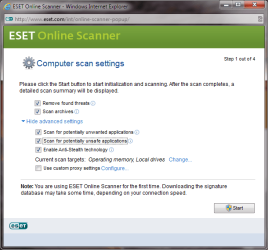
Next, run the ESET Online scanner
ESET Online Antivirus Scanner :: Overview
ESET Online Antivirus Scanner :: Help
ESET Online Antivirus Scanner :: FAQ

Run the ESET Online Scanner
Read, then Tick [[FONT=Webdings, serif]a[/FONT]] Yes, I accept the Terms of Use

This scanner takes a good amount of time to completely scan your system.

Please attach the output log when it completes:
C:\Program Files\EsetOnlineScanner\log.txt

Bill
.
 

Attachments

  • ESET Settings.png
    ESET Settings.png
    88.9 KB · Views: 26

My Computer

Computer type
Laptop
Computer Manufacturer/Model Number
HP Pavilion dv6-6c10us
OS
x64 (6.3.9600) Win8.1 Pro & soon dual boot x64 (6.1.7601) Win7_SP1 HomePrem
CPU
AMD A6-3420M APU with Radeon(tm) HD Graphics
Motherboard
Hewlett-Packard 1805
Memory
6.00 GB
Graphics Card(s)
AMD Radeon(TM) HD 6520G
Sound Card
(1) AMD High Definition Audio Device (2) IDT High Definiti
Monitor(s) Displays
HP W2072a 20" LCD (1600 x 900) @ 60 Hz
Screen Resolution
1366 x 768 x 32 bits (4294967296 colors) @ 60 Hz
Hard Drives
ST640LM0 00 HM641JI SATA Disk Device
Keyboard
Logitech k520 wireless KB
Mouse
Logitech m320 wireless mouse (bundled with KB)
Internet Speed
15/5 | 54 MB Wireless 'n'
Antivirus
Realtime: Defender or Avast | On-demand: Malwarebytes, ESET
Browser
IE 11 on Win8, IE 10 on win 7
Other Info
Media: [Gimp, Audacity, VLC] || Comm: [WEmail 2012, Skype] || Productivity: [OpenOffice,| Textpad] || Utils: [Sysinternals, cCleaner, Speccy, Defraggler]

My Computer

Computer type
PC/Desktop
Computer Manufacturer/Model Number
HP
OS
32 bit
CPU
Intel(R) Core(TM)2 CPU 6300 @ 1.86GHz
Motherboard
Intel(R) Core(TM)2 CPU 6300 @ 1.86GHz
Memory
2.00 GB
Graphics Card(s)
Intel(R) G965 Express Chipset Family
Sound Card
(1) High Definition Audio Device (2) USB Audio Device
Most of the threats were already in AdwCleaner's quarantine folder, but ESET picked up a few AdwCleaner didn't find.

Run one more to triple check your system. This is a scan only. Please post the scan results as you have been doing with the other scanners - thanks.

Download the Farbar Recovery Scan Tool (FRST) Click here
  1. Select the version that applies to your system: 32-bit OR 64-bit
    .
  2. Click the Save button
    Default save location is your Downloads folder
    :note: If the SmartFilter bar is presented, click the Actions button and click Don't Run (saves FRST but does not run it)
    .
  3. Double-click FRST or FRST64 to launch the utility
    :info: FRST is the 32-bit version / FRST64 is the 64-bit version
    • Click the Yes button to confirm UAC
      .
    • Click the Yes button on the Warranty disclaimer window.
      .
    • Tick [[FONT=Webdings, serif]a[/FONT]] all Whitelist checkboxes
      .
    • Tick [[FONT=Webdings, serif]a[/FONT]] Addition.txt in the Optional scan list
      .
  4. Click the Scan button to begin scanning.
    .
  5. FRST creates two logs when the scan has finished, they are located in the same folder where FRST was launched
Thanks
 

My Computer

Computer type
Laptop
Computer Manufacturer/Model Number
HP Pavilion dv6-6c10us
OS
x64 (6.3.9600) Win8.1 Pro & soon dual boot x64 (6.1.7601) Win7_SP1 HomePrem
CPU
AMD A6-3420M APU with Radeon(tm) HD Graphics
Motherboard
Hewlett-Packard 1805
Memory
6.00 GB
Graphics Card(s)
AMD Radeon(TM) HD 6520G
Sound Card
(1) AMD High Definition Audio Device (2) IDT High Definiti
Monitor(s) Displays
HP W2072a 20" LCD (1600 x 900) @ 60 Hz
Screen Resolution
1366 x 768 x 32 bits (4294967296 colors) @ 60 Hz
Hard Drives
ST640LM0 00 HM641JI SATA Disk Device
Keyboard
Logitech k520 wireless KB
Mouse
Logitech m320 wireless mouse (bundled with KB)
Internet Speed
15/5 | 54 MB Wireless 'n'
Antivirus
Realtime: Defender or Avast | On-demand: Malwarebytes, ESET
Browser
IE 11 on Win8, IE 10 on win 7
Other Info
Media: [Gimp, Audacity, VLC] || Comm: [WEmail 2012, Skype] || Productivity: [OpenOffice,| Textpad] || Utils: [Sysinternals, cCleaner, Speccy, Defraggler]
Most of the threats were already in AdwCleaner's quarantine folder, but ESET picked up a few AdwCleaner didn't find.

Run one more to triple check your system. This is a scan only. Please post the scan results as you have been doing with the other scanners - thanks.

Download the Farbar Recovery Scan Tool (FRST) Click here
  1. Select the version that applies to your system: 32-bit OR 64-bit
    .
  2. Click the Save button
    Default save location is your Downloads folder
    :note: If the SmartFilter bar is presented, click the Actions button and click Don't Run (saves FRST but does not run it)
    .
  3. Double-click FRST or FRST64 to launch the utility
    :info: FRST is the 32-bit version / FRST64 is the 64-bit version
    • Click the Yes button to confirm UAC
      .
    • Click the Yes button on the Warranty disclaimer window.
      .
    • Tick [[FONT=Webdings, serif]a[/FONT]] all Whitelist checkboxes
      .
    • Tick [[FONT=Webdings, serif]a[/FONT]] Addition.txt in the Optional scan list
      .
  4. Click the Scan button to begin scanning.
    .
  5. FRST creates two logs when the scan has finished, they are located in the same folder where FRST was launched
Thanks

The scan was fast.

FRST: http://puu.sh/7x2tY.txt

Addition: http://puu.sh/7x2vN.txt
 

My Computer

Computer type
PC/Desktop
Computer Manufacturer/Model Number
HP
OS
32 bit
CPU
Intel(R) Core(TM)2 CPU 6300 @ 1.86GHz
Motherboard
Intel(R) Core(TM)2 CPU 6300 @ 1.86GHz
Memory
2.00 GB
Graphics Card(s)
Intel(R) G965 Express Chipset Family
Sound Card
(1) High Definition Audio Device (2) USB Audio Device
Hmmm, looks like a few more utilities then a call for more eyes.

:ar: Kaspersky Labs: TDSSKiller

1. Download the EXE Version, not the zip version

2. Select Save on the "Do you want to run or save ..." action bar
The default save location is your Downloads folder

3. Select Run on the "... download completed." action bar
picture.php
4. Click Change parameters
Additional Options
Tick [[FONT=Webdings, serif]a[/FONT]] Detect TDLFS File System
Tick [[FONT=Webdings, serif]a[/FONT]] Use KSN to scan objects

picture.php


Click: OK​
5. Press: Start Scan

[FONT=Webdings, serif]6[/FONT] ... Next
6. Scan result actions:
a. TDSSKiller determines the best action for a threat and marks it in the Threats Detected window.
picture.php
For this exercise, you want only CURE or SKIP as an action. Kaspersky TDSSKiller is very good at determining what action should be taken, but it's better to err on the side of caution. Let a member review the output and then advise you.

b.Skip any Suspicious object, confirm the action and then press Continue

c. Cure any Malicious object, confirm the action and then press Continue
Select Skip if Cure is not available. :warn: Do NOT select Delete as the object might be a system file.

d. Restart your machine to complete the TDSSKiller malware removal process.​

The log file is placed on the homedrive (normally C:\) with the file naming convention:
TDSSKiller.Maj#. Min#. Bld#.Rev#_MM.DD.YYYY_HH.MM.SS_log.txt
Ex: C:\TDSSKiller.3.0.0.17_03.15.2014_12.03.49_log.txt

7. Attach the TDSSKiller log to a new post on your thread
See: http://www.sevenforums.com/tutorials/9733-screenshots-files-upload-post-seven-forums.html

Thanks!
 
Last edited:

My Computer

Computer type
Laptop
Computer Manufacturer/Model Number
HP Pavilion dv6-6c10us
OS
x64 (6.3.9600) Win8.1 Pro & soon dual boot x64 (6.1.7601) Win7_SP1 HomePrem
CPU
AMD A6-3420M APU with Radeon(tm) HD Graphics
Motherboard
Hewlett-Packard 1805
Memory
6.00 GB
Graphics Card(s)
AMD Radeon(TM) HD 6520G
Sound Card
(1) AMD High Definition Audio Device (2) IDT High Definiti
Monitor(s) Displays
HP W2072a 20" LCD (1600 x 900) @ 60 Hz
Screen Resolution
1366 x 768 x 32 bits (4294967296 colors) @ 60 Hz
Hard Drives
ST640LM0 00 HM641JI SATA Disk Device
Keyboard
Logitech k520 wireless KB
Mouse
Logitech m320 wireless mouse (bundled with KB)
Internet Speed
15/5 | 54 MB Wireless 'n'
Antivirus
Realtime: Defender or Avast | On-demand: Malwarebytes, ESET
Browser
IE 11 on Win8, IE 10 on win 7
Other Info
Media: [Gimp, Audacity, VLC] || Comm: [WEmail 2012, Skype] || Productivity: [OpenOffice,| Textpad] || Utils: [Sysinternals, cCleaner, Speccy, Defraggler]
Please revisit post# 34

The FRST log shows many things that should have been cleaned up by following the recommendations in that post. Specifically, uninstalling applications with little or no value add (auto-updaters, Chrome, Google apps, SkypeclickToCall, Lightshot & Puush). All of these items can be reinstalled if you really need them later (any program you paid for might require a ley to reinstall - make sure you have that key before uninstalling).

SaveShare is still hanging in there even after the scan and cleans. I saw at least one 'version' (saaveeshaaree) of it, so it might be a real tricky bugger. The tools you have already used should have mitigated that threat. I'll suggest another utility after I see the TDSSKiller log.

FRST also shows remnant pieces of threats removed, this is where I'll need another pair of eyes - to completely clean up the pieces and to make sure I didn't miss something.

Bill
.
 

My Computer

Computer type
Laptop
Computer Manufacturer/Model Number
HP Pavilion dv6-6c10us
OS
x64 (6.3.9600) Win8.1 Pro & soon dual boot x64 (6.1.7601) Win7_SP1 HomePrem
CPU
AMD A6-3420M APU with Radeon(tm) HD Graphics
Motherboard
Hewlett-Packard 1805
Memory
6.00 GB
Graphics Card(s)
AMD Radeon(TM) HD 6520G
Sound Card
(1) AMD High Definition Audio Device (2) IDT High Definiti
Monitor(s) Displays
HP W2072a 20" LCD (1600 x 900) @ 60 Hz
Screen Resolution
1366 x 768 x 32 bits (4294967296 colors) @ 60 Hz
Hard Drives
ST640LM0 00 HM641JI SATA Disk Device
Keyboard
Logitech k520 wireless KB
Mouse
Logitech m320 wireless mouse (bundled with KB)
Internet Speed
15/5 | 54 MB Wireless 'n'
Antivirus
Realtime: Defender or Avast | On-demand: Malwarebytes, ESET
Browser
IE 11 on Win8, IE 10 on win 7
Other Info
Media: [Gimp, Audacity, VLC] || Comm: [WEmail 2012, Skype] || Productivity: [OpenOffice,| Textpad] || Utils: [Sysinternals, cCleaner, Speccy, Defraggler]
Somehow i factory reset my computer, and the system perform pretty well lately. Also i delete the threat file, which help a lot better!
 

My Computer

Computer type
PC/Desktop
Computer Manufacturer/Model Number
HP
OS
32 bit
CPU
Intel(R) Core(TM)2 CPU 6300 @ 1.86GHz
Motherboard
Intel(R) Core(TM)2 CPU 6300 @ 1.86GHz
Memory
2.00 GB
Graphics Card(s)
Intel(R) G965 Express Chipset Family
Sound Card
(1) High Definition Audio Device (2) USB Audio Device
A factory reset or clean install is another way to clean up malware - glad that your system is better.

Thank you for marking the thread solved.

Bill
.
 

My Computer

Computer type
Laptop
Computer Manufacturer/Model Number
HP Pavilion dv6-6c10us
OS
x64 (6.3.9600) Win8.1 Pro & soon dual boot x64 (6.1.7601) Win7_SP1 HomePrem
CPU
AMD A6-3420M APU with Radeon(tm) HD Graphics
Motherboard
Hewlett-Packard 1805
Memory
6.00 GB
Graphics Card(s)
AMD Radeon(TM) HD 6520G
Sound Card
(1) AMD High Definition Audio Device (2) IDT High Definiti
Monitor(s) Displays
HP W2072a 20" LCD (1600 x 900) @ 60 Hz
Screen Resolution
1366 x 768 x 32 bits (4294967296 colors) @ 60 Hz
Hard Drives
ST640LM0 00 HM641JI SATA Disk Device
Keyboard
Logitech k520 wireless KB
Mouse
Logitech m320 wireless mouse (bundled with KB)
Internet Speed
15/5 | 54 MB Wireless 'n'
Antivirus
Realtime: Defender or Avast | On-demand: Malwarebytes, ESET
Browser
IE 11 on Win8, IE 10 on win 7
Other Info
Media: [Gimp, Audacity, VLC] || Comm: [WEmail 2012, Skype] || Productivity: [OpenOffice,| Textpad] || Utils: [Sysinternals, cCleaner, Speccy, Defraggler]
Back
Top