Hyperthreading on Pentium4

FTG

New member
Local time
6:22 PM
Messages
10
Hi,

I have a Pentium 4 HT 2.6Ghz cpu. When I was using XP, the task manager displayed 2 cpu graphs, showing that Hyperthreading was active. But now in Windows 7, I only see 1 cpu graph. I thought Windows 7 supports hyperthreading ?

The only thing I might have possibly done wrong, was that I disabled HT in the BIOS when I installed Windows 7, only remembering to turn it on in the BIOS after installation.

Can someone with a Pentium4 HT cpu confirm that hyperthreading is actually supported in Windows 7 ?
 

My Computer

OS
Windows 7
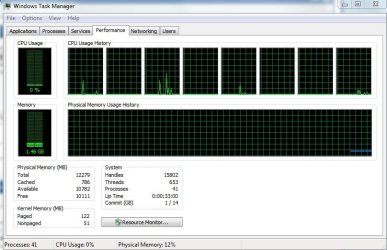
I don't have a Pentium 4, I have a corei7, but hyperthreading works.

Captureuu.JPG
 

My Computer

Computer type
PC/Desktop
Computer Manufacturer/Model Number
Airbot 2.0
OS
Windows 7 Ultimate x64 SP1
CPU
Core i7 920 (D0) @ 4Ghz, *26c idle *65c full load on air
Motherboard
Asus P6X58D Premium - Sata 6Gb/s - USB 3.0
Memory
12GB DDR3 Corsair Dominator -CMD12GX3M6A1600C8 at 1600MHz
Graphics Card(s)
Zotac Geforce GTX 770
Sound Card
ASUS Xonar D2X
Monitor(s) Displays
1 LG 24" Flatron W2453V-PF 1 Samsung 24" P2450H both 2ms RT
Screen Resolution
1920x1080@60hz
Hard Drives
1 Samsung 250GB 840 Evo SSD
1 OCZ Vertex2 180GB SSD
1 TB Samsung Spinpoint F1 7200RPM 32MB cache
2 500GB WD Caviar Blacks 7200RPM 32MB cache (WD5001AALS)

Pioneer DVD Burner DVR-S18M
PSU
Corsair HX1000W
Case
Cooler Master HAF 932
Cooling
Case Fans *3 230mm, *1 140mm/CPU - *Tuniq Tower 120 Extreme
Keyboard
Logitech Wireless MK700
Mouse
Logitech Wireless MK700
Internet Speed
DL 15 Mbps UL 0.98 Mbps
Antivirus
None
Browser
Firefox Nightly
Other Info
Processor-7.7 *RAM- 7.9 *Graphics-7.9 *Gaming Graphics- 7.9 *SSD- 7.8 W.E.I final score= 7.7
*Phone- LG Nexus 5
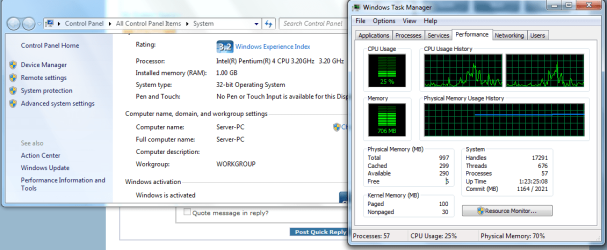
yep i have it...
P4.PNG
if you disabled it in the bios then it acts as one core as i remember it (and i believe it stays that way although you shouldn't quote me on that)....;)

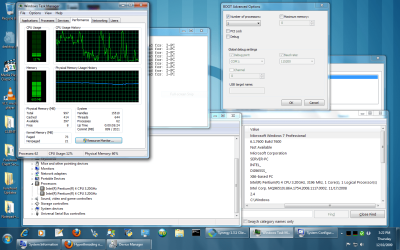
just in case check if this is enabled...
HT.png
 

My Computer

Computer Manufacturer/Model Number
Tx2500z Tablet Pc/Homemade Server
OS
Windows 7 Ult x64(x2), HomePrem x32(x4), Server 08 (+VM), 08 R2 (VM) , SuSe 11.2 (VM), XP 32 (VM)
CPU
Turion X2 ultra (oh well came with laptop)/P4 @3.2 (yes P4)
Motherboard
IDK HP Motherboard / Intel DG965SS
Memory
OCZ Dual Channel 4GB kit/ 1gb Dual Channel
Graphics Card(s)
HD 3200 graphics /GMA x3100 (yay for intergrated!!)
Sound Card
Realtek HD Audio(mic working, well sort of)/Siig IC-70012
Monitor(s) Displays
built-in Hp 12" laptop screen/ Acer 19"
Screen Resolution
1280x800 /1440x900
Cooling
All Air Cooled
Mouse
Logi MX Rev. /MS Wheel Optical 1.1A /Logitech Optical Mouse
Internet Speed
College baby but its still routed through vpn to 1536k...
Other Info
love my wacom pen and pressure sensitivity...
wished it worked in 7, SUSE for that matter though
Darn, looks like the feature is not enabled because I installed Windows 7 without turning it on in the BIOS. Oh well, will need to reinstall.
 

My Computer

OS
Windows 7
when i had my p4, i didn't have to reinstall to turn on/off hyperthreading in my bios and neither should you. it's a simple change in your bios settings
 

My Computer

OS
win xp pro/win 7 64
CPU
intel core 2 duo e7300
Motherboard
ga-ep45-ds3l
Memory
corsair xms dhx pc-6400
Graphics Card(s)
ati radeon x300
Sound Card
m-audio 2496
Monitor(s) Displays
dell e153fp
Hard Drives
maxtor 160 sata 7200 rpm
seagate 320 gb sata 7200 rpm
maxtor one touch III 500 gb
PSU
corsair 500w
Case
antec 300
Cooling
arctic cooling
Control Panel>Device Manager: One or two CPU's listed? (If HT is on, the Device Manager should list two virtual CPU's under the Processor>Your Processor heading.

Task Manager>Performance Tab>View>CPU History>One Graph All CPU's or One Graph Per CPU selected?
 

My Computers

System One System Two

  • Computer type
    Laptop
    Computer Manufacturer/Model Number
    Custom
    OS
    Windows 10 Professional 64-Bit
    CPU
    Intel Core i7 8700K
    Motherboard
    Asus Maximus X Code
    Memory
    G.Skill TridentZ RGB DDR4 4000 F4-4000C18D-16GTZR
    Graphics Card(s)
    Zotac GeForce GTX-1660 Ti AMP 6GB
    Sound Card
    ROG SupremeFX S1220 (Onboard)
    Monitor(s) Displays
    Dell UP2716D
    Screen Resolution
    2560x1440
    Hard Drives
    Samsung 980 Pro PCIe NVMe 500GB
    Samsung 970 Evo PCIe NVMe 250GB
    Samsung 860 Evo SATA III 2TB
    WD Black WD2003FZEX 2TB x 3
    ODD - GH24NSC0
    PSU
    Coolermaster V1000
    Case
    Corsair Obsidian 450D
    Cooling
    Corsair H115i - Corsair SP140 Red x 2
    Keyboard
    Logitech G213
    Mouse
    Logitech G102
    Internet Speed
    100 Mbps (Supposedly) - Asianet India FTTH
    Antivirus
    Avast Free!
    Browser
    Maxthon Cloud Browser 5.xx
    Other Info
    Asus FX-553VD (960 Evo, 860 Evo, 16GB)
    Samsung Galaxy C9 Pro
    Canon EOS 70D
  • Computer type
    Laptop
    System Manufacturer/Model Number
    Asus FX503VD
    OS
    Windows 10 Pro x64
    CPU
    Intel Core i7 7700HQ
    Memory
    2 x 8GB Samsung DDR4 2400
    Graphics Card(s)
    GTX 1050
    Screen Resolution
    1920 x 1080
    Hard Drives
    Samsung 960 Evo PCIe NVMe 250GB Boot
    Samsung 840 Pro Series 256 GB SSD (MZ-7PD256BW);
I agree with 7thangel. You should not have to reinstall - just enable it in the BIOS. But do make sure first you have TM set to display all as shown in darkassain's 2nd image.
 

My Computer

Computer Manufacturer/Model Number
BrightWorks Systems B4
OS
Windows 7 Profession 64-bit
CPU
Intel Core i7-860 Quad
Motherboard
Gigabyte P55-UD4P
Memory
Mushkin 4x2Gb PC12800
Graphics Card(s)
Gigabyte GTX260 896Mb
Sound Card
Integrated 7.1 HD Dolby
Monitor(s) Displays
2 Samsung 2220wm-HAS 22"
Screen Resolution
1680 x 1050 | 1680 x 1050
Hard Drives
WD HE 1Tb
PSU
Corsair TX-750W
Case
Ultra M998
Cooling
OEM
Keyboard
MS Wireless Comfort 5000
Mouse
MS Wireless 5000
Internet Speed
Cable and pretty darn fast
Would the "Number of CPU's" setting under the Boot>Advanced Options tab in MSConfig have any effect on this?

Would you check and see what it says? If it reads "1", set it to "2", reboot and see what happens.
 

My Computers

System One System Two

  • Computer type
    Laptop
    Computer Manufacturer/Model Number
    Custom
    OS
    Windows 10 Professional 64-Bit
    CPU
    Intel Core i7 8700K
    Motherboard
    Asus Maximus X Code
    Memory
    G.Skill TridentZ RGB DDR4 4000 F4-4000C18D-16GTZR
    Graphics Card(s)
    Zotac GeForce GTX-1660 Ti AMP 6GB
    Sound Card
    ROG SupremeFX S1220 (Onboard)
    Monitor(s) Displays
    Dell UP2716D
    Screen Resolution
    2560x1440
    Hard Drives
    Samsung 980 Pro PCIe NVMe 500GB
    Samsung 970 Evo PCIe NVMe 250GB
    Samsung 860 Evo SATA III 2TB
    WD Black WD2003FZEX 2TB x 3
    ODD - GH24NSC0
    PSU
    Coolermaster V1000
    Case
    Corsair Obsidian 450D
    Cooling
    Corsair H115i - Corsair SP140 Red x 2
    Keyboard
    Logitech G213
    Mouse
    Logitech G102
    Internet Speed
    100 Mbps (Supposedly) - Asianet India FTTH
    Antivirus
    Avast Free!
    Browser
    Maxthon Cloud Browser 5.xx
    Other Info
    Asus FX-553VD (960 Evo, 860 Evo, 16GB)
    Samsung Galaxy C9 Pro
    Canon EOS 70D
  • Computer type
    Laptop
    System Manufacturer/Model Number
    Asus FX503VD
    OS
    Windows 10 Pro x64
    CPU
    Intel Core i7 7700HQ
    Memory
    2 x 8GB Samsung DDR4 2400
    Graphics Card(s)
    GTX 1050
    Screen Resolution
    1920 x 1080
    Hard Drives
    Samsung 960 Evo PCIe NVMe 250GB Boot
    Samsung 840 Pro Series 256 GB SSD (MZ-7PD256BW);
Would the "Number of CPU's" setting under the Boot>Advanced Options tab in MSConfig have any effect on this?

Would you check and see what it says? If it reads "1", set it to "2", reboot and see what happens.

it should in theory disable the virtual core..;)
and yeah i agree it should not take a reinstall for windows to enable HT
 

My Computer

Computer Manufacturer/Model Number
Tx2500z Tablet Pc/Homemade Server
OS
Windows 7 Ult x64(x2), HomePrem x32(x4), Server 08 (+VM), 08 R2 (VM) , SuSe 11.2 (VM), XP 32 (VM)
CPU
Turion X2 ultra (oh well came with laptop)/P4 @3.2 (yes P4)
Motherboard
IDK HP Motherboard / Intel DG965SS
Memory
OCZ Dual Channel 4GB kit/ 1gb Dual Channel
Graphics Card(s)
HD 3200 graphics /GMA x3100 (yay for intergrated!!)
Sound Card
Realtek HD Audio(mic working, well sort of)/Siig IC-70012
Monitor(s) Displays
built-in Hp 12" laptop screen/ Acer 19"
Screen Resolution
1280x800 /1440x900
Cooling
All Air Cooled
Mouse
Logi MX Rev. /MS Wheel Optical 1.1A /Logitech Optical Mouse
Internet Speed
College baby but its still routed through vpn to 1536k...
Other Info
love my wacom pen and pressure sensitivity...
wished it worked in 7, SUSE for that matter though
You do not have two CPUs. You should leave it at 1.
 

My Computer

Computer Manufacturer/Model Number
BrightWorks Systems B4
OS
Windows 7 Profession 64-bit
CPU
Intel Core i7-860 Quad
Motherboard
Gigabyte P55-UD4P
Memory
Mushkin 4x2Gb PC12800
Graphics Card(s)
Gigabyte GTX260 896Mb
Sound Card
Integrated 7.1 HD Dolby
Monitor(s) Displays
2 Samsung 2220wm-HAS 22"
Screen Resolution
1680 x 1050 | 1680 x 1050
Hard Drives
WD HE 1Tb
PSU
Corsair TX-750W
Case
Ultra M998
Cooling
OEM
Keyboard
MS Wireless Comfort 5000
Mouse
MS Wireless 5000
Internet Speed
Cable and pretty darn fast
You do not have two CPUs. You should leave it at 1.

it depends since windows sees a P4 HT as "2" Logical processors but 1 core...
hold on ill test this right now...;)

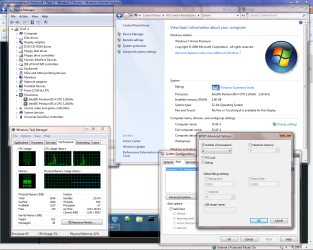
edit just tried and yes it does disable the virtual core...
look at the pic
windows recognizes it as HT in the DM but deliberalty only uses one logical processor...
one core.PNG
 

My Computer

Computer Manufacturer/Model Number
Tx2500z Tablet Pc/Homemade Server
OS
Windows 7 Ult x64(x2), HomePrem x32(x4), Server 08 (+VM), 08 R2 (VM) , SuSe 11.2 (VM), XP 32 (VM)
CPU
Turion X2 ultra (oh well came with laptop)/P4 @3.2 (yes P4)
Motherboard
IDK HP Motherboard / Intel DG965SS
Memory
OCZ Dual Channel 4GB kit/ 1gb Dual Channel
Graphics Card(s)
HD 3200 graphics /GMA x3100 (yay for intergrated!!)
Sound Card
Realtek HD Audio(mic working, well sort of)/Siig IC-70012
Monitor(s) Displays
built-in Hp 12" laptop screen/ Acer 19"
Screen Resolution
1280x800 /1440x900
Cooling
All Air Cooled
Mouse
Logi MX Rev. /MS Wheel Optical 1.1A /Logitech Optical Mouse
Internet Speed
College baby but its still routed through vpn to 1536k...
Other Info
love my wacom pen and pressure sensitivity...
wished it worked in 7, SUSE for that matter though
Two processors means two CPUs in two sockets - such as you would find in a server board.
 

My Computer

Computer Manufacturer/Model Number
BrightWorks Systems B4
OS
Windows 7 Profession 64-bit
CPU
Intel Core i7-860 Quad
Motherboard
Gigabyte P55-UD4P
Memory
Mushkin 4x2Gb PC12800
Graphics Card(s)
Gigabyte GTX260 896Mb
Sound Card
Integrated 7.1 HD Dolby
Monitor(s) Displays
2 Samsung 2220wm-HAS 22"
Screen Resolution
1680 x 1050 | 1680 x 1050
Hard Drives
WD HE 1Tb
PSU
Corsair TX-750W
Case
Ultra M998
Cooling
OEM
Keyboard
MS Wireless Comfort 5000
Mouse
MS Wireless 5000
Internet Speed
Cable and pretty darn fast
You do not have two CPUs. You should leave it at 1.

If it's a dual-core CPU, in the Search (Windows key) type in msconfig and go to Boot >> Advanced Options >> Number Of Processors. It'll probably be set to 1, so set it to 2 and reboot.

You can also enable the second core directly through the BIOS, though it varies from BIOS to BIOS.
 

My Computer

Computer type
Laptop
Computer Manufacturer/Model Number
Toshiba A500-ST6621
OS
7 Ultimate x64, Vista Ultimate x64, 7 Pro x64, XP Pro x86, Linux Mint Nadia Cinnamon
CPU
Intel Core 2 Duo T9600 2.80GHz x64
Motherboard
Intel GM45 chipset
Memory
8GB
Graphics Card(s)
ATI Mobility Radeon HD 4650
Sound Card
N/A
Monitor(s) Displays
single 16:9 widescreen (1366x768)
Hard Drives
Hitachi Travelstar 7K750 5400RPM 750GB
Keyboard
standard Toshiba backlit keyboard w/ numberpad
Internet Speed
N/A
Two processors means two CPUs in two sockets - such as you would find in a server board.

yeah but it does not define physical processors since i just explained with pic on the edit above me...
it also applies to logical processors (i.e HT, multicore) too...
 

My Computer

Computer Manufacturer/Model Number
Tx2500z Tablet Pc/Homemade Server
OS
Windows 7 Ult x64(x2), HomePrem x32(x4), Server 08 (+VM), 08 R2 (VM) , SuSe 11.2 (VM), XP 32 (VM)
CPU
Turion X2 ultra (oh well came with laptop)/P4 @3.2 (yes P4)
Motherboard
IDK HP Motherboard / Intel DG965SS
Memory
OCZ Dual Channel 4GB kit/ 1gb Dual Channel
Graphics Card(s)
HD 3200 graphics /GMA x3100 (yay for intergrated!!)
Sound Card
Realtek HD Audio(mic working, well sort of)/Siig IC-70012
Monitor(s) Displays
built-in Hp 12" laptop screen/ Acer 19"
Screen Resolution
1280x800 /1440x900
Cooling
All Air Cooled
Mouse
Logi MX Rev. /MS Wheel Optical 1.1A /Logitech Optical Mouse
Internet Speed
College baby but its still routed through vpn to 1536k...
Other Info
love my wacom pen and pressure sensitivity...
wished it worked in 7, SUSE for that matter though
A Hyperthreading CPU will be seen in DM, Task Manager and every other monitoring app (CPU-Z etc) as two virtual (logical) CPU's, since it uses two parallel execution threads.

Windows will treat it, for all intents and purposes as thought it were a dual core processor, not as if it were two discrete processors (dual socket).
 

My Computers

System One System Two

  • Computer type
    Laptop
    Computer Manufacturer/Model Number
    Custom
    OS
    Windows 10 Professional 64-Bit
    CPU
    Intel Core i7 8700K
    Motherboard
    Asus Maximus X Code
    Memory
    G.Skill TridentZ RGB DDR4 4000 F4-4000C18D-16GTZR
    Graphics Card(s)
    Zotac GeForce GTX-1660 Ti AMP 6GB
    Sound Card
    ROG SupremeFX S1220 (Onboard)
    Monitor(s) Displays
    Dell UP2716D
    Screen Resolution
    2560x1440
    Hard Drives
    Samsung 980 Pro PCIe NVMe 500GB
    Samsung 970 Evo PCIe NVMe 250GB
    Samsung 860 Evo SATA III 2TB
    WD Black WD2003FZEX 2TB x 3
    ODD - GH24NSC0
    PSU
    Coolermaster V1000
    Case
    Corsair Obsidian 450D
    Cooling
    Corsair H115i - Corsair SP140 Red x 2
    Keyboard
    Logitech G213
    Mouse
    Logitech G102
    Internet Speed
    100 Mbps (Supposedly) - Asianet India FTTH
    Antivirus
    Avast Free!
    Browser
    Maxthon Cloud Browser 5.xx
    Other Info
    Asus FX-553VD (960 Evo, 860 Evo, 16GB)
    Samsung Galaxy C9 Pro
    Canon EOS 70D
  • Computer type
    Laptop
    System Manufacturer/Model Number
    Asus FX503VD
    OS
    Windows 10 Pro x64
    CPU
    Intel Core i7 7700HQ
    Memory
    2 x 8GB Samsung DDR4 2400
    Graphics Card(s)
    GTX 1050
    Screen Resolution
    1920 x 1080
    Hard Drives
    Samsung 960 Evo PCIe NVMe 250GB Boot
    Samsung 840 Pro Series 256 GB SSD (MZ-7PD256BW);
If it's a dual-core CPU, in the Search (Windows key) type in msconfig and go to Boot >> Advanced Options >> Number Of Processors. It'll probably be set to 1, so set it to 2 and reboot.
No. That is bad advice. That setting is for debugging purposes during the boot process only. It only affects the boot process so leave it at the default setting.

What is the motherboard make and model?
 

My Computer

Computer Manufacturer/Model Number
BrightWorks Systems B4
OS
Windows 7 Profession 64-bit
CPU
Intel Core i7-860 Quad
Motherboard
Gigabyte P55-UD4P
Memory
Mushkin 4x2Gb PC12800
Graphics Card(s)
Gigabyte GTX260 896Mb
Sound Card
Integrated 7.1 HD Dolby
Monitor(s) Displays
2 Samsung 2220wm-HAS 22"
Screen Resolution
1680 x 1050 | 1680 x 1050
Hard Drives
WD HE 1Tb
PSU
Corsair TX-750W
Case
Ultra M998
Cooling
OEM
Keyboard
MS Wireless Comfort 5000
Mouse
MS Wireless 5000
Internet Speed
Cable and pretty darn fast
Well, I set HT to enabled in the bios, and re-installed. Still Windows shows 1 cpu graph. Then I went into bios and loaded all fields to defaults values, ( I don't know what else to try). And magically, Windows detects 2 logical cpus.
 

My Computer

OS
Windows 7
There you go. Funny thing about defaults - they tend to work. Thanks for the follow-up.
 

My Computer

Computer Manufacturer/Model Number
BrightWorks Systems B4
OS
Windows 7 Profession 64-bit
CPU
Intel Core i7-860 Quad
Motherboard
Gigabyte P55-UD4P
Memory
Mushkin 4x2Gb PC12800
Graphics Card(s)
Gigabyte GTX260 896Mb
Sound Card
Integrated 7.1 HD Dolby
Monitor(s) Displays
2 Samsung 2220wm-HAS 22"
Screen Resolution
1680 x 1050 | 1680 x 1050
Hard Drives
WD HE 1Tb
PSU
Corsair TX-750W
Case
Ultra M998
Cooling
OEM
Keyboard
MS Wireless Comfort 5000
Mouse
MS Wireless 5000
Internet Speed
Cable and pretty darn fast
I'd like to revive this thread. My Pentium 4 3.2 is showing a paltry 1.7 performance rating after installing Windows 7. The BIOS is set to hyperthreading. The boot shows "2" processors. The Task Master shows two and I've rerun the tests. What am I missing?

SlowPoke.png
 

My Computer

Computer Manufacturer/Model Number
Custom
OS
Windows 7
CPU
Intel Pentium 4 3.20
Motherboard
Intel D865GLC
Memory
2 G
Graphics Card(s)
Nvidia GeForce 6800 GT
Sound Card
Intergrated
Monitor(s) Displays
(1) Sony
Hard Drives
WD 160 ATA
WD 320 ATA
WD 74 ATA Raptor 10K
PSU
350W
Case
Antec NSK1380 MicroATX Cube
Cooling
standard
What am I missing?
A modern processor. P4s are old, my Core 2 Duo at a measly 2 GHz outperforms a P4 clocked at 3+ GHz easily. Hyperthreading does not always equal better performance, btw.
 

My Computer

Computer type
PC/Desktop
Computer Manufacturer/Model Number
Alienware Aurora ALX R4
OS
Windows 10 Pro (x64)
CPU
Intel Core i7-3930K (3.2GHz - 4.5GHz)
Motherboard
Alienware Aurora-R4 x79
Memory
4x Samsung 4GB PC3-12800 DDR3 (16GB 1600MHz)
Graphics Card(s)
Nvidia Geforce GTX 690
Sound Card
SteelSeries Siberia Elite
Monitor(s) Displays
Dell UltraSharp U3011
Screen Resolution
2560x1600
Hard Drives
Samsung 850 Pro 256 GB, Seagate 1TB Desktop Hybrid HDD, 2x Western Digital 4TB Green HDD
PSU
875W Some Dell PSU <.<
Case
Alienware Aurora ALX
Cooling
Custom Liquid Cooling (EK CPU & GPU blocks) dual EK 480RAD
Keyboard
Logitech G710+ Mechanical
Mouse
Logitech G700s
Internet Speed
Verizon Fios (50 mbps average)
Other Info
Server: Intel NUC D54250WYK: i5-4250U, 16GB, 256 GB mSATA, Windows Server 2012 R2
Back
Top