I hate the "Libraries" bring back "My Computer"

Status
Not open for further replies.
I thought that Libraries could be handy and started to use them last week, putting all my photos and music from other internal drives into them. A BIG problem I found was that my Win7 Backup shot up in size to a ridiculous figure. I already have a backup system in place for data, so this was a bad move and I'm going to have to look into how to sort it out. A warning might have been appreciated, I don't remember seeing any.
 

My Computer

OS
Windows 7
I admit that I have not read this thread in detail, so I may have missed the point, because a person can move any library to another partition or drive, so it would seem that would eliminate the loss of data due to a corrupted OS. I have not tried moving them to external drives, so I don't know if that entails any certain issues or not. The only thing that I think was a problem was when I attempted to use the built-in backup feature, it kept freezing part of the way through, and I have a feeling that was due to the dislocation of the libraries. I solved that by using a different backup utility.

I have never expected any Windows OS to always meet my expectations, or perhaps I should say "hopes", nor do I expect that any version in the future ever will, so I only think in terms of comparison to what I have had in the past, and by that measure, W7 does quite well. Instead of thinking about any negative aspects of the changes, I simply try to adapt, and after doing so, I'm usually happy with things as they are.
 

My Computer

Computer Manufacturer/Model Number
DIY
OS
W7x64 Pro, SuSe 12.1/** W7 x64 Pro, XP MCE
CPU
Phenom II 1090T w/Noctua NH-D14 /**4400+ X2 w/CM Hyper TX 3
Motherboard
ASRock 890FX Deluxe 4/**A8N-SLI
Memory
2 x 2GB Patriot PGS34g1600LLKA/**4x1GB Corsair VS
Graphics Card(s)
EVGA GTX460 SC/**EVGA 8800GTS
Sound Card
Asus Xonar D2X/**Xonar D1
Monitor(s) Displays
Acer X233H, Dell E152FPc /**LG M237-WD
Screen Resolution
1920x1080 & 1024x768/**1980x1080
Hard Drives
WDC 2TB, 1.5TB, 1TB, 500GB,Seagate 500GB , Maxtor 80GB /**500GB Seagate & WDC 1TB Black
PSU
CM RS600 w/ APC BX1000G/**Antec 500 TP w/ APC BX1000
Case
HAF922/**Antec 1040IIB
Cooling
3x200mm, 1x140 and 1x120mm/**5x80mm fans
Keyboard
Logitech Media USB/**Saitek Eclipse
Mouse
Cordless Trackman Wheel/**Ditto
Internet Speed
3.3Mbps
Other Info
SB 560 5.1 w/ Sennheiser RS140/**Creative T20 speakers, Dvico FusionHDTV7 Gold RT, Cisco E3000, HP 5510V AIO, Linksys E3000, Belkin F5U237 hub and **F5D8055 adapter
(** = 2nd rig)
Enough's enough of Libraries, it's clunky and a deadly slow way of working as it confuses me trying work out where files REALLY are (I'm easily confused). When I kept getting asked to open something when I was trying to save that was the point when I gave up.

I've taken all my folders out of Libraries and reverted to a simple My Docs etc. folder structure with an xxcopy 64 bit DOS type backup of data to another drive which is a blindingly fast method, double click on a shortcut and any new files are added to the backup folder in literally a second if there isn't much and as quick as your drives can manage if there's a lot. Libraries could be a good idea if it were more logical or if someone could point out a real advantage and a good workflow to use it effectively.
 

My Computer

OS
Windows 7
Enough's enough of Libraries, it's clunky and a deadly slow way of working as it confuses me trying work out where files REALLY are (I'm easily confused). When I kept getting asked to open something when I was trying to save that was the point when I gave up.

I've taken all my folders out of Libraries and reverted to a simple My Docs etc. folder structure with an xxcopy 64 bit DOS type backup of data to another drive which is a blindingly fast method, double click on a shortcut and any new files are added to the backup folder in literally a second if there isn't much and as quick as your drives can manage if there's a lot. Libraries could be a good idea if it were more logical or if someone could point out a real advantage and a good workflow to use it effectively.

Why does it matter where the files "really" are???
 

My Computer

Computer Manufacturer/Model Number
Custom
OS
Windows 7 Ultimate RTM (Technet)
CPU
3.00 gigahertz Intel Core2 Duo E8400
Motherboard
ASUSTeK Computer INC. P5K/EPU Rev 1.xx
Memory
4GB
Graphics Card(s)
ATI Radeon X1950 Pro
Sound Card
Built in HD Audio
Monitor(s) Displays
22" Gateway LCD
Screen Resolution
1920 x 1200
Hard Drives
ST3160023A [Hard drive] (160.04 GB) -- drive 0, rev 8.01, ST3500630AS [Hard drive] (500.11 GB) -- drive 2, rev 3.AAK
ST3500630AS [Hard drive] (500.11 GB) -- drive 1, rev 3.AAK
Keyboard
Logitech G11
Mouse
Microsoft Wireless Laser Mouse 5000
Internet Speed
13.44 Mbps
Enough's enough of Libraries, it's clunky and a deadly slow way of working as it confuses me trying work out where files REALLY are (I'm easily confused). When I kept getting asked to open something when I was trying to save that was the point when I gave up.

I've taken all my folders out of Libraries and reverted to a simple My Docs etc. folder structure with an xxcopy 64 bit DOS type backup of data to another drive which is a blindingly fast method, double click on a shortcut and any new files are added to the backup folder in literally a second if there isn't much and as quick as your drives can manage if there's a lot. Libraries could be a good idea if it were more logical or if someone could point out a real advantage and a good workflow to use it effectively.

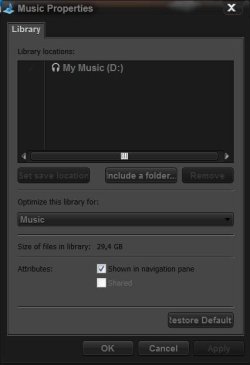
you know, in libraries, there is a default save location. That means, if you saved a document to the document library, it doesn't actually save to the library. It saves it to your default save location (you my document folder). This is why it is so awesome because you see all your documents from various folders but saving them causes them to be clumped in one good location. You can also change the default save folder
Cheers~!
 

My Computer

Computer Manufacturer/Model Number
Dell XPS 8000/HP G70 258US
OS
Windows 7 64 bit build 7600
CPU
Intel Core i5 750/Intel Pentium Duo T4200 2.00 ghz
Memory
6 gig/4 gig
Graphics Card(s)
ATI Radeon HD 4350/Intel Graphics Media Accelerator 4500MHD
Sound Card
Realtek/Conexant Smartaudio High Definition Device
Monitor(s) Displays
Two
Screen Resolution
1920x1080/1440x900
Hard Drives
750/250 gig
Internet Speed
24 mb
You can exclude or include any folder you want from library's. It's the best thing since sliced bread in my book. :)

http://www.sevenforums.com/tutorials/585-library-include-folder.html

But you can't include a folder but exclude a folder that is contained within that folder. Say I wanted to include all of the 'Pictures' folder, but exclude a folder contained within that pictures folder. Windows does not allow for that behaviour.
I think that is the behaviour that the OP was asking for, when he said 'Nothing. Except I personally don't want everything in a library.'

Include a folder but exclude one of its subfolders? And you can do that with the "My Computer" old Explorer view? How? Sounds like he needs to move that subfolder to anothet location, in which case it would not be in the Library view either.

The Library feature solves a problem that existed since Win 3.1, a single view of multiple folders on multiple devices that is user configurable. It also enables easy searching of the same.

If you don't like it don't use it. Plop a My Computer shortcut on the desktop or in the Taskbar and be done with it.
 

My Computer

OS
XP Pro & Vista Home Premium (x86); Windows Ultimate 7600 x64 Retail
Enough's enough of Libraries, it's clunky and a deadly slow way of working as it confuses me trying work out where files REALLY are (I'm easily confused). When I kept getting asked to open something when I was trying to save that was the point when I gave up.

I've taken all my folders out of Libraries and reverted to a simple My Docs etc. folder structure with an xxcopy 64 bit DOS type backup of data to another drive which is a blindingly fast method, double click on a shortcut and any new files are added to the backup folder in literally a second if there isn't much and as quick as your drives can manage if there's a lot. Libraries could be a good idea if it were more logical or if someone could point out a real advantage and a good workflow to use it effectively.

Change your ARRANGE BY setting to FOLDER... no, better stay with what makes you comfortable.
 

My Computer

OS
XP Pro & Vista Home Premium (x86); Windows Ultimate 7600 x64 Retail

My Computer

Computer Manufacturer/Model Number
Dell XPS420
OS
Vista Ult 64 bit Seven Ult RTM x64
CPU
Intel Core2 Quad Q6600 2.40 gigahertz
Memory
Crucial Ballistix 4x2GB PC2 6400
Graphics Card(s)
NVIDIA GeForce 8600 GTS 256 MB
Sound Card
Creative SB X-Fi audio
Monitor(s) Displays
HP w2207 + HPvs15
Screen Resolution
1680x1050 + 1024x768
Hard Drives
2-WD5000AAKS-500 GB
WD5000AAV-500 GB external
Keyboard
Microsoft Comfort Curve
Mouse
MX Revolution
Other Info
Wacom Intuos 2 Graphics Tablet
Experience Index=5.5
Why does it matter where the files "really" are???

Well, suppose the data is spread across several hard drives, including external drives. One day I want to take some of the files with me. Would be quite useful to know, which external drive are they on, right? Especially if "taking them with me" basically means slipping the external drive into my bag.

Now, more to the point of the thread, I do not understand people's frustration with libraries. I understand that some people do not like using them. I have only recently started using them myself. I found them to be useful for the multitude of photos on my computer, but at the same time they don't help me with my work at all.

But, the good thing about them - libraries are not real files, just links, so if you don't like them - don't use them, that's all there is to it! If you are so frustrated with the extra line in the navigation pane, then use Brink's tutorial and remove it.

If you are frustrated that explorer opens in libraries by default, then simply point your shortcut to %windir%\explorer.exe /n,/e, E:\home or whatever your favorite folder (instead of E:\home) - it will automatically go there when you click on the shortcut.

Organizing your data is your personal task. Everybody has their favorite way of doing this, there are no universal recipes - it all depends on what data, how much data, how do you like accessing your data, etc. Libraries is just one of the new ways to do this. Nobody forces you to use them.

 

My Computer

Computer Manufacturer/Model Number
Dell Inspiron 530
OS
Windows 7 Ultimate (x64)
CPU
Q6600
Memory
8 GB
Graphics Card(s)
ATI Radeon HD 2600 XT
Monitor(s) Displays
Samsung Syncmaster P2450
Screen Resolution
1920x1080
Hard Drives
Samsung HD103UJ
Samsung HD501LJ
Internet Speed
25 Mb/s
Well, suppose the data is spread across several hard drives, including external drives. One day I want to take some of the files with me. Would be quite useful to know, which external drive are they on, right? Especially if "taking them with me" basically means slipping the external drive into my bag.

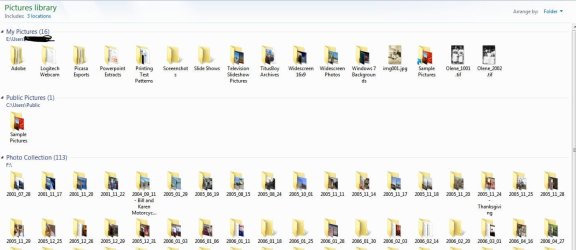
Well...We can see where our files are with one or two clicks...
Capture.JPG
Libraries are handy shortcut to our files, that's my opinion:D
 

My Computer

Computer Manufacturer/Model Number
Micro-Star International/MS-7529
OS
Windows 7 Ultimate x32
CPU
DualCore Intel Pentium E2200, 2218 MHz (11 x 202)
Motherboard
MSI G31M3 V2 (MS-7529) (2 PCI, 1 PCI-E x16,2 DDR2 DIMM)
Memory
2 GB DDR2-800 DDR2 SDRAM
Graphics Card(s)
nVIDIA GeForce 9500GT 1GB
Sound Card
Realtek ALC888/1200 @ Intel 82801GB ICH7
Monitor(s) Displays
Samsung SyncMaster 2253BW (Digital) 22'' LCD
Screen Resolution
1680x1050
Hard Drives
SAMSUNG HD322IJ ATA Device (298 GB , IDE)
Another factor in finding the location of files is an organized set of partitions. I like to create dedicated partitions for each group of data types. That way I can find what I want either by manually navigating to it with a file manager, or via the libraries that I have linked to them. I have tried to use drive letters that suggests the contents of each, and I can use the same partition in whatever OS that I'm booted to. So far as I can see, the libraries are just another tool to simplify managing the system.
 

My Computer

Computer Manufacturer/Model Number
DIY
OS
W7x64 Pro, SuSe 12.1/** W7 x64 Pro, XP MCE
CPU
Phenom II 1090T w/Noctua NH-D14 /**4400+ X2 w/CM Hyper TX 3
Motherboard
ASRock 890FX Deluxe 4/**A8N-SLI
Memory
2 x 2GB Patriot PGS34g1600LLKA/**4x1GB Corsair VS
Graphics Card(s)
EVGA GTX460 SC/**EVGA 8800GTS
Sound Card
Asus Xonar D2X/**Xonar D1
Monitor(s) Displays
Acer X233H, Dell E152FPc /**LG M237-WD
Screen Resolution
1920x1080 & 1024x768/**1980x1080
Hard Drives
WDC 2TB, 1.5TB, 1TB, 500GB,Seagate 500GB , Maxtor 80GB /**500GB Seagate & WDC 1TB Black
PSU
CM RS600 w/ APC BX1000G/**Antec 500 TP w/ APC BX1000
Case
HAF922/**Antec 1040IIB
Cooling
3x200mm, 1x140 and 1x120mm/**5x80mm fans
Keyboard
Logitech Media USB/**Saitek Eclipse
Mouse
Cordless Trackman Wheel/**Ditto
Internet Speed
3.3Mbps
Other Info
SB 560 5.1 w/ Sennheiser RS140/**Creative T20 speakers, Dvico FusionHDTV7 Gold RT, Cisco E3000, HP 5510V AIO, Linksys E3000, Belkin F5U237 hub and **F5D8055 adapter
(** = 2nd rig)
So, if I have 100Gb+ of data on various non C: drives in several folders, and then put them into Libraries - how do I stop my system backup growing enormously, because that's what happened after I started using libraries and yet the files aren't really there.
 

My Computer

OS
Windows 7
Don't move the data to the library locations, move the library location to the data. Open the user account link at the top right of the Start Menu to display a window with all of the libraries. Then with each of them that you choose (leave the ones marked as shortcuts alone), right click a library and go to Properties>Location tab>Move button and navigate to the location where you have that data located, then click the Select Folder button, and if it asks whether to merge the data from the original library location to the new, select yes.

Obviously, this only works well if you already have the data grouped into a good file directory or via dedicated partitions.

EDIT: One word of caution, doing this may cause a problem using the built in backup feature, and you may need to use a third party backup program for that function instead.
 

My Computer

Computer Manufacturer/Model Number
DIY
OS
W7x64 Pro, SuSe 12.1/** W7 x64 Pro, XP MCE
CPU
Phenom II 1090T w/Noctua NH-D14 /**4400+ X2 w/CM Hyper TX 3
Motherboard
ASRock 890FX Deluxe 4/**A8N-SLI
Memory
2 x 2GB Patriot PGS34g1600LLKA/**4x1GB Corsair VS
Graphics Card(s)
EVGA GTX460 SC/**EVGA 8800GTS
Sound Card
Asus Xonar D2X/**Xonar D1
Monitor(s) Displays
Acer X233H, Dell E152FPc /**LG M237-WD
Screen Resolution
1920x1080 & 1024x768/**1980x1080
Hard Drives
WDC 2TB, 1.5TB, 1TB, 500GB,Seagate 500GB , Maxtor 80GB /**500GB Seagate & WDC 1TB Black
PSU
CM RS600 w/ APC BX1000G/**Antec 500 TP w/ APC BX1000
Case
HAF922/**Antec 1040IIB
Cooling
3x200mm, 1x140 and 1x120mm/**5x80mm fans
Keyboard
Logitech Media USB/**Saitek Eclipse
Mouse
Cordless Trackman Wheel/**Ditto
Internet Speed
3.3Mbps
Other Info
SB 560 5.1 w/ Sennheiser RS140/**Creative T20 speakers, Dvico FusionHDTV7 Gold RT, Cisco E3000, HP 5510V AIO, Linksys E3000, Belkin F5U237 hub and **F5D8055 adapter
(** = 2nd rig)
Hello seeker,

Those are not libraries that your moving, those are personal folders, some of which are automatically included in their respective libraries. It will have the effect of causing all the files in those locations to become indexed and it will also move those folders from the user folder to where you store your files.
 

My Computer

Computer Manufacturer/Model Number
Dell XPS420
OS
Vista Ult 64 bit Seven Ult RTM x64
CPU
Intel Core2 Quad Q6600 2.40 gigahertz
Memory
Crucial Ballistix 4x2GB PC2 6400
Graphics Card(s)
NVIDIA GeForce 8600 GTS 256 MB
Sound Card
Creative SB X-Fi audio
Monitor(s) Displays
HP w2207 + HPvs15
Screen Resolution
1680x1050 + 1024x768
Hard Drives
2-WD5000AAKS-500 GB
WD5000AAV-500 GB external
Keyboard
Microsoft Comfort Curve
Mouse
MX Revolution
Other Info
Wacom Intuos 2 Graphics Tablet
Experience Index=5.5
Okay, then define "Library" please.
 

My Computer

Computer Manufacturer/Model Number
DIY
OS
W7x64 Pro, SuSe 12.1/** W7 x64 Pro, XP MCE
CPU
Phenom II 1090T w/Noctua NH-D14 /**4400+ X2 w/CM Hyper TX 3
Motherboard
ASRock 890FX Deluxe 4/**A8N-SLI
Memory
2 x 2GB Patriot PGS34g1600LLKA/**4x1GB Corsair VS
Graphics Card(s)
EVGA GTX460 SC/**EVGA 8800GTS
Sound Card
Asus Xonar D2X/**Xonar D1
Monitor(s) Displays
Acer X233H, Dell E152FPc /**LG M237-WD
Screen Resolution
1920x1080 & 1024x768/**1980x1080
Hard Drives
WDC 2TB, 1.5TB, 1TB, 500GB,Seagate 500GB , Maxtor 80GB /**500GB Seagate & WDC 1TB Black
PSU
CM RS600 w/ APC BX1000G/**Antec 500 TP w/ APC BX1000
Case
HAF922/**Antec 1040IIB
Cooling
3x200mm, 1x140 and 1x120mm/**5x80mm fans
Keyboard
Logitech Media USB/**Saitek Eclipse
Mouse
Cordless Trackman Wheel/**Ditto
Internet Speed
3.3Mbps
Other Info
SB 560 5.1 w/ Sennheiser RS140/**Creative T20 speakers, Dvico FusionHDTV7 Gold RT, Cisco E3000, HP 5510V AIO, Linksys E3000, Belkin F5U237 hub and **F5D8055 adapter
(** = 2nd rig)

My Computer

OS
XP Pro & Vista Home Premium (x86); Windows Ultimate 7600 x64 Retail
Much like a music library in WMP. It collects data about what is in particular folders and makes it all available in one place. If you have some music on your internal disks and some on your external disk, you can bring it all together in a library without actually moving any of it.

There are 11 tutorials that pretty well explain it here. http://www.sevenforums.com/tutorials/257-windows-7-tutorial-index-2.html#post1075
 

My Computer

Computer Manufacturer/Model Number
Dell XPS420
OS
Vista Ult 64 bit Seven Ult RTM x64
CPU
Intel Core2 Quad Q6600 2.40 gigahertz
Memory
Crucial Ballistix 4x2GB PC2 6400
Graphics Card(s)
NVIDIA GeForce 8600 GTS 256 MB
Sound Card
Creative SB X-Fi audio
Monitor(s) Displays
HP w2207 + HPvs15
Screen Resolution
1680x1050 + 1024x768
Hard Drives
2-WD5000AAKS-500 GB
WD5000AAV-500 GB external
Keyboard
Microsoft Comfort Curve
Mouse
MX Revolution
Other Info
Wacom Intuos 2 Graphics Tablet
Experience Index=5.5
Return of the OP

Hello - I am the OP, I have tried using the "Libraries" function on the outside chance that it is just me having difficulty learning a new system, I have been playing with it for a couple of months and I have determined that it is a complete waste of my time and resources, it appears to be an advantage for individuals that store data in multiple locations and is a good way to group those locations into a central location for easier access, I can understand a need for that except for one minor issue that I have, my music is all in one location M:\Music, my photos are all in one location P:\Pictures, my videos are all in one location V:\Videos, my letters and assorted documents are in one location X:\Data and my backups are in one location Z:\Backups, therefore I have absolutely nothing to organize because it already is organized, the use of the libraries function is a redundant step, so I have enabled the “My Computer” shortcut icon and the system works the way I prefer to see it, my drives are one click away, I only have one additional question, all of the Microsoft programs are linked to the “Libraries” so when I use the insert or save function the Libraries window pops up and I still have to search to find my drives, if I disable the “Libraries” function by the regedit method as posted Libraries Folder - Add or Remove from Navigation Pane
Will this remove the “Libraries” function altogether, which I have made my new goal in life - because I absolutely hate it and if I cannot get rid of it I will uninstall W7 and purchase a copy of XP Pro, because unlike most PC users the only thing I use my C:\ for is the OS and the programs (which are backed up elsewhere) and a format of the HD and a new installation with programs is only about a 3 hour process and I have wasted much more than that on W7, BTW I am 53 years old, I am a Licensed Professional Land Surveyor and I have been using Windows OS Systems daily since 1993, and I was around for the Windows ME disaster and the Vista disaster, the real problem I have is; M$ has not learned from those fiascos or listened to the dedicated users as to their workflow, instead they insist on trying to save face on the previous disaster when in fact they have created problems where they did not exist in the first place.
 

My Computer

OS
windows 7
Libraries are awesome. They have simplified file management extremely well. Kudos to Microsoft for this great feature.
 

My Computer

OS
Windows 7 RTM x86
I don't get it. Why are some people giving vague and more complex explanations that it actually is (talking to library furies)? I mean, it's basically a shortcut that links to multiple files and folders instead of 1.

[Which is basically what Muad Dib said. Sorry Muad Dib XP]
 

My Computer

Computer Manufacturer/Model Number
Asus G73SW-XN2
OS
Windows 2000 5.0 Build 2195
CPU
Intel Core i7-2630QM@2GHz(2.9GHz Turbo Boost) [Sandy Bridge]
Motherboard
Asus G73SW (Intel HM65 Chipset)
Memory
Kingston DDR3 1333 16GB (4GBx4)
Graphics Card(s)
nVidia GTX 460m 1.5GB
Sound Card
EAX Advanced HD 5.0, THX TruStudio
Monitor(s) Displays
17.3 in. primary & 23 in. secondary
Screen Resolution
1920x1080
Hard Drives
Seagate Momentus XT (SATA II) 500 GB @ 7200 RPM
Hitachi (SATA II) 500GB @ 7200 RPM

Non Raid because ASUS was crappy to choose an HM65 Chipset
Keyboard
Built-in 102-Key Backlit Keyboard
Other Info
It's a Laptop.
Status
Not open for further replies.
Back
Top