I messed up my network. Please help.

alant

New member
Local time
12:37 AM
Messages
21
Hello everyone,
I am trying to get my pc & laptop on the same network & homegroup (specs below). Things got mismatched and I now have 2 networks instead of 1. Here's how I'm looking right now:
-Homegroup is named HGROUP
-AJAX-PC: Network & Sharing/basic network information--> AJAX-PC--HGROUP--INTERNET. When I click on the house icon, I see AJAX-laptop & AJAX-pc
-AJAX-laptop: Network&Sharing/basic network info--> AJAX-LAPTOP--LAPTOPNETWORK-INTERNET. When I click on the house icon, I see AJAX-laptop only.
I ended up with 2 networks where the laptop doesn't see the pc network. The laptop says there is no homegroup on the network. That's because I have 2. Please help. I've seen this problem on the web, but I still can't fix it. Can I combine this into 1 network?
Thanks, Alan
 

My Computer My Computer

Computer Manufacturer/Model Number
GATEWAY DX4831
OS
Windows 7 Home Premium
Memory
RAM 6.00 GB RAM
Hard Drives
1TB
64-BIT
Hello everyone,
I am trying to get my pc & laptop on the same network & homegroup (specs below). Things got mismatched and I now have 2 networks instead of 1. Here's how I'm looking right now:
-Homegroup is named HGROUP
-AJAX-PC: Network & Sharing/basic network information--> AJAX-PC--HGROUP--INTERNET. When I click on the house icon, I see AJAX-laptop & AJAX-pc
-AJAX-laptop: Network&Sharing/basic network info--> AJAX-LAPTOP--LAPTOPNETWORK-INTERNET. When I click on the house icon, I see AJAX-laptop only.
I ended up with 2 networks where the laptop doesn't see the pc network. The laptop says there is no homegroup on the network. That's because I have 2. Please help. I've seen this problem on the web, but I still can't fix it. Can I combine this into 1 network?
Thanks, Alan


There are several solutions, but a fast easy workaround is to set up a new connection using workgroup and connecting both to that.

You wont even need to remember the homegroup password if you dont want to for workgroup doesnt require one like homegroup.
 

My Computer My Computer

Computer Manufacturer/Model Number
HP Pavillion dv-7 1005 Tx
OS
Win 8 Release candidate 8400
CPU
[email protected]
Memory
4 gigs
Graphics Card(s)
Nvidia 9600M
Sound Card
HD built-in
Monitor(s) Displays
17" Wxga
Screen Resolution
1440x900
Cooling
none
Internet Speed
45Mb down 5Mb up
How do I go about this? Do I need to delete my existing Homegroup? I have Home Premium on both computers.I would like to establish the new Homegroup on my desktop. My laptop is WIFI. What info do I need from my router? Also, my printer is connected directly to the desktop. I would like to share everything and be able to print from both. Each computer got on its' own network somehow. How do I use just 1 network and delete the other? I am also using Comodo Internet Security on both computers. At 1 point on the desktop, I believe I said to not detect new networks.Thanks.
 

My Computer My Computer

Computer Manufacturer/Model Number
GATEWAY DX4831
OS
Windows 7 Home Premium
Memory
RAM 6.00 GB RAM
Hard Drives
1TB
64-BIT
How do I go about this?
Simply go into network and sharing and create a new network connection using WORKGROUP.

Do I need to delete my existing Homegroup?
If the new connection works then you can kill IPv6 and delete the homegroup

I have Home Premium on both computers.I would like to establish the new Homegroup on my desktop.
To create a new homegroup is more difficult and you may run into the same problem again. Your choice of course.

My laptop is WIFI. What info do I need from my router?
You need do nothing to your router other than reboot it and the PC's at the same time.

Also, my printer is connected directly to the desktop. I would like to share everything and be able to print from both. Each computer got on its' own network somehow. How do I use just 1 network and delete the other?
By using workgroup

I am also using Comodo Internet Security on both computers. At 1 point on the desktop, I believe I said to not detect new networks.Thanks.
No idea but Comodo isnt my personal favorite.


See above
 

My Computer My Computer

Computer Manufacturer/Model Number
HP Pavillion dv-7 1005 Tx
OS
Win 8 Release candidate 8400
CPU
[email protected]
Memory
4 gigs
Graphics Card(s)
Nvidia 9600M
Sound Card
HD built-in
Monitor(s) Displays
17" Wxga
Screen Resolution
1440x900
Cooling
none
Internet Speed
45Mb down 5Mb up
How do I go about this?
Simply go into network and sharing and create a new network connection using WORKGROUP.
>when I go into network and sharing and select create new network connection, it says I am already connected to a network (hgroup). If I click set up new network, it hangs looking for my router to re-configure. Do I really want that?

Do I need to delete my existing Homegroup?
If the new connection works then you can kill IPv6 and delete the homegroup
pc: Currently, if I click on the homegroup (hgroup), I see the laptop & pc. This is how it looks:
PC--HGROUP-internet. If I click on HGROUP, it shows the laptop and the pc.
laptop:Network and internet says there is no homegroup on the network. If I click connect to network, it says connected to LAPTOP NETWORK. Here's how this looks:
LAPTOP--LAPTOP NETWORK--internet

My laptop is WIFI. What info do I need from my router?
You need do nothing to your router other than reboot it and the PC's at the same time.
see above4240J


Also, my printer is connected directly to the desktop. I would like to share everything and be able to print from both. Each computer got on its' own network somehow. How do I use just 1 network and delete the other?
By using workgroup
 

My Computer My Computer

Computer Manufacturer/Model Number
GATEWAY DX4831
OS
Windows 7 Home Premium
Memory
RAM 6.00 GB RAM
Hard Drives
1TB
64-BIT
Please note my latest responses below zigzag3143's bold comments. Thanks.
 

My Computer My Computer

Computer Manufacturer/Model Number
GATEWAY DX4831
OS
Windows 7 Home Premium
Memory
RAM 6.00 GB RAM
Hard Drives
1TB
64-BIT
How do I go about this?
Simply go into network and sharing and create a new network connection using WORKGROUP.
>when I go into network and sharing and select create new network connection, it says I am already connected to a network (hgroup). If I click set up new network, it hangs looking for my router to re-configure. Do I really want that?

Try booting into safe mode with network. If your network/router/computer locks when clicking new network it is either configured wrong or there is a problem.

Do I need to delete my existing Homegroup?
If the new connection works then you can kill IPv6 and delete the homegroup
pc: Currently, if I click on the homegroup (hgroup), I see the laptop & pc. This is how it looks:
PC--HGROUP-internet. If I click on HGROUP, it shows the laptop and the pc.
laptop:Network and internet says there is no homegroup on the network. If I click connect to network, it says connected to LAPTOP NETWORK. Here's how this looks:
LAPTOP--LAPTOP NETWORK--internet

You are trying to eliminate the homegroup so who cares what it says or looks.

My laptop is WIFI. What info do I need from my router?
You need do nothing to your router other than reboot it and the PC's at the same time.
see above4240J

???


Also, my printer is connected directly to the desktop. I would like to share everything and be able to print from both. Each computer got on its' own network somehow. How do I use just 1 network and delete the other?
By using workgroup

Different issue lets fix networking first
 

My Computer My Computer

Computer Manufacturer/Model Number
HP Pavillion dv-7 1005 Tx
OS
Win 8 Release candidate 8400
CPU
[email protected]
Memory
4 gigs
Graphics Card(s)
Nvidia 9600M
Sound Card
HD built-in
Monitor(s) Displays
17" Wxga
Screen Resolution
1440x900
Cooling
none
Internet Speed
45Mb down 5Mb up
How do I "kill IPv6 and delete the homegroup"?
 

My Computer My Computer

Computer Manufacturer/Model Number
GATEWAY DX4831
OS
Windows 7 Home Premium
Memory
RAM 6.00 GB RAM
Hard Drives
1TB
64-BIT
How do I "kill IPv6 and delete the homegroup"?

If workgroup works go into network and sharing>advanced>find IPv6 and uncheck it.
 

My Computer My Computer

Computer Manufacturer/Model Number
HP Pavillion dv-7 1005 Tx
OS
Win 8 Release candidate 8400
CPU
[email protected]
Memory
4 gigs
Graphics Card(s)
Nvidia 9600M
Sound Card
HD built-in
Monitor(s) Displays
17" Wxga
Screen Resolution
1440x900
Cooling
none
Internet Speed
45Mb down 5Mb up
I checked both laptop & desktop and didn't see IPv6 anywhere.
 

My Computer My Computer

Computer Manufacturer/Model Number
GATEWAY DX4831
OS
Windows 7 Home Premium
Memory
RAM 6.00 GB RAM
Hard Drives
1TB
64-BIT
I checked both laptop & desktop and didn't see IPv6 anywhere.

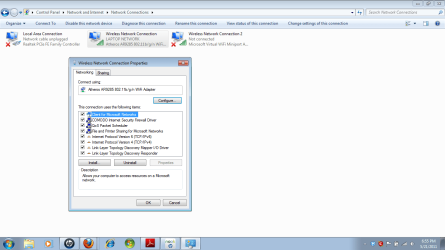
If you have Homegroup on a win 7 machine its there. Did you check here (see pic)
 
Last edited:

My Computer My Computer

Computer Manufacturer/Model Number
HP Pavillion dv-7 1005 Tx
OS
Win 8 Release candidate 8400
CPU
[email protected]
Memory
4 gigs
Graphics Card(s)
Nvidia 9600M
Sound Card
HD built-in
Monitor(s) Displays
17" Wxga
Screen Resolution
1440x900
Cooling
none
Internet Speed
45Mb down 5Mb up
I have Homegroup on WIN 7. How do I get to the screen you attached?
 

My Computer My Computer

Computer Manufacturer/Model Number
GATEWAY DX4831
OS
Windows 7 Home Premium
Memory
RAM 6.00 GB RAM
Hard Drives
1TB
64-BIT
I have Homegroup on WIN 7. How do I get to the screen you attached?

Start>control panel>all control panel items>network and sharing>change adapter settings>Pick your adapter>that screen
 

My Computer My Computer

Computer Manufacturer/Model Number
HP Pavillion dv-7 1005 Tx
OS
Win 8 Release candidate 8400
CPU
[email protected]
Memory
4 gigs
Graphics Card(s)
Nvidia 9600M
Sound Card
HD built-in
Monitor(s) Displays
17" Wxga
Screen Resolution
1440x900
Cooling
none
Internet Speed
45Mb down 5Mb up
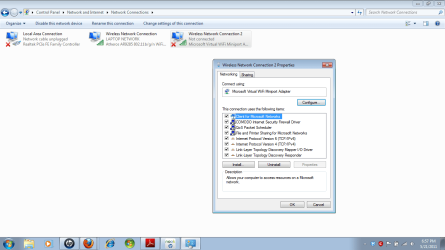
Attached are screenshots of the 2 connection settings on my laptop.Do I uncheck IPV6 on the connected connection?
 

Attachments

  • connection1.png
    connection1.png
    38.3 KB · Views: 8
  • connection2.png
    connection2.png
    36.9 KB · Views: 7

My Computer My Computer

Computer Manufacturer/Model Number
GATEWAY DX4831
OS
Windows 7 Home Premium
Memory
RAM 6.00 GB RAM
Hard Drives
1TB
64-BIT
Attached are screenshots of the 2 connection settings on my laptop.Do I uncheck IPV6 on the connected connection?

Yes you do (if IPv4) and workgroup is working.
 

My Computer My Computer

Computer Manufacturer/Model Number
HP Pavillion dv-7 1005 Tx
OS
Win 8 Release candidate 8400
CPU
[email protected]
Memory
4 gigs
Graphics Card(s)
Nvidia 9600M
Sound Card
HD built-in
Monitor(s) Displays
17" Wxga
Screen Resolution
1440x900
Cooling
none
Internet Speed
45Mb down 5Mb up
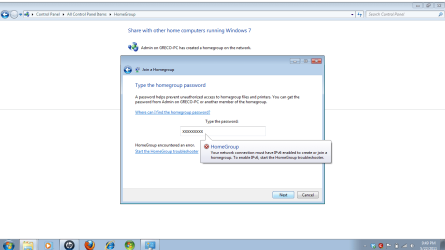
I now have IPV6 unchecked on pc & laptop. I can see everything on my laptop from the pc. The laptop says it is not connected to a homegroup. When I went to join it and entered the correct homegroup password, I received the attached error.
 

Attachments

  • homegroup error.png
    homegroup error.png
    28.5 KB · Views: 9

My Computer My Computer

Computer Manufacturer/Model Number
GATEWAY DX4831
OS
Windows 7 Home Premium
Memory
RAM 6.00 GB RAM
Hard Drives
1TB
64-BIT
I can also now see both the laptop & pc listed under network on both machines. The pc can see what's in laptop docs but not the other way around. I don't remember where to set thid
 

My Computer My Computer

Computer Manufacturer/Model Number
GATEWAY DX4831
OS
Windows 7 Home Premium
Memory
RAM 6.00 GB RAM
Hard Drives
1TB
64-BIT
I now have IPV6 unchecked on pc & laptop. I can see everything on my laptop from the pc. The laptop says it is not connected to a homegroup. When I went to join it and entered the correct homegroup password, I received the attached error.

Way back in post 7 I said there was a workaround and to use "workgroup" instead of "homegroup" so why are you trying to join a homegroup?

Thats the cause of your problem.
 

My Computer My Computer

Computer Manufacturer/Model Number
HP Pavillion dv-7 1005 Tx
OS
Win 8 Release candidate 8400
CPU
[email protected]
Memory
4 gigs
Graphics Card(s)
Nvidia 9600M
Sound Card
HD built-in
Monitor(s) Displays
17" Wxga
Screen Resolution
1440x900
Cooling
none
Internet Speed
45Mb down 5Mb up
I forgot from way back. So how do I delete the homegroup and create the workgroup?
Do I do that on both computers?
 

My Computer My Computer

Computer Manufacturer/Model Number
GATEWAY DX4831
OS
Windows 7 Home Premium
Memory
RAM 6.00 GB RAM
Hard Drives
1TB
64-BIT
I forgot from way back. So how do I delete the homegroup and create the workgroup?
Do I do that on both computers?

Read post 7 for instructions and yes both computer need to be on workgroup
 

My Computer My Computer

Computer Manufacturer/Model Number
HP Pavillion dv-7 1005 Tx
OS
Win 8 Release candidate 8400
CPU
[email protected]
Memory
4 gigs
Graphics Card(s)
Nvidia 9600M
Sound Card
HD built-in
Monitor(s) Displays
17" Wxga
Screen Resolution
1440x900
Cooling
none
Internet Speed
45Mb down 5Mb up
Back
Top