I Need Help With DVD Flick

jessejw

New member
Member
VIP
Local time
10:51 PM
Messages
157
Location
New York
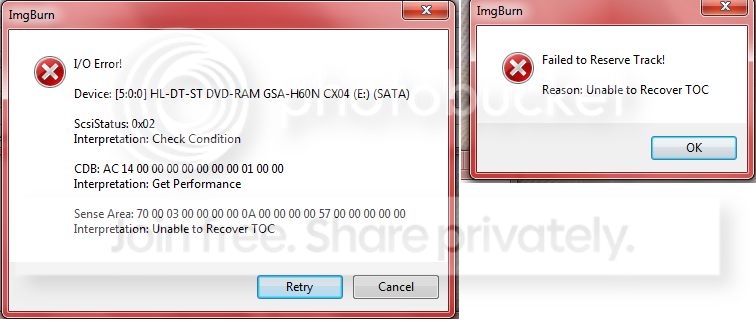
OK so I tried to burn a DVD as I was asleep and this is what I woke up to :(


dvdflick.png


Please post anything that you think will help THANKS!
 

My Computer

Computer Manufacturer/Model Number
Lenovo
OS
Windows 7 Home Premium 32bit
CPU
Intel(R) Core(TM)2 Quad CPU
Memory
3GB DDR2
Graphics Card(s)
Geforce 9800GTX+
Monitor(s) Displays
Dell 22"
Screen Resolution
1440x900
Hard Drives
1TB, 120GB External
Mouse
Razer Death Adder
Sorry, jessejw, I have yet to see that when I've used it. I've burned a number of DVD's with DVD Flick, combining various FLV files onto a DVD selectable via a menu - pretty lightweight stuff, actually.

What files were you converting to DVD when you saw this error message. Have you attempted to just start over?
 

My Computer

Computer Manufacturer/Model Number
Toshiba L355D
OS
Windows 7 Ultimate x64 SP1
CPU
Core2 Duo
Motherboard
Intel
Memory
4 GB
Graphics Card(s)
GM965 on-board
Sound Card
RealTek on-board
Monitor(s) Displays
19"+17"(laptop)
Screen Resolution
1440x900 (x 2)
Hard Drives
500GB Ext. 200GB Internal
PSU
N/A
Case
N/A
Cooling
N/A
Sorry, jessejw, I have yet to see that when I've used it. I've burned a number of DVD's with DVD Flick, combining various FLV files onto a DVD selectable via a menu - pretty lightweight stuff, actually.

What files were you converting to DVD when you saw this error message. Have you attempted to just start over?

I am burning an AVI file to a DVD-RW 4.7GB DVD and it worked a few times, but they were skipping so I tried it at a slower speed 1x this time and I got that. I used the same settings every time except for the speed.

What Kind of DVD's do you use DL or just DVD?
 

My Computer

Computer Manufacturer/Model Number
Lenovo
OS
Windows 7 Home Premium 32bit
CPU
Intel(R) Core(TM)2 Quad CPU
Memory
3GB DDR2
Graphics Card(s)
Geforce 9800GTX+
Monitor(s) Displays
Dell 22"
Screen Resolution
1440x900
Hard Drives
1TB, 120GB External
Mouse
Razer Death Adder
I just use DVD. A really cheap brand I got at Staples. ;)

I left all DVD Flick settings on default except title and menu options. I also kept working on the computer while doing the encoding and burn (it took a long time due to that).

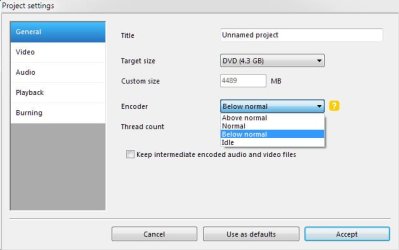
Have you tried changing the priority setting to "Above Normal" here?:

ScreenShot00325.jpg

The skipping is probably in the encoding and not the burning.
 

My Computer

Computer Manufacturer/Model Number
Toshiba L355D
OS
Windows 7 Ultimate x64 SP1
CPU
Core2 Duo
Motherboard
Intel
Memory
4 GB
Graphics Card(s)
GM965 on-board
Sound Card
RealTek on-board
Monitor(s) Displays
19"+17"(laptop)
Screen Resolution
1440x900 (x 2)
Hard Drives
500GB Ext. 200GB Internal
PSU
N/A
Case
N/A
Cooling
N/A
I just use DVD. A really cheap brand I got at Staples. ;)

I left all DVD Flick settings on default except title and menu options. I also kept working on the computer while doing the encoding and burn (it took a long time due to that).

Have you tried changing the priority setting to "Above Normal" here?:

View attachment 127134

The skipping is probably in the encoding and not the burning.

Yeah I put that to "Above Normal" and it has great quality but it skips every few mins
 

My Computer

Computer Manufacturer/Model Number
Lenovo
OS
Windows 7 Home Premium 32bit
CPU
Intel(R) Core(TM)2 Quad CPU
Memory
3GB DDR2
Graphics Card(s)
Geforce 9800GTX+
Monitor(s) Displays
Dell 22"
Screen Resolution
1440x900
Hard Drives
1TB, 120GB External
Mouse
Razer Death Adder
Back
Top