Conduit virus
There comes a time when a decision must be made. I think Noel, Tom, or another CBS knowledgable person could help resolve this.
Doing a step-bystep repair can take quite a while. I understand enough to be able to follow what they're doing, but not enough to know how the magic works.
Either of Greg's solutions will also resolve the issue. I don't know how Greg does some of his magic either, but this is fairly straight forward.
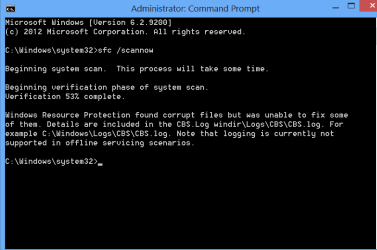
If the damaged System Files won't repair after repeated attempts then I'd judge performance to decide if you want to do a Repair Install. I reinstalls the OS while keeping files, programs and settings in place. Read over the tutorial to see if you feel up to it.
Every better would be to do a
Clean Reinstall - Factory OEM Windows 7
with our help to get it perfect.
I don't know if CheckSur would help or not in this case. Someone would have to see what information is in the CBS.log - there might be some info there even though SFC only ran to 53%
See Option Three in
http://www.sevenforums.com/tutorials/1538-sfc-scannow-command-system-file-checker.html - that tells you how to create a small sfcdetails.txt file and post it.
Please post the sfcdetails.txt file- thanks.
If you can't create it because the CBS.log file was compromised by SFC failing at 53%... don't sweat it.
Greg asked you to read up on some other things that will give you more information on a decision.
Soooo LADYPINKtomato1 what do you want to do?
Step-by-step Repair - could be a long haul, need expert help. Could be quick, still need expert help.
Repair Install - quickest
Clean Install - cleanest
The answer should probably wait until you've had a chance to read the tutorials Greg referenced and ask any questions about them. The answer might want to wait until someone can look at the sfcdetails.txt file.
Don't you love it when there is more than one way to fix Windows?
I read some more of the thread and saw conduit - a nasty pice of malware.
Members on the Security have successfuly wrestled this for other people. It's another step-by-step process that can take a while.
Now you have one more option available to you
- wait for a member of the Security Team to verify that the scans you did were sufficient to remove conduit.
Too many options? Yep, it's your machine and your thread.....
If you can't wait, then I'd back up my data and take Greg's full Reinstall sugestion.
If time isn't crucial in making a decision, I'd wait for the CBS and Security folks to provide their input.
Good luck.