Solved Icon cache always corrupts

Timsup2nothin

New member
Local time
4:23 PM
Messages
6
Following recommendations I found with Google, which came from this forum, I set up a bat file that deletes the icon cache db and reboots. That works. I also resized the icon cache to 8192, which is supposedly the max size and certainly seems like it should be big enough. But every morning when I turn my machine on I get the black icons and have to run the icon cache deleter. That's every morning.

So, two avenues to consider...

If someone has a suggestion about how to solve the basic problem I'd really like to do that.

If someone can explain how to splice the icon cache db deletion into the regular shutdown routines I can at least get rid of the double start in the morning. The final line in the deletion bat is:

shutdown /r /f /t 00

I think the /r is the restart switch, so if I just remove that I can restart in the morning, but I don't know if the other switches there would have unwanted effects for regular use. I also would rather just use the regular shutdown button since sometimes whoever is closest to the computer shuts it down and if it isn't me they would just use the regular button.

Anyone?
 

My Computer

Computer type
PC/Desktop
Computer Manufacturer/Model Number
custom build
OS
Windows 7 Home Premium 64bit
CPU
core i3 quad
Motherboard
Asus P8B75-M
Memory
8G
Graphics Card(s)
NVidia GT 520

My Computer

Computer type
PC/Desktop
Computer Manufacturer/Model Number
Self built custom
OS
64-bit Windows 11 Pro for Workstations
CPU
Intel i7-8700K OC'd to 5 GHz
Motherboard
ASUS ROG Maximus XI Formula Z390
Memory
64 GB (4x16GB) G.SKILL TridentZ RGB DDR4 3600 MHz
Graphics Card(s)
ASUS ROG-STRIX-GTX1080TI-O11G-GAMING
Sound Card
Integrated
Monitor(s) Displays
2 x Samsung Odyssey G7 27"
Screen Resolution
2560x1440
Hard Drives
1TB Samsung 990 PRO M.2,
4TB Samsung 990 PRO PRO M.2,
TerraMaster F8 SSD Plus NAS
PSU
Seasonic Prime Titanium 850W
Case
Thermaltake Core P3
Cooling
Corsair Hydro H115i
Keyboard
Logitech wireless K800
Mouse
Logitech MX Master 4
Internet Speed
2 Gb/s Download and 100 Mb/s Upload
Antivirus
Malwarebyte Anti-Malware Premium
Browser
Google Chrome
Other Info
Logitech Z625 speaker system,
Logitech BRIO 4K Pro webcam,
HP Color LaserJet Pro MFP M477fdn,
APC SMART-UPS RT 1000 XL - SURT1000XLI,
Galaxy S23 Plus phone
Welcome to the Seven Forums.

I've asked Brink to stop by this thread since he wrote this tutorial and batch file:
http://www.sevenforums.com/tutorials/49819-icon-cache-rebuild.html

In the mean time, it would be nice to know why the corruption is happening. Do you have shortcuts to network drives on your desktop?

edit: I type too slow :-)
 

My Computer

Computer type
Laptop
Computer Manufacturer/Model Number
Employer provided Dell Latitude
OS
W7 Pro SP1 64bit
CPU
i7
Memory
8GB
Graphics Card(s)
Intel HD Graphics
Hard Drives
crappy SSD
Antivirus
Employer mandated Symantec Endpoint Protection
Browser
Pale Moon 64bit, IE11 64bit & Chrome 64bit
Thanks guys. That's the batch file I'm using (great help!) but what I'm trying to avoid is having to use it every startup.

I agree it would be nice to know why the corruption is happening. By shortcuts to network drives do you mean shortcuts to files on those drives, or shortcuts to the drive itself?

I mostly have shortcuts to folders full of shortcuts on my desktop...a personal organizing system I got comfortable with in XP. Those folders of shortcuts are all in a folder called 'desktop navigation' on one of my drives.

EXAMPLE: 'Functions' on desktop is a shortcut to folder "D:\Desktop Navigation\Functions". That folder has what would be the desktop shortcuts to Firefox, Wordpad, Notepad, 7-zip, etc...all the applications I tend to use.

Is that something Win7 can't stomach?
 

My Computer

Computer type
PC/Desktop
Computer Manufacturer/Model Number
custom build
OS
Windows 7 Home Premium 64bit
CPU
core i3 quad
Motherboard
Asus P8B75-M
Memory
8G
Graphics Card(s)
NVidia GT 520

My Computer

Computer type
PC/Desktop
Computer Manufacturer/Model Number
Self built custom
OS
64-bit Windows 11 Pro for Workstations
CPU
Intel i7-8700K OC'd to 5 GHz
Motherboard
ASUS ROG Maximus XI Formula Z390
Memory
64 GB (4x16GB) G.SKILL TridentZ RGB DDR4 3600 MHz
Graphics Card(s)
ASUS ROG-STRIX-GTX1080TI-O11G-GAMING
Sound Card
Integrated
Monitor(s) Displays
2 x Samsung Odyssey G7 27"
Screen Resolution
2560x1440
Hard Drives
1TB Samsung 990 PRO M.2,
4TB Samsung 990 PRO PRO M.2,
TerraMaster F8 SSD Plus NAS
PSU
Seasonic Prime Titanium 850W
Case
Thermaltake Core P3
Cooling
Corsair Hydro H115i
Keyboard
Logitech wireless K800
Mouse
Logitech MX Master 4
Internet Speed
2 Gb/s Download and 100 Mb/s Upload
Antivirus
Malwarebyte Anti-Malware Premium
Browser
Google Chrome
Other Info
Logitech Z625 speaker system,
Logitech BRIO 4K Pro webcam,
HP Color LaserJet Pro MFP M477fdn,
APC SMART-UPS RT 1000 XL - SURT1000XLI,
Galaxy S23 Plus phone
Turns out I had failed to identify the problem.

I had used this guide to remove the shortcut arrows...option 2. For some reason on a startup it was rendering the transparent arrow as black. I installed the program from option one and it solved the problem. Why the icon cache rebuild was fixing this problem is a mystery to me, as is why the option 2 method in the guide didn't work for me. In any event the problem is now solved and I am happy to have registered here. I'll be back if I have any more problems.
 

My Computer

Computer type
PC/Desktop
Computer Manufacturer/Model Number
custom build
OS
Windows 7 Home Premium 64bit
CPU
core i3 quad
Motherboard
Asus P8B75-M
Memory
8G
Graphics Card(s)
NVidia GT 520
Ah, ok. Thank you for letting us know the specifics.

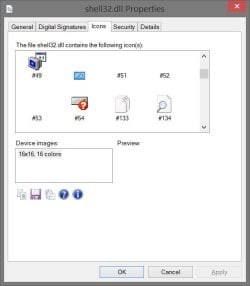
Using one of the other available numbered transparent icons below instead may be able work if you should need to.

shell32dll.jpg
 

My Computer

Computer type
PC/Desktop
Computer Manufacturer/Model Number
Self built custom
OS
64-bit Windows 11 Pro for Workstations
CPU
Intel i7-8700K OC'd to 5 GHz
Motherboard
ASUS ROG Maximus XI Formula Z390
Memory
64 GB (4x16GB) G.SKILL TridentZ RGB DDR4 3600 MHz
Graphics Card(s)
ASUS ROG-STRIX-GTX1080TI-O11G-GAMING
Sound Card
Integrated
Monitor(s) Displays
2 x Samsung Odyssey G7 27"
Screen Resolution
2560x1440
Hard Drives
1TB Samsung 990 PRO M.2,
4TB Samsung 990 PRO PRO M.2,
TerraMaster F8 SSD Plus NAS
PSU
Seasonic Prime Titanium 850W
Case
Thermaltake Core P3
Cooling
Corsair Hydro H115i
Keyboard
Logitech wireless K800
Mouse
Logitech MX Master 4
Internet Speed
2 Gb/s Download and 100 Mb/s Upload
Antivirus
Malwarebyte Anti-Malware Premium
Browser
Google Chrome
Other Info
Logitech Z625 speaker system,
Logitech BRIO 4K Pro webcam,
HP Color LaserJet Pro MFP M477fdn,
APC SMART-UPS RT 1000 XL - SURT1000XLI,
Galaxy S23 Plus phone
~~~
By shortcuts to network drives do you mean shortcuts to files on those drives, or shortcuts to the drive itself?

I mostly have shortcuts to folders full of shortcuts on my desktop...
~~~
Is that something Win7 can't stomach?
I see that you have made some progress since I last was on the forum... but I'll go ahead and answer some questions anyway.

By network drives, I mean drives on other computers or drives that are not a part of the computer that you are working with. The reason why I asked about that is: I see the same issue where I work. the icon database is corrupted with each reboot. We can stop that corruption if we remove desktop shortcuts to items that reside on a server that is in another town.

As far as W7 handling desktop folders that have shortcuts - it should handle it just fine. In fact, that is another work around for the problematic desktop shortcuts that I mentioned above (e.g. get the "networked shortcuts" off of the desktop).


Hopefully you do not need your original question answered. The difficulty in adding a shutdown line to the batch file in question is knowing how best to handle the timing. The batch file kills Explorer, then restarts Explorer. We would be adding a line that immediately shuts down Explorer again. If I were to add a shutdown line to that batch file in question, I would remove the part of the original batch file that kills/restarts Explorer... but that's just me :-)
 

My Computer

Computer type
Laptop
Computer Manufacturer/Model Number
Employer provided Dell Latitude
OS
W7 Pro SP1 64bit
CPU
i7
Memory
8GB
Graphics Card(s)
Intel HD Graphics
Hard Drives
crappy SSD
Antivirus
Employer mandated Symantec Endpoint Protection
Browser
Pale Moon 64bit, IE11 64bit & Chrome 64bit
Back
Top