
IconCache.db problem

KitKat9

New member
Local time
9:55 PM
Messages
5
Location
NorCal
((First off sorry if this post is at the wrong forum area.)


Yah I have a problem like billions of people are having. ._. It's been a month that I have this problem and I tried to fix the problem but it's not working. >.>
I'll try to go as much details to fix this problem because it's getting annoying.

BEFORE YOU SAY ANYTHING,
-Yes I tried this .bat file from Brink (http://www.sevenforums.com/tutorials/49819-icon-cache-rebuild.html)
-Yes I tried rebooting
-Yes I tried many IconCache.db rebuilders
-I DID NOT delete the IconCache.db from %USERNAME%\AppData\Local
-I DO have the "show Hidden Files" enabled
-Yes I tried doing System Restore
-Yes I tried using the Command Prompt program
-Yes I tried turning off the System Maintenance
-Yes I tried making a new User Account, same problem
-Yes I tried changing the display size
-Yes I tried changing the color depth (32bit to 16bit back to 32bit)
-Yes I tried uninstalling the theme and changing back to the default Win7 theme
-Yes I tried using Task Manager, end explorer.exe and rebooting back in

It's just NOT THERE. And no it did not "recreate" itself like it is suppose to do. Plus, I did not delete it, something did. I have NO clue what happen, but it was after I downloaded and installed MrGRiM01's Win7 theme (AKA Black Glass Aero Win 7 Final by *MrGRiM01 on deviantART)
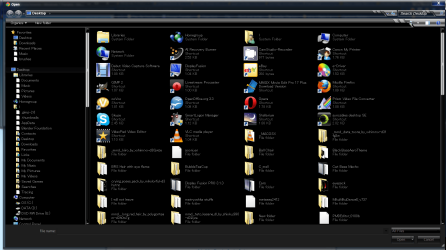
The only time I see the icons is when I open it NOT at Window Explorer (ie: opening/saving a pic on MSPaint, uploading files on SevenForums)
342345556.png

And of course, the Start Menu doesn't work, I clicked it, I pressed the Window key, and I pressed CTRL + ESC

The icons, well the shortcut icon still "works" but no icon pic what-so-ever.

And Windows Explorer LAGS, which is not suppose to happen.

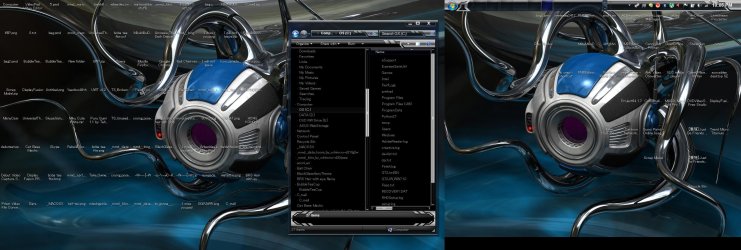
Also, my taskbar, no icons. :| I have to play the guessing game on which program is which.

I have a screenshot of my desktop, 3200 x 1080 because I'm using 2 monitors at the same time.
12424243.jpg


Sorry for wasting your time. >.>;;; I'm just a stupid female teen trying to get this fixed for a month.

BTW, I'm using an Asus G73W laptop running Windows Home Premium x64.

And I think my last option is to buy a disc of Windows Home Premium x64 and reinstall it. If so, then great, I have to beg my dad for it. :|


If you absolutely don't know what I'm talking about,
-IconCache.db missing / didn't recreate / I did not delete it / please see screenshots / I have no/blank icons
 

My Computer

OS
Windows 7 Home Premium x64
When you installed the third party party theme in question- did you back up the system files that you changed? Most third party themes will include a read me file which tells you to rename these files to explorer.exe.bak, imageres.dll.bak, etc.

Do you have these?

If so, reverse the process for each system file you changed/have a bak (original for).

Make sure you Take Ownership of each one in turn and reboot after doing so- for each system file you change back to the original.

If you changed them but do not remember which ones- download the theme pack again for the Read Me file/s?
 

My Computer

Computer type
PC/Desktop
OS
Windows 7
BEFORE YOU SAY ANYTHING,
-Yes I tried this .bat file from Brink (http://www.sevenforums.com/tutorials/49819-icon-cache-rebuild.html)

-I DID NOT delete the IconCache.db from %USERNAME%\AppData\Local


It's just NOT THERE. And no it did not "recreate" itself like it is suppose to do. Plus, I did not delete it, something did.

Hi,

You said you tried the .bat file from Brink, then you say you didn't delete the iconcache.db file.

Not sure if you know, but that is what the bat file and that tutorial does, delete the iconcache.db file in appdata/local, before recreating it.


Lot of those problems you describe sound like possible system corruption. Possibly caused by the third party theme. Might want to ask MrGrim about it.


If you ran sfc/scannow it might repair any corruption, but it will also remove your third party theme.

http://www.sevenforums.com/tutorials/1538-sfc-scannow-command-system-file-checker.html
 

My Computer

Computer type
PC/Desktop
Computer Manufacturer/Model Number
Airbot 2.0
OS
Windows 7 Ultimate x64 SP1
CPU
Core i7 920 (D0) @ 4Ghz, *26c idle *65c full load on air
Motherboard
Asus P6X58D Premium - Sata 6Gb/s - USB 3.0
Memory
12GB DDR3 Corsair Dominator -CMD12GX3M6A1600C8 at 1600MHz
Graphics Card(s)
Zotac Geforce GTX 770
Sound Card
ASUS Xonar D2X
Monitor(s) Displays
1 LG 24" Flatron W2453V-PF 1 Samsung 24" P2450H both 2ms RT
Screen Resolution
1920x1080@60hz
Hard Drives
1 Samsung 250GB 840 Evo SSD
1 OCZ Vertex2 180GB SSD
1 TB Samsung Spinpoint F1 7200RPM 32MB cache
2 500GB WD Caviar Blacks 7200RPM 32MB cache (WD5001AALS)

Pioneer DVD Burner DVR-S18M
PSU
Corsair HX1000W
Case
Cooler Master HAF 932
Cooling
Case Fans *3 230mm, *1 140mm/CPU - *Tuniq Tower 120 Extreme
Keyboard
Logitech Wireless MK700
Mouse
Logitech Wireless MK700
Internet Speed
DL 15 Mbps UL 0.98 Mbps
Antivirus
None
Browser
Firefox Nightly
Other Info
Processor-7.7 *RAM- 7.9 *Graphics-7.9 *Gaming Graphics- 7.9 *SSD- 7.8 W.E.I final score= 7.7
*Phone- LG Nexus 5
When you installed the third party party theme in question- did you back up the system files that you changed? Most third party themes will include a read me file which tells you to rename these files to explorer.exe.bak, imageres.dll.bak, etc.

Do you have these?

If so, reverse the process for each system file you changed/have a bak (original for).

Make sure you Take Ownership of each one in turn and reboot after doing so- for each system file you change back to the original.

If you changed them but do not remember which ones- download the theme pack again for the Read Me file/s?

May 24th, so basically 2 weeks right now. (I know that I said a month but it felt like a month to me >.>;;)

Oh I so wish that there was a readme file because there was none when I downloaded it. GREAT, now I'm screwed big time.
 

My Computer

OS
Windows 7 Home Premium x64
BEFORE YOU SAY ANYTHING,
-Yes I tried this .bat file from Brink (http://www.sevenforums.com/tutorials/49819-icon-cache-rebuild.html)

-I DID NOT delete the IconCache.db from %USERNAME%\AppData\Local


It's just NOT THERE. And no it did not "recreate" itself like it is suppose to do. Plus, I did not delete it, something did.

Hi,

You said you tried the .bat file from Brink, then you say you didn't delete the iconcache.db file.

Not sure if you know, but that is what the bat file and that tutorial does, delete the iconcache.db file in appdata/local, before recreating it.


Lot of those problems you describe sound like possible system corruption. Possibly caused by the third party theme. Might want to ask MrGrim about it.


If you ran sfc/scannow it might repair any corruption, but it will also remove your third party theme.

http://www.sevenforums.com/tutorials/1538-sfc-scannow-command-system-file-checker.html

Well there's not much solved posts that relates to my problem so I thought it would work. ^^;;

I'll ask MrGrim about it, and I'll try using the Command Prompt again.
 

My Computer

OS
Windows 7 Home Premium x64
May 24th, so basically 2 weeks right now. (I know that I said a month but it felt like a month to me >.>;;)

I know you said you tried a system restore but did you pick one prior to this date? As opposed to the one automatically offered by Windows? If not got to C:\Windows\Resources\Themes > right click the theme in question and select properties to find the date the file was created. Now do a restore and select a restore point prior to this date.

I am just downloading the theme and will take a look, I'll post again as soon as possible...
 

My Computer

Computer type
PC/Desktop
OS
Windows 7
KitKat9, did you install the Black Glass Aero *theme only* or the Mega Pack version? If it was the latter can you please tell me the exact style name you have in C:\Windows\Resources\Themes please?

If you installed the theme only version and did not change any system files then I suspect if Mr Grimm cannot help you are at the mercy of a restore/repair/reinstall.

If on the other hand it was the mega pack then you should check the locations below to see if you have backups of the originals. As I said earlier they may have .bak tagged on the end, or similar? Personally I *always* add .original so there can be no confusion if subsequently you change the theme again.

(64Bit)
x:\Windows\System32\imageres.dll
x:\Windows\System32\shell32.dll
x:\Windows\System32\imagesp1.dll
x:\Windows\SysWOW64\imageres.dll
x:\Windows\SysWOW64\shell32.dll
x:\Windows\SysWOW64\imagesp1.dll

If you have these backups please post back to this thread before trying to change them again- there are installation instructions for some of the sub themes which involve a cleanup utility included in the pack...
 
Last edited:

My Computer

Computer type
PC/Desktop
OS
Windows 7
KitKat9, did you install the Black Glass Aero *theme only* or the Mega Pack version? If it was the latter can you please tell me the exact style name you have in C:\Windows\Resources\Themes please?

If you installed the theme only version and did not change any system files then I suspect if Mr Grimm cannot help you are at the mercy of a restore/repair/reinstall.

If on the other hand it was the mega pack then you should check the locations below to see if you have backups of the originals. As I said earlier they may have .bak tagged on the end, or similar? Personally I *always* add .original so there can be no confusion.

(64Bit)
x:\Windows\System32\imageres.dll
x:\Windows\System32\shell32.dll
x:\Windows\System32\imagesp1.dll
x:\Windows\SysWOW64\imageres.dll
x:\Windows\SysWOW64\shell32.dll
x:\Windows\SysWOW64\imagesp1.dll

If you have these backups please post back to this thread before trying to change them again- there are installation instructions for some of the sub themes which involve a cleanup utility included in the pack...

I downloaded the Mega Pack.

I've looked up the files you mentioned, all were not modified. But I did not see any .bak files of them, only .mui, which I will not mess around with. But in the theme folder (AKA C:\Windows\Resources\Theme\Full_Glass_Blue_Icon_Pack_7600_X64\Data\), there are the same files in there, so I think is to backup the original files and drag/drop the new files to there?
 

My Computer

OS
Windows 7 Home Premium x64
May 24th, so basically 2 weeks right now. (I know that I said a month but it felt like a month to me >.>;;)

I know you said you tried a system restore but did you pick one prior to this date? As opposed to the one automatically offered by Windows? If not got to C:\Windows\Resources\Themes > right click the theme in question and select properties to find the date the file was created. Now do a restore and select a restore point prior to this date.

I am just downloading the theme and will take a look, I'll post again as soon as possible...

On the system restore, I did picked a date a bit earlier than what it was created (ie: I tried using System Restore on May 25, and "undo" to May 24 about 8:00AM when I dl'd the theme pack around 4:30 PM)
 

My Computer

OS
Windows 7 Home Premium x64

My Computer

Computer type
PC/Desktop
Computer Manufacturer/Model Number
Self Assembled
OS
Microsoft Windows 10 Pro Insider Preview 64-bit
CPU
Intel(R) Core(TM) i3-4130 CPU @ 3.40GHz
Motherboard
Gigabyte Technology Co., Ltd. B85M-D3H
Memory
Corsair Vengence 4GB x2 (8.00GB Dual-Channel DDR3 @ 798MHz)
Graphics Card(s)
2047MB GeForce GTS 450 (ZOTAC International)
Sound Card
Onboard (Realtek High Definition Audio)
Monitor(s) Displays
LG Flatron E2040T
Screen Resolution
1600x900
Hard Drives
Western Digital 1 TB
Seagate 500 GB
PSU
Corsair VS550
Case
Cooler Master K380
Cooling
Cooler Master Seidon 120V Plus
Keyboard
Logitech MK260r
Mouse
Logitech MK260r
Internet Speed
PMPL Broadband
Antivirus
Windows Defender + MBAM
Browser
Firefox
Other Info
Dell Studio 15" Laptop
One more question .... Have you tried SFC /SCANNOW Command - System File Checker ? it should revert the main theme at least .

Is the full Glass thing is there in your system trey ? Exit it, and disable it to be started up from the next time (Hold Windows key +"R" to open the run window, type msconfig and hit enter, and go the startup tab of the resulting window .... if full glass is there, disable it ).

If everything else but the folder issue is solved, let us know.

If there is still a problem (but not the icon problem.... it may be solved easily) like start menu malfunctioning, back your data up externally, and reset your computer to factory settings .
 

My Computer

Computer type
PC/Desktop
Computer Manufacturer/Model Number
Self Assembled
OS
Microsoft Windows 10 Pro Insider Preview 64-bit
CPU
Intel(R) Core(TM) i3-4130 CPU @ 3.40GHz
Motherboard
Gigabyte Technology Co., Ltd. B85M-D3H
Memory
Corsair Vengence 4GB x2 (8.00GB Dual-Channel DDR3 @ 798MHz)
Graphics Card(s)
2047MB GeForce GTS 450 (ZOTAC International)
Sound Card
Onboard (Realtek High Definition Audio)
Monitor(s) Displays
LG Flatron E2040T
Screen Resolution
1600x900
Hard Drives
Western Digital 1 TB
Seagate 500 GB
PSU
Corsair VS550
Case
Cooler Master K380
Cooling
Cooler Master Seidon 120V Plus
Keyboard
Logitech MK260r
Mouse
Logitech MK260r
Internet Speed
PMPL Broadband
Antivirus
Windows Defender + MBAM
Browser
Firefox
Other Info
Dell Studio 15" Laptop
In the installation folder for the style you have quoted there is a READ ME file that I have attached here;

View attachment README.txt

According to this you are advised to create backups of various system files. If I understand your last posts correctly then you have not made these backups, nor have you replaced the originals with those provided in the theme pack. In which case I would not suggest you try to salvage the effort by utilizing any of the replacement files located in C:\Windows\Resources\Theme\Full_Glass_Blue_Icon_Pack_7600_X64\Data.

It seems to me you may have only partially installed the theme, and given the READ ME instructions advice for reinstallation- I would seek Mr Grimm's advice on which tools might be used in the circumstances.

Otherwise you should follow Arc's advice and turn off Full glass.exe, if you have it running. Then I would try one or two more system restore points prior to the date of the one you chose last time, and/or SFC /SCANNOW Command - System File Checker.
 

My Computer

Computer type
PC/Desktop
OS
Windows 7
Back
Top