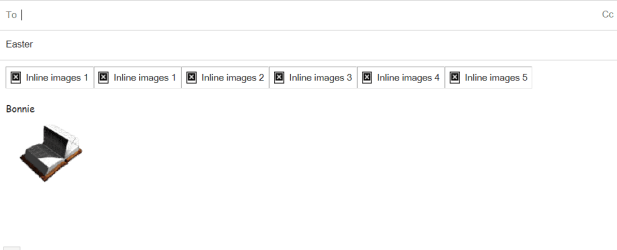
Solved icons change to inline images

bjclark

New member
Member
Local time
4:27 AM
Messages
51
I downloaded a number of icons to my gmail drafts to use with my email. For some reason, the icons have all reverted to little black boxes with a white x and are labeled inline images. Can anyone tell me what I have done now? Thanks.
 

Attachments

  • Inline images.png
    Inline images.png
    7.1 KB · Views: 16

My Computer My Computer

Computer Manufacturer/Model Number
Dell Inspiron 545
OS
Windows 7
CPU
Pentium Dual-Core 2.70GHz
Memory
6.00 GB

My Computer My Computer

Computer type
Laptop
Computer Manufacturer/Model Number
Sony Vaio VPCEB47GM Laptop
OS
Win 7 Pro 64-bit
CPU
Intel i5 2.4 Ghz
Memory
8GB DDR3
Graphics Card(s)
Intel HD 3000
Sound Card
IDT High Definition
Monitor(s) Displays
15.6 WGXA Anti-Glare LED
Screen Resolution
1280x800
Hard Drives
640Gb 7200rpm
Antivirus
MSE
Browser
Opera (primary) with IE9 backup
Thanks for your reply. Rebuilding the Icon Cache didn't help.
 

My Computer My Computer

Computer Manufacturer/Model Number
Dell Inspiron 545
OS
Windows 7
CPU
Pentium Dual-Core 2.70GHz
Memory
6.00 GB
Where did you get those icons, are they locally stored or linked?
Are they a .ico format?
 

My Computer My Computer

Computer type
PC/Desktop
OS
Windows 10
CPU
Intel Core i5 3570K
Motherboard
Asus P8Z77V-PRO
Memory
16GB 1600Mhz G.Skill
Graphics Card(s)
Gigabyte GTX 970 G1-Gaming
PSU
Seasonic 1000W Platinum
Case
Fractal Design Define R4
Cooling
Noctua NH-D14
I got them from many different places and all are gifs. I have copies of them in my "Pictures" and they are displayed correctly there. The odd thing is that they were all fine in Gmail until sometime in the last month. It may have happened because I tinkered with one of the settings to create this problem.
 

My Computer My Computer

Computer Manufacturer/Model Number
Dell Inspiron 545
OS
Windows 7
CPU
Pentium Dual-Core 2.70GHz
Memory
6.00 GB
New info: I copied one of the "inline image" boxes, pasted it to a newly composed email, and sent it to myself. When I received it, it appeared as an icon! I tried to copy and paste the icon back into "drafts" but it reverted to the "inline image" box again. Do you think "inline image" is the way Gmail stores icons when there are too many of them? Thanks for your time.

 

My Computer My Computer

Computer Manufacturer/Model Number
Dell Inspiron 545
OS
Windows 7
CPU
Pentium Dual-Core 2.70GHz
Memory
6.00 GB
Could be its in a storage state, sadly I can't test the theory because the drafts
I make doesn't even have an option to view the file's thumbnails, my email is using a different style
of viewing attached files.

What is your email client?
 

My Computer My Computer

Computer type
PC/Desktop
OS
Windows 10
CPU
Intel Core i5 3570K
Motherboard
Asus P8Z77V-PRO
Memory
16GB 1600Mhz G.Skill
Graphics Card(s)
Gigabyte GTX 970 G1-Gaming
PSU
Seasonic 1000W Platinum
Case
Fractal Design Define R4
Cooling
Noctua NH-D14

My Computer My Computer

Computer type
PC/Desktop
Computer Manufacturer/Model Number
Self Built
OS
Win 10 Pro x64
CPU
Intel I5-2500K @3.3GHz
Motherboard
Asrock P67 Extreme4
Memory
16GB G.Skill Ripjaws X (4x4GB)
Graphics Card(s)
EVGA GeForce 750 Ti SC 2GB
Sound Card
ASUS Xonar DG 5.1 Channels 24-bit 96KHz PCI Interface Sound
Monitor(s) Displays
auria eq2367
Screen Resolution
1920 x 1080
Hard Drives
250GB Samsung 850 EVO SSD
1TB WD Blue
1TB Hitachi
PSU
SeaSonic X 650W 80 Plus Gold
Case
Corsair Obsidian 750D
Cooling
Corsair H60, Three 140mm case fans
Keyboard
Logitech Wireless Keyboard K520
Mouse
Logitech Wireless Mouse M310
Internet Speed
Wave Broadband ~ 100 dn 5 up
Antivirus
Windows Defender, Malwarebytes Premium
Browser
Edge, IE11, Chrome
Other Info
Laptop specs: HP g7-1365dx /
CPU: AMD A6-3420M APU with Radeon(tm) HD Graphics /
RAM: Crucial 8Gb (2x4Gb) /
SSD: Crucial M4-CT128M4SSD2 ATA Device/ FW 000F /
GFX: AMD Radeon HD 6520G /
OS: Windows 10 Pro x64
:doh: *hides*

Gmail forces me to use the new style, so I assumed it does for everyone.
With that in mind I still can't test it :o
 

My Computer My Computer

Computer type
PC/Desktop
OS
Windows 10
CPU
Intel Core i5 3570K
Motherboard
Asus P8Z77V-PRO
Memory
16GB 1600Mhz G.Skill
Graphics Card(s)
Gigabyte GTX 970 G1-Gaming
PSU
Seasonic 1000W Platinum
Case
Fractal Design Define R4
Cooling
Noctua NH-D14
I played around with Gmail and discovered that when you are composing an email, a number of little icons will appear on the very bottom line. One of them looks like a camera, and when you click on it you can add an icon or photo to your email from your "pictures" collection. It's a perfect way to add images! No more trying to save images in "drafts" and no more inline image problems! Thanks for all of the replies.
 

My Computer My Computer

Computer Manufacturer/Model Number
Dell Inspiron 545
OS
Windows 7
CPU
Pentium Dual-Core 2.70GHz
Memory
6.00 GB
Back
Top