P poolmon New member Power User VIP Local time 1:23 AM Messages 172 Jul 2, 2009 #1 How can I get my IE 8 "Favorites" window in Win7 to remain open as I browse. After I click on a link in Favorites, Favorites immediately closes. My Computer OSwin 7
How can I get my IE 8 "Favorites" window in Win7 to remain open as I browse. After I click on a link in Favorites, Favorites immediately closes.
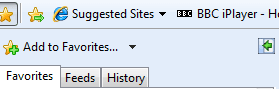
seano New member Power User Local time 6:23 AM Messages 108 Location UK Jul 2, 2009 #2 Open up your favourites, then look across the favourites window at the top; you will see a little green arrow in a box. Click that and it will pin your favourites open for you. Hope that explains it lol. Attachments Untitled.png 2.9 KB · Views: 78 Last edited: Jul 2, 2009 My Computer Computer Manufacturer/Model NumberAll mine :)OS7x86 7260, 7x86 7264CPUE6850Memory4GIG DDR2Graphics Card(s)8800GTS
Open up your favourites, then look across the favourites window at the top; you will see a little green arrow in a box. Click that and it will pin your favourites open for you. Hope that explains it lol.
P poolmon New member Power User VIP Thread Starter Local time 1:23 AM Messages 172 Jul 2, 2009 #3 Thanks Much! I searched all over for a solution. I've got to get used to "pinning." My Computer OSwin 7