“IE cannot display the webpage” after each Windows logon

Thomas R

New member
Member
Local time
11:21 PM
Messages
69
Location
SF Bay
“IE cannot display the webpage” after each Windows logon

After each Windows logon when I try to open a webpage I get the following message: “IE cannot display the webpage”
I have to go to Tools –> Internet options –> Connections tab –> LAN settings and check “Automatically detect settings” to enable browsing.
If this was a one time deal it would be fine but every time I log off, restart the computer or connect to another network (this is on a laptop) Windows forgets this setting and I have to re-check “Automatically detect settings”.

I only have this issue on one of my computers – the others don’t have this problem nor do they need the check at “Automatically detect settings” to browse webpages properly.

I have this issue since I did a clean re-install of Windows 7 x64 Ultimate and used EasyTransfer to transfer my account and files (which btw failed to transfer my Windows Live Mail accounts properly so that I hat to do that manually).

This issue is very annoying.

What is wrong and how can I fix it?
 

My Computer My Computer

Computer type
PC/Desktop
Computer Manufacturer/Model Number
Dell Precision M6300
OS
Windows 7 Ultimate x64 SP1 Ver. 6.1.7601 (Build 7601)
CPU
Intel Core 2 Extreme X9000, 2.80GHz 6MB L2-Cache, 800MHz FSB
Motherboard
Dell JM679
Memory
8 GB - 2x 4GB SODIMM DDR-II
Graphics Card(s)
NVIDIA Quadro FX 3600M (Driver Ver. 8.17.12.6776)
Sound Card
IDT/SigmaTel STAC 92XX C Major HD Audio
Monitor(s) Displays
17'' WUXGA TFT
Screen Resolution
1920 x 1200
Hard Drives
SSD Crucial m4 512GB (CT512M4SSD2)
Case
Laptop
Mouse
Microsoft Wireless Laser Mouse 8000
Browser
IE 10
When you transferred files and settings apparently the registry entry for that setting went bad (I'm fairly certain it's a registry item at least)

I'm stuck on my old laptop right now and won't have access to my main machine until morning I could track it for you then, this thing only runs xp though. It appears for some reason your system has decided the default setting is the reverse of what it should be though.

anyhow working from a old ms tech file I found it should be something to the effect of


  • HKEY_LOCAL_MACHINE\SOFTWARE\Policies\Microsoft\Internet Explorer\Control Panel\ConnectionsTab
or very close to that.You'll be looking for the autoconfig entry.
 

My Computer My Computer

Computer Manufacturer/Model Number
Insane hobo technologies. ;-)
OS
Windows 7 x64
CPU
Intel i7 2600k
Motherboard
Asrock z68 extreme 4 gen 3
Memory
G.skill Ripjaw 16gigs @ 1866
Graphics Card(s)
Nvidia gtx580 (evga)
Sound Card
Integrated HD audio + hdmi
Monitor(s) Displays
24" ASUS widescreen + 42" insignia
Screen Resolution
1080p (1920x1080)
Hard Drives
128 Samsung 830
256 Samsung 840
3 x 1tb storage drive (various)
1 western digital 1tb (eSATA)
1 Seagate 1tb (eSATA)
PSU
1 kilowatt SLI/Crossfire rated Silverstone modular
Case
NZXT Phantom + additional 220 fan
Cooling
Zalmann
Keyboard
Microsoft wireless 3000 (v2)
Mouse
MS - wireless 5000 (bluetrack)
Internet Speed
depends on if you ask me or my provider.
Other Info
The above information is provided as is, and the author assumes no responsibility for issues it may cause with your sanity or fanboyism.
I’m also sure this is a registry setting gone bad – the question is just which.

I searched my registry for that entry you gave but it does not exist on my system

- HKEY_LOCAL_MACHINE\SOFTWARE\Policies\Microsoft\ exists but does not contain an Internet Explorer sub-key. So it must be somewhere else.
 

My Computer My Computer

Computer type
PC/Desktop
Computer Manufacturer/Model Number
Dell Precision M6300
OS
Windows 7 Ultimate x64 SP1 Ver. 6.1.7601 (Build 7601)
CPU
Intel Core 2 Extreme X9000, 2.80GHz 6MB L2-Cache, 800MHz FSB
Motherboard
Dell JM679
Memory
8 GB - 2x 4GB SODIMM DDR-II
Graphics Card(s)
NVIDIA Quadro FX 3600M (Driver Ver. 8.17.12.6776)
Sound Card
IDT/SigmaTel STAC 92XX C Major HD Audio
Monitor(s) Displays
17'' WUXGA TFT
Screen Resolution
1920 x 1200
Hard Drives
SSD Crucial m4 512GB (CT512M4SSD2)
Case
Laptop
Mouse
Microsoft Wireless Laser Mouse 8000
Browser
IE 10
Even though the setting "check automatically" is not needed based on the other PCs, I don't think IE should "forget" it when you boot up. Have you tried to reset IE: Tools/Internet Options/Advanced/Reset.

BTW, installing Windows "Clean" is the right way. But instead of using "easy transfer" it would be better to just save the files and folders you understand (Documents, Favorites, Pictures...) on a usb drive and plug it in to the new PC for drag and drop of the contents of those folders to the new folders by the same name on your new PC. All programs should be reinstalled from scratch, all emails and contacts moved separately or using the respective programs' export/import features, and all accounts, message rules, and any other customizations should be recreated from scratch. (Admittedly, it would be nice if computers were smart enough to make things easy.)
 

My Computer My Computer

Computer type
PC/Desktop
Computer Manufacturer/Model Number
OQO 2+
OS
Windows 8 Pro w/MC 32-bit
CPU
Intel Atom 1.86 GHz
Motherboard
OQO 2+
Memory
2 GB
Graphics Card(s)
Intel GMA 500
Sound Card
IDT
Monitor(s) Displays
LCD
Screen Resolution
800 x 480 (portable) 1280 x 1024 (docked)
Hard Drives
64 GB SSD
PSU
9 Ah Battery (portable) or OQO Brick (docked)
Case
Shirt Pocket Sized
Cooling
Tiny Fan
Keyboard
Slide out (portable) DiNovo Edge (docked)
Mouse
Eraser head (portable) Logitech Bluetooth (docked)
Internet Speed
WWAN or 802.11G (portable) T1 (docked)
Browser
IE 10
Other Info
DVD-RW OQO Docking Station
Hi,

I've seen this behavior many time before when malware gets onto a machine, the first thing it does is disable internet access via setting a nul proxy.

1st thing you need to do is a full system scan using MalwareBytes and see what reults it turns up.
 

My Computer My Computer

Computer Manufacturer/Model Number
Compaq Desktop
OS
Windows 7 Ultimate x64
CPU
AMD Sempron Dual Core
Memory
3GB
Graphics Card(s)
NVIDIA GeForce 6150SE nForce 430
Screen Resolution
1024x768
Hard Drives
150GB Sata
I did a full scan with MalwareBytes and it has not found any infections of the system. So it’s not that.
 

My Computer My Computer

Computer type
PC/Desktop
Computer Manufacturer/Model Number
Dell Precision M6300
OS
Windows 7 Ultimate x64 SP1 Ver. 6.1.7601 (Build 7601)
CPU
Intel Core 2 Extreme X9000, 2.80GHz 6MB L2-Cache, 800MHz FSB
Motherboard
Dell JM679
Memory
8 GB - 2x 4GB SODIMM DDR-II
Graphics Card(s)
NVIDIA Quadro FX 3600M (Driver Ver. 8.17.12.6776)
Sound Card
IDT/SigmaTel STAC 92XX C Major HD Audio
Monitor(s) Displays
17'' WUXGA TFT
Screen Resolution
1920 x 1200
Hard Drives
SSD Crucial m4 512GB (CT512M4SSD2)
Case
Laptop
Mouse
Microsoft Wireless Laser Mouse 8000
Browser
IE 10
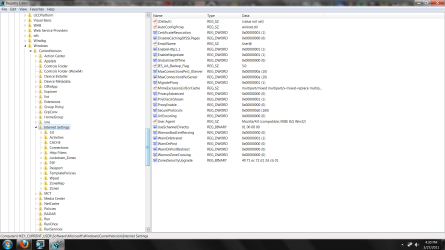
Do you match these settings in reg?
(path on bottom in status bar)
 

Attachments

  • Untitled.png
    Untitled.png
    86.6 KB · Views: 36

My Computer My Computer

Computer Manufacturer/Model Number
Insane hobo technologies. ;-)
OS
Windows 7 x64
CPU
Intel i7 2600k
Motherboard
Asrock z68 extreme 4 gen 3
Memory
G.skill Ripjaw 16gigs @ 1866
Graphics Card(s)
Nvidia gtx580 (evga)
Sound Card
Integrated HD audio + hdmi
Monitor(s) Displays
24" ASUS widescreen + 42" insignia
Screen Resolution
1080p (1920x1080)
Hard Drives
128 Samsung 830
256 Samsung 840
3 x 1tb storage drive (various)
1 western digital 1tb (eSATA)
1 Seagate 1tb (eSATA)
PSU
1 kilowatt SLI/Crossfire rated Silverstone modular
Case
NZXT Phantom + additional 220 fan
Cooling
Zalmann
Keyboard
Microsoft wireless 3000 (v2)
Mouse
MS - wireless 5000 (bluetrack)
Internet Speed
depends on if you ask me or my provider.
Other Info
The above information is provided as is, and the author assumes no responsibility for issues it may cause with your sanity or fanboyism.
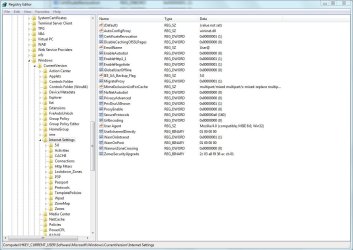
I have 2 entries less and some have different values. But I don't know if those make a difference.
This is how it looks on my system:
 

Attachments

  • Registry 1.JPG
    Registry 1.JPG
    122.6 KB · Views: 13

My Computer My Computer

Computer type
PC/Desktop
Computer Manufacturer/Model Number
Dell Precision M6300
OS
Windows 7 Ultimate x64 SP1 Ver. 6.1.7601 (Build 7601)
CPU
Intel Core 2 Extreme X9000, 2.80GHz 6MB L2-Cache, 800MHz FSB
Motherboard
Dell JM679
Memory
8 GB - 2x 4GB SODIMM DDR-II
Graphics Card(s)
NVIDIA Quadro FX 3600M (Driver Ver. 8.17.12.6776)
Sound Card
IDT/SigmaTel STAC 92XX C Major HD Audio
Monitor(s) Displays
17'' WUXGA TFT
Screen Resolution
1920 x 1200
Hard Drives
SSD Crucial m4 512GB (CT512M4SSD2)
Case
Laptop
Mouse
Microsoft Wireless Laser Mouse 8000
Browser
IE 10
well there goes that theory I was thinking the winint entry was missing.
 

My Computer My Computer

Computer Manufacturer/Model Number
Insane hobo technologies. ;-)
OS
Windows 7 x64
CPU
Intel i7 2600k
Motherboard
Asrock z68 extreme 4 gen 3
Memory
G.skill Ripjaw 16gigs @ 1866
Graphics Card(s)
Nvidia gtx580 (evga)
Sound Card
Integrated HD audio + hdmi
Monitor(s) Displays
24" ASUS widescreen + 42" insignia
Screen Resolution
1080p (1920x1080)
Hard Drives
128 Samsung 830
256 Samsung 840
3 x 1tb storage drive (various)
1 western digital 1tb (eSATA)
1 Seagate 1tb (eSATA)
PSU
1 kilowatt SLI/Crossfire rated Silverstone modular
Case
NZXT Phantom + additional 220 fan
Cooling
Zalmann
Keyboard
Microsoft wireless 3000 (v2)
Mouse
MS - wireless 5000 (bluetrack)
Internet Speed
depends on if you ask me or my provider.
Other Info
The above information is provided as is, and the author assumes no responsibility for issues it may cause with your sanity or fanboyism.
That damn Windows registry is just too big and convoluted to easily find the entry that is causing the problem.
Not that I have much of an idea where to look in the first place ...

I’m not 100% sure but I think this issue started after I set up/configured Dell QuickSet (not after installing it!)
Though I have QuickSet also on my 2 other M6300 laptops and those don’t have this problem.
And before the system re-install it worked fine with the same QuickSet settings.
 

My Computer My Computer

Computer type
PC/Desktop
Computer Manufacturer/Model Number
Dell Precision M6300
OS
Windows 7 Ultimate x64 SP1 Ver. 6.1.7601 (Build 7601)
CPU
Intel Core 2 Extreme X9000, 2.80GHz 6MB L2-Cache, 800MHz FSB
Motherboard
Dell JM679
Memory
8 GB - 2x 4GB SODIMM DDR-II
Graphics Card(s)
NVIDIA Quadro FX 3600M (Driver Ver. 8.17.12.6776)
Sound Card
IDT/SigmaTel STAC 92XX C Major HD Audio
Monitor(s) Displays
17'' WUXGA TFT
Screen Resolution
1920 x 1200
Hard Drives
SSD Crucial m4 512GB (CT512M4SSD2)
Case
Laptop
Mouse
Microsoft Wireless Laser Mouse 8000
Browser
IE 10
Yeah, sorry if this were xp it would be simple to find, I can't figure out where they've moved the directly corresponding registry entry in win 7 though.
 

My Computer My Computer

Computer Manufacturer/Model Number
Insane hobo technologies. ;-)
OS
Windows 7 x64
CPU
Intel i7 2600k
Motherboard
Asrock z68 extreme 4 gen 3
Memory
G.skill Ripjaw 16gigs @ 1866
Graphics Card(s)
Nvidia gtx580 (evga)
Sound Card
Integrated HD audio + hdmi
Monitor(s) Displays
24" ASUS widescreen + 42" insignia
Screen Resolution
1080p (1920x1080)
Hard Drives
128 Samsung 830
256 Samsung 840
3 x 1tb storage drive (various)
1 western digital 1tb (eSATA)
1 Seagate 1tb (eSATA)
PSU
1 kilowatt SLI/Crossfire rated Silverstone modular
Case
NZXT Phantom + additional 220 fan
Cooling
Zalmann
Keyboard
Microsoft wireless 3000 (v2)
Mouse
MS - wireless 5000 (bluetrack)
Internet Speed
depends on if you ask me or my provider.
Other Info
The above information is provided as is, and the author assumes no responsibility for issues it may cause with your sanity or fanboyism.
What / where was it in XP?
 

My Computer My Computer

Computer type
PC/Desktop
Computer Manufacturer/Model Number
Dell Precision M6300
OS
Windows 7 Ultimate x64 SP1 Ver. 6.1.7601 (Build 7601)
CPU
Intel Core 2 Extreme X9000, 2.80GHz 6MB L2-Cache, 800MHz FSB
Motherboard
Dell JM679
Memory
8 GB - 2x 4GB SODIMM DDR-II
Graphics Card(s)
NVIDIA Quadro FX 3600M (Driver Ver. 8.17.12.6776)
Sound Card
IDT/SigmaTel STAC 92XX C Major HD Audio
Monitor(s) Displays
17'' WUXGA TFT
Screen Resolution
1920 x 1200
Hard Drives
SSD Crucial m4 512GB (CT512M4SSD2)
Case
Laptop
Mouse
Microsoft Wireless Laser Mouse 8000
Browser
IE 10
The first location I pointed you to way up above.
 

My Computer My Computer

Computer Manufacturer/Model Number
Insane hobo technologies. ;-)
OS
Windows 7 x64
CPU
Intel i7 2600k
Motherboard
Asrock z68 extreme 4 gen 3
Memory
G.skill Ripjaw 16gigs @ 1866
Graphics Card(s)
Nvidia gtx580 (evga)
Sound Card
Integrated HD audio + hdmi
Monitor(s) Displays
24" ASUS widescreen + 42" insignia
Screen Resolution
1080p (1920x1080)
Hard Drives
128 Samsung 830
256 Samsung 840
3 x 1tb storage drive (various)
1 western digital 1tb (eSATA)
1 Seagate 1tb (eSATA)
PSU
1 kilowatt SLI/Crossfire rated Silverstone modular
Case
NZXT Phantom + additional 220 fan
Cooling
Zalmann
Keyboard
Microsoft wireless 3000 (v2)
Mouse
MS - wireless 5000 (bluetrack)
Internet Speed
depends on if you ask me or my provider.
Other Info
The above information is provided as is, and the author assumes no responsibility for issues it may cause with your sanity or fanboyism.
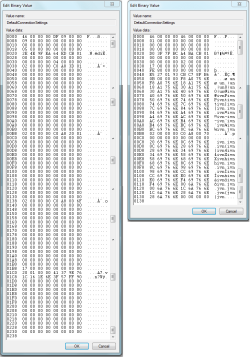
So I checked HKEY_CURRENT_USER\Software\Microsoft\Windows\CurrentVersion\Internet Settings\Connections
and compared it to one of my other 2 systems and these keys are significantly different.
In the image: left the system with the connection issues - right the comparison system with no issues (both on the same network)
The question now is what happens when I edit, replace (with the one from the other machine) or delete this key?
 

Attachments

  • DefaultConnectionSettings Compare.PNG
    DefaultConnectionSettings Compare.PNG
    23 KB · Views: 5

My Computer My Computer

Computer type
PC/Desktop
Computer Manufacturer/Model Number
Dell Precision M6300
OS
Windows 7 Ultimate x64 SP1 Ver. 6.1.7601 (Build 7601)
CPU
Intel Core 2 Extreme X9000, 2.80GHz 6MB L2-Cache, 800MHz FSB
Motherboard
Dell JM679
Memory
8 GB - 2x 4GB SODIMM DDR-II
Graphics Card(s)
NVIDIA Quadro FX 3600M (Driver Ver. 8.17.12.6776)
Sound Card
IDT/SigmaTel STAC 92XX C Major HD Audio
Monitor(s) Displays
17'' WUXGA TFT
Screen Resolution
1920 x 1200
Hard Drives
SSD Crucial m4 512GB (CT512M4SSD2)
Case
Laptop
Mouse
Microsoft Wireless Laser Mouse 8000
Browser
IE 10
I would force a system restore point before attempting this, we are messing with something outside personal experience here, you want to have a recent full restore point to fall back on in case things go horribly wrong.

http://www.sevenforums.com/tutorials/697-system-restore-point-create.html

normally I wouldn't even suggest such a drastic measure, but I've run out of ideals here myself.
 

My Computer My Computer

Computer Manufacturer/Model Number
Insane hobo technologies. ;-)
OS
Windows 7 x64
CPU
Intel i7 2600k
Motherboard
Asrock z68 extreme 4 gen 3
Memory
G.skill Ripjaw 16gigs @ 1866
Graphics Card(s)
Nvidia gtx580 (evga)
Sound Card
Integrated HD audio + hdmi
Monitor(s) Displays
24" ASUS widescreen + 42" insignia
Screen Resolution
1080p (1920x1080)
Hard Drives
128 Samsung 830
256 Samsung 840
3 x 1tb storage drive (various)
1 western digital 1tb (eSATA)
1 Seagate 1tb (eSATA)
PSU
1 kilowatt SLI/Crossfire rated Silverstone modular
Case
NZXT Phantom + additional 220 fan
Cooling
Zalmann
Keyboard
Microsoft wireless 3000 (v2)
Mouse
MS - wireless 5000 (bluetrack)
Internet Speed
depends on if you ask me or my provider.
Other Info
The above information is provided as is, and the author assumes no responsibility for issues it may cause with your sanity or fanboyism.
I just renamed the key to "OldDefaultConnectionSettings" and restarted the computer.
Windows just created a new DefaultConnectionSettings key.
Though the problem persists ...
 

My Computer My Computer

Computer type
PC/Desktop
Computer Manufacturer/Model Number
Dell Precision M6300
OS
Windows 7 Ultimate x64 SP1 Ver. 6.1.7601 (Build 7601)
CPU
Intel Core 2 Extreme X9000, 2.80GHz 6MB L2-Cache, 800MHz FSB
Motherboard
Dell JM679
Memory
8 GB - 2x 4GB SODIMM DDR-II
Graphics Card(s)
NVIDIA Quadro FX 3600M (Driver Ver. 8.17.12.6776)
Sound Card
IDT/SigmaTel STAC 92XX C Major HD Audio
Monitor(s) Displays
17'' WUXGA TFT
Screen Resolution
1920 x 1200
Hard Drives
SSD Crucial m4 512GB (CT512M4SSD2)
Case
Laptop
Mouse
Microsoft Wireless Laser Mouse 8000
Browser
IE 10
Sadly I don't think whatever has gone wrong here is traceable by any means I know.
It seems the others have given up as well.

You may be headed for a reformat of the system to fix this problem.
I would suggest only backing up bookmarks and personal files manually this time, as the transferred import is more than likely the source of the problem.
 

My Computer My Computer

Computer Manufacturer/Model Number
Insane hobo technologies. ;-)
OS
Windows 7 x64
CPU
Intel i7 2600k
Motherboard
Asrock z68 extreme 4 gen 3
Memory
G.skill Ripjaw 16gigs @ 1866
Graphics Card(s)
Nvidia gtx580 (evga)
Sound Card
Integrated HD audio + hdmi
Monitor(s) Displays
24" ASUS widescreen + 42" insignia
Screen Resolution
1080p (1920x1080)
Hard Drives
128 Samsung 830
256 Samsung 840
3 x 1tb storage drive (various)
1 western digital 1tb (eSATA)
1 Seagate 1tb (eSATA)
PSU
1 kilowatt SLI/Crossfire rated Silverstone modular
Case
NZXT Phantom + additional 220 fan
Cooling
Zalmann
Keyboard
Microsoft wireless 3000 (v2)
Mouse
MS - wireless 5000 (bluetrack)
Internet Speed
depends on if you ask me or my provider.
Other Info
The above information is provided as is, and the author assumes no responsibility for issues it may cause with your sanity or fanboyism.
Yeah, as far as I can tell EasyTranfer only works properly when used to transfer settings from XP to Windows 7 (at least that worked for me flawlessly on 3 different machines) but so far it failed me every time I tried to transfer profiles between Windows 7 machines ...

When the first transfer went completely bad and I had to scrap the system and re-install Windows 7 and all programs the second time from scratch (with the added inconvenience to call Microsoft for the Windows activation code) I made an image of the new installation before transferring the profile. I guess that was a wise precaution ...

Though I will try a little longer and contact Microsoft before pulling the plug on the current installation.
 

My Computer My Computer

Computer type
PC/Desktop
Computer Manufacturer/Model Number
Dell Precision M6300
OS
Windows 7 Ultimate x64 SP1 Ver. 6.1.7601 (Build 7601)
CPU
Intel Core 2 Extreme X9000, 2.80GHz 6MB L2-Cache, 800MHz FSB
Motherboard
Dell JM679
Memory
8 GB - 2x 4GB SODIMM DDR-II
Graphics Card(s)
NVIDIA Quadro FX 3600M (Driver Ver. 8.17.12.6776)
Sound Card
IDT/SigmaTel STAC 92XX C Major HD Audio
Monitor(s) Displays
17'' WUXGA TFT
Screen Resolution
1920 x 1200
Hard Drives
SSD Crucial m4 512GB (CT512M4SSD2)
Case
Laptop
Mouse
Microsoft Wireless Laser Mouse 8000
Browser
IE 10
Well one final thing did occur to me, you can remove internet explorer and then reinstall it.
It's in programs and features on the left side add remove windows features.
You can actually uninstall ie and try installing it again without actually reformatting.
Don't know if this will solve your problem but it's the last thing I can come up with.
 

My Computer My Computer

Computer Manufacturer/Model Number
Insane hobo technologies. ;-)
OS
Windows 7 x64
CPU
Intel i7 2600k
Motherboard
Asrock z68 extreme 4 gen 3
Memory
G.skill Ripjaw 16gigs @ 1866
Graphics Card(s)
Nvidia gtx580 (evga)
Sound Card
Integrated HD audio + hdmi
Monitor(s) Displays
24" ASUS widescreen + 42" insignia
Screen Resolution
1080p (1920x1080)
Hard Drives
128 Samsung 830
256 Samsung 840
3 x 1tb storage drive (various)
1 western digital 1tb (eSATA)
1 Seagate 1tb (eSATA)
PSU
1 kilowatt SLI/Crossfire rated Silverstone modular
Case
NZXT Phantom + additional 220 fan
Cooling
Zalmann
Keyboard
Microsoft wireless 3000 (v2)
Mouse
MS - wireless 5000 (bluetrack)
Internet Speed
depends on if you ask me or my provider.
Other Info
The above information is provided as is, and the author assumes no responsibility for issues it may cause with your sanity or fanboyism.
I was able to identify the registry key that controls the “Automatically detect settings” check:

HKEY_CURRENT_USER\Software\Microsoft\Windows\CurrentVersion\Internet Settings\Connections\
Sub Key DefaultConnectionSettings

“Automatically detect settings” check not set
0000 XX XX XX XX XX XX XX XX
0008 01 XX XX XX XX XX XX XX
0010 XX XX XX XX XX XX XX XX

“Automatically detect settings” check set
0000 XX XX XX XX XX XX XX XX
0008 09 XX XX XX XX XX XX XX
0010 XX XX XX XX XX XX XX XX

By changing that bit I can check or uncheck the setting.

The issue is that after a restart (or log off/log on) the value is reset to “00” (=undefined?)
0000 XX XX XX XX XX XX XX XX
0008 00 XX XX XX XX XX XX XX
0010 XX XX XX XX XX XX XX XX

The question now is what resets this value an why.
Now I need to know how to track what accesses a given registry key. Is there any program that can do this?

BTW: as a test I installed Firefox an it works without being affected by this issue.
 

My Computer My Computer

Computer type
PC/Desktop
Computer Manufacturer/Model Number
Dell Precision M6300
OS
Windows 7 Ultimate x64 SP1 Ver. 6.1.7601 (Build 7601)
CPU
Intel Core 2 Extreme X9000, 2.80GHz 6MB L2-Cache, 800MHz FSB
Motherboard
Dell JM679
Memory
8 GB - 2x 4GB SODIMM DDR-II
Graphics Card(s)
NVIDIA Quadro FX 3600M (Driver Ver. 8.17.12.6776)
Sound Card
IDT/SigmaTel STAC 92XX C Major HD Audio
Monitor(s) Displays
17'' WUXGA TFT
Screen Resolution
1920 x 1200
Hard Drives
SSD Crucial m4 512GB (CT512M4SSD2)
Case
Laptop
Mouse
Microsoft Wireless Laser Mouse 8000
Browser
IE 10
Back
Top