IE HTTP 400 Bad Request

The only thing I changed recently was that I cleared out my cache and cookies when I was installing my new network - the tech and I were trying to get into the signal expander/repeater's page. I was having issues with it and he had me clear that stuff out to see if it was a corrupted file that was preventing me from accessing it.


I know what I changed, so no worries about that. But I think that mightve had caused the 400 error issue, we shall see.
Did you change it back yet?
 

My Computer

Computer type
PC/Desktop
Computer Manufacturer/Model Number
Bruce ... somewhere in his 40's
OS
Windows 7 Ultimate 32bit SP1
CPU
Intel(R) Core(TM)2 Quad CPU @ 2.40GHz, 2400 MHz
Motherboard
INTEL/D975XBX2
Memory
4 GB
Graphics Card(s)
ATI Radeon HD 2600 Pro
Monitor(s) Displays
Samsung SyncMaster 914v
Screen Resolution
1280 x 1024
Hard Drives
2/500GB each ... ST3500630AS ATA Device.
One is not connected
PSU
Rocketfish 700 W
Case
G.Skill Gigabyte Chassis
Keyboard
Standard PS/2 Keyboard
Mouse
Microsoft PS/2 Mouse
Internet Speed
DSL
Antivirus
Avira Internet Security
Browser
IE 11
Other Info
ATI HDMI Audio
Captain - Linksys helped me, as its a Linksys router. If you go to page 3, I think, you'll see that I mentioned that I did reconfigure it.

Jacee - No. The thing I changed was the security settings. I had the errors before and the errors after, so I dont think thats going to make a difference if I change it. And I dont think I'm going to as its standard security now where it wasnt before.
 

My Computer

Computer type
Laptop
Computer Manufacturer/Model Number
HP HDX16 Notebook
OS
Windows 7 Ultimate Home 64
CPU
Intel Core Duo @ 3.06GHz
Motherboard
Quanta 361B
Graphics Card(s)
NVDIA GeForce GT 130M
Sound Card
IDT HD Audio Codec
Screen Resolution
1920 x 1080
Hard Drives
500GB Seagate
Mouse
Wacom Intuos4
Antivirus
Norton Internet Security
Browser
IE10
sheesh!! Let's try something different. If you have shortcuts to those websites, delete them. Also delete them in your Favorites, if there.

Download ATF Cleaner Welcome to the Frontpage - www.atribune.org
Click "Main" > check 'select all' (except for Prefetch) this first time using it, then click "Empty Selected". Do the same for FireFox or Opera if you use either of those browsers.
Finally go to Control Panel > Internet Options.
On the General tab under "Temporary Internet Files" Click "Delete Files".
Put a check by "Delete Offline Content" and click OK.

Now using Google Search, find the websites again and click on the main link ... are you able to load it without the bad request error?
 

My Computer

Computer type
PC/Desktop
Computer Manufacturer/Model Number
Bruce ... somewhere in his 40's
OS
Windows 7 Ultimate 32bit SP1
CPU
Intel(R) Core(TM)2 Quad CPU @ 2.40GHz, 2400 MHz
Motherboard
INTEL/D975XBX2
Memory
4 GB
Graphics Card(s)
ATI Radeon HD 2600 Pro
Monitor(s) Displays
Samsung SyncMaster 914v
Screen Resolution
1280 x 1024
Hard Drives
2/500GB each ... ST3500630AS ATA Device.
One is not connected
PSU
Rocketfish 700 W
Case
G.Skill Gigabyte Chassis
Keyboard
Standard PS/2 Keyboard
Mouse
Microsoft PS/2 Mouse
Internet Speed
DSL
Antivirus
Avira Internet Security
Browser
IE 11
Other Info
ATI HDMI Audio
Jacee, thats the problem - it doesnt happen all the time and its not always the same sites that do it. It could take hours, days or weeks before it shows up again.
 

My Computer

Computer type
Laptop
Computer Manufacturer/Model Number
HP HDX16 Notebook
OS
Windows 7 Ultimate Home 64
CPU
Intel Core Duo @ 3.06GHz
Motherboard
Quanta 361B
Graphics Card(s)
NVDIA GeForce GT 130M
Sound Card
IDT HD Audio Codec
Screen Resolution
1920 x 1080
Hard Drives
500GB Seagate
Mouse
Wacom Intuos4
Antivirus
Norton Internet Security
Browser
IE10
Okay, well at least it's not a constant (every other 5 min or so) problem. Next time it happens try clearing out your prefetch along with cookies and temps.
 

My Computer

Computer type
PC/Desktop
Computer Manufacturer/Model Number
Bruce ... somewhere in his 40's
OS
Windows 7 Ultimate 32bit SP1
CPU
Intel(R) Core(TM)2 Quad CPU @ 2.40GHz, 2400 MHz
Motherboard
INTEL/D975XBX2
Memory
4 GB
Graphics Card(s)
ATI Radeon HD 2600 Pro
Monitor(s) Displays
Samsung SyncMaster 914v
Screen Resolution
1280 x 1024
Hard Drives
2/500GB each ... ST3500630AS ATA Device.
One is not connected
PSU
Rocketfish 700 W
Case
G.Skill Gigabyte Chassis
Keyboard
Standard PS/2 Keyboard
Mouse
Microsoft PS/2 Mouse
Internet Speed
DSL
Antivirus
Avira Internet Security
Browser
IE 11
Other Info
ATI HDMI Audio
Alright. Thanks :)


EDIT: Sorry, didnt mean to sound/seem short. I'm just so tired of this stupid issue. And Linksys wont admit it could be their product that caused it.:rolleyes:


I'd probably throw my computer into the wall if it was going on every 5 minutes ALL the time.:confused:
 
Last edited:

My Computer

Computer type
Laptop
Computer Manufacturer/Model Number
HP HDX16 Notebook
OS
Windows 7 Ultimate Home 64
CPU
Intel Core Duo @ 3.06GHz
Motherboard
Quanta 361B
Graphics Card(s)
NVDIA GeForce GT 130M
Sound Card
IDT HD Audio Codec
Screen Resolution
1920 x 1080
Hard Drives
500GB Seagate
Mouse
Wacom Intuos4
Antivirus
Norton Internet Security
Browser
IE10
Yep, I have a feeling it's on Linksys' side too. I don't have any knowledge about their product configuration though :( So sorry I couldn't help you.

Persevere m'dear ACWN
 

My Computer

Computer type
PC/Desktop
Computer Manufacturer/Model Number
Bruce ... somewhere in his 40's
OS
Windows 7 Ultimate 32bit SP1
CPU
Intel(R) Core(TM)2 Quad CPU @ 2.40GHz, 2400 MHz
Motherboard
INTEL/D975XBX2
Memory
4 GB
Graphics Card(s)
ATI Radeon HD 2600 Pro
Monitor(s) Displays
Samsung SyncMaster 914v
Screen Resolution
1280 x 1024
Hard Drives
2/500GB each ... ST3500630AS ATA Device.
One is not connected
PSU
Rocketfish 700 W
Case
G.Skill Gigabyte Chassis
Keyboard
Standard PS/2 Keyboard
Mouse
Microsoft PS/2 Mouse
Internet Speed
DSL
Antivirus
Avira Internet Security
Browser
IE 11
Other Info
ATI HDMI Audio
Dont say that just yet, you might have. Its only a matter of waiting and trying.
 

My Computer

Computer type
Laptop
Computer Manufacturer/Model Number
HP HDX16 Notebook
OS
Windows 7 Ultimate Home 64
CPU
Intel Core Duo @ 3.06GHz
Motherboard
Quanta 361B
Graphics Card(s)
NVDIA GeForce GT 130M
Sound Card
IDT HD Audio Codec
Screen Resolution
1920 x 1080
Hard Drives
500GB Seagate
Mouse
Wacom Intuos4
Antivirus
Norton Internet Security
Browser
IE10
Count on it. *nod*
 

My Computer

Computer type
Laptop
Computer Manufacturer/Model Number
HP HDX16 Notebook
OS
Windows 7 Ultimate Home 64
CPU
Intel Core Duo @ 3.06GHz
Motherboard
Quanta 361B
Graphics Card(s)
NVDIA GeForce GT 130M
Sound Card
IDT HD Audio Codec
Screen Resolution
1920 x 1080
Hard Drives
500GB Seagate
Mouse
Wacom Intuos4
Antivirus
Norton Internet Security
Browser
IE10
Its doing it again.

Jacee - the ATF cleaner 3 (the only one I can find) is for XP or Windows 2000. I have Windows 7.


I did what the HP tech told me to do, I uninstalled all the updates around the time that this error started. Rebooting clears the error, so I dont know if anything has changed yet or not.
 

My Computer

Computer type
Laptop
Computer Manufacturer/Model Number
HP HDX16 Notebook
OS
Windows 7 Ultimate Home 64
CPU
Intel Core Duo @ 3.06GHz
Motherboard
Quanta 361B
Graphics Card(s)
NVDIA GeForce GT 130M
Sound Card
IDT HD Audio Codec
Screen Resolution
1920 x 1080
Hard Drives
500GB Seagate
Mouse
Wacom Intuos4
Antivirus
Norton Internet Security
Browser
IE10
Hi, ACWN.

I have used ATF-Cleaner on Windows Vista and Windows 7. Just right-click and Run as Admin with the instructions Jacee provided. (BTW, you'll notice that prefetch is grayed out as disabled.)

The direct download page is at ATF-Cleaner.exe - www.atribune.org
 

My Computer

OS
Windows 7 & Windows Vista Ultimate
Kay, if it comes back I'll give it a shot. Thanks, Corrine :)
 

My Computer

Computer type
Laptop
Computer Manufacturer/Model Number
HP HDX16 Notebook
OS
Windows 7 Ultimate Home 64
CPU
Intel Core Duo @ 3.06GHz
Motherboard
Quanta 361B
Graphics Card(s)
NVDIA GeForce GT 130M
Sound Card
IDT HD Audio Codec
Screen Resolution
1920 x 1080
Hard Drives
500GB Seagate
Mouse
Wacom Intuos4
Antivirus
Norton Internet Security
Browser
IE10
You're very welcome.

It seems like there was a longer period of time before you got the error again.
 

My Computer

OS
Windows 7 & Windows Vista Ultimate
About a week. It took a week last time too.
 

My Computer

Computer type
Laptop
Computer Manufacturer/Model Number
HP HDX16 Notebook
OS
Windows 7 Ultimate Home 64
CPU
Intel Core Duo @ 3.06GHz
Motherboard
Quanta 361B
Graphics Card(s)
NVDIA GeForce GT 130M
Sound Card
IDT HD Audio Codec
Screen Resolution
1920 x 1080
Hard Drives
500GB Seagate
Mouse
Wacom Intuos4
Antivirus
Norton Internet Security
Browser
IE10
Well, uninstalling the updates was totally pointless. The error hasnt come back, but my computer just reinstalled them. *rolls eyes* Figures.
 

My Computer

Computer type
Laptop
Computer Manufacturer/Model Number
HP HDX16 Notebook
OS
Windows 7 Ultimate Home 64
CPU
Intel Core Duo @ 3.06GHz
Motherboard
Quanta 361B
Graphics Card(s)
NVDIA GeForce GT 130M
Sound Card
IDT HD Audio Codec
Screen Resolution
1920 x 1080
Hard Drives
500GB Seagate
Mouse
Wacom Intuos4
Antivirus
Norton Internet Security
Browser
IE10
Turn off automatic updates. Choose to be notified of updates; but don't install them. Reinstall the updates one at time. Run your system before installing the next update. This way you can find the one causing the problem.

When you find the problem update, uninstall it and hide it.
 

My Computer

Computer Manufacturer/Model Number
Home built
OS
Windows 7 Ultimate 32 bit
CPU
Intel(R) Pentium(R) 4 CPU 3.00GHz
Motherboard
ASUS P4P800-VM Motherboard Chipset: Intel 865G + ICH5
Memory
2.50 GB RAM
Graphics Card(s)
NVIDIA GeForce 7600 GS
Sound Card
SoundMax Integrated Digital Audio (Chip)
Monitor(s) Displays
ViewSonic VX 1962 wm
Screen Resolution
1680 X 1050
Hard Drives
Seagate Barracuda 7200.10 80 GB
ST380215A ATA Device 18.6 GB
Western Digital "My Book" external hard drive 750 GB
Cooling
Fan based
Keyboard
Microsoft Comfort Curve Keyboard 2000 v10 USB
Mouse
Logitec optic USB
Internet Speed
3.01 Mb/s download 0.64 Mb/s upload
You're going to have to talk me through some of this. I'm not entirely familiar with Windows 7, so I'm not sure where to go for everything.


The only problem is is that the updates reinstalled and I'm not sure which ones they were. I had removed them by date. I'm not sure if I'll be able to find them again.
 

My Computer

Computer type
Laptop
Computer Manufacturer/Model Number
HP HDX16 Notebook
OS
Windows 7 Ultimate Home 64
CPU
Intel Core Duo @ 3.06GHz
Motherboard
Quanta 361B
Graphics Card(s)
NVDIA GeForce GT 130M
Sound Card
IDT HD Audio Codec
Screen Resolution
1920 x 1080
Hard Drives
500GB Seagate
Mouse
Wacom Intuos4
Antivirus
Norton Internet Security
Browser
IE10
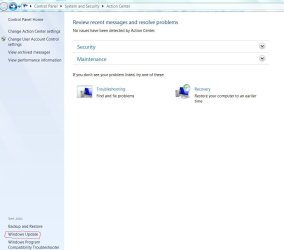
Open Action Center. Click on Windows Update on the left side of your screen.

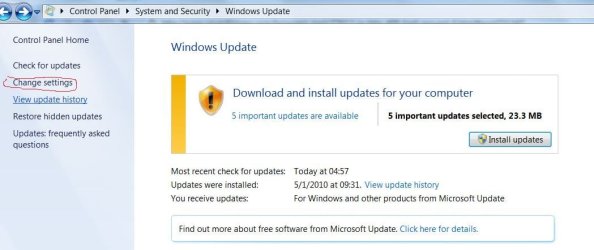
Click on Change Settings (left side of the screen).

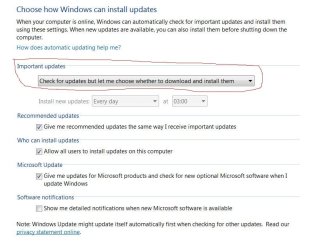
From the drop down menu, select Check for updates but let me choose whether to download and install them.
 

Attachments

  • Capture.JPG
    Capture.JPG
    52.4 KB · Views: 3
  • Capture1.JPG
    Capture1.JPG
    56 KB · Views: 2
  • Capture2.JPG
    Capture2.JPG
    65 KB · Views: 6

My Computer

Computer Manufacturer/Model Number
Home built
OS
Windows 7 Ultimate 32 bit
CPU
Intel(R) Pentium(R) 4 CPU 3.00GHz
Motherboard
ASUS P4P800-VM Motherboard Chipset: Intel 865G + ICH5
Memory
2.50 GB RAM
Graphics Card(s)
NVIDIA GeForce 7600 GS
Sound Card
SoundMax Integrated Digital Audio (Chip)
Monitor(s) Displays
ViewSonic VX 1962 wm
Screen Resolution
1680 X 1050
Hard Drives
Seagate Barracuda 7200.10 80 GB
ST380215A ATA Device 18.6 GB
Western Digital "My Book" external hard drive 750 GB
Cooling
Fan based
Keyboard
Microsoft Comfort Curve Keyboard 2000 v10 USB
Mouse
Logitec optic USB
Internet Speed
3.01 Mb/s download 0.64 Mb/s upload
Okay, I dont know if this is linked or not... but.. I just got this while going to deviantart... I contacted the webmaster, for all the good it will do me.

Object not found!

The requested URL was not found on this server. If you entered the URL manually please check your spelling and try again.
If you think this is a server error, please contact the webmaster.
Error 404

deviantart.com
Tue May 18 19:12:34 2010
Apache


Never mind! I guess they were revamping the site and I caught it while they were refreshing it or something.
 

My Computer

Computer type
Laptop
Computer Manufacturer/Model Number
HP HDX16 Notebook
OS
Windows 7 Ultimate Home 64
CPU
Intel Core Duo @ 3.06GHz
Motherboard
Quanta 361B
Graphics Card(s)
NVDIA GeForce GT 130M
Sound Card
IDT HD Audio Codec
Screen Resolution
1920 x 1080
Hard Drives
500GB Seagate
Mouse
Wacom Intuos4
Antivirus
Norton Internet Security
Browser
IE10
Back
Top