IE11 Won't install, no error code!

austinsom

New member
Local time
12:00 AM
Messages
14
Hi all,

My first post here, so hopefully I'll get this right!

I have for some time now been trying to install ie11, but to no avail. The install fails and I get no error coes or anything. It puts a link on my desktop which tells me about pre-requisite updates, some I have installed, others, I am told, are not applicable to my machine.

I have tried to uninstall ie10, but can't, and also tried to update ie10 with the latest patches, but again they fail to install with error code 8000FFFF which appears to be the least helpful error code in the history of time.

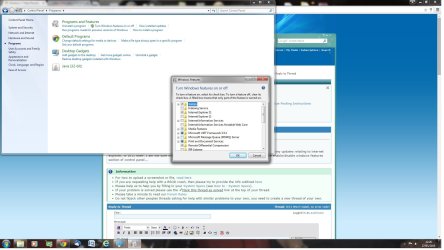
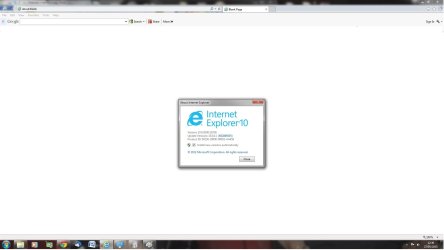
I have also notice that I seem to have two instances of ie11 in the windows features section in control panel. One cannot be turned off, the other cannot be turned on. My browser tells me it is ie10 too, so 11 is not installed. I do not know what is going on, and I have tried everything I can think of, and as of now I'm using Chrome, as clealrly ie for me is not very well at all.

Can anyone help me?!

Thank you in advance :)
 

My Computer

Computer type
PC/Desktop
Computer Manufacturer/Model Number
custom build
OS
Windows 7 Ultimate x64
CPU
AMD phenom II 1090T
Motherboard
Asus M5A99X
Memory
8GB
CBS log file is 75MB, so too big too attach, but the IE11 log is now attached, hopefully someone can figure out what is going on :s

So, I can't attach any files...
 

My Computer

Computer type
PC/Desktop
Computer Manufacturer/Model Number
custom build
OS
Windows 7 Ultimate x64
CPU
AMD phenom II 1090T
Motherboard
Asus M5A99X
Memory
8GB
How have you tried to install 11, through windows update ? Did you download 11 and try to install it ?

Which way ?
 

My Computer

Computer type
PC/Desktop
Computer Manufacturer/Model Number
Skylake Special #666
OS
Windows 10 Pro x64
CPU
Intel Core i7 6700K
Motherboard
Asus Sabertooth Z170 Mark 1
Memory
GSkill TridentZ RGB 16GB 3600 16-16-16-36
Graphics Card(s)
EVGA GTX 980 Ti SC x2
Sound Card
Realtek High Definition
Monitor(s) Displays
AOC G2460PG
Screen Resolution
1920 x 1080 144Hz
Hard Drives
Samsung 860 Pro 256GB, Seagate Barracuda 4TB x2
PSU
EVGA 1000 P2, EVGA White Custom Braided Cables
Case
Corsair Vengeance C70 Gunmetal Black
Cooling
Corsair H100i v2, Corsair ML120 x2, Thermal Grizzly Kryonaut
Keyboard
Logitech G910 Orion Spectrum
Mouse
Logitech G700s
Internet Speed
Verizon Fios Quantum Gateway 75/75
Antivirus
Windows Defender, Malwarebytes Free 3.8.3
Browser
Chrome
Other Info
Corsair SP120 x4, LG Blu-ray Drive, Durabrand HT-395 100 Watt Dolby Digital Amp, Corsair H2100 Wireless 7.1 Headset
Hi Addram,

It doesn't show up in windows update, so I've tried to install a downloaded version (from Microsoft download), and it fails every time.

I'm not sure what else to try!
 

My Computer

Computer type
PC/Desktop
Computer Manufacturer/Model Number
custom build
OS
Windows 7 Ultimate x64
CPU
AMD phenom II 1090T
Motherboard
Asus M5A99X
Memory
8GB
That`s odd, it should show up in windows update if it`s not yet installed, you didn`t hide the update did you ?
 

My Computer

Computer type
PC/Desktop
Computer Manufacturer/Model Number
Skylake Special #666
OS
Windows 10 Pro x64
CPU
Intel Core i7 6700K
Motherboard
Asus Sabertooth Z170 Mark 1
Memory
GSkill TridentZ RGB 16GB 3600 16-16-16-36
Graphics Card(s)
EVGA GTX 980 Ti SC x2
Sound Card
Realtek High Definition
Monitor(s) Displays
AOC G2460PG
Screen Resolution
1920 x 1080 144Hz
Hard Drives
Samsung 860 Pro 256GB, Seagate Barracuda 4TB x2
PSU
EVGA 1000 P2, EVGA White Custom Braided Cables
Case
Corsair Vengeance C70 Gunmetal Black
Cooling
Corsair H100i v2, Corsair ML120 x2, Thermal Grizzly Kryonaut
Keyboard
Logitech G910 Orion Spectrum
Mouse
Logitech G700s
Internet Speed
Verizon Fios Quantum Gateway 75/75
Antivirus
Windows Defender, Malwarebytes Free 3.8.3
Browser
Chrome
Other Info
Corsair SP120 x4, LG Blu-ray Drive, Durabrand HT-395 100 Watt Dolby Digital Amp, Corsair H2100 Wireless 7.1 Headset
No, I've not hidden the update, but I did double check to see if it had somehow hidden itself, and it is definitely not there :(

I should probably add that ie11 WAS installed before, but I had some problems with what I thought was IE11 freezing. It turned out to be my old SSD, but by the time I worked that out, ie11 was uninstalled (it previously installed as a windows update) and now I can't get it back. I'll try and post some screen grabs later of the various bits I have already mentioned.

It seems as though something is preventing me installing anything to do with ie, as even security updates for ie10 won't install, and ie10 itself cannot be removed. the uninstall process fails, and doesn't work even thought it runs, at the command prompt.

I really am stuck! If I can get the various bits and bobs to upload today, I'll post them.
 

My Computer

Computer type
PC/Desktop
Computer Manufacturer/Model Number
custom build
OS
Windows 7 Ultimate x64
CPU
AMD phenom II 1090T
Motherboard
Asus M5A99X
Memory
8GB
If you compress the CBS.log file, it should come down to less than 2MB, and you can upload it then....


Please follow the Windows Update Posting Instructions and post the requested data

If the file is too large (8MB compressed), remove the older CBSPersist cab files until the final file is below the limit - you can always post them separately after zipping them. (the forum doesn't allow the upload of bare CAB files, for a number of reasons)

Please also post the C:\Windows\windowsudpate.log file
 

My Computer

Computer type
Laptop
Computer Manufacturer/Model Number
Asus K52F or Lenovo B51-80
OS
Win 7 x64 Home Premium (and x86 VirtualBox VM)/Win10
CPU
i3 370M/i7 6500U
Motherboard
Asus/Lenovo
Memory
8GB - finally :)/8GB
Graphics Card(s)
it's an i3, dude!/dual Intel&nVidia
Sound Card
onboard
Monitor(s) Displays
15.6" built-in
Screen Resolution
1366x768/1920x1080
Hard Drives
750GB Seagate internal
Sundry external drives attached to other computers on the local network
1TB SSD on the Lenovo
PSU
n/a
Internet Speed
as much as I can get - usually on a dongle/phone, so <1MB/s
Antivirus
MSE/Defender
Browser
IE11/12/Edge/Chrome/FF(if I must)
Hi guys,

Thanks for the responses so far. I have managed to get the windowsupdate log and have added that here. I can't however add the CBS.log as the log file itself is 604,000Kb, and even removing all but one of the CBSpersist folder, it is still 48MB.

Is it safe to delete the old CBS.log and runs scannow again, as it seems I can't do anything else to make it smaller!

I look forward to reading the next post :)
 

Attachments

My Computer

Computer type
PC/Desktop
Computer Manufacturer/Model Number
custom build
OS
Windows 7 Ultimate x64
CPU
AMD phenom II 1090T
Motherboard
Asus M5A99X
Memory
8GB
If the CBS.log file is 600MB, then there is a serious problem with the system - it's supposed to be limited in size.
You appear to be having problems with BitDefender - which shouldn't be appearing in the windowsupdate.log file at all as far as I know!

I would suggest uninstalling Bitdefender - with prejudice! - and installing MSE, at least as a temporary measure, and then doing a full system scan.
 

My Computer

Computer type
Laptop
Computer Manufacturer/Model Number
Asus K52F or Lenovo B51-80
OS
Win 7 x64 Home Premium (and x86 VirtualBox VM)/Win10
CPU
i3 370M/i7 6500U
Motherboard
Asus/Lenovo
Memory
8GB - finally :)/8GB
Graphics Card(s)
it's an i3, dude!/dual Intel&nVidia
Sound Card
onboard
Monitor(s) Displays
15.6" built-in
Screen Resolution
1366x768/1920x1080
Hard Drives
750GB Seagate internal
Sundry external drives attached to other computers on the local network
1TB SSD on the Lenovo
PSU
n/a
Internet Speed
as much as I can get - usually on a dongle/phone, so <1MB/s
Antivirus
MSE/Defender
Browser
IE11/12/Edge/Chrome/FF(if I must)
That's interesting, thanks for the tip. Bitdefender is almost impossible to turn off as well. Will post back when I have done that :)
 

My Computer

Computer type
PC/Desktop
Computer Manufacturer/Model Number
custom build
OS
Windows 7 Ultimate x64
CPU
AMD phenom II 1090T
Motherboard
Asus M5A99X
Memory
8GB
I've now run MSE on the machine and it did find quite a few things. I told it to clean the PC and MSE decided to hang at about 75% and did not complete :(

I've now run Malwarebytes and removed what was left and am now running MSE again. The log file is much smaller now, but even with the oldest .cab files removed and the whole lot zipped, is still over 20MB. The cbs log is about 8MB on it's own when zipped and 150MB when not.

I'll see what it looks like after MSE runs again (providing it doesn't hang).
 

My Computer

Computer type
PC/Desktop
Computer Manufacturer/Model Number
custom build
OS
Windows 7 Ultimate x64
CPU
AMD phenom II 1090T
Motherboard
Asus M5A99X
Memory
8GB
Managed to run another scan, and that completed and removed a few unwanted peices of lurking rubbish. However, even compressed the cbs.log is a smudge over 8MB, and the rest, with only the most recent CAB is 24MB - is there anything else I can do to make it smaller?
 

My Computer

Computer type
PC/Desktop
Computer Manufacturer/Model Number
custom build
OS
Windows 7 Ultimate x64
CPU
AMD phenom II 1090T
Motherboard
Asus M5A99X
Memory
8GB
I think I have now done it - hopefully attached is a folder with everything that is required! Thank for your help so far Noel, I appreciate it :)
 
Last edited:

My Computer

Computer type
PC/Desktop
Computer Manufacturer/Model Number
custom build
OS
Windows 7 Ultimate x64
CPU
AMD phenom II 1090T
Motherboard
Asus M5A99X
Memory
8GB
Here's the errors from the SFC log...
Code:
 Line 4640: 2015-05-26 18:21:06, Info                  CSI    00000353 [SR] Repairing 1 components
 Line 4641: 2015-05-26 18:21:06, Info                  CSI    00000354 [SR] Beginning Verify and Repair transaction
 Line 4644: 2015-05-26 18:21:06, Info                  CSI    00000356 [SR] Cannot repair member file [l:24{12}]"utc.app.json" of Microsoft-Windows-Unified-Telemetry-Client, Version = 6.1.7601.18839, pA = PROCESSOR_ARCHITECTURE_AMD64 (9), Culture neutral, VersionScope = 1 nonSxS, PublicKeyToken = {l:8 b:31bf3856ad364e35}, Type neutral, TypeName neutral, PublicKey neutral in the store, hash mismatch
 Line 4647: 2015-05-26 18:21:06, Info                  CSI    00000358 [SR] Cannot repair member file [l:66{33}]"telemetry.ASM-WindowsDefault.json" of Microsoft-Windows-Unified-Telemetry-Client, Version = 6.1.7601.18839, pA = PROCESSOR_ARCHITECTURE_AMD64 (9), Culture neutral, VersionScope = 1 nonSxS, PublicKeyToken = {l:8 b:31bf3856ad364e35}, Type neutral, TypeName neutral, PublicKey neutral in the store, hash mismatch

These are due to the KB3022345 update - and the latest advice from MS is to ignore them, as they are the result of a logic error rather than a real problem. (MS forgot to add the flags that tell SFC to ignore the files!)
You can either ignore them, or uninstall the update and hide it - when MS fix the problem (as promised!) then the new version of the update will appear.

How is the system behaving now?
 

My Computer

Computer type
Laptop
Computer Manufacturer/Model Number
Asus K52F or Lenovo B51-80
OS
Win 7 x64 Home Premium (and x86 VirtualBox VM)/Win10
CPU
i3 370M/i7 6500U
Motherboard
Asus/Lenovo
Memory
8GB - finally :)/8GB
Graphics Card(s)
it's an i3, dude!/dual Intel&nVidia
Sound Card
onboard
Monitor(s) Displays
15.6" built-in
Screen Resolution
1366x768/1920x1080
Hard Drives
750GB Seagate internal
Sundry external drives attached to other computers on the local network
1TB SSD on the Lenovo
PSU
n/a
Internet Speed
as much as I can get - usually on a dongle/phone, so <1MB/s
Antivirus
MSE/Defender
Browser
IE11/12/Edge/Chrome/FF(if I must)
Hi Noel,

Thanks for your help in identifying what was causing the error in SFC. However, I am still unable to install any updates relating to internet explorer, or IE11 itself. I am not sure what to try next. I have attached a screenshot of what I see in the enable/disable windows features section of control panel and also of the current version of ie I have installed....
 

Attachments

  • Features screenshot.jpg
    Features screenshot.jpg
    163.5 KB · Views: 3
  • ie version.jpg
    ie version.jpg
    53.1 KB · Views: 1
Last edited:

My Computer

Computer type
PC/Desktop
Computer Manufacturer/Model Number
custom build
OS
Windows 7 Ultimate x64
CPU
AMD phenom II 1090T
Motherboard
Asus M5A99X
Memory
8GB
That is very odd!
The twin entries for IE11 in the Features list is odd enough - add in the fact that IE itself thinks it's IE10, and you have real strangeness!
I think we'd better try and get back to IE10 proper and see what happens...

Use the manual uninstall method for IE11 on this page... MSDN Blogs
 

My Computer

Computer type
Laptop
Computer Manufacturer/Model Number
Asus K52F or Lenovo B51-80
OS
Win 7 x64 Home Premium (and x86 VirtualBox VM)/Win10
CPU
i3 370M/i7 6500U
Motherboard
Asus/Lenovo
Memory
8GB - finally :)/8GB
Graphics Card(s)
it's an i3, dude!/dual Intel&nVidia
Sound Card
onboard
Monitor(s) Displays
15.6" built-in
Screen Resolution
1366x768/1920x1080
Hard Drives
750GB Seagate internal
Sundry external drives attached to other computers on the local network
1TB SSD on the Lenovo
PSU
n/a
Internet Speed
as much as I can get - usually on a dongle/phone, so <1MB/s
Antivirus
MSE/Defender
Browser
IE11/12/Edge/Chrome/FF(if I must)
Thanks for getting back to me. I've just done the uninstall, it ran through fine in the command prompt, but on restarting, I still have the double IE11 entry! I have looked in the registry settings, and it displays as IE10 there. I have come across few problems that have me as perplexed as this!
 

My Computer

Computer type
PC/Desktop
Computer Manufacturer/Model Number
custom build
OS
Windows 7 Ultimate x64
CPU
AMD phenom II 1090T
Motherboard
Asus M5A99X
Memory
8GB
Hopefully, things are on a relatively even keel now - please run through the posting instructions again so we can check that we haven't introduced further errors - post the CheckSUR.log and CBS.log files.
 

My Computer

Computer type
Laptop
Computer Manufacturer/Model Number
Asus K52F or Lenovo B51-80
OS
Win 7 x64 Home Premium (and x86 VirtualBox VM)/Win10
CPU
i3 370M/i7 6500U
Motherboard
Asus/Lenovo
Memory
8GB - finally :)/8GB
Graphics Card(s)
it's an i3, dude!/dual Intel&nVidia
Sound Card
onboard
Monitor(s) Displays
15.6" built-in
Screen Resolution
1366x768/1920x1080
Hard Drives
750GB Seagate internal
Sundry external drives attached to other computers on the local network
1TB SSD on the Lenovo
PSU
n/a
Internet Speed
as much as I can get - usually on a dongle/phone, so <1MB/s
Antivirus
MSE/Defender
Browser
IE11/12/Edge/Chrome/FF(if I must)
Thanks Noel, the latest scan showed no integrity violations. I have attached both files. Still no joy with updates for IE. I wonder if something has skewed the IE registry settings as I can't uninstall ie11 (apparently) or IE10... Very odd!
 

My Computer

Computer type
PC/Desktop
Computer Manufacturer/Model Number
custom build
OS
Windows 7 Ultimate x64
CPU
AMD phenom II 1090T
Motherboard
Asus M5A99X
Memory
8GB
Anyone have any ideas on what might be causing this issue?
 

My Computer

Computer type
PC/Desktop
Computer Manufacturer/Model Number
custom build
OS
Windows 7 Ultimate x64
CPU
AMD phenom II 1090T
Motherboard
Asus M5A99X
Memory
8GB
Back
Top