IE9 and Win7 32bit

judyf1

New member
Local time
5:49 AM
Messages
7
I am new to this forum and thanks for allowing me here.

Trying to help a friend of mine who has Windows 7 32bit and IE 9. Whenever she opens her browser window, it opens in what I call minimized (like half the size of the normal screen. She has tried dragging the screen to the size she wants and clicking the red X, opening again and still has it. She didn't have this problem with IE8.

Any idea? No techy talk please.

Thanks so much,
Judy F.
SW Florida - USA
 

My Computer

OS
Windows 7 64bit
Welcome to Seven Forums judyf1. It may be hard not to use "techy talk" :). If your friend has an IE shortcut on the desktop:

shortcut.jpg

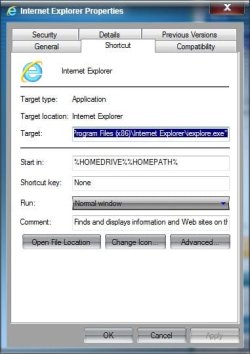
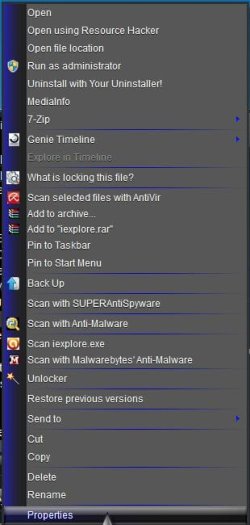
Right click on that, and left click on Properties, at bottom of the list:

Pro.jpg

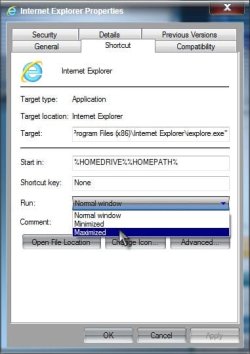
On the properties window, on the shortcut tab, where it says run:

Properties.jpg

Choose maximize:

max.jpg

and click apply at bottom, and ok until out of menus. Now when they click on the shortcut, it should open a full window. A Guy
 

My Computer

Computer type
PC/Desktop
OS
Windows 10 Home x64
CPU
INTEL Core i5-750 Quad-Core 3.37GHz
Motherboard
ASUS P7P55D
Memory
HyperX Fury Black Series 8GB (2 x 4GB) 1866Mhz
Graphics Card(s)
EVGA GeForce GTX 750 Superclocked 1GB 128-Bit GDDR5
Monitor(s) Displays
LG 32MA68HY 32" IPS
Screen Resolution
1920 x 1080
Hard Drives
Samsung 840 Evo 120GB, SEAGATE 500GB Barracuda® 7200.12, SATA 3 Gb/s, 7200 RPM, 16MB cache
PSU
ANTEC TruePower New TP-550, 80 PLUS, 550W
Case
ANTEC Three Hundred Illusion
Cooling
COOLER MASTER Hyper 212 Plus, 4 x 120mm 1 x 140mm Noctua's
Internet Speed
85 + Mbps
Antivirus
Avast
Browser
Vivaldi
Thank you so much A. Guy. I have just made you my hero of the day. And you did good with no techy talk. LOL

Now let's just hope she has the the IE shortcut on the desktop.

Thanks again,
Judy F.
 

My Computer

OS
Windows 7 64bit
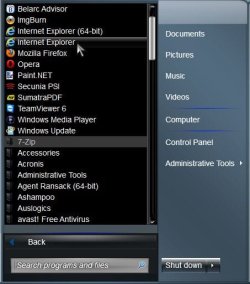
If she doesn't have the desktop shortcut, she may be using the one on her start menu:

Start.jpg

(She won't have the IE 64 bit of course). She can right click that and follow the same procedure.

A Guy
 

My Computer

Computer type
PC/Desktop
OS
Windows 10 Home x64
CPU
INTEL Core i5-750 Quad-Core 3.37GHz
Motherboard
ASUS P7P55D
Memory
HyperX Fury Black Series 8GB (2 x 4GB) 1866Mhz
Graphics Card(s)
EVGA GeForce GTX 750 Superclocked 1GB 128-Bit GDDR5
Monitor(s) Displays
LG 32MA68HY 32" IPS
Screen Resolution
1920 x 1080
Hard Drives
Samsung 840 Evo 120GB, SEAGATE 500GB Barracuda® 7200.12, SATA 3 Gb/s, 7200 RPM, 16MB cache
PSU
ANTEC TruePower New TP-550, 80 PLUS, 550W
Case
ANTEC Three Hundred Illusion
Cooling
COOLER MASTER Hyper 212 Plus, 4 x 120mm 1 x 140mm Noctua's
Internet Speed
85 + Mbps
Antivirus
Avast
Browser
Vivaldi
Again, thank you so much.
Judy F.
 

My Computer

OS
Windows 7 64bit
You're welcome. Report back and let us know how it went. If no fix, we'll go deeper :)

A Guy
 

My Computer

Computer type
PC/Desktop
OS
Windows 10 Home x64
CPU
INTEL Core i5-750 Quad-Core 3.37GHz
Motherboard
ASUS P7P55D
Memory
HyperX Fury Black Series 8GB (2 x 4GB) 1866Mhz
Graphics Card(s)
EVGA GeForce GTX 750 Superclocked 1GB 128-Bit GDDR5
Monitor(s) Displays
LG 32MA68HY 32" IPS
Screen Resolution
1920 x 1080
Hard Drives
Samsung 840 Evo 120GB, SEAGATE 500GB Barracuda® 7200.12, SATA 3 Gb/s, 7200 RPM, 16MB cache
PSU
ANTEC TruePower New TP-550, 80 PLUS, 550W
Case
ANTEC Three Hundred Illusion
Cooling
COOLER MASTER Hyper 212 Plus, 4 x 120mm 1 x 140mm Noctua's
Internet Speed
85 + Mbps
Antivirus
Avast
Browser
Vivaldi
I am new to this forum and thanks for allowing me here.

Trying to help a friend of mine who has Windows 7 32bit and IE 9. Whenever she opens her browser window, it opens in what I call minimized (like half the size of the normal screen. She has tried dragging the screen to the size she wants and clicking the red X, opening again and still has it. She didn't have this problem with IE8.

Any idea? No techy talk please.

Thanks so much,
Judy F.
SW Florida - USA


For those who don't like the maximized look. When IE opens at half screen, open an additional window which will also be half sized. Drag the title bar of the second window to the left until the left top window corner is aligned with the left corner of your screen. In the right bottom corner of the half sized window, drag the re-sizer down diagonally until it rests on top of the taskbar and at the right hand side of your screen. Close the first window and then close the second window. IE will now remember your postion and size on the next opening. If I remember correct, IE 8 and IE 9 have to be resized with the re-sizer for this to work. I think in previous versions, you could resize the non maximized window using any border and it would work but for some reason 8 and 9 needs to be done with the resizer.
 

My Computer

Computer Manufacturer/Model Number
Averatec 6130HS-20
OS
Windows 7 Professional 32-bit (6.1, Build 7600)
CPU
Intel(R) Pentium(R) 4 3.00 GHz HT
Memory
2.0 GB
Graphics Card(s)
ATI Mobility Radeon 9600 64MB
Sound Card
Realtek AC'97 Audio
Screen Resolution
1280 x 800
Hard Drives
Seagate 96023A 60GB 7200RPM -
Seagate FreeAgentDesktop 250GB
Cooling
20 Inch Box Fan
Mouse
Targus PAWM10 Wireless Optical Laptop Mouse
OK, thanks I will be sure and do that.
Judy F.
 

My Computer

OS
Windows 7 64bit
Thanks Greg, I have printed off your suggestion also.

You guys are great!
Judy F.
 

My Computer

OS
Windows 7 64bit

My Computer

Computer type
PC/Desktop
OS
Windows 10 Home x64
CPU
INTEL Core i5-750 Quad-Core 3.37GHz
Motherboard
ASUS P7P55D
Memory
HyperX Fury Black Series 8GB (2 x 4GB) 1866Mhz
Graphics Card(s)
EVGA GeForce GTX 750 Superclocked 1GB 128-Bit GDDR5
Monitor(s) Displays
LG 32MA68HY 32" IPS
Screen Resolution
1920 x 1080
Hard Drives
Samsung 840 Evo 120GB, SEAGATE 500GB Barracuda® 7200.12, SATA 3 Gb/s, 7200 RPM, 16MB cache
PSU
ANTEC TruePower New TP-550, 80 PLUS, 550W
Case
ANTEC Three Hundred Illusion
Cooling
COOLER MASTER Hyper 212 Plus, 4 x 120mm 1 x 140mm Noctua's
Internet Speed
85 + Mbps
Antivirus
Avast
Browser
Vivaldi
OK, so which one should I tell her about. We will be doing this via phone.
Judy F.
SW Florida - USA
 

My Computer

OS
Windows 7 64bit
The drag method might be easier, I'd try that 1st. A Guy
 

My Computer

Computer type
PC/Desktop
OS
Windows 10 Home x64
CPU
INTEL Core i5-750 Quad-Core 3.37GHz
Motherboard
ASUS P7P55D
Memory
HyperX Fury Black Series 8GB (2 x 4GB) 1866Mhz
Graphics Card(s)
EVGA GeForce GTX 750 Superclocked 1GB 128-Bit GDDR5
Monitor(s) Displays
LG 32MA68HY 32" IPS
Screen Resolution
1920 x 1080
Hard Drives
Samsung 840 Evo 120GB, SEAGATE 500GB Barracuda® 7200.12, SATA 3 Gb/s, 7200 RPM, 16MB cache
PSU
ANTEC TruePower New TP-550, 80 PLUS, 550W
Case
ANTEC Three Hundred Illusion
Cooling
COOLER MASTER Hyper 212 Plus, 4 x 120mm 1 x 140mm Noctua's
Internet Speed
85 + Mbps
Antivirus
Avast
Browser
Vivaldi
Back
Top