IE9/Chrome loading pages very slowly.

saqash

New member
Local time
5:00 PM
Messages
5
I am using IE9/Chrome which is loading pages extremely slowly 40-60seconds. Often giving error that page not found. However strangely Youtube videos play fine and downloads (like from download.com) are done properly. Also, msn messenger not signing in properly usually in 6th or 7th attempt it logs on however disconnects after a while automatically.

Am using Win 7 Ultimate 32bit edition.

Pls help.
 

My Computer My Computer

At a glance

Win 7 Ultimate 32bit
OS
Win 7 Ultimate 32bit
I am assuming that is suspicious activity. Do a scan with Malware bytes to ensure that your system is not governed by any malware. Also, try to reinstall chrome (uninstall, then install).
 

My Computer My Computer

At a glance

Win7 Ultimate x64 SP1 / WCP x64 / Ubuntu 11 x64
OS
Win7 Ultimate x64 SP1 / WCP x64 / Ubuntu 11 x64
How long has it been since you emptied your cache in both browsers, delete cookies and history? After doing that a chkdisk could help. :)
 

My Computer My Computer

At a glance

WIN7 x64 Home Premium SP1Intel Core i5-2400 processor(6MB Cache, 3.1GHz)8 GB RAM
Computer Manufacturer/Model Number
DELLXPS 8300
OS
WIN7 x64 Home Premium SP1
CPU
Intel Core i5-2400 processor(6MB Cache, 3.1GHz)
Memory
8 GB RAM
Hard Drives
1.5TB C Drive
I have ran both the Malware as well as MS Malicious Software Removal Tool but no improvement. Cache, and all related history has also been deleted.

Pls help.
 

My Computer My Computer

At a glance

Win 7 Ultimate 32bit
OS
Win 7 Ultimate 32bit
I have ran both the Malware as well as MS Malicious Software Removal Tool but no improvement. Cache, and all related history has also been deleted.

Pls help.

Please try my mentioned suggestion to Reinstall (uninstall then install) Chrome.
 

My Computer My Computer

At a glance

Win7 Ultimate x64 SP1 / WCP x64 / Ubuntu 11 x64
OS
Win7 Ultimate x64 SP1 / WCP x64 / Ubuntu 11 x64
Have tried all that.

Pls assist. It too me 6 minutes to get to this screen!

:(
 

My Computer My Computer

At a glance

Win 7 Ultimate 32bit
OS
Win 7 Ultimate 32bit
no access to hotmail or msn messenger... but it downloads perfectly. But no browsing! :(
 

My Computer My Computer

At a glance

Win 7 Ultimate 32bit
OS
Win 7 Ultimate 32bit
This could be related to packet size or TCP\IP throughput.
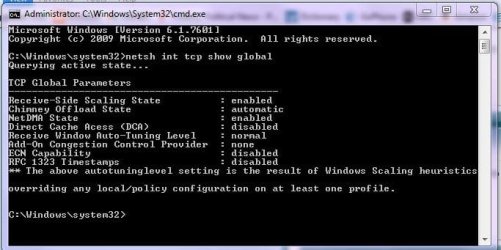
can you go to start menu, type CMD in the run line, right click the cmd.exe link that appears aboce the run line and select 'run as administrator' this gives you an elevated command prompt, now please type netsh int tcp show global press enter you will get a list of your current settings. If you can post a snip of it here I can have a look if there is anything can or needs changing.

Tutorial how to use snipping tool and upload. (just in case you need it, we don't know your experience level yet.)
 

My Computer My Computer

At a glance

Windows 7 home premium x64AMD FX-4100 AM3+ 3.6GHz 12MB Black EditionCrsair vengeance 12Gb DDR3 1600MHz CL9Asus GTX 560 1GB
Computer Manufacturer/Model Number
DIY
OS
Windows 7 home premium x64
CPU
AMD FX-4100 AM3+ 3.6GHz 12MB Black Edition
Motherboard
Asus M5A97 Pro
Memory
Crsair vengeance 12Gb DDR3 1600MHz CL9
Graphics Card(s)
Asus GTX 560 1GB
Sound Card
Realtek onboard
Monitor(s) Displays
Hanns G 1680x1050 native
Hard Drives
OCZ 128Gb Petrol ssd
2x500 Gb Samsung
PSU
OCZ StealthXstream II 500W
Internet Speed
8Mb or better
for some reason, its not uploading the screen shot so i wud try reproduce the screen shot for ur reference:

tcp global parameters

receive-side scaling state: enabled
chimney offload state: automatic
netDMA state: enabled
direct cache access (DCA): disabled
receive window auto-tuning level: normal
add-on congestion control provider:none
ecn capability:disabled
rfc 1323 timestamps:disabled
 

My Computer My Computer

At a glance

Win 7 Ultimate 32bit
OS
Win 7 Ultimate 32bit
I too am having this issue......it just started yesterday. No changes except the installation of a new printer. I have done all of the troubleshooting steps detailed prior. No luck. I have attached my tcip snip. I am running Windows 7 64 bit with IE9. I am tried resetting defaults, disabling add-ons, and all other steps provided.
 

Attachments

  • Capture.JPG
    Capture.JPG
    47.3 KB · Views: 20

My Computer My Computer

At a glance

Windows 7 64bit
OS
Windows 7 64bit
Back
Top