junjuramesh
New member
hi
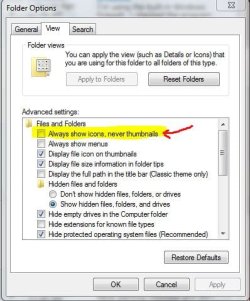
I am using windows 7 on my PC. I am not getting images preview in windows explorer. when I open a folder that contains image files ( jpg, gif,..etc.,) I am not able to view the images when I selected large icons and extra large icons in more options for some reasons(both in the preview pane and in the folder itself). Can any one please tell me how to view the images in windows explorer ?
Thanks in advance..
I am using windows 7 on my PC. I am not getting images preview in windows explorer. when I open a folder that contains image files ( jpg, gif,..etc.,) I am not able to view the images when I selected large icons and extra large icons in more options for some reasons(both in the preview pane and in the folder itself). Can any one please tell me how to view the images in windows explorer ?
Thanks in advance..
My Computer
- Computer Manufacturer/Model Number
- INTEL DG31GL
- OS
- windows 7 ultimate
- CPU
- INTEL(R) CORE(TM)2 DUO CPU E7300 @ 2.66 GHz
- Motherboard
- INTEL DG31GL
- Memory
- 2.0 GB RAM
- Monitor(s) Displays
- Samsung SyncMaster 632 NW
- Screen Resolution
- 1360*768
- Hard Drives
- 320 GB hard drive partitioned into five
- Keyboard
- microsoft
- Mouse
- microsoft
- Internet Speed
- 100 Mbps buffering