Imaging with free Macrium

   Information

This tutorial shows imaging with free Macrium Version 5.0. If you are still using Macrium Version 4.2, go to this Vimeo site where the tutorial of that version is stored.

The Video does not show the recovery part because I have no setup to screen capture it. But Keith (Kado) made this excellent recovery tutorial with text (but no sound) that he captured from a virtual partition.


   Warning


Note that the external disk to which you image must be formatted in NTFS. A disk that is formatted in Fat32 will accept an image, but the recovery programs cannot restore that image. You can, however, mount (open) a Fat32 image as VHD.


   Note
The production of the WinPE recovery CD (which is highly recommended) may take up to 3 hours because Macrium needs to download the 1.7GB WAIK (Windows Application Installation Kit). For your convenience I have uploaded a ready made .iso of the WinPE recovery disc. That can be downloaded in appr. 8 minutes which clearly beats the WAIK download. Once you downloaded and unzipped the folder, you can burn it directly to a CD with e.g. ImgBurn.

Here is the link to my Skydrive site.

Here is an alternate link from FileSwap (courtesy of Gary - Britton30)

I draw your attention to the fact that this WinPE CD can also be used to make images. That may be convenient in case you do not want to install Macrium on your PC.


This video tutorial explains the full cycle of the imaging process which is:

· Initial setups
· Image definition
· Image scheduling
· Image production

The imaging program that was used for this tutorial is free Macrium. But the basic principles are the same for other imaging programs although the user interface will be different.

This video runs for appr. 7 minutes.
There is a related thread on the Vista forum which gives a brief introduction to Macrium followed by a discussion.
You can download the free Macrium edition from here.

Note: If you have a problem with the loudness of the sound output of the video, check the "Loudness Equalization" box in your Playback device. It is under the 'Enhancements' tab.


Last edited by a moderator:
Are internal docks basically hot swapping cradles? I assumed that hot swap drive sata connections would need to be physically pushed in and out each time they were used resulting in wear over time on the connectors.
The drives in my external docking stations are not physically inserted and ejected very often. They get connected and disconnected by a power switch. They could be placed out of sight somewhere I guess for anal retentiveness. It would look neater!

For spinners I don't think direct sata vs usb3 data transfer rates (up to 5 Gb/s) would make a difference. I don't think spinner R/W rates come close to the usb3 limit? SSDs are a different story - you probably want sata 6 Gb/s.

I haven't heard the term "hot swapping cradles" before but I suppose you could call internal docks that. Another term is "hot swap bay". The thing to watch out for is that some hot swap bays require that the drive be screwed into a tray that then gets inserted into the bay (which can be a royal pain to deal with when frequently inserting and removing drives). Another kind is called a trayless hot swap bay; that is far better suited for using with backup drives that are frequently inserted and removed.

I once wondered if repeated insertions and removal of backup drives would cause excessive wear and tear on the contacts of the drives but several years of doing so has not caused any problems. In fact, I just took a look at the contacts on my old WD Greens I retired early this year, some of which are around five years old. All of the contacts not only show no signs of wear, they still have the gold plating on the copper traces of the contacts. I sure as heck wouldn't be frequently plugging and unplugging my $1600 (current price; I didn't pay quite that much) backup SSDs if there was any real danger of contact wear.

Even though USB 3.0 is rated at up to 5.0Gbps (just shy of SATA III's up to 6.0Gbps), that doesn't mean all USB 3.0 ports and devices will run at those speeds. All a USB port or device needs to do to be rated as USB 3.0 is to have the added connections of USB 3.0 and to run faster than USB 2.0 (all but the highest priced USB 3.0 flash drives are notorious for being pokier than 5.0Gbps). A SATA III port is more likely to run at or close to full speed than a USB 3.0 port. On my machine, the SATA III ports on my HBA card are actually rated at only 5.0Gbps (the rated speed of a single PCIe lane). Some MOBO SATA ports (ones that run off a PCI-e chip, such as Asmedia or Marvell, also run at only 5.0Gbps). Even then, even 5400rpm HDDs plugged into a hot swap bay connected to one of those ports were noticeably faster than ones in a dock connected by USB 3.0 when doing large transfers (of course YMMV). Still, the biggest advantages of using an internal dock over an external dock is more convenience and better aesthetics rather than more speed.

When using an external dock, even if you shut off the power to the dock via its power switch, there still is a remote chance that current surge or voltage spike could blow through even a physical switch and barbeque any drives still plugged in. The greater danger to keeping a backup drive, however, is if ol' Light Fingers Louie decides to apply a five finger discount to acquire your computer, it's highly likely he will snag the backup drive as well. It's far safer to keep backup drives out of sight away from the computer. As already stated, wear and tear on the drive contact fingers isn't really an issue.

Also, unless doing simultaneous backups on multiple drives, it's not a good idea to have more than one backup drive plugged into an external dock. Since an external dock has only the once connection to the computer, running a backup on multiple drives at the same time will pretty much increase the time it takes to update each backup by a factor of the number of drives (example: 2 drives = double the time), negating the advantage of simultaneous backups. If running only one backup at a time, any other drives plugged into the dock will subject to the same dangers any other drive connected to the computer, either internally or externally. I'm not saying external docks shouldn't be used for connecting a backup drive—often that is the only practical way; I'm just saying only one backup drive should be plugged in a time.

Other than for software issues I haven't sorted out yet (mutter, mutter, mumble, mumble), I can get away with running simultaneous backups since each backup drive gets plugged into its own SATA port, negating the speed issue, and because I have duplicate onsite backups for each data drive in my computer so, if the unthinkable were to happen and I killed two backup drives, I would still have their duplicates.
 

My Computer

Computer type
PC/Desktop
Computer Manufacturer/Model Number
Custom Build
OS
Win 7 Ultimate 64 bit
CPU
Intel i7-3930K
Motherboard
ASUS P9X79 WS
Memory
Kingston HyperX Genesis 32GB Kit (8x4GB Modules) 1600MHz DDR
Graphics Card(s)
MSI R7850 Twin Frozr 2GD5/OC Radeon HD 7850 2GB 256-bit GDDR
Sound Card
Asus Xonar Essence STX
Monitor(s) Displays
3x Asus VG248QE 24", Vizio 32" TV
Screen Resolution
1920 x 1080, ?
Hard Drives
Samsung 128GB 840 Pro SSD (1),
Samsung 4TB 850 EVO SSDs (4)
Samsung 4TB 850 EVO SSDs (16) external backup drives used in 2.5" hot swap bays in the computer.
PSU
Corsair HX750w
Case
Antec Two Hundred v2 (modified)
Cooling
Cooler Master GeminII S524 120mm (fan replaced with a 140mm)
Keyboard
Logitech G510s
Mouse
Logitech M525 (two in use)
Internet Speed
=< 32Mbps down, 8Mbps up
Antivirus
AVAST!, MBAM, SAS, Spybot S&D (all but MBAM free) Glary Util
Browser
IE11
Other Info
LSI 9211-8i HBA card (8 SATA III ports), 2.5" & 3.5" Hot Swap Bays, HooToo HT-CR001 PCI-E to USB 3.0 Internal Hub + 6 Slot Card Reader, and LG Model CH12LS28 BD-ROM Optical Drive. Also, ScanSnap S1500 ADF duplexing scanner, Canon 9000F flat bed scanner, Corsair SP2500 2.1 speakers, Samsung CLP 415nw laser color printer, Cyberpower PP2200SW UPS
A couple of points. A Hot swap capability does involve fiddling with your case that some people may not want to do. I wouldn't have a problem but don't see a great advantage for me at the moment.

When my external docks aren't in use the little 12v power pack is disconnected.

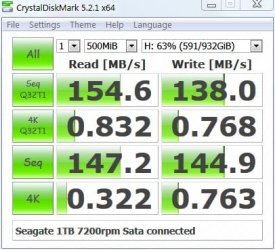
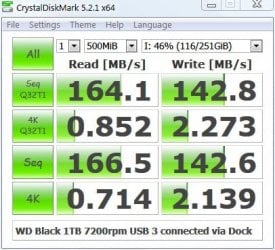
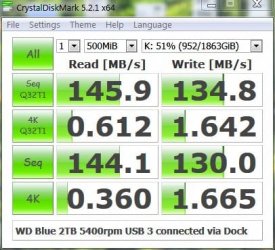
As to speed here are some tests I just ran.

Capture1.JPG

Capture2.JPG

Capture3.JPG

The tests were run on the PC under my specs. Speed will vary a bit depending on whether the faster outer tracks are being used vs the slower inner tracks.

I think USB 3 easily handles the maximum capabilities of a 7200rpm spinner. The 5400rpm WD Blue (same in my earlier pic) performs well. My OS partition is around 58 GB and the system image using Macrium v5 and the USB 3 connected WD Blue takes around 8 minutes. Restore is a little faster.
I also don't plan to make more than one image at a time.
 

My Computer

Computer type
PC/Desktop
Computer Manufacturer/Model Number
Own build
OS
Windows 7x64 Home Premium SP1
CPU
Intel i7 2600k
Motherboard
ASUS P8Z68 Deluxe
Memory
G.Skill Ripjaws (DDR3-1600) 2x4GB
Graphics Card(s)
Nvidia GeForce GTS 450; Intel HD Graphics 3000(GT2+)
Monitor(s) Displays
Dell Ultrasharp IPS panel U2311H, Samsung SyncMaster P2350
Screen Resolution
1920x1080
Hard Drives
Samsung 850 Pro SSD 256GB, Samsung SSD 840 120GB, Seagates 1TB Barracuda ST31000528AS x2
PSU
Seasonic M12II 520W
Case
Lian Li Lancool PC-K60
Cooling
Case: 1x120mm, 3x140mm CPU: Hyper 212+
Keyboard
Logitech MK520 (wireless)
Mouse
Logitech MK520
Internet Speed
6-7 Mbps
Antivirus
Norton Security Premium, Malwarebytes on 2 (MSE on 3rd PC)
Browser
FireFox
Other Info
Audio: Logitech Z523 2.1
Okay; we see that their are many ways to create backup external storage.

The big thing is use one or more methods to create your backups and or clones.

Here is another option. Thunderbolt. It's fairly new but super fast if your laptop or desktop has the options.
My desktop build has Thunderbolt. I don't use it at this time because I don't need it.
One can hook up a array of external drives with super fast speeds.

Their is lot of information and videos online if one care to know more.
A little teaser.


Jack
 

My Computer

Computer type
PC/Desktop
Computer Manufacturer/Model Number
Home made Desktop
OS
Windows 10 Pro. 64/ version 1709 Windows 7 Pro/64
CPU
Intel i7-6800K @ 4.3
Motherboard
ASUS X-99 Deluxe II
Memory
Corsair Platinum 16 gig @2400
Graphics Card(s)
EVGA GTX 1070 OC
Monitor(s) Displays
Asus 27" LED LCD/VE278Q
Screen Resolution
1920-1080 or 1280-720 HDMI
Hard Drives
INTEL SSD 730-240 Gb Sata 3.0/
PSU
EVGA Platium 1200W
Case
Phanteks Luxe Tempered Glass 8 fans/ one radiator
Cooling
XSPC/ Water Cooled CPU
Keyboard
Das 4 Professional
Mouse
Logitech M705/MX Anywhere 2-S
Internet Speed
100 mbits
Antivirus
Microsoft Security Essentials/ Malwarebytes Premium 3.0/ SAS
Browser
I.E. 11 default/Firefox/ ISP Time Warner Cable/Spectrum
Other Info
LG BluRay Burner/
Sound system-KLipsch-THX/
Icy Dock ssd Hot Swap bays.
Can't Clone A Samsung Laptop....

Newbie here, I'm not too sure if I'm posting in the right place, or should post a new topic, but here goes.


I've tried cloning my Samsung laptop at least 9 times using different programs, without success.
I have Windows home premium, an Intel i7 2675QM @ 2.20GHz processor. 4 GB Ram, 64bit, and a 1T HD.
I thought my HDD was starting to fail, as it would run slow, or appear to freeze up, occasionally.

I bought a Samsung 850 EVO 500GB SSD. I installed the Samsung Data Migration Software,
and tried to clone my HD, as Admin. It appeared to be working for about 2.5 Hours, 57%, then everything froze. The elapsed timers stopped. The HD light on my computer stayed solid, as did the light on the external device I had the SDD plugged into.
I waited for hours for it to move...it did not. I had to do a hard power shutdown to start up my laptop again.

I tried the procedure several more times. Samsung support was no help, as there was no error code, or any other information.

My 1T HD has 1 MBR Disk, with 3 partitions, and an iSSD. (I did shrink the partitions when I used Macrium)

I searched the forums, and FAQ's. I tried MSCONFIG to start only Microsoft related stuff. Nothing was running in the background.
I ran chkdisk a couple times, with no issues. I ran virus scans, and malware scans....all ok.
I tried a few more times...sometimes it would freeze at 56%, sometimes 57%....all different elapsed times around 2.5 hours. I tried letting it run over night after it froze....Nope!

I downloaded Macrium Reflect. That also froze up after cloning the 1st partition, (System) sucessfully.
The message was "Clone failed-Read failed- 22 - Invalid argument - 32 m_pSegmentToRestore->m_FileSystem.ReadFile failed
WriteFilemSystemData failed pDataRun == NULL RemapMFTRecord failed"
Every time it showed 0% done.

I tried Macrium several times, and tried Samsung Data Migration several more times too.

To test myself, and the SSD I tried the whole process on an old Sony desktop running XP....it worked 100%, cloning just like it should.

I did try a couple other free programs, that I can't remember now, and I'm not real sure I was using them right.

I'm just an old guy so please be gentle, as I'm not very computer savvy....I know about enough to get myself into trouble.

Thanks for any help, or suggestions you can give me.
 

My Computer

Computer type
Laptop
Computer Manufacturer/Model Number
Samsung
OS
Win 7 Home Premium 64 bit
CPU
i7
Memory
4 gb
Hard Drives
1T
You've been waiting a long time. If you can catch Brink, Lady Fitzgerald, or Layback Bear with a PM, maybe they can help. They're all Win 7 experts. Just refer them to post #1743 at this URL.
 

My Computer

Computer type
PC/Desktop
Computer Manufacturer/Model Number
HP p6-2020t
OS
Win 7 Ult 64-bit
CPU
G620 2.6GHZ Pentium R
Memory
6 GB
Monitor(s) Displays
25" HPLV2311
Screen Resolution
1920 x 1200
Hard Drives
1 SATA, 1 exterior SATA
Case
HP
Cooling
PSU
Antivirus
Glasswire
Browser
Waterfox; Firefox; Chrome for work
Other Info
Firewall--Glasswire
Similar specs in Gateway DX4200
Verizon FIOS Wired network

1 other Win7 computer-- has SSD
I've tried cloning my Samsung laptop at least 9 times using different programs, without success.
I have Windows home premium, an Intel i7 2675QM @ 2.20GHz processor. 4 GB Ram, 64bit, and a 1T HD.
I thought my HDD was starting to fail, as it would run slow, or appear to freeze up, occasionally.

I bought a Samsung 850 EVO 500GB SSD. I installed the Samsung Data Migration Software,
and tried to clone my HD, as Admin. It appeared to be working for about 2.5 Hours, 57%, then everything froze. The elapsed timers stopped. The HD light on my computer stayed solid, as did the light on the external device I had the SDD plugged into.
I waited for hours for it to move...it did not. I had to do a hard power shutdown to start up my laptop again.

Ok mate I ma no expert but personally I use Macrium for cloning as I am not a fan of Samsung softeawre after I hasd issues with it a couple of years back.
Now if I were you I would clean the drive you have tried to clone to using DISKPART and then use Macrium to clone the original drive to it. If that fails I woud be looking at testing the new drive for any anomalies.
To clean the drive see this Disk - Clean and Clean All with Diskpart Command - Windows 7 Help Forums and you can leave the drive unallocated for the clone.
 

My Computer

Computer type
PC/Desktop
Computer Manufacturer/Model Number
Own build (new) Desk1 / Asus ROG Win 7 / Desk2 1st build
OS
Desk1 7 Home Prem / Desk2 10 Pro / Main lap Asus ROG 10 Pro 2 laptop Toshiba 7 Pro Asus P2520 7 & 10
CPU
Desk1 i5 3750K / Laptop i7 GTX 860M / Desk2 i5 2500
Motherboard
Desk1 Asus P877-V / Desk2 Gigabyte H67 UD3H / Laptop ?
Memory
Desk1 8GB (1866) / Desk2 16GB (1333) / Laptop 8Gb DDR3
Graphics Card(s)
Desk 1& 2NVidia GTX 650 & Laptops on board Intel
Sound Card
Desk 1 & 2 -XONAR DG Realtek High Def audio Laptop
Monitor(s) Displays
Desk 1 Benq HD 2450 / Desk2 Philips 24" / Laptop 17.5"
Screen Resolution
1920x1080 D1 & D2 & Laptop 1
Hard Drives
Desk1 Samsung 120GB 830 SSD
Asus ROG 256GB 850 Pro SSD
Desk2 Samsung 840 256 SSD
Toshiba 120GB EVO
PSU
Desk 1 Corsair HX 1050/ Laptop ? / Desk 2 Corsair HX 650
Case
Desk 1 Cooler HAF XM ? Toshiba laptop / Desk2 Coolermaster
Cooling
Fans on all Desk1 -2 Desk2 - all Coolermasters 5 Laptop ?
Keyboard
Desk 1 MS Sidewinder X6 Desk 2 MS Sidewinder X 4
Mouse
Desk 1&2 - Gigabyte MS 900 gamer - laptop - Logitec wireless
Internet Speed
ADSL2+
Other Info
One other Desktop (tester) and spare Toshba laptop both with SSD's
Running Kaspersky 2016 ISS on all machines config'd identically
Logitec audio stereo systems on each machine (x3)
Canon MG5250MFC
Router/modem TP-Link running WPA2SK
I like ICIT2LOL, clean the drive the clone will be installed. Another tool to use to clean your new Samsung ssd is Mini Tool Partition Wizard. I have found some method of cleaning a drive leaves little bits of 'junk' on the front of the drive that upsets the apple cart.
When I did use Samsung SSD's I also descovered that their copy programs where nothing but a head ache.
Now I use Intel ssd's and still do a clean before attempting a clone using Macrium Reflect. Because of my limited data I use nothing but Clones and have no problems. When using a Clone you will have to re-start the protection on the clone drive to activate Restore Points.

Jack
 

My Computer

Computer type
PC/Desktop
Computer Manufacturer/Model Number
Home made Desktop
OS
Windows 10 Pro. 64/ version 1709 Windows 7 Pro/64
CPU
Intel i7-6800K @ 4.3
Motherboard
ASUS X-99 Deluxe II
Memory
Corsair Platinum 16 gig @2400
Graphics Card(s)
EVGA GTX 1070 OC
Monitor(s) Displays
Asus 27" LED LCD/VE278Q
Screen Resolution
1920-1080 or 1280-720 HDMI
Hard Drives
INTEL SSD 730-240 Gb Sata 3.0/
PSU
EVGA Platium 1200W
Case
Phanteks Luxe Tempered Glass 8 fans/ one radiator
Cooling
XSPC/ Water Cooled CPU
Keyboard
Das 4 Professional
Mouse
Logitech M705/MX Anywhere 2-S
Internet Speed
100 mbits
Antivirus
Microsoft Security Essentials/ Malwarebytes Premium 3.0/ SAS
Browser
I.E. 11 default/Firefox/ ISP Time Warner Cable/Spectrum
Other Info
LG BluRay Burner/
Sound system-KLipsch-THX/
Icy Dock ssd Hot Swap bays.
I agree that Samsung's Migration software is significantly less than stellar but that doesn't mean their SSDs are also less than stellar. However, I still feel Samsung SSDs are excellent products and should not be eschewed just because their migration software is garbage for anything more than two partitions.

The only time I've had a problem with cloning a drive with Macrium Reflect (MR) is when the source had some kind of corruption on it. I would suggest first using Secure Erase (you can use Samsung magician for that) to clean up the destination drive, reformat the drive, then try using MR again to clone from the source drive to the SSD. If it still fails, then try to make an image of the source drive (you will need a third drive to store the image on; you should have one anyway for backups), then try to restore the image to the drive in question.

If that still fails, try to get ahold of Jumanji here for help with determining what is wrong with your source drive.
 

My Computer

Computer type
PC/Desktop
Computer Manufacturer/Model Number
Custom Build
OS
Win 7 Ultimate 64 bit
CPU
Intel i7-3930K
Motherboard
ASUS P9X79 WS
Memory
Kingston HyperX Genesis 32GB Kit (8x4GB Modules) 1600MHz DDR
Graphics Card(s)
MSI R7850 Twin Frozr 2GD5/OC Radeon HD 7850 2GB 256-bit GDDR
Sound Card
Asus Xonar Essence STX
Monitor(s) Displays
3x Asus VG248QE 24", Vizio 32" TV
Screen Resolution
1920 x 1080, ?
Hard Drives
Samsung 128GB 840 Pro SSD (1),
Samsung 4TB 850 EVO SSDs (4)
Samsung 4TB 850 EVO SSDs (16) external backup drives used in 2.5" hot swap bays in the computer.
PSU
Corsair HX750w
Case
Antec Two Hundred v2 (modified)
Cooling
Cooler Master GeminII S524 120mm (fan replaced with a 140mm)
Keyboard
Logitech G510s
Mouse
Logitech M525 (two in use)
Internet Speed
=< 32Mbps down, 8Mbps up
Antivirus
AVAST!, MBAM, SAS, Spybot S&D (all but MBAM free) Glary Util
Browser
IE11
Other Info
LSI 9211-8i HBA card (8 SATA III ports), 2.5" & 3.5" Hot Swap Bays, HooToo HT-CR001 PCI-E to USB 3.0 Internal Hub + 6 Slot Card Reader, and LG Model CH12LS28 BD-ROM Optical Drive. Also, ScanSnap S1500 ADF duplexing scanner, Canon 9000F flat bed scanner, Corsair SP2500 2.1 speakers, Samsung CLP 415nw laser color printer, Cyberpower PP2200SW UPS
Well Jeannie I have to agree that Samsungs as drives are really as good as they get but that Magician software wrecked my Ivy Bridge by disconnecting all my USB ports and that was some time ago and it was a member in here who just happened to see my issue and knew just what it was and it is never going back on my machines ever.
Macrium for me has never let me down for cloning or imaging etc etc and I would just not use anything else.
 

My Computer

Computer type
PC/Desktop
Computer Manufacturer/Model Number
Own build (new) Desk1 / Asus ROG Win 7 / Desk2 1st build
OS
Desk1 7 Home Prem / Desk2 10 Pro / Main lap Asus ROG 10 Pro 2 laptop Toshiba 7 Pro Asus P2520 7 & 10
CPU
Desk1 i5 3750K / Laptop i7 GTX 860M / Desk2 i5 2500
Motherboard
Desk1 Asus P877-V / Desk2 Gigabyte H67 UD3H / Laptop ?
Memory
Desk1 8GB (1866) / Desk2 16GB (1333) / Laptop 8Gb DDR3
Graphics Card(s)
Desk 1& 2NVidia GTX 650 & Laptops on board Intel
Sound Card
Desk 1 & 2 -XONAR DG Realtek High Def audio Laptop
Monitor(s) Displays
Desk 1 Benq HD 2450 / Desk2 Philips 24" / Laptop 17.5"
Screen Resolution
1920x1080 D1 & D2 & Laptop 1
Hard Drives
Desk1 Samsung 120GB 830 SSD
Asus ROG 256GB 850 Pro SSD
Desk2 Samsung 840 256 SSD
Toshiba 120GB EVO
PSU
Desk 1 Corsair HX 1050/ Laptop ? / Desk 2 Corsair HX 650
Case
Desk 1 Cooler HAF XM ? Toshiba laptop / Desk2 Coolermaster
Cooling
Fans on all Desk1 -2 Desk2 - all Coolermasters 5 Laptop ?
Keyboard
Desk 1 MS Sidewinder X6 Desk 2 MS Sidewinder X 4
Mouse
Desk 1&2 - Gigabyte MS 900 gamer - laptop - Logitec wireless
Internet Speed
ADSL2+
Other Info
One other Desktop (tester) and spare Toshba laptop both with SSD's
Running Kaspersky 2016 ISS on all machines config'd identically
Logitec audio stereo systems on each machine (x3)
Canon MG5250MFC
Router/modem TP-Link running WPA2SK
Thanks everyone....but after my post with no responses, I went to the "Back up and Restore" and got assistance there......but alas, ended up returning the SSD.
Thanks again
 

My Computer

Computer type
Laptop
Computer Manufacturer/Model Number
Samsung
OS
Win 7 Home Premium 64 bit
CPU
i7
Memory
4 gb
Hard Drives
1T
Many forum members have very good luck with Samsung ssd's but I personally had nothing but problems.
Maybe it's just me. I gave my 500 GB Samsung ssd away because I didn't need the problems it caused.

I use Intel ssd's and yes I had one go bad. I got a free replacement in a week from Intel. That is what I call service.
Intel has a program that they call 'Tool Box' for their ssd's that takes care of the ssd and the program has always work as it should.
'Knock on wood'.
Intel's ssd's do cost more but I think they are worth it. The bad news is Intel ssd's are seldom on sale.

Jack
 

My Computer

Computer type
PC/Desktop
Computer Manufacturer/Model Number
Home made Desktop
OS
Windows 10 Pro. 64/ version 1709 Windows 7 Pro/64
CPU
Intel i7-6800K @ 4.3
Motherboard
ASUS X-99 Deluxe II
Memory
Corsair Platinum 16 gig @2400
Graphics Card(s)
EVGA GTX 1070 OC
Monitor(s) Displays
Asus 27" LED LCD/VE278Q
Screen Resolution
1920-1080 or 1280-720 HDMI
Hard Drives
INTEL SSD 730-240 Gb Sata 3.0/
PSU
EVGA Platium 1200W
Case
Phanteks Luxe Tempered Glass 8 fans/ one radiator
Cooling
XSPC/ Water Cooled CPU
Keyboard
Das 4 Professional
Mouse
Logitech M705/MX Anywhere 2-S
Internet Speed
100 mbits
Antivirus
Microsoft Security Essentials/ Malwarebytes Premium 3.0/ SAS
Browser
I.E. 11 default/Firefox/ ISP Time Warner Cable/Spectrum
Other Info
LG BluRay Burner/
Sound system-KLipsch-THX/
Icy Dock ssd Hot Swap bays.
Question: Will Free Macrium clone only a partition to another partition, without having to clone the entire disk ?
I looked at the feature list on Macrium site but I could not make head nor tail of it.

Thanks for reading.
 

My Computer

Computer type
PC/Desktop
Computer Manufacturer/Model Number
Dell Optiplex 780m "mini-tower"
OS
Windows 7 Pro x64
CPU
Intel Core Two Duo E8600 3.33 ghz
Motherboard
Whatever DELL put in it
Memory
8GB
Graphics Card(s)
Gigabyte Radeon R7 240
Monitor(s) Displays
HP 2159m
PSU
750 Watt Corsair CX750
Keyboard
Logitech Wireless
Mouse
Logitech Wireless
Browser
Chrome, Firefox, IE
Question: Will Free Macrium clone only a partition to another partition, without having to clone the entire disk ?
I looked at the feature list on Macrium site but I could not make head nor tail of it.

Thanks for reading.

Yes. Just tick the partition you want to clone and clear any others.
 

My Computer

Computer type
Laptop
Computer Manufacturer/Model Number
Hewlett-Packard/G62-107SA Notebook
OS
Microsoft Windows 7 Home Premium 64-bit Service Pack 1
CPU
Intel(R) Core(TM) i3 CPU M 330 @ 2.13GHz
Motherboard
Hewlett-Packard 1425
Memory
8 GB DDR3
Graphics Card(s)
Intel(R) HD Graphics
Sound Card
Realtek High Definition Audio
Monitor(s) Displays
Builtin
Screen Resolution
1366 x 768 x 32 bits (4294967296 colors) @ 60 Hz
Hard Drives
250 GB SATA Hard Disk Drive 7200 rpm
2TB Seagate GoFlex USB 2 Drive
1TB Iomega Prestige USB 2 Drive
1.5TB Iomega Prestige USB 2 Drive (Samsung)
2TB WD MyBook Live NAS.
Mouse
Logitech Anywhere MX
Internet Speed
152 Mbs download 10 Mbs upload
Antivirus
Norton 360
Browser
Chrome
Yes. Just tick the partition you want to clone and clear any others.

Do you mean clear the tick marks or do you mean Macrium will wipe clear the other partitions ?

Probably a dumb question, but I sure don't want to misunderstand.

Thanks for answering.
 

My Computer

Computer type
PC/Desktop
Computer Manufacturer/Model Number
Dell Optiplex 780m "mini-tower"
OS
Windows 7 Pro x64
CPU
Intel Core Two Duo E8600 3.33 ghz
Motherboard
Whatever DELL put in it
Memory
8GB
Graphics Card(s)
Gigabyte Radeon R7 240
Monitor(s) Displays
HP 2159m
PSU
750 Watt Corsair CX750
Keyboard
Logitech Wireless
Mouse
Logitech Wireless
Browser
Chrome, Firefox, IE
You can drag the partition to where you want to put it on the target disk. That should either be unallocated or a partition you want to replace. Unfortunately I don't have a setup I can test this on at the moment. I suggest you experiment. You will be given plenty of opportunity to cancel before you start the clone process.
 

My Computer

Computer type
Laptop
Computer Manufacturer/Model Number
Hewlett-Packard/G62-107SA Notebook
OS
Microsoft Windows 7 Home Premium 64-bit Service Pack 1
CPU
Intel(R) Core(TM) i3 CPU M 330 @ 2.13GHz
Motherboard
Hewlett-Packard 1425
Memory
8 GB DDR3
Graphics Card(s)
Intel(R) HD Graphics
Sound Card
Realtek High Definition Audio
Monitor(s) Displays
Builtin
Screen Resolution
1366 x 768 x 32 bits (4294967296 colors) @ 60 Hz
Hard Drives
250 GB SATA Hard Disk Drive 7200 rpm
2TB Seagate GoFlex USB 2 Drive
1TB Iomega Prestige USB 2 Drive
1.5TB Iomega Prestige USB 2 Drive (Samsung)
2TB WD MyBook Live NAS.
Mouse
Logitech Anywhere MX
Internet Speed
152 Mbs download 10 Mbs upload
Antivirus
Norton 360
Browser
Chrome
You can drag the partition to where you want to put it on the target disk. That should either be unallocated or a partition you want to replace. Unfortunately I don't have a setup I can test this on at the moment. I suggest you experiment. You will be given plenty of opportunity to cancel before you start the clone process.

Thanks so much.

I have version 6.3.1745; is there anything in the new version, 7.something, that would make it worthwhile or should I just wait before upgrading ?
 

My Computer

Computer type
PC/Desktop
Computer Manufacturer/Model Number
Dell Optiplex 780m "mini-tower"
OS
Windows 7 Pro x64
CPU
Intel Core Two Duo E8600 3.33 ghz
Motherboard
Whatever DELL put in it
Memory
8GB
Graphics Card(s)
Gigabyte Radeon R7 240
Monitor(s) Displays
HP 2159m
PSU
750 Watt Corsair CX750
Keyboard
Logitech Wireless
Mouse
Logitech Wireless
Browser
Chrome, Firefox, IE
I don't think there is a great deal new in the free version but I'm not sure how long it will be supported. I don't think there has been an update since the free 7.1 was released.
 

My Computer

Computer type
Laptop
Computer Manufacturer/Model Number
Hewlett-Packard/G62-107SA Notebook
OS
Microsoft Windows 7 Home Premium 64-bit Service Pack 1
CPU
Intel(R) Core(TM) i3 CPU M 330 @ 2.13GHz
Motherboard
Hewlett-Packard 1425
Memory
8 GB DDR3
Graphics Card(s)
Intel(R) HD Graphics
Sound Card
Realtek High Definition Audio
Monitor(s) Displays
Builtin
Screen Resolution
1366 x 768 x 32 bits (4294967296 colors) @ 60 Hz
Hard Drives
250 GB SATA Hard Disk Drive 7200 rpm
2TB Seagate GoFlex USB 2 Drive
1TB Iomega Prestige USB 2 Drive
1.5TB Iomega Prestige USB 2 Drive (Samsung)
2TB WD MyBook Live NAS.
Mouse
Logitech Anywhere MX
Internet Speed
152 Mbs download 10 Mbs upload
Antivirus
Norton 360
Browser
Chrome
Do you mean clear the tick marks or do you mean Macrium will wipe clear the other partitions ?

Probably a dumb question, but I sure don't want to misunderstand.

Thanks for answering.

He was referring to clearing the tick marks. Anything not ticked will be ignored by Macrium Reflect.
 

My Computer

Computer type
PC/Desktop
Computer Manufacturer/Model Number
Custom Build
OS
Win 7 Ultimate 64 bit
CPU
Intel i7-3930K
Motherboard
ASUS P9X79 WS
Memory
Kingston HyperX Genesis 32GB Kit (8x4GB Modules) 1600MHz DDR
Graphics Card(s)
MSI R7850 Twin Frozr 2GD5/OC Radeon HD 7850 2GB 256-bit GDDR
Sound Card
Asus Xonar Essence STX
Monitor(s) Displays
3x Asus VG248QE 24", Vizio 32" TV
Screen Resolution
1920 x 1080, ?
Hard Drives
Samsung 128GB 840 Pro SSD (1),
Samsung 4TB 850 EVO SSDs (4)
Samsung 4TB 850 EVO SSDs (16) external backup drives used in 2.5" hot swap bays in the computer.
PSU
Corsair HX750w
Case
Antec Two Hundred v2 (modified)
Cooling
Cooler Master GeminII S524 120mm (fan replaced with a 140mm)
Keyboard
Logitech G510s
Mouse
Logitech M525 (two in use)
Internet Speed
=< 32Mbps down, 8Mbps up
Antivirus
AVAST!, MBAM, SAS, Spybot S&D (all but MBAM free) Glary Util
Browser
IE11
Other Info
LSI 9211-8i HBA card (8 SATA III ports), 2.5" & 3.5" Hot Swap Bays, HooToo HT-CR001 PCI-E to USB 3.0 Internal Hub + 6 Slot Card Reader, and LG Model CH12LS28 BD-ROM Optical Drive. Also, ScanSnap S1500 ADF duplexing scanner, Canon 9000F flat bed scanner, Corsair SP2500 2.1 speakers, Samsung CLP 415nw laser color printer, Cyberpower PP2200SW UPS
Just one additional suggestion, although this process is as safe as it can be, there is always a possibility of something beyond your control causing a clone to fail and cause further issues

I would therefore strongly recommend that you make a full backup/image of the current working disk before you start your cloning process
 

My Computers

System One System Two

  • Computer type
    PC/Desktop
    Computer Manufacturer/Model Number
    ChillBlast - Custom to my design
    OS
    Windows 11 Pro x64 [Latest Release and Release Preview]
    CPU
    Ryzen 9 5950X, 3.8 - 5.2 MHz
    Motherboard
    Asus Prime X570-Pro
    Memory
    64GB [2 x 32GB] DDR4 3200MHz
    Graphics Card(s)
    4GB NVIDIA GEFORCE GTX 1650 Ti
    Sound Card
    On-board SPDIF to 5.1 System + HDMI [5.1 system]
    Monitor(s) Displays
    32" UHD 32 Bit HDR Monitor + 43" UHD 4K 32Bit HDR TV
    Screen Resolution
    2 x 3840 x 2160 @60Hz
    Hard Drives
    1TB M2 SSD OS, 500GB Fast Access SSD, 2 x 8TB Data + Various Externals from 1TB to 4TB, 10TB NAS
    PSU
    NZXT C750 80 PLUS Gold 750W Modular PSU
    Case
    Workstation Case [Matt Black]
    Cooling
    NZXT Kraken X63 280mm CPU Cooler +2x Quiet Case fans
    Keyboard
    Logitech Wireless MX Keys & K400 + others
    Mouse
    Logitech Wireless MX Master 3S
    Internet Speed
    920 MB Down 50 MB Up
    Antivirus
    BitDefender Total Security Pro
    Browser
    Chrome (always run latest Non-Beta)
    Other Info
    Also run ...
    Laptop - Quad 8GB - Windows 10 Pro x64
    Nexus 7 Android tablet x2
    Samsung 10.2" tablet
    Blackview TAB 8 4G Android Tablet c/w Keyboard
    Wacom Intuos Pro Medium Pen Pad
    Wacom Intuos Pro Small Pen Pad
    Wacom Expresskeys Remote
    Loopdeck+ Graphics Controller
    Shuttle Pro v2 Control
  • Computer type
    Laptop
    System Manufacturer/Model Number
    Dell XPS 17 10750H
    OS
    Windows 11 Pro x64 Latest RP
    CPU
    Intel I7 10750H 5.0GHz
    Motherboard
    Dell XPS
    Memory
    32GB [2x16GB] DDR4 2933 MHz
    Graphics Card(s)
    nVidia GTX1650Ti 4 GB GDDR6
    Sound Card
    Stock [Realtek] 4 Speaker
    Monitor(s) Displays
    17" IPS UHD+ Infinity Edge Touchscreen
    Screen Resolution
    3840 x 2400
    Hard Drives
    2TB M2 NVMe, 4TB External + various 500GB & 1TB External NVMe (also have access to spinner HDD from
    PSU
    Stock
    Case
    Stock XPS Aluminium & Carbon Fibre
    Cooling
    Stock - Active Fan Control
    Keyboard
    Backlit + Various Logitech
    Mouse
    Stock Track Pad + Logitech MX Trackball
    Internet Speed
    72 MB Down 18MB Up
    Browser
    Chrome
    Other Info
    Also run ...
    Laptop - Quad 8GB - Windows 10 Pro x64
    Nexus 7 Android tablet x2
    10.2" tablet
    Sony Z3 Android Smartphone
    Wacom Intuos Pro Medium Pen Pad
    Wacom Intuos Pro Small Pen Pad
    Wacom Expresskeys Remote
    Loopdeck+ Graphics Controller
    Shuttle Pro v2 Control Pad
    10TB NAS
A good point Nigel. I should have mentioned it myself.
 

My Computer

Computer type
Laptop
Computer Manufacturer/Model Number
Hewlett-Packard/G62-107SA Notebook
OS
Microsoft Windows 7 Home Premium 64-bit Service Pack 1
CPU
Intel(R) Core(TM) i3 CPU M 330 @ 2.13GHz
Motherboard
Hewlett-Packard 1425
Memory
8 GB DDR3
Graphics Card(s)
Intel(R) HD Graphics
Sound Card
Realtek High Definition Audio
Monitor(s) Displays
Builtin
Screen Resolution
1366 x 768 x 32 bits (4294967296 colors) @ 60 Hz
Hard Drives
250 GB SATA Hard Disk Drive 7200 rpm
2TB Seagate GoFlex USB 2 Drive
1TB Iomega Prestige USB 2 Drive
1.5TB Iomega Prestige USB 2 Drive (Samsung)
2TB WD MyBook Live NAS.
Mouse
Logitech Anywhere MX
Internet Speed
152 Mbs download 10 Mbs upload
Antivirus
Norton 360
Browser
Chrome
Back
Top