
Improve Windows 7 Startup

karlsnooks

New member
Guru
Gold Member
VIP
Local time
8:41 AM
Messages
10,200
Location
Austin, Texas

My Computer

Computer Manufacturer/Model Number
Toshiba Satellite S875D-S7239 laptop
OS
MS Windows 7 Ultimate SP1 64-bit
CPU
AMD A10-4600M
Motherboard
AMD Pumori (Socket FT1)
Memory
6.00 GB Dual-Channel DDR3 @ 798MHz (11-11-12-28)
Graphics Card(s)
AMD Radeon HD 7660G
Sound Card
High Definition Audio Device
Monitor(s) Displays
Generic PnP Monitor (1600x900@60Hz)
Screen Resolution
1600x900@60Hz
Hard Drives
SSD 119GB Corsair CSSD-V128GB2 ATA Device
Keyboard
Standard PS/2 Keyboard
Mouse
HP Wireless Optical Mobile Mouse Model FHA-3410
Internet Speed
What the local pub, local coffee shop offers.
Other Info
Optical Drive:MATSHITA BD-CMB UJ160B ATA Device


Also have an Asus ha1002xp netbook with Win 7 Ultimate installed.
It would be nice if they would come up with a patch or some thing that gives you better start up performance as mine takes awhile to boot up even with the specs of my computer.

RitualJman
 

My Computer

Computer type
PC/Desktop
Computer Manufacturer/Model Number
Custom Build
OS
Windows 7 Pro 64-bit
CPU
AMD BullDozer FX-4100 3.6GHz Overclocked to 4.51GHz
Motherboard
Asus SaberTooth 990FX
Memory
16GB G.Skill DDR3
Graphics Card(s)
Sapphire Radeon HD 6770 Video Card - 1024MB, GDDR5
Sound Card
Creative Labs SB X-FI Titanium Fatal1ty Champ PCIe
Monitor(s) Displays
Viewsonic VX2025VM & Acer P191w
Screen Resolution
Viewsonic VX2025VM 1680x1050 & Acer P191w 1440X900
Hard Drives
Crucial M100 512GB SSD
Seagate 2TB
PSU
CORSAIR 860W 80 PLUS PLATINUM Certified Full Modular Active
Case
NZXT Phantom 410
Cooling
CoolerMaster Siedon 240XL Water Cooling
Keyboard
Logitech G510 Gaming Keyboard
Mouse
Razer Abyssus Gaming Mouse
Internet Speed
Ping: 4Ms Download: 88.25Mbps Upload: 91.00Mbps
Antivirus
Avast Internet Security
Browser
Google Chrome
Other Info
1. Thermaltake BlacX 5G Black USB 3.0 HDD Docking Station
2. NZXT Aperture M 5.25" Internal Card Reader 2x USB3.0
3. Dazzle Multimedia DVD Recorder HD & Video Capture
4. Razer Sabertooth Elite Gaming Controller
5. Xbox 360 Guitar Hero 3 Guitar (USB2.0)
6. Microsoft LifeCam HD-5001
6. Plantronics RIG Stereo Headset + Mixer
It would be nice if they would come up with a patch or some thing that gives you better start up performance as mine takes awhile to boot up even with the specs of my computer.

RitualJman

What do you mean by "A While".

My system is a i5 760, 2.8, Overclocked to 3.8 and I just installed a SSD yesterday as a OS & programs drive.
Even before installing the SSD my system booted from hitting the power button to Welcome screen in about 40 - 50 seconds, that is with all the POST diagnostics done for the RAM, CPU and Chipset my motherboard does automatically. After typing in my password to full functional desktop about another 10 seconds. Since the install of the SSD it has shortened by about 10-15 seconds overall.

Just how long does your system take from a cold boot to a functioning desktop.
And how many processes are running.
 

My Computer

Computer Manufacturer/Model Number
Built be Me
OS
Windows 7 Pro x64
CPU
i5 760
Motherboard
Asus P7P55D-E Pro
Memory
16GB
Graphics Card(s)
Nvidia GTS450
Sound Card
On board
Monitor(s) Displays
Dell 2007WFP Dell 1800FP
Screen Resolution
1680x1050 1280x1024
Hard Drives
Seagate 250GB & 750GB
WD 1TB
PSU
Antec 750
Case
In Win
Cooling
Cooler Master Hyper 212+
Keyboard
IBM
Mouse
MS
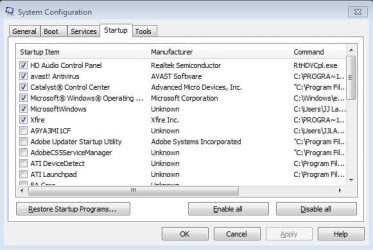
type msconfig into the start-menu searchbox.

look at the startup tab - you've probably got lots of programs starting up with windows, delaying the boot.

most of them can be safely disabled - make sure you leave any entries to do with antivirus/malware.

if you're unsure about which ones to keep, post a screenshot and we can advise further.
 

My Computer

Computer Manufacturer/Model Number
mickey megabyte 1234
OS
ultimate 64 sp1
CPU
i5 2500K [email protected]
Motherboard
MSI P67A-GD53
Memory
8 gigs GSkill Ripjaws 1600
Graphics Card(s)
amd hd6950
Sound Card
creative x-fi gamer
Monitor(s) Displays
samsung 24"
Screen Resolution
1920x1080
Hard Drives
ocz vertex 2e 60 gig, samsung f3 1tb, buffalo 2tb ext
PSU
antec 550
Case
antec three hundred
Cooling
i'm a cooling fan
Keyboard
saitek eclipse ii
Mouse
logitech g3
Internet Speed
about 4 Mbps
Other Info
i love win7
My system tasks about 3-4 minutes to get to a fulling working desktop from a cold start. I have ran many virus scans i have run a couple in safe mode, even done a boot scan and nothing. I have also tried CCleaner and that has made the boot a little bit fast but not much. I have checked MSCONFIG but I am very picky on what boots with my computer. As far as I can see there is nothing on the would really slow it down. I should mention that most of the time is at the Splash screen that says windows is starting before the welcome screen.

Thanks
RitualJman

Capture.JPG
 

My Computer

Computer type
PC/Desktop
Computer Manufacturer/Model Number
Custom Build
OS
Windows 7 Pro 64-bit
CPU
AMD BullDozer FX-4100 3.6GHz Overclocked to 4.51GHz
Motherboard
Asus SaberTooth 990FX
Memory
16GB G.Skill DDR3
Graphics Card(s)
Sapphire Radeon HD 6770 Video Card - 1024MB, GDDR5
Sound Card
Creative Labs SB X-FI Titanium Fatal1ty Champ PCIe
Monitor(s) Displays
Viewsonic VX2025VM & Acer P191w
Screen Resolution
Viewsonic VX2025VM 1680x1050 & Acer P191w 1440X900
Hard Drives
Crucial M100 512GB SSD
Seagate 2TB
PSU
CORSAIR 860W 80 PLUS PLATINUM Certified Full Modular Active
Case
NZXT Phantom 410
Cooling
CoolerMaster Siedon 240XL Water Cooling
Keyboard
Logitech G510 Gaming Keyboard
Mouse
Razer Abyssus Gaming Mouse
Internet Speed
Ping: 4Ms Download: 88.25Mbps Upload: 91.00Mbps
Antivirus
Avast Internet Security
Browser
Google Chrome
Other Info
1. Thermaltake BlacX 5G Black USB 3.0 HDD Docking Station
2. NZXT Aperture M 5.25" Internal Card Reader 2x USB3.0
3. Dazzle Multimedia DVD Recorder HD & Video Capture
4. Razer Sabertooth Elite Gaming Controller
5. Xbox 360 Guitar Hero 3 Guitar (USB2.0)
6. Microsoft LifeCam HD-5001
6. Plantronics RIG Stereo Headset + Mixer
hmm - okay fair enough, you've already well-pruned your msconfig startup doodah.

what's the 'MicrosoftWindows / Unknown' entry?

not sure what your problem is in that case.
 

My Computer

Computer Manufacturer/Model Number
mickey megabyte 1234
OS
ultimate 64 sp1
CPU
i5 2500K [email protected]
Motherboard
MSI P67A-GD53
Memory
8 gigs GSkill Ripjaws 1600
Graphics Card(s)
amd hd6950
Sound Card
creative x-fi gamer
Monitor(s) Displays
samsung 24"
Screen Resolution
1920x1080
Hard Drives
ocz vertex 2e 60 gig, samsung f3 1tb, buffalo 2tb ext
PSU
antec 550
Case
antec three hundred
Cooling
i'm a cooling fan
Keyboard
saitek eclipse ii
Mouse
logitech g3
Internet Speed
about 4 Mbps
Other Info
i love win7
My system tasks about 3-4 minutes to get to a fulling working desktop from a cold start. I have ran many virus scans i have run a couple in safe mode, even done a boot scan and nothing. I have also tried CCleaner and that has made the boot a little bit fast but not much. I have checked MSCONFIG but I am very picky on what boots with my computer. As far as I can see there is nothing on the would really slow it down. I should mention that most of the time is at the Splash screen that says windows is starting before the welcome screen.

Thanks
RitualJman

View attachment 149112
Why do you need the audio control panel and CCC to start at boot? As for the 2 entries for windows, expand the columns in msconfig to check what they are- they are usually the sidebar etc. And what is xfire?
 

My Computer

Computer Manufacturer/Model Number
Too many to describe...
OS
Windows 7 x64 pro/ Windows 7 x86 Pro/ XP SP3 x86
xfire is a gaming utility, so you can see which servers your friends are playing on, and quickly join them etc.

do you really need it to start at each boot? can you not start it manually when you need it?
 

My Computer

Computer Manufacturer/Model Number
mickey megabyte 1234
OS
ultimate 64 sp1
CPU
i5 2500K [email protected]
Motherboard
MSI P67A-GD53
Memory
8 gigs GSkill Ripjaws 1600
Graphics Card(s)
amd hd6950
Sound Card
creative x-fi gamer
Monitor(s) Displays
samsung 24"
Screen Resolution
1920x1080
Hard Drives
ocz vertex 2e 60 gig, samsung f3 1tb, buffalo 2tb ext
PSU
antec 550
Case
antec three hundred
Cooling
i'm a cooling fan
Keyboard
saitek eclipse ii
Mouse
logitech g3
Internet Speed
about 4 Mbps
Other Info
i love win7
My system is a i5 760, 2.8, Overclocked to 3.8 and I just installed a SSD yesterday as a OS & programs drive.
Even before installing the SSD my system booted from hitting the power button to Welcome screen in about 40 - 50 seconds, that is with all the POST diagnostics done for the RAM, CPU and Chipset my motherboard does automatically. After typing in my password to full functional desktop about another 10 seconds. Since the install of the SSD it has shortened by about 10-15 seconds overall.

Heh yeah, with an SSD on one of my machines, I sometimes end up at the login screen a second or so before the keyboard has even finished booting up itself :D
 

My Computer

Computer Manufacturer/Model Number
Scratch built
OS
Windows 7 x64 Ultimate
CPU
i7 960
Motherboard
Asus P6X58D
Memory
12 Gig Corsair Dominator
Graphics Card(s)
Nvidia 480
Sound Card
Maudio Delta 44 + breakout box
Monitor(s) Displays
Dell UltraSharp U2410 24in and Samsung 21 dual monitors
Screen Resolution
1920x1200 and 1280x1024
Hard Drives
Primary: Intel X-25M G2 160G SSD
Secondary: Segate baracuda 1.0 TB
HDs in AHCI mode.
PSU
Corasair TX850
Case
Cooler Master HAF
Cooling
Corsair H50
Keyboard
Logitech G15 + N52 game pad
Mouse
Logitech MX518
Internet Speed
15kbs down 4.5kbps up
Other Info
WEI 7.6
CPU & RAM 7.6
Graphics 7.9
Hard disk 7.7
I have Xfire starting up at boot because this is my Gaming computer and thats really all i do on it is game. I have a laptop for doing emails music facebook etc.

microsoftwindows (unknown) file location is: C:users\JJLandry\AppData\Roaming\Windows32.exe

I can turn off the CCC and the HD audio Control Panel with out having problems and it should help fix my problem?

Thanks
RitualJman
 

My Computer

Computer type
PC/Desktop
Computer Manufacturer/Model Number
Custom Build
OS
Windows 7 Pro 64-bit
CPU
AMD BullDozer FX-4100 3.6GHz Overclocked to 4.51GHz
Motherboard
Asus SaberTooth 990FX
Memory
16GB G.Skill DDR3
Graphics Card(s)
Sapphire Radeon HD 6770 Video Card - 1024MB, GDDR5
Sound Card
Creative Labs SB X-FI Titanium Fatal1ty Champ PCIe
Monitor(s) Displays
Viewsonic VX2025VM & Acer P191w
Screen Resolution
Viewsonic VX2025VM 1680x1050 & Acer P191w 1440X900
Hard Drives
Crucial M100 512GB SSD
Seagate 2TB
PSU
CORSAIR 860W 80 PLUS PLATINUM Certified Full Modular Active
Case
NZXT Phantom 410
Cooling
CoolerMaster Siedon 240XL Water Cooling
Keyboard
Logitech G510 Gaming Keyboard
Mouse
Razer Abyssus Gaming Mouse
Internet Speed
Ping: 4Ms Download: 88.25Mbps Upload: 91.00Mbps
Antivirus
Avast Internet Security
Browser
Google Chrome
Other Info
1. Thermaltake BlacX 5G Black USB 3.0 HDD Docking Station
2. NZXT Aperture M 5.25" Internal Card Reader 2x USB3.0
3. Dazzle Multimedia DVD Recorder HD & Video Capture
4. Razer Sabertooth Elite Gaming Controller
5. Xbox 360 Guitar Hero 3 Guitar (USB2.0)
6. Microsoft LifeCam HD-5001
6. Plantronics RIG Stereo Headset + Mixer
microsoftwindows (unknown) file location is: C:users\JJLandry\AppData\Roaming\Windows32.exe

what is this for?


I can turn off the CCC and the HD audio Control Panel with out having problems and it should help fix my problem?

try it and see - if you can't hear anything or have trouble with your games after disabling, then it's very simple to re-enable.
 

My Computer

Computer Manufacturer/Model Number
mickey megabyte 1234
OS
ultimate 64 sp1
CPU
i5 2500K [email protected]
Motherboard
MSI P67A-GD53
Memory
8 gigs GSkill Ripjaws 1600
Graphics Card(s)
amd hd6950
Sound Card
creative x-fi gamer
Monitor(s) Displays
samsung 24"
Screen Resolution
1920x1080
Hard Drives
ocz vertex 2e 60 gig, samsung f3 1tb, buffalo 2tb ext
PSU
antec 550
Case
antec three hundred
Cooling
i'm a cooling fan
Keyboard
saitek eclipse ii
Mouse
logitech g3
Internet Speed
about 4 Mbps
Other Info
i love win7
I'll try that right now and get back to you.

Thanks
RitualJman
 

My Computer

Computer type
PC/Desktop
Computer Manufacturer/Model Number
Custom Build
OS
Windows 7 Pro 64-bit
CPU
AMD BullDozer FX-4100 3.6GHz Overclocked to 4.51GHz
Motherboard
Asus SaberTooth 990FX
Memory
16GB G.Skill DDR3
Graphics Card(s)
Sapphire Radeon HD 6770 Video Card - 1024MB, GDDR5
Sound Card
Creative Labs SB X-FI Titanium Fatal1ty Champ PCIe
Monitor(s) Displays
Viewsonic VX2025VM & Acer P191w
Screen Resolution
Viewsonic VX2025VM 1680x1050 & Acer P191w 1440X900
Hard Drives
Crucial M100 512GB SSD
Seagate 2TB
PSU
CORSAIR 860W 80 PLUS PLATINUM Certified Full Modular Active
Case
NZXT Phantom 410
Cooling
CoolerMaster Siedon 240XL Water Cooling
Keyboard
Logitech G510 Gaming Keyboard
Mouse
Razer Abyssus Gaming Mouse
Internet Speed
Ping: 4Ms Download: 88.25Mbps Upload: 91.00Mbps
Antivirus
Avast Internet Security
Browser
Google Chrome
Other Info
1. Thermaltake BlacX 5G Black USB 3.0 HDD Docking Station
2. NZXT Aperture M 5.25" Internal Card Reader 2x USB3.0
3. Dazzle Multimedia DVD Recorder HD & Video Capture
4. Razer Sabertooth Elite Gaming Controller
5. Xbox 360 Guitar Hero 3 Guitar (USB2.0)
6. Microsoft LifeCam HD-5001
6. Plantronics RIG Stereo Headset + Mixer
I have Xfire starting up at boot because this is my Gaming computer and thats really all i do on it is game. I have a laptop for doing emails music facebook etc.

microsoftwindows (unknown) file location is: C:users\JJLandry\AppData\Roaming\Windows32.exe

I can turn off the CCC and the HD audio Control Panel with out having problems and it should help fix my problem?

Thanks
RitualJman
That may be malware, run a scan of Malwarebytes
 

My Computer

Computer type
PC/Desktop
Computer Manufacturer/Model Number
Custom Build
OS
Windows 10 Pro x64, Arch Linux
CPU
Intel Core 2 Quad Q8200 OC'd 3.08GHz
Motherboard
Asus Rampage formula LGA775
Memory
8GB DDR2 900Mhz
Graphics Card(s)
MSI GT730 2GB GDDR5 (Kepler)
Sound Card
Supreme FX2
Monitor(s) Displays
Samsung LS22F350 LED
Screen Resolution
1080P
Hard Drives
Kingston SSDNow UV400 120GB, 500GB Hitachi, 2TB Samsung, 500GB Seagate FreeAgent, 640GB Samsung, 160GB Toshiba (Arch)
PSU
AeroCool 500W Bronze
Cooling
Cooler Master V6 + 3X fans
Keyboard
Prolink keyboard
Mouse
Logitech M705
Internet Speed
1MiB/s
Browser
Chrome Beta
Well Disabling the CCC and HD audio Manager did speed up my system a lot. I will do i'll let it run while I am at work. I'll try and get on at work guy.

Thanks
RitualJman
 

My Computer

Computer type
PC/Desktop
Computer Manufacturer/Model Number
Custom Build
OS
Windows 7 Pro 64-bit
CPU
AMD BullDozer FX-4100 3.6GHz Overclocked to 4.51GHz
Motherboard
Asus SaberTooth 990FX
Memory
16GB G.Skill DDR3
Graphics Card(s)
Sapphire Radeon HD 6770 Video Card - 1024MB, GDDR5
Sound Card
Creative Labs SB X-FI Titanium Fatal1ty Champ PCIe
Monitor(s) Displays
Viewsonic VX2025VM & Acer P191w
Screen Resolution
Viewsonic VX2025VM 1680x1050 & Acer P191w 1440X900
Hard Drives
Crucial M100 512GB SSD
Seagate 2TB
PSU
CORSAIR 860W 80 PLUS PLATINUM Certified Full Modular Active
Case
NZXT Phantom 410
Cooling
CoolerMaster Siedon 240XL Water Cooling
Keyboard
Logitech G510 Gaming Keyboard
Mouse
Razer Abyssus Gaming Mouse
Internet Speed
Ping: 4Ms Download: 88.25Mbps Upload: 91.00Mbps
Antivirus
Avast Internet Security
Browser
Google Chrome
Other Info
1. Thermaltake BlacX 5G Black USB 3.0 HDD Docking Station
2. NZXT Aperture M 5.25" Internal Card Reader 2x USB3.0
3. Dazzle Multimedia DVD Recorder HD & Video Capture
4. Razer Sabertooth Elite Gaming Controller
5. Xbox 360 Guitar Hero 3 Guitar (USB2.0)
6. Microsoft LifeCam HD-5001
6. Plantronics RIG Stereo Headset + Mixer
Ritual,
As an experiment, uncheck everything except for the one program from Microsoft.

If now the performance is better, try following:

Uninstall Avast,
Install Microsoft Security Essentials which is free, small-footprint, non-interfering, updated very regularly.

This will give you excellent AV protection with excellent performance ant zero cost.

MSE - Microsoft Security Essentials

I also 100% agree with the recommendation to run MalwareBytes. Run first the quick scan, then run the full scan.

Malwarebytes

Let us know the results.
 

My Computer

Computer Manufacturer/Model Number
Toshiba Satellite S875D-S7239 laptop
OS
MS Windows 7 Ultimate SP1 64-bit
CPU
AMD A10-4600M
Motherboard
AMD Pumori (Socket FT1)
Memory
6.00 GB Dual-Channel DDR3 @ 798MHz (11-11-12-28)
Graphics Card(s)
AMD Radeon HD 7660G
Sound Card
High Definition Audio Device
Monitor(s) Displays
Generic PnP Monitor (1600x900@60Hz)
Screen Resolution
1600x900@60Hz
Hard Drives
SSD 119GB Corsair CSSD-V128GB2 ATA Device
Keyboard
Standard PS/2 Keyboard
Mouse
HP Wireless Optical Mobile Mouse Model FHA-3410
Internet Speed
What the local pub, local coffee shop offers.
Other Info
Optical Drive:MATSHITA BD-CMB UJ160B ATA Device


Also have an Asus ha1002xp netbook with Win 7 Ultimate installed.
Its nice to see MS releasing updates that improve boot speed.....while my system boots up pretty quick, its got somewhat old specs.

However, my school computers take a hell of a long time to boot up (close to a minute), but run great when I use them regularly (web browsing, word processing, etc.). And they're decent computers....4G RAM, quad-core processors, HP workstations. This I don't get at all, maybe its just the way their configured?
 

My Computer

Computer Manufacturer/Model Number
self built
OS
Windows 8 Pro x64; Win 7 Home Premium x64 SP1 on VirtualBox
CPU
Intel Core i3-2120 @ 3.3GHz
Motherboard
ASUS P8Z68-M Pro
Memory
8GB DDR3
Graphics Card(s)
ZOTAC GeForce GTX 560 Ti
Sound Card
Realteck HD Audio
Monitor(s) Displays
ASUS VS228 21.5" 1080p
Screen Resolution
1920x1080
Hard Drives
120GB SanDisk SSD;
500GB 7200RPM HDD
PSU
500W 80PLUS Bronze Certified
Case
Antec Three Hundred Illusion
Keyboard
Microsoft Comfort Curve Keyboard 2000 v1.0
Mouse
Microsoft Wireless Mobile Mouse 3000
Internet Speed
26/22Mbps Verizon FiOS
Other Info
very first PC build
Ritual,
As an experiment, uncheck everything except for the one program from Microsoft.

If now the performance is better, try following:

Uninstall Avast,
Install Microsoft Security Essentials which is free, small-footprint, non-interfering, updated very regularly.

This will give you excellent AV protection with excellent performance ant zero cost.

MSE - Microsoft Security Essentials

I also 100% agree with the recommendation to run MalwareBytes. Run first the quick scan, then run the full scan.

Malwarebytes

Let us know the results.

So you think it could just be something as simple as my anti-virus? Currently I am using Avast Free.
 

My Computer

Computer type
PC/Desktop
Computer Manufacturer/Model Number
Custom Build
OS
Windows 7 Pro 64-bit
CPU
AMD BullDozer FX-4100 3.6GHz Overclocked to 4.51GHz
Motherboard
Asus SaberTooth 990FX
Memory
16GB G.Skill DDR3
Graphics Card(s)
Sapphire Radeon HD 6770 Video Card - 1024MB, GDDR5
Sound Card
Creative Labs SB X-FI Titanium Fatal1ty Champ PCIe
Monitor(s) Displays
Viewsonic VX2025VM & Acer P191w
Screen Resolution
Viewsonic VX2025VM 1680x1050 & Acer P191w 1440X900
Hard Drives
Crucial M100 512GB SSD
Seagate 2TB
PSU
CORSAIR 860W 80 PLUS PLATINUM Certified Full Modular Active
Case
NZXT Phantom 410
Cooling
CoolerMaster Siedon 240XL Water Cooling
Keyboard
Logitech G510 Gaming Keyboard
Mouse
Razer Abyssus Gaming Mouse
Internet Speed
Ping: 4Ms Download: 88.25Mbps Upload: 91.00Mbps
Antivirus
Avast Internet Security
Browser
Google Chrome
Other Info
1. Thermaltake BlacX 5G Black USB 3.0 HDD Docking Station
2. NZXT Aperture M 5.25" Internal Card Reader 2x USB3.0
3. Dazzle Multimedia DVD Recorder HD & Video Capture
4. Razer Sabertooth Elite Gaming Controller
5. Xbox 360 Guitar Hero 3 Guitar (USB2.0)
6. Microsoft LifeCam HD-5001
6. Plantronics RIG Stereo Headset + Mixer
Ritual,

To come to the correct conclusion, carrying out all of the items in my msg are essential.

Thanks,
karl
 

My Computer

Computer Manufacturer/Model Number
Toshiba Satellite S875D-S7239 laptop
OS
MS Windows 7 Ultimate SP1 64-bit
CPU
AMD A10-4600M
Motherboard
AMD Pumori (Socket FT1)
Memory
6.00 GB Dual-Channel DDR3 @ 798MHz (11-11-12-28)
Graphics Card(s)
AMD Radeon HD 7660G
Sound Card
High Definition Audio Device
Monitor(s) Displays
Generic PnP Monitor (1600x900@60Hz)
Screen Resolution
1600x900@60Hz
Hard Drives
SSD 119GB Corsair CSSD-V128GB2 ATA Device
Keyboard
Standard PS/2 Keyboard
Mouse
HP Wireless Optical Mobile Mouse Model FHA-3410
Internet Speed
What the local pub, local coffee shop offers.
Other Info
Optical Drive:MATSHITA BD-CMB UJ160B ATA Device


Also have an Asus ha1002xp netbook with Win 7 Ultimate installed.
Ritual,

To come to the correct conclusion, carrying out all of the items in my msg are essential.

Thanks,
karl


Alrighty Karlsnooks, I will try it after I finish up rendering my video

Thanks
RitualJman
 

My Computer

Computer type
PC/Desktop
Computer Manufacturer/Model Number
Custom Build
OS
Windows 7 Pro 64-bit
CPU
AMD BullDozer FX-4100 3.6GHz Overclocked to 4.51GHz
Motherboard
Asus SaberTooth 990FX
Memory
16GB G.Skill DDR3
Graphics Card(s)
Sapphire Radeon HD 6770 Video Card - 1024MB, GDDR5
Sound Card
Creative Labs SB X-FI Titanium Fatal1ty Champ PCIe
Monitor(s) Displays
Viewsonic VX2025VM & Acer P191w
Screen Resolution
Viewsonic VX2025VM 1680x1050 & Acer P191w 1440X900
Hard Drives
Crucial M100 512GB SSD
Seagate 2TB
PSU
CORSAIR 860W 80 PLUS PLATINUM Certified Full Modular Active
Case
NZXT Phantom 410
Cooling
CoolerMaster Siedon 240XL Water Cooling
Keyboard
Logitech G510 Gaming Keyboard
Mouse
Razer Abyssus Gaming Mouse
Internet Speed
Ping: 4Ms Download: 88.25Mbps Upload: 91.00Mbps
Antivirus
Avast Internet Security
Browser
Google Chrome
Other Info
1. Thermaltake BlacX 5G Black USB 3.0 HDD Docking Station
2. NZXT Aperture M 5.25" Internal Card Reader 2x USB3.0
3. Dazzle Multimedia DVD Recorder HD & Video Capture
4. Razer Sabertooth Elite Gaming Controller
5. Xbox 360 Guitar Hero 3 Guitar (USB2.0)
6. Microsoft LifeCam HD-5001
6. Plantronics RIG Stereo Headset + Mixer
Install CCleaner and look on it's Tools>Startup tab for what it makes of that MS unknown entry. I'd turn it off after setting a Restore point anyway.

Then run CCleaner "Run Cleaner" and on Registry tab "Check for Issues," then Fix Issues after backing them up to Documents. CCleaner - Free software downloads and software reviews - CNET Download.com

The new version of free Puran Defragger gives a great boot-time Disk defrag, and will optimize your HD for faster reads if you tick the optimize choice on Operations tab. http://download.cnet.com/Puran-Defrag-Free-Edition/3000-2094_4-75115626.html

The next round is to check the Services tab in msconfig, hide all MS Services, then see what is running without your knowledge. These may need to be uninstalled if they can't be turned off in their program Preferences.

If you're not using special settings or overclocking you don't even need the Catalyst Control bloatware, only it's driver. I would uninstall.

Others tips for general maintenance and troubleshooting with Win7: troubleshooting steps
 
Back
Top