Solved Indexing has stopped functioning

pjd

New member
Power User
Local time
1:06 PM
Messages
115
I changed the indexing on a file type from File Properties to File Properties and Text (I think)

It said rebuilding could take a while

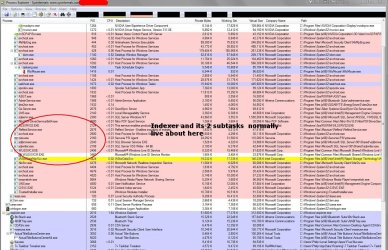
However - Indexing has 'stopped' running (according to Process Explorer and Task Manager)

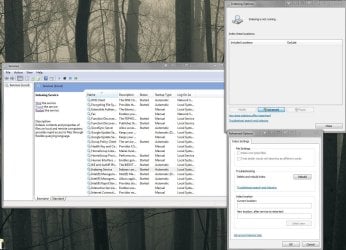
Services says it is running - tried stop, start and restart, also tried reboot

The Control Panel Indexing Options reports Indexing is not running, included locations are empty and the Modify button is grey

In advanced the only thing that's 'alive' is the Rebuild button - but the location is empty and the Select New button is grey

Tried this fixit Fix Windows Desktop Search when it crashes or not showing results It told me it found three problems but didn't say what they were :mad:

Ran sfc /scannow - says it found no problems

TIA pjd
 

Attachments
  • Capture.JPG
    Capture.JPG
    193.4 KB · Views: 5
  • Capture2.JPG
    Capture2.JPG
    291.8 KB · Views: 9

My Computer

Computer type
PC/Desktop
Computer Manufacturer/Model Number
generic - made to spec
OS
Win 7 Professional 64bit
CPU
I5 650 @ 3.2GHz
Motherboard
Gigabyte H55M-UD2H
Memory
6G
Graphics Card(s)
AMD Radeon R7 200 Series
Sound Card
whatever is on mobo
Monitor(s) Displays
1 x 24" Samsung
Screen Resolution
1920x1200
Hard Drives
Internal 1x256GB Toshiba SSD
Internal 1x2TB
External 2 slot USB 3.0 dock (various drives)
External 1 500GB USB 2.0 drive
PSU
850W Antech Modular
Case
Shiny Black Aluminium
Cooling
extra fans - sucker in front, blower at back - noisy & cool
Keyboard
Microsoft USB Dual Receiver Wireless Keyboard
Mouse
Microsoft USB Dual Receiver Wireless Mouse
Internet Speed
20/1Mbps down/up
Antivirus
MSE
Browser
Firefox and Chrome
Other Info
Hitachi USB 3.0 adapter
Have you done any tweaking or used an Optimizer or Registry cleaner on Win7? It doesn't need any of that since it's already the most lightweight OS ever, and it can cause problems like this.

Try to System Restore to before this occurred.

Check the WIndows Search Service and Remote Procedural Call service to see if they are also running.

If this won't resolve it and someone else doesn't have something to try then I'd probably run a Repair Install.

However if you have other corruption issues or less than perfect performance I'd take the time to get a perfect Clean Reinstall using the tools and methods listed which work best for Win7.
 
Have you done any tweaking or used an Optimizer or Registry cleaner on Win7? It doesn't need any of that since it's already the most lightweight OS ever, and it can cause problems like this.
Thanks mate.

Nuh, I don't ever do any of that sort of stuff, they IMO create problems and solve none. I do all housekeeping manually

Try to System Restore to before this occurred.

:doh: - I forgot about System Restore - I have one from this morning, and another from yesterday morning - I haven't done anything much system wise other than MSE downloads and giving the epub file type in the indexer a poke.

Check the WIndows Search Service and Remote Procedural Call service to see if they are also running.
RPC Service is running but the Windows Search Service isn't and when I try to start it it says it can't find a file - but gives no indication of which file :mad:


If this won't resolve it and someone else doesn't have something to try then I'd probably run a Repair Install.

However if you have other corruption issues or less than perfect performance I'd take the time to get a perfect Clean Reinstall using the tools and methods listed which work best for Win7.
Repair/Reinstall were my next steps - thanks for the links.

I've been running Win7 since Nov 2009 without having to do a a repair or reinstall - I guess 3.5 years is not too bad, I was aiming for 5 years. I'll probably opt for a clean install because to do a repair I'd have to uninstall SP1, and...

I'll let you know if Restore fixes it

pjd
 

My Computer

Computer type
PC/Desktop
Computer Manufacturer/Model Number
generic - made to spec
OS
Win 7 Professional 64bit
CPU
I5 650 @ 3.2GHz
Motherboard
Gigabyte H55M-UD2H
Memory
6G
Graphics Card(s)
AMD Radeon R7 200 Series
Sound Card
whatever is on mobo
Monitor(s) Displays
1 x 24" Samsung
Screen Resolution
1920x1200
Hard Drives
Internal 1x256GB Toshiba SSD
Internal 1x2TB
External 2 slot USB 3.0 dock (various drives)
External 1 500GB USB 2.0 drive
PSU
850W Antech Modular
Case
Shiny Black Aluminium
Cooling
extra fans - sucker in front, blower at back - noisy & cool
Keyboard
Microsoft USB Dual Receiver Wireless Keyboard
Mouse
Microsoft USB Dual Receiver Wireless Mouse
Internet Speed
20/1Mbps down/up
Antivirus
MSE
Browser
Firefox and Chrome
Other Info
Hitachi USB 3.0 adapter
And you`ve never made a disk image in all that time ?
 

My Computer

Computer type
PC/Desktop
Computer Manufacturer/Model Number
Skylake Special #666
OS
Windows 10 Pro x64
CPU
Intel Core i7 6700K
Motherboard
Asus Sabertooth Z170 Mark 1
Memory
GSkill TridentZ RGB 16GB 3600 16-16-16-36
Graphics Card(s)
EVGA GTX 980 Ti SC x2
Sound Card
Realtek High Definition
Monitor(s) Displays
AOC G2460PG
Screen Resolution
1920 x 1080 144Hz
Hard Drives
Samsung 860 Pro 256GB, Seagate Barracuda 4TB x2
PSU
EVGA 1000 P2, EVGA White Custom Braided Cables
Case
Corsair Vengeance C70 Gunmetal Black
Cooling
Corsair H100i v2, Corsair ML120 x2, Thermal Grizzly Kryonaut
Keyboard
Logitech G910 Orion Spectrum
Mouse
Logitech G700s
Internet Speed
Verizon Fios Quantum Gateway 75/75
Antivirus
Windows Defender, Malwarebytes Free 3.8.3
Browser
Chrome
Other Info
Corsair SP120 x4, LG Blu-ray Drive, Durabrand HT-395 100 Watt Dolby Digital Amp, Corsair H2100 Wireless 7.1 Headset
And you`ve never made a disk image in all that time ?
One a week ever since the year DOT, but I don't use them unless I really have to - they contain all the sins of the past.

pjd
 

My Computer

Computer type
PC/Desktop
Computer Manufacturer/Model Number
generic - made to spec
OS
Win 7 Professional 64bit
CPU
I5 650 @ 3.2GHz
Motherboard
Gigabyte H55M-UD2H
Memory
6G
Graphics Card(s)
AMD Radeon R7 200 Series
Sound Card
whatever is on mobo
Monitor(s) Displays
1 x 24" Samsung
Screen Resolution
1920x1200
Hard Drives
Internal 1x256GB Toshiba SSD
Internal 1x2TB
External 2 slot USB 3.0 dock (various drives)
External 1 500GB USB 2.0 drive
PSU
850W Antech Modular
Case
Shiny Black Aluminium
Cooling
extra fans - sucker in front, blower at back - noisy & cool
Keyboard
Microsoft USB Dual Receiver Wireless Keyboard
Mouse
Microsoft USB Dual Receiver Wireless Mouse
Internet Speed
20/1Mbps down/up
Antivirus
MSE
Browser
Firefox and Chrome
Other Info
Hitachi USB 3.0 adapter
System Restore to this AM and yesterday AM did not restore search - symptoms unchanged

So it looks like an Image Recovery as of last Sunday PM, a non destructive System Repair as of now, or Fresh System Install.

Might wait a day or two to see if anyone has any other suggestions on how to fix search

I also want to cogitate on options & opportunities - like should I invest in an SSD, and/or do I wait for 8.1 and upgrade to it, do I forget Windows Search and use an alternate product like DocFetcher which claims to index ePUB files.

pjd
 

My Computer

Computer type
PC/Desktop
Computer Manufacturer/Model Number
generic - made to spec
OS
Win 7 Professional 64bit
CPU
I5 650 @ 3.2GHz
Motherboard
Gigabyte H55M-UD2H
Memory
6G
Graphics Card(s)
AMD Radeon R7 200 Series
Sound Card
whatever is on mobo
Monitor(s) Displays
1 x 24" Samsung
Screen Resolution
1920x1200
Hard Drives
Internal 1x256GB Toshiba SSD
Internal 1x2TB
External 2 slot USB 3.0 dock (various drives)
External 1 500GB USB 2.0 drive
PSU
850W Antech Modular
Case
Shiny Black Aluminium
Cooling
extra fans - sucker in front, blower at back - noisy & cool
Keyboard
Microsoft USB Dual Receiver Wireless Keyboard
Mouse
Microsoft USB Dual Receiver Wireless Mouse
Internet Speed
20/1Mbps down/up
Antivirus
MSE
Browser
Firefox and Chrome
Other Info
Hitachi USB 3.0 adapter
I don't use system restore or indexing. I do make an Image every other day-takes about 20 minutes. Without system restore , your system will perform a great deal better.
 

My Computer

Computer type
PC/Desktop
Computer Manufacturer/Model Number
Custom Build
OS
Win 10 Pro 64
CPU
Intel Core i7 960 @3.20 GHz
Motherboard
MSI MS7522
Memory
24.0 GB DDR3
Graphics Card(s)
EVGA GTX 750Ti
Monitor(s) Displays
LG E2341 23 Inch
Screen Resolution
1920x1080
Hard Drives
1TB Western Dgital 1002FAEX-00Y9A0
1TB Hitachi HDS721010CLA322
PSU
700 Watt
Case
Haf 912
Cooling
Fans
Keyboard
Logitech MK710
Mouse
Logitech M705
Internet Speed
Cable
Antivirus
AIS 2015 .10.0.2225
Browser
Firefox 49
Other Info
MalwareBytes Anti-Rootkit utility
I don't use system restore or indexing. I do make an Image every other day-takes about 20 minutes. Without system restore , your system will perform a great deal better.
I am satisfied with performance of my system, its the user that's the bottleneck.

I use Windows Search to index the contents of tens of thousands of documents that I search most every day. Luckily they're backed up onto a linux box, so I've installed Recoll on it to provide a short term backup Search facility.

I do wonder about the efficacy of Restore Points though, they've never fixed anything for me. Nor for that matter have I ever restored from my weekly image backups on Vista or Win 7, I often wonder why I bother doing them, but I figure the week after I stop doing them I will regret it. Was a difference story on XP, where I did restore from image on a couple of occasions.

About a year ago I tried turning indexing off for a few days just to test the theory that its a resource hog. My judgement is that on Vista and Win 7 it makes no practical difference to system performance, providing you run it at Below Normal priority, which is the default. I've seen it cranked up to Normal and even High on some hardware vendor installs. XP was an entirely different story, IMO the only XP desktop search tool that was even half decent was the one from Yahoo - then they scrapped it, all the others were less than ordinary.

pjd
 

My Computer

Computer type
PC/Desktop
Computer Manufacturer/Model Number
generic - made to spec
OS
Win 7 Professional 64bit
CPU
I5 650 @ 3.2GHz
Motherboard
Gigabyte H55M-UD2H
Memory
6G
Graphics Card(s)
AMD Radeon R7 200 Series
Sound Card
whatever is on mobo
Monitor(s) Displays
1 x 24" Samsung
Screen Resolution
1920x1200
Hard Drives
Internal 1x256GB Toshiba SSD
Internal 1x2TB
External 2 slot USB 3.0 dock (various drives)
External 1 500GB USB 2.0 drive
PSU
850W Antech Modular
Case
Shiny Black Aluminium
Cooling
extra fans - sucker in front, blower at back - noisy & cool
Keyboard
Microsoft USB Dual Receiver Wireless Keyboard
Mouse
Microsoft USB Dual Receiver Wireless Mouse
Internet Speed
20/1Mbps down/up
Antivirus
MSE
Browser
Firefox and Chrome
Other Info
Hitachi USB 3.0 adapter
I don't use system restore or indexing. I do make an Image every other day-takes about 20 minutes. Without system restore , your system will perform a great deal better.

I must disagree. Every day we see users here whose WIn7 is saved by System Restore which is a vital system feature that should be kept turned on.

Likewise the OS is designed to easily find anything by typing a key word in the Start search box. You can set the search parameters and rebuild the index by typing Index in Start Search box.

All Win7 functions including Indexing and System Restore should not affect performance on adequate hardware with a clean install. It is a lightweight OS no longer requiring old-school XP service edits.
 
I did a repair install, nothing changed with respect to search, same state as it was in original post. Still doing the post SP1 updates but I not hold out much hope that they will solve the problem. So it looks like its back to last weeks image or a fresh install or use Docfetcher or something

pjd
 

My Computer

Computer type
PC/Desktop
Computer Manufacturer/Model Number
generic - made to spec
OS
Win 7 Professional 64bit
CPU
I5 650 @ 3.2GHz
Motherboard
Gigabyte H55M-UD2H
Memory
6G
Graphics Card(s)
AMD Radeon R7 200 Series
Sound Card
whatever is on mobo
Monitor(s) Displays
1 x 24" Samsung
Screen Resolution
1920x1200
Hard Drives
Internal 1x256GB Toshiba SSD
Internal 1x2TB
External 2 slot USB 3.0 dock (various drives)
External 1 500GB USB 2.0 drive
PSU
850W Antech Modular
Case
Shiny Black Aluminium
Cooling
extra fans - sucker in front, blower at back - noisy & cool
Keyboard
Microsoft USB Dual Receiver Wireless Keyboard
Mouse
Microsoft USB Dual Receiver Wireless Mouse
Internet Speed
20/1Mbps down/up
Antivirus
MSE
Browser
Firefox and Chrome
Other Info
Hitachi USB 3.0 adapter

My Computer

Computer type
PC/Desktop
Computer Manufacturer/Model Number
generic - made to spec
OS
Win 7 Professional 64bit
CPU
I5 650 @ 3.2GHz
Motherboard
Gigabyte H55M-UD2H
Memory
6G
Graphics Card(s)
AMD Radeon R7 200 Series
Sound Card
whatever is on mobo
Monitor(s) Displays
1 x 24" Samsung
Screen Resolution
1920x1200
Hard Drives
Internal 1x256GB Toshiba SSD
Internal 1x2TB
External 2 slot USB 3.0 dock (various drives)
External 1 500GB USB 2.0 drive
PSU
850W Antech Modular
Case
Shiny Black Aluminium
Cooling
extra fans - sucker in front, blower at back - noisy & cool
Keyboard
Microsoft USB Dual Receiver Wireless Keyboard
Mouse
Microsoft USB Dual Receiver Wireless Mouse
Internet Speed
20/1Mbps down/up
Antivirus
MSE
Browser
Firefox and Chrome
Other Info
Hitachi USB 3.0 adapter

My Computer

Computer type
PC/Desktop
Computer Manufacturer/Model Number
Self Built Custom
OS
Windows 7 Ultimate Retail Box (64-bit installed) + Service Pack 1
CPU
AMD FX-8350 CPU v1.15 (or 1.0F) BIOS was required!
Motherboard
MSI 890FXA-GD70
Memory
8G CAS-7 G-Skill DDR3 @1333 (2 fours) [mobo nonOC max rec'd]
Graphics Card(s)
Radeon HD 7950 [3 gigs of GDDR5] MSI Twin Frozr model
Sound Card
Realtek High Definition Audio (onboard mobo, ALC-889 chip)
Monitor(s) Displays
2 WS LED Monitors: One LG One Viewsonic
Screen Resolution
1920 by 1080
Hard Drives
SSD for OS: Samsung 840 Pro
SSD for VM and utilities: Adata SX900
7200 RPM SATA HDs for the rest: Hitachi and Seagate
PSU
Corsair TX850 - 850W max, in service since August 2010.
Case
Thermaltake Armor A90
Cooling
Thermaltake Spin Q CPU Cooler, in service since August 2010
Keyboard
Logitech G11
Mouse
Logitech M310 Wireless
Internet Speed
100 Megabit broadband supposedly upgraded from 50 (Cable)
Antivirus
Bitdefender Internet Security 2014 suite
Browser
Pale Moon 64-bit main, also IceDragon, Opera, and Maxthon.
Other Info
CompTIA A+ certified (220-800 series) in July 2013.
I did a repair install, nothing changed with respect to search, same state as it was in original post. Still doing the post SP1 updates but I not hold out much hope that they will solve the problem. So it looks like its back to last weeks image or a fresh install or use Docfetcher or something

pjd

Then it's likely another program or setting interfering. For this reason it would have been better to start with System Restore to before the problem occurred. Now its too late as a setting has been passed back through that's corrupt without any ability to roll it back.

Turn off everything at Startup in msconfig>Startup and >Services (after Hiding All MS Services) except AV using only a lightweight AV like MSE or Avast.

Have you used a Tweaking suite, Optimizer or Registry cleaner by chance? These will ruin Win7.
 
Found this search tool as an alternative, so small and free....

https://code.google.com/p/jkhfilesearch/

Thanks faladu,

That proggie promotes itself as an alternative to Agent Ransack which is a file system finder that looks at folder & file names, but it doesn't look at file contents like Windows Search, I already use Agent Ransack. And Agent Ransack's big brother File Locator is on my list of alternatives for Windows Search.

But - I think I solved my problem...
 

My Computer

Computer type
PC/Desktop
Computer Manufacturer/Model Number
generic - made to spec
OS
Win 7 Professional 64bit
CPU
I5 650 @ 3.2GHz
Motherboard
Gigabyte H55M-UD2H
Memory
6G
Graphics Card(s)
AMD Radeon R7 200 Series
Sound Card
whatever is on mobo
Monitor(s) Displays
1 x 24" Samsung
Screen Resolution
1920x1200
Hard Drives
Internal 1x256GB Toshiba SSD
Internal 1x2TB
External 2 slot USB 3.0 dock (various drives)
External 1 500GB USB 2.0 drive
PSU
850W Antech Modular
Case
Shiny Black Aluminium
Cooling
extra fans - sucker in front, blower at back - noisy & cool
Keyboard
Microsoft USB Dual Receiver Wireless Keyboard
Mouse
Microsoft USB Dual Receiver Wireless Mouse
Internet Speed
20/1Mbps down/up
Antivirus
MSE
Browser
Firefox and Chrome
Other Info
Hitachi USB 3.0 adapter
I did a repair install, nothing changed with respect to search, same state as it was in original post. Still doing the post SP1 updates but I not hold out much hope that they will solve the problem. So it looks like its back to last weeks image or a fresh install or use Docfetcher or something

pjd

Then it's likely another program or setting interfering. For this reason it would have been better to start with System Restore to before the problem occurred. Now its too late as a setting has been passed back through that's corrupt without any ability to roll it back.

Turn off everything at Startup in msconfig>Startup and >Services (after Hiding All MS Services) except AV using only a lightweight AV like MSE or Avast.

Have you used a Tweaking suite, Optimizer or Registry cleaner by chance? These will ruin Win7.
@gregrocker I did do System Restore, 2 of them - see post 6 !! I never use things like registry cleaners, or optimizers - see post 3 !! And its not a 3rd party application - it died when moi changed a file type (epub) from Index Properties Only to Index Properties and File Contents - see post 1 !!

However, the good news is indexing is running again :) But the bad news is I don't know why :(

While I was updating Windows after the in place 'repair', I found that MS thread I posted in post 11. One of the suggestions there was to ensure that Windows Search was 'turned on' in Program Updates->Turn Windows Features on or off. Well it was 'turned on' as was Indexing Service.

So I turned them both off. Then I thought... no you dummy... wait till the updates are finished and you've done a restart. So I turned them both on again. But when you turn features on and off windows scurries around for a while before telling you to do a restart. I'm not sure what it does - but its more than a couple of registry adjustments.

Anyway 30 minutes later the updates finished, did a restart - installed four more updates, then had a look at Indexing Options, It was working again!!

Now did the in-place repair and subsequent updates fix it, or did I fix it by turning Indexing and Search off and on again?

My money is on me turning Indexing and/or Search off and on again. But I am not going to experiment to find out.

BTW epub came back with Index Properties and File Contents set :rolleyes:

Thanks to everyone - problem resolved :cool:

BR
 

My Computer

Computer type
PC/Desktop
Computer Manufacturer/Model Number
generic - made to spec
OS
Win 7 Professional 64bit
CPU
I5 650 @ 3.2GHz
Motherboard
Gigabyte H55M-UD2H
Memory
6G
Graphics Card(s)
AMD Radeon R7 200 Series
Sound Card
whatever is on mobo
Monitor(s) Displays
1 x 24" Samsung
Screen Resolution
1920x1200
Hard Drives
Internal 1x256GB Toshiba SSD
Internal 1x2TB
External 2 slot USB 3.0 dock (various drives)
External 1 500GB USB 2.0 drive
PSU
850W Antech Modular
Case
Shiny Black Aluminium
Cooling
extra fans - sucker in front, blower at back - noisy & cool
Keyboard
Microsoft USB Dual Receiver Wireless Keyboard
Mouse
Microsoft USB Dual Receiver Wireless Mouse
Internet Speed
20/1Mbps down/up
Antivirus
MSE
Browser
Firefox and Chrome
Other Info
Hitachi USB 3.0 adapter
Good work. :geek: We'll have to remember turning Indexing and Search on and off in Features. It has worked in the past for me for Internet Explorer that wouldn't reset properly.
 
Good work. :geek: We'll have to remember turning Indexing and Search on and off in Features. It has worked in the past for me for Internet Explorer that wouldn't reset properly.
Probably worth trying on anything that appears in the Turn Windows features on and off. Problem is that the switches are so discretely placed that we all forget about them - be better if it was a separate cpl applet. You may lose associated data - eg for Search I think it removes the indexes if you turn the feature off.

Whilst the reinstall was probably not the solution to the original problem, it did resolve a couple of right click registry tweaks that had mysteriously stopped working and that I couldn't get working again - take ownership and search - reapplied the registry patches and their back.

thanks again - pjd
 

My Computer

Computer type
PC/Desktop
Computer Manufacturer/Model Number
generic - made to spec
OS
Win 7 Professional 64bit
CPU
I5 650 @ 3.2GHz
Motherboard
Gigabyte H55M-UD2H
Memory
6G
Graphics Card(s)
AMD Radeon R7 200 Series
Sound Card
whatever is on mobo
Monitor(s) Displays
1 x 24" Samsung
Screen Resolution
1920x1200
Hard Drives
Internal 1x256GB Toshiba SSD
Internal 1x2TB
External 2 slot USB 3.0 dock (various drives)
External 1 500GB USB 2.0 drive
PSU
850W Antech Modular
Case
Shiny Black Aluminium
Cooling
extra fans - sucker in front, blower at back - noisy & cool
Keyboard
Microsoft USB Dual Receiver Wireless Keyboard
Mouse
Microsoft USB Dual Receiver Wireless Mouse
Internet Speed
20/1Mbps down/up
Antivirus
MSE
Browser
Firefox and Chrome
Other Info
Hitachi USB 3.0 adapter
Back
Top