

On my C: drive indexing is disabled
- I don't use Windows "Find" -- because ...
"Everything.exe" lists every file on my machine (including system AND external drives), if I need to find a lost file (a rarity)
"FileSearchEX.exe" finds contents (and file/folder names) on any drive -- it does not use Windows indexing
An external HDD is used for data storage.
- on the external HDD if I disable ...
[ ] Allow files on this drive to have contents indexed in addition to file properties
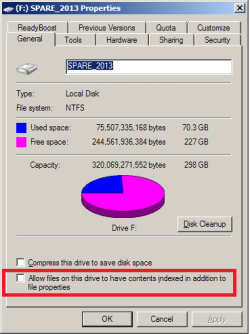
When I disabled Allow files on this drive ~~ ... there was a lot of visible activity (a progress window) for about 10 minutes
Q1: what was the system doing ?
Q2: will it corrupt or hinder files (or folders) on the external HHD ?
Q3: file-type ICOs, HTM associated folders, shortcuts etc ?
Thank you
- I don't use Windows "Find" -- because ...
- affects my laptop performance
- it does not search for contents
- only searches specified folders -- I have read Brinks Index locations Add Remove
"Everything.exe" lists every file on my machine (including system AND external drives), if I need to find a lost file (a rarity)
"FileSearchEX.exe" finds contents (and file/folder names) on any drive -- it does not use Windows indexing
An external HDD is used for data storage.
- on the external HDD if I disable ...
[ ] Allow files on this drive to have contents indexed in addition to file properties
When I disabled Allow files on this drive ~~ ... there was a lot of visible activity (a progress window) for about 10 minutes
Q1: what was the system doing ?
Q2: will it corrupt or hinder files (or folders) on the external HHD ?
Q3: file-type ICOs, HTM associated folders, shortcuts etc ?
Thank you
My Computer
- Computer type
- PC/Desktop
- Computer Manufacturer/Model Number
- Toshiba, Lenovo (laptops) + 4 rigs
- OS
- XP Pro (x86) | 7 HP (x86) & (x64) | 7 Pro (x64)


