Solved Inert Boot Tab in MSCONFIG

glennc

New member
Power User
VIP
Local time
5:01 PM
Messages
1,024
Hello,
Went into msconfig as admin and when I went to the boot tab, there was no Windows installation, and all the options did not function. Wanted to check on my processors settings in Advanced. Appreciate any assistance!
Glenn
 

My Computer

Computer type
PC/Desktop
Computer Manufacturer/Model Number
Self-Built
OS
Windows 7 Ultimate
CPU
AMD Phenom-II X4 965
Motherboard
Gigabyte GA-MA785GM-US2H
Memory
8192 MB DDR2-SDRAM
Graphics Card(s)
ATI Radeon HD 4200
Sound Card
ATI Radeon HD 4200 High Definition Audo
Monitor(s) Displays
LG Electronics W1943
Screen Resolution
1360 X 768
Hard Drives
C: 500 GB Caviar Black SATA
E: 500 GB Caviar Black SATA
PSU
Ultra LSP 750
Case
Ultra XBlaster
Cooling
2 Fans, CPU Fan, PS Fan
Keyboard
Acer
Mouse
Logitech
Internet Speed
6 MB

My Computer

Computer type
PC/Desktop
Computer Manufacturer/Model Number
Bruce ... somewhere in his 40's
OS
Windows 7 Ultimate 32bit SP1
CPU
Intel(R) Core(TM)2 Quad CPU @ 2.40GHz, 2400 MHz
Motherboard
INTEL/D975XBX2
Memory
4 GB
Graphics Card(s)
ATI Radeon HD 2600 Pro
Monitor(s) Displays
Samsung SyncMaster 914v
Screen Resolution
1280 x 1024
Hard Drives
2/500GB each ... ST3500630AS ATA Device.
One is not connected
PSU
Rocketfish 700 W
Case
G.Skill Gigabyte Chassis
Keyboard
Standard PS/2 Keyboard
Mouse
Microsoft PS/2 Mouse
Internet Speed
DSL
Antivirus
Avira Internet Security
Browser
IE 11
Other Info
ATI HDMI Audio
Hello Jacee,
Thanks for your reply! Winver says it is to Owner, me. Just finished the sfc /scannow with no problems. Don't know of any EasyBDC or boot programs that I have ever used. Ran msconfig as administrator and in a command window as administrator.
It shows Selective Startup marked with Load System Services and Load Startup items as checked. When I change to Diagnostic Startup the boot tab was still disabled and when it rebooted it came up with only Systems services loaded.
When I tried Normal Startup, the boot tab showed Windows 7 (C:\Windows) : Default OS but the options are still inert. When I go to OK to allow this startup a System Configuration window pops up stating that "System Configuration cannot save the original boot configuration for later restoration. Boot changes will be reverted. The device is not ready." and an OK button. When I hit the OK button the restart computer option comes up and with it it reboots back to the original Selective Startup with system and startup options checked.
Any ideas???
Glenn
 

My Computer

Computer type
PC/Desktop
Computer Manufacturer/Model Number
Self-Built
OS
Windows 7 Ultimate
CPU
AMD Phenom-II X4 965
Motherboard
Gigabyte GA-MA785GM-US2H
Memory
8192 MB DDR2-SDRAM
Graphics Card(s)
ATI Radeon HD 4200
Sound Card
ATI Radeon HD 4200 High Definition Audo
Monitor(s) Displays
LG Electronics W1943
Screen Resolution
1360 X 768
Hard Drives
C: 500 GB Caviar Black SATA
E: 500 GB Caviar Black SATA
PSU
Ultra LSP 750
Case
Ultra XBlaster
Cooling
2 Fans, CPU Fan, PS Fan
Keyboard
Acer
Mouse
Logitech
Internet Speed
6 MB
No Windows in Computer > Advanced Settings > Startup and Recovery

Hello,
Noted while trying to track down another problem that when I choose Computer and Properties > Advanced System Settings and go into Advanced > Startup and Recovery > Settings, that in the Default Operating System there is no entry. This is in Windows 7 Ultimate 64 bit.
How can I get this set correctly?
Glenn
 

My Computer

Computer type
PC/Desktop
Computer Manufacturer/Model Number
Self-Built
OS
Windows 7 Ultimate
CPU
AMD Phenom-II X4 965
Motherboard
Gigabyte GA-MA785GM-US2H
Memory
8192 MB DDR2-SDRAM
Graphics Card(s)
ATI Radeon HD 4200
Sound Card
ATI Radeon HD 4200 High Definition Audo
Monitor(s) Displays
LG Electronics W1943
Screen Resolution
1360 X 768
Hard Drives
C: 500 GB Caviar Black SATA
E: 500 GB Caviar Black SATA
PSU
Ultra LSP 750
Case
Ultra XBlaster
Cooling
2 Fans, CPU Fan, PS Fan
Keyboard
Acer
Mouse
Logitech
Internet Speed
6 MB
Using BCDEdit For Windows Vista and later versions of Windows, you can specify the default boot entry using the /default option. The syntax to specify the default operating system is as follows:

Scroll down to that instruction: Changing the Default Boot Entry (Windows Drivers)
 

My Computer

Computer type
PC/Desktop
Computer Manufacturer/Model Number
Bruce ... somewhere in his 40's
OS
Windows 7 Ultimate 32bit SP1
CPU
Intel(R) Core(TM)2 Quad CPU @ 2.40GHz, 2400 MHz
Motherboard
INTEL/D975XBX2
Memory
4 GB
Graphics Card(s)
ATI Radeon HD 2600 Pro
Monitor(s) Displays
Samsung SyncMaster 914v
Screen Resolution
1280 x 1024
Hard Drives
2/500GB each ... ST3500630AS ATA Device.
One is not connected
PSU
Rocketfish 700 W
Case
G.Skill Gigabyte Chassis
Keyboard
Standard PS/2 Keyboard
Mouse
Microsoft PS/2 Mouse
Internet Speed
DSL
Antivirus
Avira Internet Security
Browser
IE 11
Other Info
ATI HDMI Audio
Using BCDEdit For Windows Vista and later versions of Windows, you can specify the default boot entry using the /default option. The syntax to specify the default operating system is as follows:

Scroll down to that instruction: Changing the Default Boot Entry (Windows Drivers)

Hey Jacee,
Found the GUID and did the command line in a administrative cmd.exe as

bcdedit /default (XXXXXXXXXXXXXXXXXXXXXXXXXXXX}

It indicated that "The boot configuration data store could not be opened.
The system cannot find the file specified."

Thanks for the idea but no luck so far and I am quite a bit over my head here!!!!!
Glenn
 

My Computer

Computer type
PC/Desktop
Computer Manufacturer/Model Number
Self-Built
OS
Windows 7 Ultimate
CPU
AMD Phenom-II X4 965
Motherboard
Gigabyte GA-MA785GM-US2H
Memory
8192 MB DDR2-SDRAM
Graphics Card(s)
ATI Radeon HD 4200
Sound Card
ATI Radeon HD 4200 High Definition Audo
Monitor(s) Displays
LG Electronics W1943
Screen Resolution
1360 X 768
Hard Drives
C: 500 GB Caviar Black SATA
E: 500 GB Caviar Black SATA
PSU
Ultra LSP 750
Case
Ultra XBlaster
Cooling
2 Fans, CPU Fan, PS Fan
Keyboard
Acer
Mouse
Logitech
Internet Speed
6 MB
Me too, so will ask for more help, hang in there! :)
 

My Computer

Computer type
PC/Desktop
Computer Manufacturer/Model Number
Bruce ... somewhere in his 40's
OS
Windows 7 Ultimate 32bit SP1
CPU
Intel(R) Core(TM)2 Quad CPU @ 2.40GHz, 2400 MHz
Motherboard
INTEL/D975XBX2
Memory
4 GB
Graphics Card(s)
ATI Radeon HD 2600 Pro
Monitor(s) Displays
Samsung SyncMaster 914v
Screen Resolution
1280 x 1024
Hard Drives
2/500GB each ... ST3500630AS ATA Device.
One is not connected
PSU
Rocketfish 700 W
Case
G.Skill Gigabyte Chassis
Keyboard
Standard PS/2 Keyboard
Mouse
Microsoft PS/2 Mouse
Internet Speed
DSL
Antivirus
Avira Internet Security
Browser
IE 11
Other Info
ATI HDMI Audio

My Computer

Computer type
PC/Desktop
Computer Manufacturer/Model Number
Own build (new) Desk1 / Asus ROG Win 7 / Desk2 1st build
OS
Desk1 7 Home Prem / Desk2 10 Pro / Main lap Asus ROG 10 Pro 2 laptop Toshiba 7 Pro Asus P2520 7 & 10
CPU
Desk1 i5 3750K / Laptop i7 GTX 860M / Desk2 i5 2500
Motherboard
Desk1 Asus P877-V / Desk2 Gigabyte H67 UD3H / Laptop ?
Memory
Desk1 8GB (1866) / Desk2 16GB (1333) / Laptop 8Gb DDR3
Graphics Card(s)
Desk 1& 2NVidia GTX 650 & Laptops on board Intel
Sound Card
Desk 1 & 2 -XONAR DG Realtek High Def audio Laptop
Monitor(s) Displays
Desk 1 Benq HD 2450 / Desk2 Philips 24" / Laptop 17.5"
Screen Resolution
1920x1080 D1 & D2 & Laptop 1
Hard Drives
Desk1 Samsung 120GB 830 SSD
Asus ROG 256GB 850 Pro SSD
Desk2 Samsung 840 256 SSD
Toshiba 120GB EVO
PSU
Desk 1 Corsair HX 1050/ Laptop ? / Desk 2 Corsair HX 650
Case
Desk 1 Cooler HAF XM ? Toshiba laptop / Desk2 Coolermaster
Cooling
Fans on all Desk1 -2 Desk2 - all Coolermasters 5 Laptop ?
Keyboard
Desk 1 MS Sidewinder X6 Desk 2 MS Sidewinder X 4
Mouse
Desk 1&2 - Gigabyte MS 900 gamer - laptop - Logitec wireless
Internet Speed
ADSL2+
Other Info
One other Desktop (tester) and spare Toshba laptop both with SSD's
Running Kaspersky 2016 ISS on all machines config'd identically
Logitec audio stereo systems on each machine (x3)
Canon MG5250MFC
Router/modem TP-Link running WPA2SK
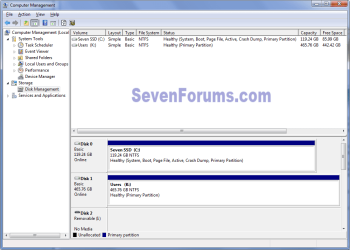
Glenn, do you have the 100 MB system reserved partition on your installation? I seem to remember this problem when it was not active? Open Disk management and post a screenshot. One of the smarter people can then see if it is OK ;)

Start> In search box type computer management> Enter> Click on Disk management

A Guy
 

My Computer

Computer type
PC/Desktop
OS
Windows 10 Home x64
CPU
INTEL Core i5-750 Quad-Core 3.37GHz
Motherboard
ASUS P7P55D
Memory
HyperX Fury Black Series 8GB (2 x 4GB) 1866Mhz
Graphics Card(s)
EVGA GeForce GTX 750 Superclocked 1GB 128-Bit GDDR5
Monitor(s) Displays
LG 32MA68HY 32" IPS
Screen Resolution
1920 x 1080
Hard Drives
Samsung 840 Evo 120GB, SEAGATE 500GB Barracuda® 7200.12, SATA 3 Gb/s, 7200 RPM, 16MB cache
PSU
ANTEC TruePower New TP-550, 80 PLUS, 550W
Case
ANTEC Three Hundred Illusion
Cooling
COOLER MASTER Hyper 212 Plus, 4 x 120mm 1 x 140mm Noctua's
Internet Speed
85 + Mbps
Antivirus
Avast
Browser
Vivaldi

My Computer

Computer type
PC/Desktop
Computer Manufacturer/Model Number
Home Built Desktop By DataTech
OS
Windows 7 Ultimate X64 SP1
CPU
Intel i5-2550K, Differing ~4.4-4.8GHz No built in GPU
Motherboard
ASUS P8Z68-V PRO/GEN3
Memory
16GB G.Skill Sniper 1866MHz @ 2133MHz 2x8GB
Graphics Card(s)
ASUS GTX650TIB-DC2OC-2GD5, (650TI Boost)
Sound Card
Onboard Realtek 5-1
Monitor(s) Displays
Samsung P2570HD
Screen Resolution
1920x1080
Hard Drives
Samsung 840 Pro 256GB SSD for OS, 500GB Seagate Constellation (Enterprise drive) for Data
PSU
Corsair HX650W
Case
Inwin Dragon Rider
Cooling
Hyper 212 EVO w/two Noctua fans, push-pull, @1300 RPM
Keyboard
E-Z Eyes, bright yellow keys with large characters
Mouse
steelseries SENSEI Laser Pro Gaming
Internet Speed
48-51Mbs Mbs down, 11 Mbs up Xfinity Cable
Antivirus
Norton Internet Security 2013
Browser
IE 10, Opera, Pale Moon if needed
Other Info
4 case fans, LG BluRay-RE, ASUS DVD-RW, Mr. Fusion power supply, 1.21 gigawatts.

My Computer

Computer type
PC/Desktop
Computer Manufacturer/Model Number
Self-Built
OS
Windows 7 Ultimate
CPU
AMD Phenom-II X4 965
Motherboard
Gigabyte GA-MA785GM-US2H
Memory
8192 MB DDR2-SDRAM
Graphics Card(s)
ATI Radeon HD 4200
Sound Card
ATI Radeon HD 4200 High Definition Audo
Monitor(s) Displays
LG Electronics W1943
Screen Resolution
1360 X 768
Hard Drives
C: 500 GB Caviar Black SATA
E: 500 GB Caviar Black SATA
PSU
Ultra LSP 750
Case
Ultra XBlaster
Cooling
2 Fans, CPU Fan, PS Fan
Keyboard
Acer
Mouse
Logitech
Internet Speed
6 MB
How about trying a chkdsk Glenn http://www.sevenforums.com/tutorials/433-disk-check.html

By the way have you downgraded from 8 as I know the Boot on it's msconfig has to go to task manager.

Howdy ICit2lol,
Thanks for adding to the investigation!! I did not know of all the switches but I did run a chkdsk on the drive and it said it was ok.....
To add to the mystery and fun. I decided to reload my system several months ago. When doing so, even though I had been using it sing 2010, and it passed the Microsoft Genuine Program check, it was as of May 3, considered not legitimate...... So I had to purchase, download and get a new registration license. But to answer your question, it has never had a non Windows 7 Ultimate OS on it.
Cheers

Glenn
 

My Computer

Computer type
PC/Desktop
Computer Manufacturer/Model Number
Self-Built
OS
Windows 7 Ultimate
CPU
AMD Phenom-II X4 965
Motherboard
Gigabyte GA-MA785GM-US2H
Memory
8192 MB DDR2-SDRAM
Graphics Card(s)
ATI Radeon HD 4200
Sound Card
ATI Radeon HD 4200 High Definition Audo
Monitor(s) Displays
LG Electronics W1943
Screen Resolution
1360 X 768
Hard Drives
C: 500 GB Caviar Black SATA
E: 500 GB Caviar Black SATA
PSU
Ultra LSP 750
Case
Ultra XBlaster
Cooling
2 Fans, CPU Fan, PS Fan
Keyboard
Acer
Mouse
Logitech
Internet Speed
6 MB
Glenn, do you have the 100 MB system reserved partition on your installation? I seem to remember this problem when it was not active? Open Disk management and post a screenshot. One of the smarter people can then see if it is OK ;)

Start> In search box type computer management> Enter> Click on Disk management

A Guy

Hey there A Guy,
How ya been? Of course thanks for weighing in on my problem. Yes the 100MB System Reserved is Active and healthy.... Been searching the web for similar occurrences and that was one problem. Much appreciated!
Glenn
 

My Computer

Computer type
PC/Desktop
Computer Manufacturer/Model Number
Self-Built
OS
Windows 7 Ultimate
CPU
AMD Phenom-II X4 965
Motherboard
Gigabyte GA-MA785GM-US2H
Memory
8192 MB DDR2-SDRAM
Graphics Card(s)
ATI Radeon HD 4200
Sound Card
ATI Radeon HD 4200 High Definition Audo
Monitor(s) Displays
LG Electronics W1943
Screen Resolution
1360 X 768
Hard Drives
C: 500 GB Caviar Black SATA
E: 500 GB Caviar Black SATA
PSU
Ultra LSP 750
Case
Ultra XBlaster
Cooling
2 Fans, CPU Fan, PS Fan
Keyboard
Acer
Mouse
Logitech
Internet Speed
6 MB

My Computer

Computer type
PC/Desktop
Computer Manufacturer/Model Number
Self-Built
OS
Windows 7 Ultimate
CPU
AMD Phenom-II X4 965
Motherboard
Gigabyte GA-MA785GM-US2H
Memory
8192 MB DDR2-SDRAM
Graphics Card(s)
ATI Radeon HD 4200
Sound Card
ATI Radeon HD 4200 High Definition Audo
Monitor(s) Displays
LG Electronics W1943
Screen Resolution
1360 X 768
Hard Drives
C: 500 GB Caviar Black SATA
E: 500 GB Caviar Black SATA
PSU
Ultra LSP 750
Case
Ultra XBlaster
Cooling
2 Fans, CPU Fan, PS Fan
Keyboard
Acer
Mouse
Logitech
Internet Speed
6 MB
Well, moving on with limited web info and blind luck, it may be running properly. As mentioned I looked at the disks under Computer management and the reserve was active, the rest of the disk was normal. In a fit of tomfoolery, I made the rest of the C: drive active.... This immediately caused a NO BOOTMGR hit Ctrl/Alt/Del to restart loop completely locking me out of my system. Got it to boot off the Repair CD and tried a startup repair. NO luck.
I then tried a restore to a previous restore point, which it did but would still not boot.
Thanks to this great forum, I found a tutorial about fixing a missing bootmgr. Using the Repair CD, the command prompt and bootrec I seemed to have rewritten the MBR and rebuilt the Bcd. I did another Start Up repair and it created a C: Boot (recovered) on the drive and it booted.
I checked msconfig and this OS was listed and it allowed me to use the features on the boot tab hurray!
Checking under Properties of the C: drive in Advanced/ System and Recovery Setting, it showed the C:\ Boot Recovery OS.
In my limited knowledge it seems that rewriting the MBR with bootrec did the trick. Doing checks on the computer now and if it works consistently, I'm gonna do a backup!
I wish I knew when that problem began....
Thanks to all and also any further information or replys are requested and appreciated. Thanks to the Admins of the forum for this site!!!
Glenn

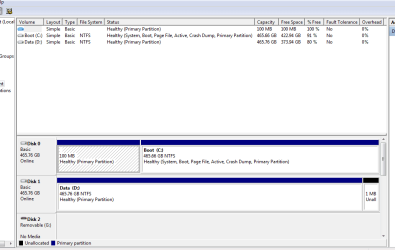
BTW the 100 MB section is now listed as healthy, primary partition -- Not Active --, the Boot C: is listed as Healthy, System, Boot, Page File, Active, Crash Dump, Primary Partition.
IS THIS correct>
 

My Computer

Computer type
PC/Desktop
Computer Manufacturer/Model Number
Self-Built
OS
Windows 7 Ultimate
CPU
AMD Phenom-II X4 965
Motherboard
Gigabyte GA-MA785GM-US2H
Memory
8192 MB DDR2-SDRAM
Graphics Card(s)
ATI Radeon HD 4200
Sound Card
ATI Radeon HD 4200 High Definition Audo
Monitor(s) Displays
LG Electronics W1943
Screen Resolution
1360 X 768
Hard Drives
C: 500 GB Caviar Black SATA
E: 500 GB Caviar Black SATA
PSU
Ultra LSP 750
Case
Ultra XBlaster
Cooling
2 Fans, CPU Fan, PS Fan
Keyboard
Acer
Mouse
Logitech
Internet Speed
6 MB
Wow, by hook or by crook ;) Glad you seem to have it sorted. I don't have the 100MB reserved myself. A Guy
 

My Computer

Computer type
PC/Desktop
OS
Windows 10 Home x64
CPU
INTEL Core i5-750 Quad-Core 3.37GHz
Motherboard
ASUS P7P55D
Memory
HyperX Fury Black Series 8GB (2 x 4GB) 1866Mhz
Graphics Card(s)
EVGA GeForce GTX 750 Superclocked 1GB 128-Bit GDDR5
Monitor(s) Displays
LG 32MA68HY 32" IPS
Screen Resolution
1920 x 1080
Hard Drives
Samsung 840 Evo 120GB, SEAGATE 500GB Barracuda® 7200.12, SATA 3 Gb/s, 7200 RPM, 16MB cache
PSU
ANTEC TruePower New TP-550, 80 PLUS, 550W
Case
ANTEC Three Hundred Illusion
Cooling
COOLER MASTER Hyper 212 Plus, 4 x 120mm 1 x 140mm Noctua's
Internet Speed
85 + Mbps
Antivirus
Avast
Browser
Vivaldi
Wow, by hook or by crook ;) Glad you seem to have it sorted. I don't have the 100MB reserved myself. A Guy

Thanks kind Sir! I don't know enough to delete that 100MB partition! Did all check and another Chkdsk on the the drive and it still boots!!!!!!!
Glenn
 

My Computer

Computer type
PC/Desktop
Computer Manufacturer/Model Number
Self-Built
OS
Windows 7 Ultimate
CPU
AMD Phenom-II X4 965
Motherboard
Gigabyte GA-MA785GM-US2H
Memory
8192 MB DDR2-SDRAM
Graphics Card(s)
ATI Radeon HD 4200
Sound Card
ATI Radeon HD 4200 High Definition Audo
Monitor(s) Displays
LG Electronics W1943
Screen Resolution
1360 X 768
Hard Drives
C: 500 GB Caviar Black SATA
E: 500 GB Caviar Black SATA
PSU
Ultra LSP 750
Case
Ultra XBlaster
Cooling
2 Fans, CPU Fan, PS Fan
Keyboard
Acer
Mouse
Logitech
Internet Speed
6 MB
Good to know you got it sorted. The 100MB reserved will not be created if w7 is installed to a formatted partion, but will if the installer does the format during install.
Your description of your drives sounds correct, that's why we wanted to see the dskmgnt snip. I don't have the 100MB reserved either.

dsk mngmt.png
 

My Computer

Computer type
PC/Desktop
Computer Manufacturer/Model Number
Home Built Desktop By DataTech
OS
Windows 7 Ultimate X64 SP1
CPU
Intel i5-2550K, Differing ~4.4-4.8GHz No built in GPU
Motherboard
ASUS P8Z68-V PRO/GEN3
Memory
16GB G.Skill Sniper 1866MHz @ 2133MHz 2x8GB
Graphics Card(s)
ASUS GTX650TIB-DC2OC-2GD5, (650TI Boost)
Sound Card
Onboard Realtek 5-1
Monitor(s) Displays
Samsung P2570HD
Screen Resolution
1920x1080
Hard Drives
Samsung 840 Pro 256GB SSD for OS, 500GB Seagate Constellation (Enterprise drive) for Data
PSU
Corsair HX650W
Case
Inwin Dragon Rider
Cooling
Hyper 212 EVO w/two Noctua fans, push-pull, @1300 RPM
Keyboard
E-Z Eyes, bright yellow keys with large characters
Mouse
steelseries SENSEI Laser Pro Gaming
Internet Speed
48-51Mbs Mbs down, 11 Mbs up Xfinity Cable
Antivirus
Norton Internet Security 2013
Browser
IE 10, Opera, Pale Moon if needed
Other Info
4 case fans, LG BluRay-RE, ASUS DVD-RW, Mr. Fusion power supply, 1.21 gigawatts.
Howdy Britton30,
Here is the snip, hope I got all the info. Thanks again for your help!

Capture.PNG

Glenn
 

My Computer

Computer type
PC/Desktop
Computer Manufacturer/Model Number
Self-Built
OS
Windows 7 Ultimate
CPU
AMD Phenom-II X4 965
Motherboard
Gigabyte GA-MA785GM-US2H
Memory
8192 MB DDR2-SDRAM
Graphics Card(s)
ATI Radeon HD 4200
Sound Card
ATI Radeon HD 4200 High Definition Audo
Monitor(s) Displays
LG Electronics W1943
Screen Resolution
1360 X 768
Hard Drives
C: 500 GB Caviar Black SATA
E: 500 GB Caviar Black SATA
PSU
Ultra LSP 750
Case
Ultra XBlaster
Cooling
2 Fans, CPU Fan, PS Fan
Keyboard
Acer
Mouse
Logitech
Internet Speed
6 MB

My Computer

Computer type
PC/Desktop
Computer Manufacturer/Model Number
Own build (new) Desk1 / Asus ROG Win 7 / Desk2 1st build
OS
Desk1 7 Home Prem / Desk2 10 Pro / Main lap Asus ROG 10 Pro 2 laptop Toshiba 7 Pro Asus P2520 7 & 10
CPU
Desk1 i5 3750K / Laptop i7 GTX 860M / Desk2 i5 2500
Motherboard
Desk1 Asus P877-V / Desk2 Gigabyte H67 UD3H / Laptop ?
Memory
Desk1 8GB (1866) / Desk2 16GB (1333) / Laptop 8Gb DDR3
Graphics Card(s)
Desk 1& 2NVidia GTX 650 & Laptops on board Intel
Sound Card
Desk 1 & 2 -XONAR DG Realtek High Def audio Laptop
Monitor(s) Displays
Desk 1 Benq HD 2450 / Desk2 Philips 24" / Laptop 17.5"
Screen Resolution
1920x1080 D1 & D2 & Laptop 1
Hard Drives
Desk1 Samsung 120GB 830 SSD
Asus ROG 256GB 850 Pro SSD
Desk2 Samsung 840 256 SSD
Toshiba 120GB EVO
PSU
Desk 1 Corsair HX 1050/ Laptop ? / Desk 2 Corsair HX 650
Case
Desk 1 Cooler HAF XM ? Toshiba laptop / Desk2 Coolermaster
Cooling
Fans on all Desk1 -2 Desk2 - all Coolermasters 5 Laptop ?
Keyboard
Desk 1 MS Sidewinder X6 Desk 2 MS Sidewinder X 4
Mouse
Desk 1&2 - Gigabyte MS 900 gamer - laptop - Logitec wireless
Internet Speed
ADSL2+
Other Info
One other Desktop (tester) and spare Toshba laptop both with SSD's
Running Kaspersky 2016 ISS on all machines config'd identically
Logitec audio stereo systems on each machine (x3)
Canon MG5250MFC
Router/modem TP-Link running WPA2SK
Back
Top