Solved install ssd and keep all programs without a reinstall of windows

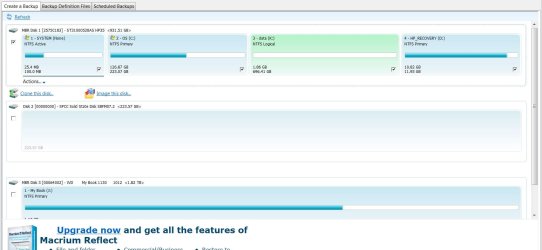
This is what I started with.
 

Attachments

  • ssd.JPG
    ssd.JPG
    96.8 KB · Views: 4

My Computer My Computer

At a glance

Windows 7, 64 bit, Home Premium
Computer type
PC/Desktop
Computer Manufacturer/Model Number
HP
OS
Windows 7, 64 bit, Home Premium
Hard Drives
ssd and hdd
Antivirus
avg
Browser
IE 1
According to what I have written down in my notes. I used partition wizard to shrink c partition down to 220GB. Then, used Macrium to clone system and c from disk one to disk two. I did not partition any thing on disk two. Macrium cloned it as it is now.
 

Attachments

  • snip7.JPG
    snip7.JPG
    81.8 KB · Views: 6

My Computer My Computer

At a glance

Windows 7, 64 bit, Home Premium
Computer type
PC/Desktop
Computer Manufacturer/Model Number
HP
OS
Windows 7, 64 bit, Home Premium
Hard Drives
ssd and hdd
Antivirus
avg
Browser
IE 1
While getting my stuff in order, I now find that Mini Partition Wizard (free) won't let me merge partitions. Now I need to find a way to do that too. Free, keyword here.
 
Last edited:

My Computer My Computer

At a glance

Windows 7, 64 bit, Home Premium
Computer type
PC/Desktop
Computer Manufacturer/Model Number
HP
OS
Windows 7, 64 bit, Home Premium
Hard Drives
ssd and hdd
Antivirus
avg
Browser
IE 1
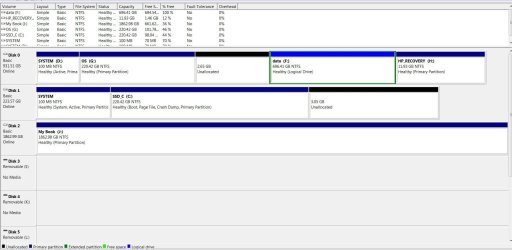
Post a screen print of your current Windows disk management.
What partitions are you trying to merge ?
Is the screen print in post #64 the latest and greatest for what you see in Macrium ?

Can you post a screen print showing what you see for
I now find that Mini Partition Wizard (free) won't let me merge partitions
 

My Computer My Computer

At a glance

Multi-Boot W7_Pro_x64 W8.1_Pro_x64 W10_Pro_x6...AMD Athlon II x4 6206GB GSkill DDR2 800AMD 4670 GPU + AMD 4200 IGP
Computer type
PC/Desktop
Computer Manufacturer/Model Number
home built
OS
Multi-Boot W7_Pro_x64 W8.1_Pro_x64 W10_Pro_x64 +Linux_VMs +Chromium_VM
CPU
AMD Athlon II x4 620
Motherboard
Gigabyte GA-MA785G-UD3H
Memory
6GB GSkill DDR2 800
Graphics Card(s)
AMD 4670 GPU + AMD 4200 IGP
Sound Card
on board Realtek ALC889A
Monitor(s) Displays
RCA 40" LCD TV, Insignia 32" LCD TV, HP 15" LCD monitor
Screen Resolution
1680 x 1050
Hard Drives
OCZ Vertex 3 120GB,
Samsung F3 1TB (3),
Several others - WD, Seagate, Hitachi, ...
PSU
Corsair 500 W
Case
Rosewill mid tower
Cooling
CM 90mm rifle
Keyboard
Gyration wireless, Logitech wireless, Dell USB wired
Mouse
Gyration wireless, Logitech wireless, V7 USB wired
Internet Speed
Spectrum - 100Mbps D / 10Mbps U
Antivirus
Avast, MBAM3, EMET, WinPatrol
Browser
Pale Moon, Firefox, IE
Other Info
2 multi-boot PC's
Mainly HTPC/Office/Gen purpose (no gaming).
Trendnet USB KVM.
LG DVD burner/Blue Ray Player.
Tray system for removable SATA backup drives.

Not currently OCd, under-volted.
I use Hybrid sleep, rarely re-boot or shutdown.

Hauppauge HD-PVR, Avermedia PCIe TV Tuner, Hauppauge PCI TV Tuner.
The last snip is from today, nothing is changed. Just to try, I thought I would merge the 2.65GB to F in disk one. Won't let me. If you have followed along, I don't really know what I'm doing, trial and error sort of. Without ruining something that now works. Partitioning is new to me too, that's why the 2.65 GB is there. never really needed to partition on anything. I got back ups though in more than one spot so feel sort of safe.
 

My Computer My Computer

At a glance

Windows 7, 64 bit, Home Premium
Computer type
PC/Desktop
Computer Manufacturer/Model Number
HP
OS
Windows 7, 64 bit, Home Premium
Hard Drives
ssd and hdd
Antivirus
avg
Browser
IE 1
It`s not a partition, it`s un allocated space. You have to extend the partition on it`s left to grab that space.

You really need to post a shot of disk management from windows for us, it`s just such a better picture, oh want ya pertty please :roflmao:

What does it matter ? Arent you going to delete all those partitions off that drive and format it ? Set it up properly ?

I would just delete everything but that Rcovery partition. That partition may not even be of any use anymore either, so if it`s not, that can be deleted too. Greg will know for sure.

Then you will have an entire hard drive for data storage and disk images.
 

My Computer My Computer

At a glance

Windows 10 Pro x64Intel Core i7 6700KGSkill TridentZ RGB 16GB 3600 16-16-16-36EVGA GTX 980 Ti SC x2
Computer type
PC/Desktop
Computer Manufacturer/Model Number
Skylake Special #666
OS
Windows 10 Pro x64
CPU
Intel Core i7 6700K
Motherboard
Asus Sabertooth Z170 Mark 1
Memory
GSkill TridentZ RGB 16GB 3600 16-16-16-36
Graphics Card(s)
EVGA GTX 980 Ti SC x2
Sound Card
Realtek High Definition
Monitor(s) Displays
AOC G2460PG
Screen Resolution
1920 x 1080 144Hz
Hard Drives
Samsung 860 Pro 256GB, Seagate Barracuda 4TB x2
PSU
EVGA 1000 P2, EVGA White Custom Braided Cables
Case
Corsair Vengeance C70 Gunmetal Black
Cooling
Corsair H100i v2, Corsair ML120 x2, Thermal Grizzly Kryonaut
Keyboard
Logitech G910 Orion Spectrum
Mouse
Logitech G700s
Internet Speed
Verizon Fios Quantum Gateway 75/75
Antivirus
Windows Defender, Malwarebytes Free 3.8.3
Browser
Chrome
Other Info
Corsair SP120 x4, LG Blu-ray Drive, Durabrand HT-395 100 Watt Dolby Digital Amp, Corsair H2100 Wireless 7.1 Headset
Looks like you start getting a headache over that. Take 20 bucks and get this program. It transfers your C partition and system partition with 3 clicks. 3 minutes of work and 20 minutes of waiting and it is all done. It does all the alignments and the settings required for SSDs.
 

My Computer My Computer

At a glance

Vista, Windows7, Mint Mate, Zorin, Windows 8from 1.6GHz Duo to i7
Computer Manufacturer/Model Number
HP, Dell, Gateway, Toshiba - 4 laptops and 2 desktops
OS
Vista, Windows7, Mint Mate, Zorin, Windows 8
CPU
from 1.6GHz Duo to i7
Monitor(s) Displays
2x HP w2207
Hard Drives
5x HDD, 7x SSD, 12x Externals
Keyboard
with trackball - no mices
Mouse
Trackball mice
Internet Speed
DSL 6000
But, but ..... he`s all done, he`s just working on the hard drive, no need to spend any money.
 

My Computer My Computer

At a glance

Windows 10 Pro x64Intel Core i7 6700KGSkill TridentZ RGB 16GB 3600 16-16-16-36EVGA GTX 980 Ti SC x2
Computer type
PC/Desktop
Computer Manufacturer/Model Number
Skylake Special #666
OS
Windows 10 Pro x64
CPU
Intel Core i7 6700K
Motherboard
Asus Sabertooth Z170 Mark 1
Memory
GSkill TridentZ RGB 16GB 3600 16-16-16-36
Graphics Card(s)
EVGA GTX 980 Ti SC x2
Sound Card
Realtek High Definition
Monitor(s) Displays
AOC G2460PG
Screen Resolution
1920 x 1080 144Hz
Hard Drives
Samsung 860 Pro 256GB, Seagate Barracuda 4TB x2
PSU
EVGA 1000 P2, EVGA White Custom Braided Cables
Case
Corsair Vengeance C70 Gunmetal Black
Cooling
Corsair H100i v2, Corsair ML120 x2, Thermal Grizzly Kryonaut
Keyboard
Logitech G910 Orion Spectrum
Mouse
Logitech G700s
Internet Speed
Verizon Fios Quantum Gateway 75/75
Antivirus
Windows Defender, Malwarebytes Free 3.8.3
Browser
Chrome
Other Info
Corsair SP120 x4, LG Blu-ray Drive, Durabrand HT-395 100 Watt Dolby Digital Amp, Corsair H2100 Wireless 7.1 Headset
First, to AddRAM, I don't know, but here's the snip. to whs, I don't have twenty bucks, And If I did I wouldn't learn anything.
 

Attachments

  • disk snip.JPG
    disk snip.JPG
    136.6 KB · Views: 5

My Computer My Computer

At a glance

Windows 7, 64 bit, Home Premium
Computer type
PC/Desktop
Computer Manufacturer/Model Number
HP
OS
Windows 7, 64 bit, Home Premium
Hard Drives
ssd and hdd
Antivirus
avg
Browser
IE 1
Macrium can resize partitions during the cloning or imaging process by highlighting the partition to Manage from the link just below the partition when it's highlighted to size it correctly.

But you can easily do it now in Disk Mgmt by rightclicking C to Extend, then click Next all the way through inserting a label in the empty label box if you want it labeled. Partition or Volume - Extend

Tell us what you want to do with the hard drive now and we'll give you the steps. Since the clone is configured correctly to boot itself, you can delete the OS partitions on the HD at any time when ready to either create a new partition there or Extend the data partition to the left which requires Partition Wizard How to extend partition easily with Partition Wizard - video help. You can also delete the Recovery partition since it will be useless after deleting the OS partition.

Or you can move the data off the HD to wipe it cleanest using Diskpart Clean Command then repartition as a data drive for storage. But if it is going to remain in DISK0 position then I would only use Logical partitions so that any repairs or reinstall cannot derail the System boot files to the first Primary partition as can happen: Partition / Extended : Logical Drives - Windows 7 Forums
 
I got this SSD as a Christmas gift, not the one I would have bought. I would have bought a Crucial one, with help to install. Not what I got so, working on getting things in order.
 

My Computer My Computer

At a glance

Windows 7, 64 bit, Home Premium
Computer type
PC/Desktop
Computer Manufacturer/Model Number
HP
OS
Windows 7, 64 bit, Home Premium
Hard Drives
ssd and hdd
Antivirus
avg
Browser
IE 1
Come on people, let`s just help the guy get done what he wants to get done.

1st thing, do you want to add that 3.05 GB of un allocated space to the ssd ?

Let`s try to get that done 1st.
 

My Computer My Computer

At a glance

Windows 10 Pro x64Intel Core i7 6700KGSkill TridentZ RGB 16GB 3600 16-16-16-36EVGA GTX 980 Ti SC x2
Computer type
PC/Desktop
Computer Manufacturer/Model Number
Skylake Special #666
OS
Windows 10 Pro x64
CPU
Intel Core i7 6700K
Motherboard
Asus Sabertooth Z170 Mark 1
Memory
GSkill TridentZ RGB 16GB 3600 16-16-16-36
Graphics Card(s)
EVGA GTX 980 Ti SC x2
Sound Card
Realtek High Definition
Monitor(s) Displays
AOC G2460PG
Screen Resolution
1920 x 1080 144Hz
Hard Drives
Samsung 860 Pro 256GB, Seagate Barracuda 4TB x2
PSU
EVGA 1000 P2, EVGA White Custom Braided Cables
Case
Corsair Vengeance C70 Gunmetal Black
Cooling
Corsair H100i v2, Corsair ML120 x2, Thermal Grizzly Kryonaut
Keyboard
Logitech G910 Orion Spectrum
Mouse
Logitech G700s
Internet Speed
Verizon Fios Quantum Gateway 75/75
Antivirus
Windows Defender, Malwarebytes Free 3.8.3
Browser
Chrome
Other Info
Corsair SP120 x4, LG Blu-ray Drive, Durabrand HT-395 100 Watt Dolby Digital Amp, Corsair H2100 Wireless 7.1 Headset
@ gregrocker, still trying to sort out the libraries. All I want is a nice clean SSD. so machine boots and everything to go to my HDD. Sounds easy. Probably is for you guys. I have plenty of room there. Machine works great now. Just not how it should be I think.
 

My Computer My Computer

At a glance

Windows 7, 64 bit, Home Premium
Computer type
PC/Desktop
Computer Manufacturer/Model Number
HP
OS
Windows 7, 64 bit, Home Premium
Hard Drives
ssd and hdd
Antivirus
avg
Browser
IE 1
What your asking I don't know. I want a nice clean SSD, for quick boot. That was why I wanted it to begin with. And, everything should go to HDD where I have lots of room. That's it. Maybe it's wrong, maybe it can't be done, that's why I came here.
 

My Computer My Computer

At a glance

Windows 7, 64 bit, Home Premium
Computer type
PC/Desktop
Computer Manufacturer/Model Number
HP
OS
Windows 7, 64 bit, Home Premium
Hard Drives
ssd and hdd
Antivirus
avg
Browser
IE 1
There are 2 Active partitions right now.
That can cause problems (unless you're dual booting and configured correctly).
I think that is part of what Greg is trying to clean up now...
He's also trying to make sure you don't lose any data.
 

My Computer My Computer

At a glance

Multi-Boot W7_Pro_x64 W8.1_Pro_x64 W10_Pro_x6...AMD Athlon II x4 6206GB GSkill DDR2 800AMD 4670 GPU + AMD 4200 IGP
Computer type
PC/Desktop
Computer Manufacturer/Model Number
home built
OS
Multi-Boot W7_Pro_x64 W8.1_Pro_x64 W10_Pro_x64 +Linux_VMs +Chromium_VM
CPU
AMD Athlon II x4 620
Motherboard
Gigabyte GA-MA785G-UD3H
Memory
6GB GSkill DDR2 800
Graphics Card(s)
AMD 4670 GPU + AMD 4200 IGP
Sound Card
on board Realtek ALC889A
Monitor(s) Displays
RCA 40" LCD TV, Insignia 32" LCD TV, HP 15" LCD monitor
Screen Resolution
1680 x 1050
Hard Drives
OCZ Vertex 3 120GB,
Samsung F3 1TB (3),
Several others - WD, Seagate, Hitachi, ...
PSU
Corsair 500 W
Case
Rosewill mid tower
Cooling
CM 90mm rifle
Keyboard
Gyration wireless, Logitech wireless, Dell USB wired
Mouse
Gyration wireless, Logitech wireless, V7 USB wired
Internet Speed
Spectrum - 100Mbps D / 10Mbps U
Antivirus
Avast, MBAM3, EMET, WinPatrol
Browser
Pale Moon, Firefox, IE
Other Info
2 multi-boot PC's
Mainly HTPC/Office/Gen purpose (no gaming).
Trendnet USB KVM.
LG DVD burner/Blue Ray Player.
Tray system for removable SATA backup drives.

Not currently OCd, under-volted.
I use Hybrid sleep, rarely re-boot or shutdown.

Hauppauge HD-PVR, Avermedia PCIe TV Tuner, Hauppauge PCI TV Tuner.
But, but ..... he`s all done, he`s just working on the hard drive, no need to spend any money.
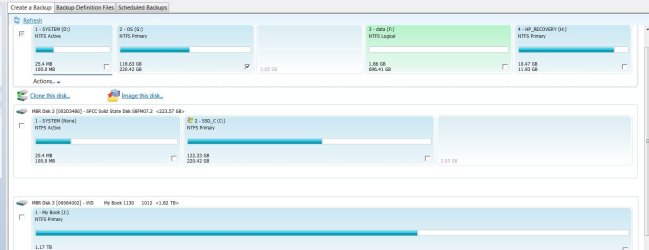
I guess I should have read the whole sage, LOL.
 

My Computer My Computer

At a glance

Vista, Windows7, Mint Mate, Zorin, Windows 8from 1.6GHz Duo to i7
Computer Manufacturer/Model Number
HP, Dell, Gateway, Toshiba - 4 laptops and 2 desktops
OS
Vista, Windows7, Mint Mate, Zorin, Windows 8
CPU
from 1.6GHz Duo to i7
Monitor(s) Displays
2x HP w2207
Hard Drives
5x HDD, 7x SSD, 12x Externals
Keyboard
with trackball - no mices
Mouse
Trackball mice
Internet Speed
DSL 6000
For most people that size SSD should be big enough to include all programs and files. Your previous Win7 partition used only half that much. Was it severely edited down in size in preparation for the cloning?

If not then what I would do is wait until you notice the space is getting spare to move User folders gradually to the HD, trying both the methods to see which one you like best: User Folders - Change Default Location or Library - Include a Folder - Windows 7 Forums with Library - Set Save Folder - Windows 7 Help Forums. I prefer moving the User folders myself.
 
@DavidE. I shouldn't lose any data, it's backed up on J, another external, and DVD disks unless I missed something. That's possible.
 

My Computer My Computer

At a glance

Windows 7, 64 bit, Home Premium
Computer type
PC/Desktop
Computer Manufacturer/Model Number
HP
OS
Windows 7, 64 bit, Home Premium
Hard Drives
ssd and hdd
Antivirus
avg
Browser
IE 1
David, the old System Reserved is still Active because it is self-booting but because it isn't booted in the screenshot does not have the System flag showing. We confirmed this earlier when the old OS was booted (as signified by the Boot flag) and contained System flag in screenshot:

346272d1421182794-install-ssd-keep-all-programs-without-reinstall-windows-snip-5.jpg


Hence if he removes the Active flag it will not be able to boot so I'd wait until he is ready to get rid of that OS before marking it Inactive and then deleting the old System Reserved and Win7 partitions. Or he can wipe that HD to get it cleanest.
 
Understood and agreed.
Thanks Greg.
 

My Computer My Computer

At a glance

Multi-Boot W7_Pro_x64 W8.1_Pro_x64 W10_Pro_x6...AMD Athlon II x4 6206GB GSkill DDR2 800AMD 4670 GPU + AMD 4200 IGP
Computer type
PC/Desktop
Computer Manufacturer/Model Number
home built
OS
Multi-Boot W7_Pro_x64 W8.1_Pro_x64 W10_Pro_x64 +Linux_VMs +Chromium_VM
CPU
AMD Athlon II x4 620
Motherboard
Gigabyte GA-MA785G-UD3H
Memory
6GB GSkill DDR2 800
Graphics Card(s)
AMD 4670 GPU + AMD 4200 IGP
Sound Card
on board Realtek ALC889A
Monitor(s) Displays
RCA 40" LCD TV, Insignia 32" LCD TV, HP 15" LCD monitor
Screen Resolution
1680 x 1050
Hard Drives
OCZ Vertex 3 120GB,
Samsung F3 1TB (3),
Several others - WD, Seagate, Hitachi, ...
PSU
Corsair 500 W
Case
Rosewill mid tower
Cooling
CM 90mm rifle
Keyboard
Gyration wireless, Logitech wireless, Dell USB wired
Mouse
Gyration wireless, Logitech wireless, V7 USB wired
Internet Speed
Spectrum - 100Mbps D / 10Mbps U
Antivirus
Avast, MBAM3, EMET, WinPatrol
Browser
Pale Moon, Firefox, IE
Other Info
2 multi-boot PC's
Mainly HTPC/Office/Gen purpose (no gaming).
Trendnet USB KVM.
LG DVD burner/Blue Ray Player.
Tray system for removable SATA backup drives.

Not currently OCd, under-volted.
I use Hybrid sleep, rarely re-boot or shutdown.

Hauppauge HD-PVR, Avermedia PCIe TV Tuner, Hauppauge PCI TV Tuner.
Back
Top