
Solved Installation of Windows 7 "no option for custom installation"

RealPetChicken

New member
Local time
2:26 AM
Messages
140
Installation of Windows 7 "no option for custom installation"

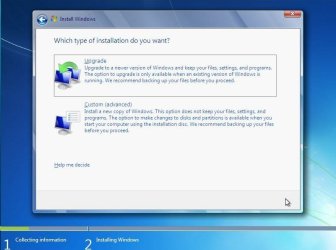
So i am installing Windows 7 Home Premium x32-bit to my laptop, which right now has Ultimate installed. I am trying to do a clean install. Every time i go trough the options, i never receive the window asking for type of installation (upgrade or clean install). image related.

I don't know if it's because i am have no way to upgrade. I tried this on another laptop that had windows vista, and it did not give me the option either. After installing Windows 7, i had some previous files show up on my newly install windows 7 laptop. I am planning on selling my laptop, and i don't want any of my files on the PC.

Thank you.
 

Attachments
  • Image49.jpg
    Image49.jpg
    46.9 KB · Views: 10

My Computer My Computer

At a glance

Windows Seven Ultimate x64 SP1Intel Core i7 x980 @ 3.33GHz12.0 GBNvidia GeForce GTX 260
Computer type
PC/Desktop
Computer Manufacturer/Model Number
HP
OS
Windows Seven Ultimate x64 SP1
CPU
Intel Core i7 x980 @ 3.33GHz
Memory
12.0 GB
Graphics Card(s)
Nvidia GeForce GTX 260
Download Darrick's Boot and Nuke (DBAN). Use it as input to a program like ImgBurn to create a bootable CD.

Boot it. When you get to the prompt, type autonuke and press Enter. Let it run for a few minutes. That will wipe out the MBR (Master Boot Record) and the Partition Table so the drive will be unallocated, unformatted (RAW).

Now start your install by booting the Win 7 install DVD. It will take care of everything for you and there will be nothing left of your data.
 

My Computer My Computer

At a glance

Windows 10 Pro X64Intel Quad Core i7-4770 @ 3.4Ghz16.0GB PC3-12800 DDR3 SDRAM 1600 MHzIntel Integrated HD Graphics
Computer type
PC/Desktop
Computer Manufacturer/Model Number
Lenovo IdeaCenter 450
OS
Windows 10 Pro X64
CPU
Intel Quad Core i7-4770 @ 3.4Ghz
Memory
16.0GB PC3-12800 DDR3 SDRAM 1600 MHz
Graphics Card(s)
Intel Integrated HD Graphics
Sound Card
Realtek HD Audio
Monitor(s) Displays
HP 22" LCD
Screen Resolution
1680 x 1050
Hard Drives
250GB Samsung EVO SATA-3 SSD
2TB Seagate ST2000DM001 SATA-2
1.5TB Seagate ST3150041AS SATA
Keyboard
Dell USB
Mouse
Lenovo USB
Internet Speed
Cable via Road Runner 3MB Upload, 30MB Download
Antivirus
Windows Defender, MBAM Pro, MBAE
Browser
Seamonkey
Other Info
UEFI/GPT
PLDS DVD-RW DH16AERSH
Download Darrick's Boot and Nuke (DBAN). Use it as input to a program like ImgBurn to create a bootable CD.

Boot it. When you get to the prompt, type autonuke and press Enter. Let it run for a few minutes. That will wipe out the MBR (Master Boot Record) and the Partition Table so the drive will be unallocated, unformatted (RAW).

Now start your install by booting the Win 7 install DVD. It will take care of everything for you and there will be nothing left of your data.

Thanks, question though, Why isn't the dialog to choose the type of installation not showing up? just curious.
 

My Computer My Computer

At a glance

Windows Seven Ultimate x64 SP1Intel Core i7 x980 @ 3.33GHz12.0 GBNvidia GeForce GTX 260
Computer type
PC/Desktop
Computer Manufacturer/Model Number
HP
OS
Windows Seven Ultimate x64 SP1
CPU
Intel Core i7 x980 @ 3.33GHz
Memory
12.0 GB
Graphics Card(s)
Nvidia GeForce GTX 260
Edit: I downloaded the official installer like you said and it worked fine. The custom menu appeared.

Where did you get the Win7 installer? Start over with the latest official installer in Step 1 of Clean Reinstall - Factory OEM Windows 7 which will help you get a perfect reinstall.

Thanks for the link, i got it off rapidshare, and used the serial from the sticker under my laptop. I thought it would work with no problems.
 
Last edited:

My Computer My Computer

At a glance

Windows Seven Ultimate x64 SP1Intel Core i7 x980 @ 3.33GHz12.0 GBNvidia GeForce GTX 260
Computer type
PC/Desktop
Computer Manufacturer/Model Number
HP
OS
Windows Seven Ultimate x64 SP1
CPU
Intel Core i7 x980 @ 3.33GHz
Memory
12.0 GB
Graphics Card(s)
Nvidia GeForce GTX 260
The problem with using a Torrent or RapidSHare is you never know what they have added or modded so you can end up with something other than genuine Win7.

You owe it to yourself as an owner of the OS to use the latest official Win7 installer provided in the link I gave you. You can also follow the steps given to get and keep a perfect install - even for retail.
 
Back
Top