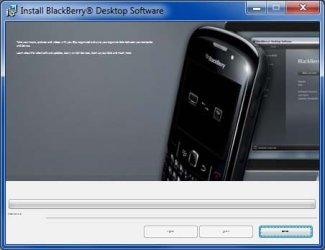
Installation windows to big or to small

swift1965

New member
Local time
9:55 PM
Messages
9
When I am installing software the instruction windows either come up to small to read or very big. I have tried Ctrl scroll but it will not change the window size.

See attachment
 

Attachments

  • small.jpg
    small.jpg
    32.4 KB · Views: 17

My Computer My Computer

OS
windows 7 home premium 32bit
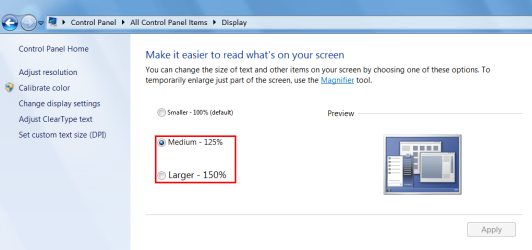
Display DPI Increase?

Have you changed your display DPI settings?
Display DPI.png
Some programs are poorly written and they can't cope if the DPI setting is >100%.
 

My Computer My Computer

Computer type
PC/Desktop
Computer Manufacturer/Model Number
n/a
OS
W7 Ultimate SP1, LM19.2 MATE, W10 Home 1703, W10 Pro 1703 VM, #All 64 bit
CPU
AMD Phenom II x6 1100T, 3.3 GHz
Motherboard
ASUS M4A88T-M/USB3 (AM3)
Memory
12GB DDR3 1333 G-Skill (4GB x 2), G-Skill (2GB x 2)
Graphics Card(s)
NVIDIA GeForce GTX 660
Sound Card
Realtek?
Monitor(s) Displays
Samsung S23B350
Screen Resolution
1920x1080
Hard Drives
WD Green 2TB (SATA), WD Green 3TB (SATA), WD Blue 4TB (SATA), WD Blue 6TB (SATA)
PSU
Cooler Master
Case
Antec GX300 Tower
Cooling
3x Antec TRICOOL 120mm Fans
Mouse
Wired Optical
Internet Speed
DSL
Antivirus
Avast
Browser
Pale Moon (64 bit)
Other Info
2018-12-27 Upgraded HDDs
2015-12-10 Upgraded case, graphics card, storage
2015-08-15 Upgraded motherboard & RAM
2015-07-15 Upgraded LM17.1 to LM17.2
I just tried changing the DPI settings. This does not help. Some of the windows come up bigger than the screen as well as too small. this happend when installing office 2010 so I don't think it's the programs that are at fault. thanks for trying antway.
 

My Computer My Computer

OS
windows 7 home premium 32bit
Are you saying ...

I just tried changing the DPI settings. This does not help. Some of the windows come up bigger than the screen as well as too small. this happend when installing office 2010 so I don't think it's the programs that are at fault. thanks for trying antway.

Are you saying that the problem started, AFTER you installed Office 2010?

Can you "reset" your PC using a backup HDD image, or "System Restore Point", pre-dating the problem?

Have you recently updated your graphics card drivers?
Note: the forum creates the link in the question above.

Does uninstalling Office 2010 fix the problem?
 
Last edited:

My Computer My Computer

Computer type
PC/Desktop
Computer Manufacturer/Model Number
n/a
OS
W7 Ultimate SP1, LM19.2 MATE, W10 Home 1703, W10 Pro 1703 VM, #All 64 bit
CPU
AMD Phenom II x6 1100T, 3.3 GHz
Motherboard
ASUS M4A88T-M/USB3 (AM3)
Memory
12GB DDR3 1333 G-Skill (4GB x 2), G-Skill (2GB x 2)
Graphics Card(s)
NVIDIA GeForce GTX 660
Sound Card
Realtek?
Monitor(s) Displays
Samsung S23B350
Screen Resolution
1920x1080
Hard Drives
WD Green 2TB (SATA), WD Green 3TB (SATA), WD Blue 4TB (SATA), WD Blue 6TB (SATA)
PSU
Cooler Master
Case
Antec GX300 Tower
Cooling
3x Antec TRICOOL 120mm Fans
Mouse
Wired Optical
Internet Speed
DSL
Antivirus
Avast
Browser
Pale Moon (64 bit)
Other Info
2018-12-27 Upgraded HDDs
2015-12-10 Upgraded case, graphics card, storage
2015-08-15 Upgraded motherboard & RAM
2015-07-15 Upgraded LM17.1 to LM17.2
Look down in the bottom right hand of the screen. Does it say 100% or is it bigger or smaller?
 

My Computer My Computer

Computer type
PC/Desktop
Computer Manufacturer/Model Number
Custom Build
OS
Windows 7 Home Premium 32-Bit - Build 7600 SP1
CPU
Intel Core i3-2120 3.30Ghz
Motherboard
Asus P8Z68-V LX Intel Z68 Socket H2 ATX
Memory
Kingston 4 GB DDR3 1333 mhz
Graphics Card(s)
AMD Radeon HD6670
Sound Card
Sound Blaster Audigy SE 24-Bit
Monitor(s) Displays
Asus VE228
Screen Resolution
1440 X 900
Hard Drives
OCZ Vertex 3 120 GB Sata 3 SSD ==
Kingston SH103/S3 120 G Hyper X 120 GB SSD ==
Western Digital 500 GB Caviar Green 7200 RPM ==
PSU
Corsair CX600M == 600 Watt
Case
NZXT Apollo - Silver with Clear Side Panel
Cooling
Three 120 mm Fans
Keyboard
Microsoft Natural 4000
Mouse
Microsoft Custom Optical 3000
Internet Speed
AT&T Fiber Optic Wireless Network
Antivirus
Microsoft Security Essentials
Browser
Chrome
Other Info
120 mm Blue LED Fan -- Three Blue LED Lazer Light Sticks
Hi, no I'm not saying this started with office 2010, that was just an example of one of the programs that this happened with. I have tried changing the magnification at the bottom right of my screen but it is only the pop-up windows that this affects the rest of my computer is fine. I thought it may be a compatibility issue with older programs but as it happened with office 2010 I don't think that is the case. As I said it seem to go both ways. When I start my adobe elements program the update checker comes up bigger than the screen. I had one program were the pop-up was so big I could not click on any of the buttons or move the window, I had to re-boot the computer.

 

My Computer My Computer

OS
windows 7 home premium 32bit
Back
Top