Solved Installed a NVMe SSD, but Win7 doesn't detect it.

i wonder, this patches are from 2015, but why is this not included in an actual installation of Windows 7 ?

cuz Win7 did not originally support nvme SSDs when Win7 first came out
 

My Computer My Computer

At a glance

Windows 7 SP1 Home Premium 64bit [x64]Intel(R) Core(TM) i5-2310 CPU @ 2.90GHz6 GBIntel HD Graphics 2000
Computer type
PC/Desktop
Computer Manufacturer/Model Number
Dell Inspiron 620
OS
Windows 7 SP1 Home Premium 64bit [x64]
CPU
Intel(R) Core(TM) i5-2310 CPU @ 2.90GHz
Memory
6 GB
Graphics Card(s)
Intel HD Graphics 2000
Sound Card
Conexant CX20641 HD Audio
Hard Drives
Western Digital 1TB (1024GB) WD10EALX-759BA1
Internet Speed
Spectrum Cable Internet up to 100Mbps
nvme-win7x64.zip
USB3_win7_2021.zip
Yes, it has been 440 days but it's related to the topic (and your signature (thanks for the links))
kb2990941-v3 says Windows 7 and sp1 are the things it requires; nonetheless it refuses to install on my windows 7 sp1 machine (the one with a factory-installed Dell windows 7 sp1). VistaLite and RT7lite refuses to incorporate it into the installation .iso.
What gives ? what is missing ?

I used imagex to incorporate nvme drivers into boot.wim & install.wim (when NVMe card arrives we'll find out if it worked)
==============
"The price of freedom is eternal vigilance" ---that is why there is no freedom
Freedom, if occasionally there is any, generally wears a crown
A patriot must always be ready to defend his country against his government” ---that is why government lords it over tenant farmers & city dwellers
 

My Computers My Computers

  • At a glance

    slackwarehaswell amdhave somebuilt in
    Computer type
    PC/Desktop
    Computer Manufacturer/Model Number
    IBM, HP, Gateway, Dell
    OS
    slackware
    CPU
    haswell amd
    Motherboard
    q87
    Memory
    have some
    Graphics Card(s)
    built in
    Hard Drives
    spinning m.2 mSata
  • Computer type
    PC/Desktop
why i not may download this files? Forum say: "You dont have permissions..."
 

My Computers My Computers

  • At a glance

    Max64PIVGeForce
    Computer type
    PC/Desktop
    Computer Manufacturer/Model Number
    Dell
    OS
    Max64
    CPU
    PIV
    Graphics Card(s)
    GeForce
  • Computer type
    PC/Desktop
I had to install these two updates, and then it was recognized:

KB2990941
KB3087873-v2

(These are the 64 bit ones)
 

My Computer My Computer

At a glance

Windows 7 x64 SP1AMD Athlon 64 X2 6000+ / 3.0 GHz6 GB
Computer type
PC/Desktop
Computer Manufacturer/Model Number
Gateway GT5656
OS
Windows 7 x64 SP1
CPU
AMD Athlon 64 X2 6000+ / 3.0 GHz
Motherboard
NVIDIA GeForce 6150 SE
Memory
6 GB
Monitor(s) Displays
Lenovo LED
Screen Resolution
1920 X 1080
Hard Drives
Windows on 500 GB spinner; Ubuntu 16 on Sandisk 250GB SSD; Bodhi5 on Samsung 250GB SSD; another old spinner for fooling around.
PSU
Original that came with computer
Keyboard
Logitech wireless
Mouse
Logitech wireless
Antivirus
Microsoft Sec Essentials
Browser
Vivaldi
OK gang - here's a doozy of a question on these NVMe drivers for Win 7 Pro 64-bit - hold onto your hats -

My Dell Optiplex 7010 (from 2014, not the new "7000"s the last few years since Dell started re-using the "7000" model numbers a little while ago) was dual-booting Win 7 Pro 64-bit and Win 10 Pro 64-bit when it had a classic HDD. The dual-booting worked perfectly for years, and I updated both the Win 7 and the Win 10 regularly.

Two ± years ago, using the technique in this amazing article, I was able to install a Samsung SSD NVMe drive and cloned my old HDD to the new NVMe:>> Just a moment...

With the NVMe in place, I can boot into the Win 10 side nicely, and everything on the old Win 10 side is there (apps and files galore), but the PC no longer boots into the Win 7 side.

NOTE: When I'm running Win 10, I can access all the files and folders on the Win 7 side by using Explorer and going to D:\.

So - my doozy question - while I'm running Win 10, is there a way to extract the Win 7 NVMe driver files mentioned above and simply PASTE THEM into one or more folders on the Win 7 side so that my next attempt to boot into the Win 7 side will work? To clarify - while running Win 10, I will NOT "install" or "run" these two .msu files, but can I open them (using 7-Zip, for example) and copy and paste their files into the Win 7 side so that maybe they will work when I next try to boot into Win 7?
Where would I paste the files on the Win 7 side?

Also, my NVMe is a Samsung 970 EVO Plus
So, are there any FURTHER driver files I need to get and paste into the Win 7 side?

It probably won't work, but I'd like to try.

Thanks, all.

 

My Computer My Computer

At a glance

Dual boot - Win 10 Pro 64-bit (good) and Win ...Intel Core i5 3470 @ 3.2GHz16GB RAM DDR3 (Four x 4GB)Intel HD Graphics (on the CPU)
Computer type
PC/Desktop
Computer Manufacturer/Model Number
Dell Optiplex 7010 MT
OS
Dual boot - Win 10 Pro 64-bit (good) and Win 7 Pro 64-bit (won't boot on the NVMe)
CPU
Intel Core i5 3470 @ 3.2GHz
Motherboard
Dell 0GY6Y8 - what would the Intel number be? - Q77 chipset
Memory
16GB RAM DDR3 (Four x 4GB)
Graphics Card(s)
Intel HD Graphics (on the CPU)
Sound Card
Realtek High Definition Audio - and Intel Display Audio
Monitor(s) Displays
Dell E176FP - nothing fancy
Screen Resolution
1280 x 1024 @ 60 Hz
Hard Drives
Now a Samsung 970 EVO Plus SSD NVMe, which works for the Win 10 only

Used to be two 500GB WDC WD5000AAKX (SATA @ 6GB/sec)

- External WD My Book 1110 USB device
PSU
What means PSU? I'm at sea level
Cooling
Ice cubes
Keyboard
Noisy
Mouse
Micky
Internet Speed
Verizon FIOS 500 Mbps (was 1Gbps but I can't type that fast)
Antivirus
Win 10 Windows Defender - Win 7 Avast Free
Browser
Firefox only with lots of security drives my wife crazy
Other Info
Also I still have an old but important XP SP3 machine that can run - Optiplex 755 Desktop w 4GB RAM and Momentus XT hybrid HD-SSD 500 GB hard drive. Used the registry hack to get more updates through "XP Embedded" or "POS" so now the machine rings like a cash register and the CD drawer opens to give change.
is there a way to extract the Win 7 NVMe driver files mentioned above and simply PASTE THEM into one or more folders on the Win 7 side

No you will have to install the nvme driver into win7 .

Easily done from within win10

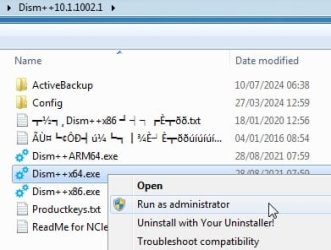
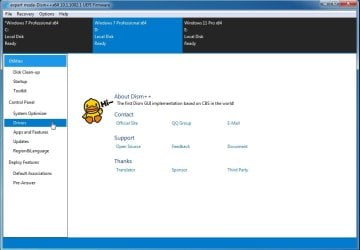
use dism++ :ar: https://github.com/Chuyu-Team/Dism-.../download/v10.1.1002.2/Dism++10.1.1002.1B.zip

dism++.jpg


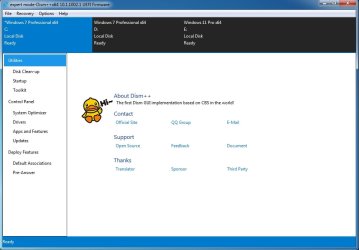
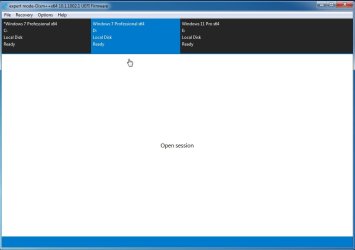
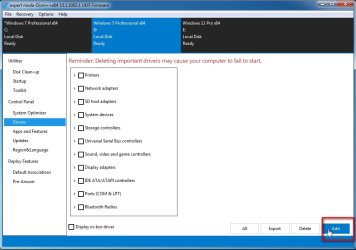
1. Click the win 7 partition in the top pane to highlight it in blue

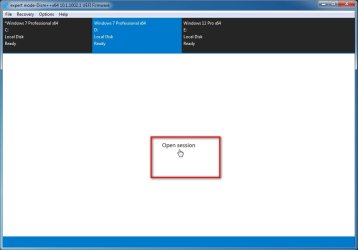
2. Click "Open Session"

3. Click Drivers in the left pane

4. Click ADD

5. browse to the unzipped FOLDER containing nvme driver

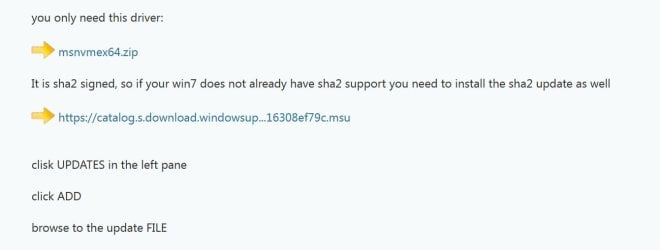
you only need this driver:

:ar: View attachment msnvmex64.zip

It is sha2 signed, so if your win7 does not already have sha2 support you need to install the sha2 update as well

:ar: https://catalog.s.download.windowsu..._b5614c6cea5cb4e198717789633dca16308ef79c.msu


clisk UPDATES in the left pane

click ADD

browse to the update FILE

- - - Updated - - -

I did something similar on one of my old 3rd gen machines. Fortunately there is a gigabyte bios that supports nvme boot for the b75m d3h motherboard.
 

My Computers My Computers

  • At a glance

    7 X64i5 84002x8gb 3200mhz
    Computer type
    PC/Desktop
    OS
    7 X64
    CPU
    i5 8400
    Motherboard
    gigabyte b365m ds3h
    Memory
    2x8gb 3200mhz
    Hard Drives
    various
    PSU
    pure power 11 400w cm
    Case
    Coolermaster
    Cooling
    cryorig m9i
  • At a glance

    7x64g54008gb ddr4 2400
    Computer type
    PC/Desktop
    OS
    7x64
    CPU
    g5400
    Motherboard
    ga b365m ds3h
    Memory
    8gb ddr4 2400
    PSU
    xfx pro 450w
Oh, SIW2!

I would so like to use an app while I'm in my Win 10 to install drivers into my non-booting Win 7! And you have so many awards for your great service on Seven Forums!

But your app's files are all in Chinese! (From your link to github in your post above.)

Is there a nice, boring but positively-commented-on English-language app that will do the same job?

Sorry! Thanks.
 

My Computer My Computer

At a glance

Dual boot - Win 10 Pro 64-bit (good) and Win ...Intel Core i5 3470 @ 3.2GHz16GB RAM DDR3 (Four x 4GB)Intel HD Graphics (on the CPU)
Computer type
PC/Desktop
Computer Manufacturer/Model Number
Dell Optiplex 7010 MT
OS
Dual boot - Win 10 Pro 64-bit (good) and Win 7 Pro 64-bit (won't boot on the NVMe)
CPU
Intel Core i5 3470 @ 3.2GHz
Motherboard
Dell 0GY6Y8 - what would the Intel number be? - Q77 chipset
Memory
16GB RAM DDR3 (Four x 4GB)
Graphics Card(s)
Intel HD Graphics (on the CPU)
Sound Card
Realtek High Definition Audio - and Intel Display Audio
Monitor(s) Displays
Dell E176FP - nothing fancy
Screen Resolution
1280 x 1024 @ 60 Hz
Hard Drives
Now a Samsung 970 EVO Plus SSD NVMe, which works for the Win 10 only

Used to be two 500GB WDC WD5000AAKX (SATA @ 6GB/sec)

- External WD My Book 1110 USB device
PSU
What means PSU? I'm at sea level
Cooling
Ice cubes
Keyboard
Noisy
Mouse
Micky
Internet Speed
Verizon FIOS 500 Mbps (was 1Gbps but I can't type that fast)
Antivirus
Win 10 Windows Defender - Win 7 Avast Free
Browser
Firefox only with lots of security drives my wife crazy
Other Info
Also I still have an old but important XP SP3 machine that can run - Optiplex 755 Desktop w 4GB RAM and Momentus XT hybrid HD-SSD 500 GB hard drive. Used the registry hack to get more updates through "XP Embedded" or "POS" so now the machine rings like a cash register and the CD drawer opens to give change.
I already gave you the instructions.

It is very obvious, the program is in English


dism++1.jpg

Select the operating system by clicking it in the top pane to highlight it in blue


dism++2.jpg

click open session


dism++3.jpg


dism++4.jpg


dism++5jpg.jpg
 

My Computers My Computers

  • At a glance

    7 X64i5 84002x8gb 3200mhz
    Computer type
    PC/Desktop
    OS
    7 X64
    CPU
    i5 8400
    Motherboard
    gigabyte b365m ds3h
    Memory
    2x8gb 3200mhz
    Hard Drives
    various
    PSU
    pure power 11 400w cm
    Case
    Coolermaster
    Cooling
    cryorig m9i
  • At a glance

    7x64g54008gb ddr4 2400
    Computer type
    PC/Desktop
    OS
    7x64
    CPU
    g5400
    Motherboard
    ga b365m ds3h
    Memory
    8gb ddr4 2400
    PSU
    xfx pro 450w
SIW2 - no luck. Followed your instructions for DISM ++, selecting my Win 7 and selecting the NVME driver, but on boot 7 still freezes at the swirling flags.
I also tried to find Samsung's driver for the 970 EVO Plus NVME I have, but Samsung offers only an .exe package to install its driver , not a folder like your NVMe (unless you can find one).
When I ran the DISM++ with the NVMe driver, I got an immediate Success 1, reject 0, but there must be errors. Here is the DISM++ log:

2024-09-01 14:25:32, Info PID=14576 TID=10100, Dism++ 成功启动,程序版本: 10.1.1002.1,CBS抽象层: 10.1.1002.1,Host版本:10.0.19041.4522
2024-09-01 14:25:44, Error PID=11732 TID=14804, 驱动管理 oem87.inf 无法获取信息
2024-09-01 14:26:22, Error PID=11732 TID=14804, 驱动管理 oem87.inf 无法获取信息
2024-09-01 14:27:05, Debug PID=11732 TID=14804, Dism++消息循环 消息循环已经退出!
2024-09-01 14:27:05, Debug PID=11732 TID=14804, Dism++会话 会话全部退出!

I did NOT try to add your
Windows6.1-KB2990941-v3-x64.msu
or
Windows6.1-KB3087873-v2-x64.msu
Should I try to add those to the DISM ++ for my Windows 7? How would I do that using DISM ++ ?

Or ... any thoughts?

Thanks,
 

My Computer My Computer

At a glance

Dual boot - Win 10 Pro 64-bit (good) and Win ...Intel Core i5 3470 @ 3.2GHz16GB RAM DDR3 (Four x 4GB)Intel HD Graphics (on the CPU)
Computer type
PC/Desktop
Computer Manufacturer/Model Number
Dell Optiplex 7010 MT
OS
Dual boot - Win 10 Pro 64-bit (good) and Win 7 Pro 64-bit (won't boot on the NVMe)
CPU
Intel Core i5 3470 @ 3.2GHz
Motherboard
Dell 0GY6Y8 - what would the Intel number be? - Q77 chipset
Memory
16GB RAM DDR3 (Four x 4GB)
Graphics Card(s)
Intel HD Graphics (on the CPU)
Sound Card
Realtek High Definition Audio - and Intel Display Audio
Monitor(s) Displays
Dell E176FP - nothing fancy
Screen Resolution
1280 x 1024 @ 60 Hz
Hard Drives
Now a Samsung 970 EVO Plus SSD NVMe, which works for the Win 10 only

Used to be two 500GB WDC WD5000AAKX (SATA @ 6GB/sec)

- External WD My Book 1110 USB device
PSU
What means PSU? I'm at sea level
Cooling
Ice cubes
Keyboard
Noisy
Mouse
Micky
Internet Speed
Verizon FIOS 500 Mbps (was 1Gbps but I can't type that fast)
Antivirus
Win 10 Windows Defender - Win 7 Avast Free
Browser
Firefox only with lots of security drives my wife crazy
Other Info
Also I still have an old but important XP SP3 machine that can run - Optiplex 755 Desktop w 4GB RAM and Momentus XT hybrid HD-SSD 500 GB hard drive. Used the registry hack to get more updates through "XP Embedded" or "POS" so now the machine rings like a cash register and the CD drawer opens to give change.
I did NOT try to add your
Windows6.1-KB2990941-v3-x64.msu
or
Windows6.1-KB3087873-v2-x64.msu
Should I try to add those to the DISM ++ for my Windows 7? How would I do that using DISM ++ ?

Simlar to adding drivers, except select Updates in the left pane. Then click ADD. Then browse to .msu file

Install the sha2 update if you havent already windows6.1-kb4474419-v3-x64.msu . The previous nvme driver will not work without the sha2 update

post#86

2024-09-01_183130.jpg
 

My Computers My Computers

  • At a glance

    7 X64i5 84002x8gb 3200mhz
    Computer type
    PC/Desktop
    OS
    7 X64
    CPU
    i5 8400
    Motherboard
    gigabyte b365m ds3h
    Memory
    2x8gb 3200mhz
    Hard Drives
    various
    PSU
    pure power 11 400w cm
    Case
    Coolermaster
    Cooling
    cryorig m9i
  • At a glance

    7x64g54008gb ddr4 2400
    Computer type
    PC/Desktop
    OS
    7x64
    CPU
    g5400
    Motherboard
    ga b365m ds3h
    Memory
    8gb ddr4 2400
    PSU
    xfx pro 450w
Back
Top