Installed app in XP mode - not available in 7

GRoston

Member
Power User
VIP
Local time
4:43 AM
Messages
382
I installed an app using XP Mode. (In case anyone cares, FrameMaker 5.5 - this is so old I cannot imagine that it can be installed under 7.) The installation went fine and I was able to run the app within the XP virtual machine. However, no shortcut for launching the app from Win 7 was created. Can you please point me to instructions for doing this manually.

Thx.
 

My Computer My Computer

At a glance

Windows 7 x64 ProCore i7 860 @ 3.8 GHz16 GB F3-12800CL7D (DDR3 1600 7-7-7-24)Sapphire Vapor-X 100283VXL Radeon HD 5770
Computer type
PC/Desktop
OS
Windows 7 x64 Pro
CPU
Core i7 860 @ 3.8 GHz
Motherboard
MSI P55-GD80
Memory
16 GB F3-12800CL7D (DDR3 1600 7-7-7-24)
Graphics Card(s)
Sapphire Vapor-X 100283VXL Radeon HD 5770
Monitor(s) Displays
NEC LCD3090WQXi-BK
Open windows explorer
navigate to where the program was installed
find the main .exe file, right click and drag to desktop and select create shortcut.
 

My Computer My Computer

At a glance

Windows 7 Professional 64-bitIntel E8400 3GHzKingston PC3-10700H 4GbXFX Radeon HD 5850 BlackEd.
Computer Manufacturer/Model Number
self built
OS
Windows 7 Professional 64-bit
CPU
Intel E8400 3GHz
Motherboard
Intel DX48BT2
Memory
Kingston PC3-10700H 4Gb
Graphics Card(s)
XFX Radeon HD 5850 BlackEd.
Sound Card
Asus Xonar DG
Monitor(s) Displays
2x Samsung SM-T220HD 22"
Screen Resolution
1680x1050 on two monitors
Hard Drives
OCZ Vertex 2 120gb 3.5" (OS)
Seagate Momentus XT 500gb
Samsung F3 1Tb (games)
2x Samsung F1 1Tb
PSU
Thermaltake ToughPower 850w
Case
Thermaltake Armor
Cooling
Scythe Mugen II
Keyboard
Microsoft Comfort Curve USB
Mouse
Razer Diamondback 3G
Internet Speed
8128/443
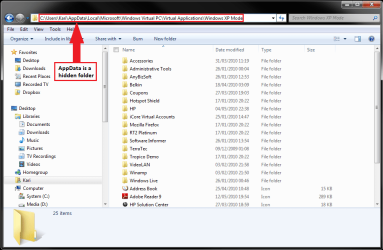
Check C:\Users\Your_Username\AppData\Local\Microsoft\Windows Virtual PC\Virtual Applications\Windows XP Mode

Do you find an entry (folder) for FrameMaker there? If yes, you should be able to see it in host's Start Menu > All Programs > Windows Virtual PC > Windows XP Mode Applications and launch it from there, or copy a shortcut on host's desktop.

Kari
 

My Computer My Computer

At a glance

Windows 10 Pro x64 EN-GB1.6 GHz Intel Core i7-720QM Processor6 GBATI Mobility Radeon HD 5850 Graphics
Computer type
Laptop
Computer Manufacturer/Model Number
HP ENVY 17-1150eg
OS
Windows 10 Pro x64 EN-GB
CPU
1.6 GHz Intel Core i7-720QM Processor
Memory
6 GB
Graphics Card(s)
ATI Mobility Radeon HD 5850 Graphics
Sound Card
Beats sound system with integrated subwoofer
Monitor(s) Displays
17" laptop display, 22" LED and 32" Full HD TV through HDMI
Screen Resolution
1600*900 (1), 1920*1080 (2&3)
Hard Drives
Internal: 2 x 500 GB SATA Hard Disk Drive 7200 rpm
External: 2TB for backups, 3TB USB3 network drive for media
Cooling
As Envy runs a bit warm, I have it on a Cooler Master pad
Keyboard
Logitech diNovo Media Desktop Laser (bluetooth)
Mouse
Logitech Performance Mouse MX
Internet Speed
50/10 Mbps VDSL
Antivirus
Windows Defender 4.3.9431.0
Browser
Maxthon 3.5.2., IE11
Swarfega, Kari,

Thanks for the prompt replies.

Seems that the trick is to create the shortcut, on the VM, in C:\Documents and Settings\All Users\Start Menu.
 

My Computer My Computer

At a glance

Windows 7 x64 ProCore i7 860 @ 3.8 GHz16 GB F3-12800CL7D (DDR3 1600 7-7-7-24)Sapphire Vapor-X 100283VXL Radeon HD 5770
Computer type
PC/Desktop
OS
Windows 7 x64 Pro
CPU
Core i7 860 @ 3.8 GHz
Motherboard
MSI P55-GD80
Memory
16 GB F3-12800CL7D (DDR3 1600 7-7-7-24)
Graphics Card(s)
Sapphire Vapor-X 100283VXL Radeon HD 5770
Monitor(s) Displays
NEC LCD3090WQXi-BK
Hi I have the same problem like with GRoston, I followed your suggestion.

Check C:\Users\Your_Username\AppData\Local\Microsoft\Windows Virtual PC\Virtual Applications\Windows XP Mode

In my machine I dont have "virtual application folder", why is that so?

Thank you.
 

My Computer My Computer

At a glance

windows 7
OS
windows 7
Hello, Wasnik, welcome to the Seven Forums.

The folder should be there, if you have any apps installed on XP Mode. Check once more. AppData is a hidden folder, so you have to turn Show hidden files and folders on from Control Panel > Folder Options.

Kari

VPC_Apps_Folder.png
 

My Computer My Computer

At a glance

Windows 10 Pro x64 EN-GB1.6 GHz Intel Core i7-720QM Processor6 GBATI Mobility Radeon HD 5850 Graphics
Computer type
Laptop
Computer Manufacturer/Model Number
HP ENVY 17-1150eg
OS
Windows 10 Pro x64 EN-GB
CPU
1.6 GHz Intel Core i7-720QM Processor
Memory
6 GB
Graphics Card(s)
ATI Mobility Radeon HD 5850 Graphics
Sound Card
Beats sound system with integrated subwoofer
Monitor(s) Displays
17" laptop display, 22" LED and 32" Full HD TV through HDMI
Screen Resolution
1600*900 (1), 1920*1080 (2&3)
Hard Drives
Internal: 2 x 500 GB SATA Hard Disk Drive 7200 rpm
External: 2TB for backups, 3TB USB3 network drive for media
Cooling
As Envy runs a bit warm, I have it on a Cooler Master pad
Keyboard
Logitech diNovo Media Desktop Laser (bluetooth)
Mouse
Logitech Performance Mouse MX
Internet Speed
50/10 Mbps VDSL
Antivirus
Windows Defender 4.3.9431.0
Browser
Maxthon 3.5.2., IE11
Hi Kari,

Yes I did that procedure, but the problem is in this path i don't see "Virtual Applications folder. C:\Users\Your_Username\AppData\Local\Microsoft\Windows Virtual PC\

Thanks.


My Computer My Computer

At a glance

windows 7
OS
windows 7
Hi Kari,

Yes I did that procedure, but the problem is in this path i don't see "Virtual Applications folder. C:\Users\Your_Username\AppData\Local\Microsoft\Windows Virtual PC\

Thanks.

This usually means there are no installed applications. When you install something on XP Mode, if it does not appear in the host's Start Menu > Windows Virtual PC > XP Mode Applications, you have to place a shortcut to XP Mode's C:\Documents and Settings\All Users\Start Menu, as GRoston mentioned a couple posts ago.
 

My Computer My Computer

At a glance

Windows 10 Pro x64 EN-GB1.6 GHz Intel Core i7-720QM Processor6 GBATI Mobility Radeon HD 5850 Graphics
Computer type
Laptop
Computer Manufacturer/Model Number
HP ENVY 17-1150eg
OS
Windows 10 Pro x64 EN-GB
CPU
1.6 GHz Intel Core i7-720QM Processor
Memory
6 GB
Graphics Card(s)
ATI Mobility Radeon HD 5850 Graphics
Sound Card
Beats sound system with integrated subwoofer
Monitor(s) Displays
17" laptop display, 22" LED and 32" Full HD TV through HDMI
Screen Resolution
1600*900 (1), 1920*1080 (2&3)
Hard Drives
Internal: 2 x 500 GB SATA Hard Disk Drive 7200 rpm
External: 2TB for backups, 3TB USB3 network drive for media
Cooling
As Envy runs a bit warm, I have it on a Cooler Master pad
Keyboard
Logitech diNovo Media Desktop Laser (bluetooth)
Mouse
Logitech Performance Mouse MX
Internet Speed
50/10 Mbps VDSL
Antivirus
Windows Defender 4.3.9431.0
Browser
Maxthon 3.5.2., IE11
Hi Kari,

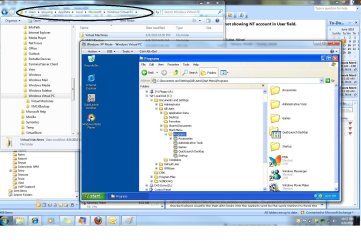
I do have shortcut of the application in XPMode's C:\Documents and Settings\All Users\Start Menu but the problem I have is in the "Virtual Applications\Windows XP Mode" folder in my Windows 7's as you describe in the previous post. I have attached the screen shot of my Windows7 ans XP VM. "C:\Users\Your_Username\AppData\Local\Microsoft\Windows Virtual PC\Virtual Applications\Windows XP Mode"

FYI, upon installation of XPMode and Virtual PC and when I ran XPMode it prompts me to enable virtualization in my Bios, instead of doing that I just run a windows update that bypass virtualization that's why I can ran XPMode even if I don't enable virtualization in my BIOS.
 

Attachments

  • Win7_XPMode.jpg
    Win7_XPMode.jpg
    179.3 KB · Views: 60

My Computer My Computer

At a glance

windows 7
OS
windows 7
According to your screenshot, you have not installed any third party software on your XP Mode. The host's Start > All Programs > Windows Virtual PC > Windows XP Mode Applications menu shows only installed third party applications, not those included in XP like Paint, Wordpad, Notepad etc.

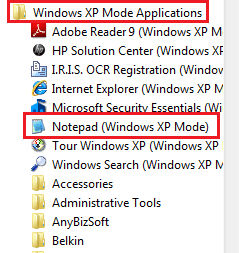
When there are no installed third party applications, the menu is empty or not showing at all. However, there's an easy trick to add built-in XP applications to that menu. I'm using XP Mode's Notepad as an example here:
  • In XP Mode, click Start, right click All Programs
  • Open Programs > Accessories folder
  • Copy Notepad shortcut
  • Go back one level, to Programs folder
  • Paste the shortcut here
  • Turn off XP Mode

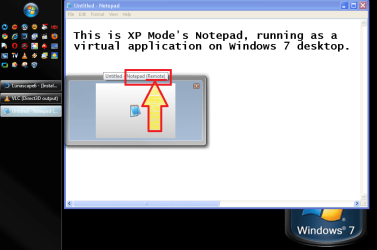
The result:

XPM_VirtualApps1.png

XPM_VirtualApps2.png

XP Mode Notepad is now found in XP Mode Applications menu, and as shown here running as an independent virtual application on Windows 7 desktop, as the Taskbar Preview mouseover balloon tells.

Kari
 

My Computer My Computer

At a glance

Windows 10 Pro x64 EN-GB1.6 GHz Intel Core i7-720QM Processor6 GBATI Mobility Radeon HD 5850 Graphics
Computer type
Laptop
Computer Manufacturer/Model Number
HP ENVY 17-1150eg
OS
Windows 10 Pro x64 EN-GB
CPU
1.6 GHz Intel Core i7-720QM Processor
Memory
6 GB
Graphics Card(s)
ATI Mobility Radeon HD 5850 Graphics
Sound Card
Beats sound system with integrated subwoofer
Monitor(s) Displays
17" laptop display, 22" LED and 32" Full HD TV through HDMI
Screen Resolution
1600*900 (1), 1920*1080 (2&3)
Hard Drives
Internal: 2 x 500 GB SATA Hard Disk Drive 7200 rpm
External: 2TB for backups, 3TB USB3 network drive for media
Cooling
As Envy runs a bit warm, I have it on a Cooler Master pad
Keyboard
Logitech diNovo Media Desktop Laser (bluetooth)
Mouse
Logitech Performance Mouse MX
Internet Speed
50/10 Mbps VDSL
Antivirus
Windows Defender 4.3.9431.0
Browser
Maxthon 3.5.2., IE11
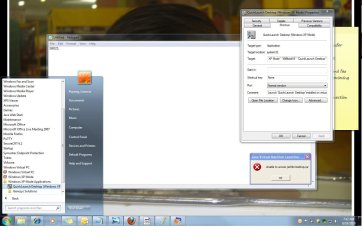
Your tip works, thanks for that. Now I have new issue. I have installed this application and it show in my Windows 7 startup menu. When I start to run the shortcut icon in windows 7 it gives me an error "unable to access jarfile Desktop.jar" See the screen shot.
 

Attachments

  • Error_Running in Win7.jpg
    Error_Running in Win7.jpg
    123.9 KB · Views: 12

My Computer My Computer

At a glance

windows 7
OS
windows 7

My Computer My Computer

At a glance

Windows 10 Pro x64 EN-GB1.6 GHz Intel Core i7-720QM Processor6 GBATI Mobility Radeon HD 5850 Graphics
Computer type
Laptop
Computer Manufacturer/Model Number
HP ENVY 17-1150eg
OS
Windows 10 Pro x64 EN-GB
CPU
1.6 GHz Intel Core i7-720QM Processor
Memory
6 GB
Graphics Card(s)
ATI Mobility Radeon HD 5850 Graphics
Sound Card
Beats sound system with integrated subwoofer
Monitor(s) Displays
17" laptop display, 22" LED and 32" Full HD TV through HDMI
Screen Resolution
1600*900 (1), 1920*1080 (2&3)
Hard Drives
Internal: 2 x 500 GB SATA Hard Disk Drive 7200 rpm
External: 2TB for backups, 3TB USB3 network drive for media
Cooling
As Envy runs a bit warm, I have it on a Cooler Master pad
Keyboard
Logitech diNovo Media Desktop Laser (bluetooth)
Mouse
Logitech Performance Mouse MX
Internet Speed
50/10 Mbps VDSL
Antivirus
Windows Defender 4.3.9431.0
Browser
Maxthon 3.5.2., IE11
I have JRE installed in my XP Mode 1.5.0_20, you mean do I need to install the JVM?
 

My Computer My Computer

At a glance

windows 7
OS
windows 7
To be honest, I don't know. Could you provide a download link to the program that won't run and gives that error (if it's free), so I could test it.

Kari
 

My Computer My Computer

At a glance

Windows 10 Pro x64 EN-GB1.6 GHz Intel Core i7-720QM Processor6 GBATI Mobility Radeon HD 5850 Graphics
Computer type
Laptop
Computer Manufacturer/Model Number
HP ENVY 17-1150eg
OS
Windows 10 Pro x64 EN-GB
CPU
1.6 GHz Intel Core i7-720QM Processor
Memory
6 GB
Graphics Card(s)
ATI Mobility Radeon HD 5850 Graphics
Sound Card
Beats sound system with integrated subwoofer
Monitor(s) Displays
17" laptop display, 22" LED and 32" Full HD TV through HDMI
Screen Resolution
1600*900 (1), 1920*1080 (2&3)
Hard Drives
Internal: 2 x 500 GB SATA Hard Disk Drive 7200 rpm
External: 2TB for backups, 3TB USB3 network drive for media
Cooling
As Envy runs a bit warm, I have it on a Cooler Master pad
Keyboard
Logitech diNovo Media Desktop Laser (bluetooth)
Mouse
Logitech Performance Mouse MX
Internet Speed
50/10 Mbps VDSL
Antivirus
Windows Defender 4.3.9431.0
Browser
Maxthon 3.5.2., IE11
Back
Top