Installed new PSU, now have Disk Boot Failure Error...

Takaaaa

New member
Member
Local time
4:45 PM
Messages
77
Hello,
So a while back I had a problem and the good members of this forum help narrow down the problem to a bad PSU and was kind enough to give me a link to what I needed.
I bought the new PSU and installed it into my HP Slimline s5220y and started it up. First thing I noticed was the power light on the Tower doesnt come on, then the next thing i noticed was the "DISK BOOT FAILURE, INSERT SYSTEM DISK AND PRESS ENTER" message.
Looking around the net for an answer, led me to changing settings in my BIO, problem is it goes straight to this error. I cant go into my BIOs.

I have very very important photos from my photography company and want to know if I can keep my files?

Im pretty sure I installed my new PSU correctly, only 4 harnesses used. This is the PSU I bought
Newegg.com - SeaSonic SS-300TFX Bronze 300W TFX12V v2.3 80 PLUS BRONZE Certified Active PFC Power Supply - Power Supplies

Thank you
 

My Computer My Computer

Computer Manufacturer/Model Number
HP DV7-2185dx
OS
Microsoft Windows 7 Ultimate 64-bit 7600 Multiprocessor Free
CPU
Intel(R) Core(TM)2 Quad CPU Q9000 @ 2.00GHz
Motherboard
Quanta 3624
Memory
DDR-2 2.00 GB/ DDR-2 4.00 GB
Graphics Card(s)
ATI Mobility Radeon HD 4650
Sound Card
(1) AMD High Definition Audio Device (2) High Definition A
Hard Drives
FUJITSU MJA2500BH G2 ATA Device 465.76 GB
Our job will be much easier if you could supply as much info - in the System Specs- for the system.

Update your SevenForums System Specs
User CP (3rd item in the top menu bar) |
Your Profile | Edit System Spec
(left-hand column)http://www.portablefreeware.com/?id=159http://www.piriform.com/speccyhttp://www.sevenforums.com/tutorials/180324-system-info-see-your-system-specs.html

Add the word laptop or desktop or netbook to the
“system manufacturer” block, for example,
Toshiba Satellite L305D notebook.

Provide full windows version info, for example:
MS Windows 7 Ultimate SP1 64-bit

Use the “Other Info” block for Optical Reader,
Mouse, touchpad, wifi adapter, speakers, monitor, etc

Scroll down and click on the SAVE CHANGES button.
 

My Computer My Computer

Computer Manufacturer/Model Number
Toshiba Satellite S875D-S7239 laptop
OS
MS Windows 7 Ultimate SP1 64-bit
CPU
AMD A10-4600M
Motherboard
AMD Pumori (Socket FT1)
Memory
6.00 GB Dual-Channel DDR3 @ 798MHz (11-11-12-28)
Graphics Card(s)
AMD Radeon HD 7660G
Sound Card
High Definition Audio Device
Monitor(s) Displays
Generic PnP Monitor (1600x900@60Hz)
Screen Resolution
1600x900@60Hz
Hard Drives
SSD 119GB Corsair CSSD-V128GB2 ATA Device
Keyboard
Standard PS/2 Keyboard
Mouse
HP Wireless Optical Mobile Mouse Model FHA-3410
Internet Speed
What the local pub, local coffee shop offers.
Other Info
Optical Drive:MATSHITA BD-CMB UJ160B ATA Device


Also have an Asus ha1002xp netbook with Win 7 Ultimate installed.
I've had a look at the specs for your PC, and, according to that, it originally came with a 220W PSU, so a 300W one should work. Check all connections, particularly the data cables where they plug into the drives and motherboard. If they aren't of the latching type, consider replacing them with latching cables. One of the drawbacks with SATA (and it's the only one) is because the connectors are much smaller, they are far easier to dislodge from their sockets than the old PATA (ribbon cable) connectors. Don't forget to check all other wiring connections as well, as it is very easy to dislodge a wire without realising it, particularly where space is at a premium.
 

My Computer My Computer

Computer type
PC/Desktop
Computer Manufacturer/Model Number
Dwarf Dwf/11/2012 r09/2013
OS
Windows 8.1 Pro RTM x64
CPU
Intel Core-i5-3570K 4-core @ 3.4GHz (Ivy Bridge) (OC 4.4GHz)
Motherboard
ASRock Z77 Extreme4-M
Memory
4 x 4GB DDR3-1600 Corsair Vengeance CMZ8GX3M2A1600C9B (16GB)
Graphics Card(s)
MSI GeForce GTX770 Gaming OC 2GB
Sound Card
Realtek High Definition on board solution (ALC 898)
Monitor(s) Displays
ViewSonic VA1912w Widescreen (VGA)
Screen Resolution
1440x900
Hard Drives
OCZ Agility 3 SSD 120GB SATA III x2 (RAID 0)
Samsung HD501LJ 500GB SATA II x2
Hitachi HDS721010CLA332 1TB SATA II
Iomega 1.5TB Ext USB 2.0
WD 2.0TB Ext USB 3.0
PSU
XFX Pro Series 850W Semi-Modular
Case
Gigabyte IF233
Cooling
1 x 120mm Front Inlet 1 x 120mm Rear Exhaust
Keyboard
Microsoft Comfort Curve Keyboard 3000 (USB)
Mouse
Microsoft Comfort Mouse 3000 for Business (USB)
Internet Speed
NetGear DG834Gv3 ADSL Modem/Router (Ethernet) ~4.0 Mb/s (O2)
Antivirus
Avast! 8.0.1497
Browser
IE 11
Other Info
Optical Drive: HL-DT-ST BD-RE BH10LS30 SATA Bluray
Lexmark S305 Printer/Scanner/Copier (USB)
WEI Score: 8.1/8.1/8.5/8.5/8.25
Asus Eee PC 1011PX Netbook (Windows 7 x86 Starter)
Our job will be much easier if you could supply as much info - in the System Specs- for the system.
Thanks, I updated it.

I've had a look at the specs for your PC, and, according to that, it originally came with a 220W PSU, so a 300W one should work. Check all connections, particularly the data cables where they plug into the drives and motherboard. If they aren't of the latching type, consider replacing them with latching cables. One of the drawbacks with SATA (and it's the only one) is because the connectors are much smaller, they are far easier to dislodge from their sockets than the old PATA (ribbon cable) connectors. Don't forget to check all other wiring connections as well, as it is very easy to dislodge a wire without realising it, particularly where space is at a premium.

I made sure that everything was in nice and tight. Still same problem. Im not the best at this so maybe i didnt do something right? I will take a picture of how I installed it, maybe it will help.
 

My Computer My Computer

Computer Manufacturer/Model Number
HP DV7-2185dx
OS
Microsoft Windows 7 Ultimate 64-bit 7600 Multiprocessor Free
CPU
Intel(R) Core(TM)2 Quad CPU Q9000 @ 2.00GHz
Motherboard
Quanta 3624
Memory
DDR-2 2.00 GB/ DDR-2 4.00 GB
Graphics Card(s)
ATI Mobility Radeon HD 4650
Sound Card
(1) AMD High Definition Audio Device (2) High Definition A
Hard Drives
FUJITSU MJA2500BH G2 ATA Device 465.76 GB
Takaaaa,

First, as already suggested, very carefully check the connectors and their connections.

My suspicion is that one or more cables are not correctly seated/connected.

After inspecting and reseating the connectors, the system still doesn't boot correctly, then does the hard drive make a quiet spinning noise?

You will need to leave the cover off of the computer until the problem is resolved.
 

My Computer My Computer

Computer Manufacturer/Model Number
Toshiba Satellite S875D-S7239 laptop
OS
MS Windows 7 Ultimate SP1 64-bit
CPU
AMD A10-4600M
Motherboard
AMD Pumori (Socket FT1)
Memory
6.00 GB Dual-Channel DDR3 @ 798MHz (11-11-12-28)
Graphics Card(s)
AMD Radeon HD 7660G
Sound Card
High Definition Audio Device
Monitor(s) Displays
Generic PnP Monitor (1600x900@60Hz)
Screen Resolution
1600x900@60Hz
Hard Drives
SSD 119GB Corsair CSSD-V128GB2 ATA Device
Keyboard
Standard PS/2 Keyboard
Mouse
HP Wireless Optical Mobile Mouse Model FHA-3410
Internet Speed
What the local pub, local coffee shop offers.
Other Info
Optical Drive:MATSHITA BD-CMB UJ160B ATA Device


Also have an Asus ha1002xp netbook with Win 7 Ultimate installed.
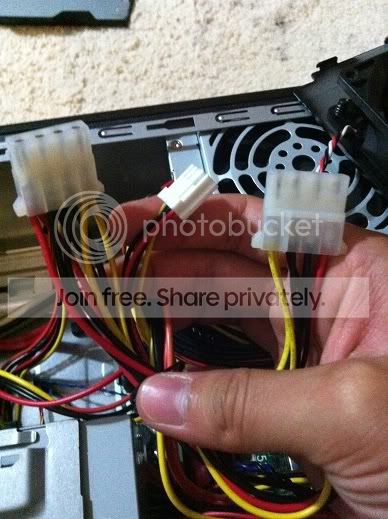
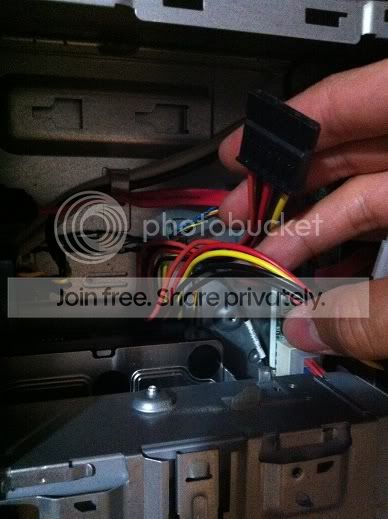
Here are pictures of my connections.

First is my original PSU
IMG_4429.jpg


Then my new PSU. Disk drive connection
IMG_4430.jpg


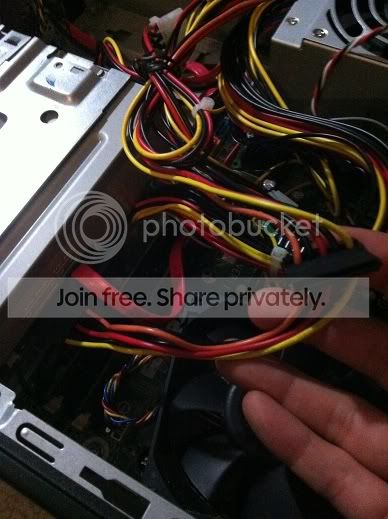
Hard drive connection
IMG_4431.jpg


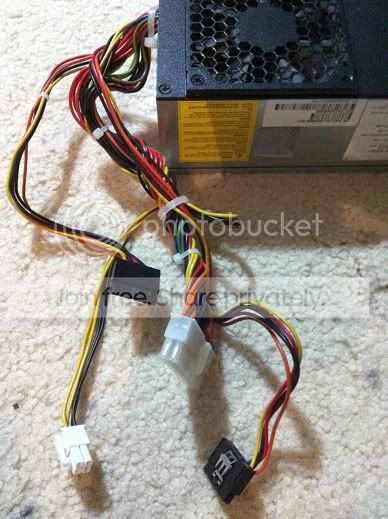
a four pin harness that idk what it does
IMG_4432.jpg


and the harnesses that i didnt use
IMG_4433.jpg


Its hard to take a picture of the MB connection but im sure thats fine.
 

My Computer My Computer

Computer Manufacturer/Model Number
HP DV7-2185dx
OS
Microsoft Windows 7 Ultimate 64-bit 7600 Multiprocessor Free
CPU
Intel(R) Core(TM)2 Quad CPU Q9000 @ 2.00GHz
Motherboard
Quanta 3624
Memory
DDR-2 2.00 GB/ DDR-2 4.00 GB
Graphics Card(s)
ATI Mobility Radeon HD 4650
Sound Card
(1) AMD High Definition Audio Device (2) High Definition A
Hard Drives
FUJITSU MJA2500BH G2 ATA Device 465.76 GB
Takaaaa,

First, as already suggested, very carefully check the connectors and their connections.

My suspicion is that one or more cables are not correctly seated/connected.

After inspecting and reseating the connectors, the system still doesn't boot correctly, then does the hard drive make a quiet spinning noise?

You will need to leave the cover off of the computer until the problem is resolved.

Yes, I double checked my connections. Also its hard to hear with the other fans going but i do believe that the hard drive is making a spinning sound
 

My Computer My Computer

Computer Manufacturer/Model Number
HP DV7-2185dx
OS
Microsoft Windows 7 Ultimate 64-bit 7600 Multiprocessor Free
CPU
Intel(R) Core(TM)2 Quad CPU Q9000 @ 2.00GHz
Motherboard
Quanta 3624
Memory
DDR-2 2.00 GB/ DDR-2 4.00 GB
Graphics Card(s)
ATI Mobility Radeon HD 4650
Sound Card
(1) AMD High Definition Audio Device (2) High Definition A
Hard Drives
FUJITSU MJA2500BH G2 ATA Device 465.76 GB
Please try this test:

1. Disconnect everything connected in the back of the computer, and any other USB devices, except for keyboard and mouse.

2. Disconnect the power and data cables from the hard drive and CD/DVD drive (and any other drives), then boot the computer. Do you get the same error? Can you get into the BIOS? Note your results.

3. Now connect only the hard drive and boot.

Let us know what you find.
 

My Computer My Computer

Computer type
PC/Desktop
Computer Manufacturer/Model Number
Home Built - Jan 2013
OS
Windows 7 64 Bit Home Premium SP1
CPU
i7-3820
Motherboard
Asus P9X79-PRO - Bios 4608
Memory
GSkill F3-14900CL9Q - 16GB
Graphics Card(s)
EVGA GeForce GTX660 - Driver 352.86
Sound Card
On board Realtek ALC898
Monitor(s) Displays
Acer S271HL
Screen Resolution
1920 x 1080
Hard Drives
#1- Samsung 840 Pro Series
#2- Western Digital WD1002FAEX Sata3 Black
#3- Western Digital WD1002FAEX Sata3 Black
PSU
Corsair CMPSU-850TX-V2 - 850 watt (by Seasonic)
Case
Corsair Obsidian 550D
Cooling
Standard 3 120mm case fans, Cooler Master Hyper 212 EVO
Keyboard
MS KC-0405
Mouse
Intellimouse 5-button
Internet Speed
56 Mbits/Sec (on a good day)
Antivirus
Avast & Malwarebytes
Browser
Firefox
Other Info
Asus DVD - DRW-24B1ST 24X
First can you enter your BIOS settings menu? you need to pres a key (usually DEL or F2 but there maybe others please read the manual if you dont know) when pc is booting (before windows boot).. if you can enter bios check if the HDD is detected in bios.
if no then there is problem with HDD or connection.
it would be good to have some kind of botable cd (linux or other bootable testing tools) to check your other hardware.
 

My Computer My Computer

Computer type
PC/Desktop
Computer Manufacturer/Model Number
Self Built PC
OS
Windows 7 pro 64bit. (SP1)
CPU
Intel core I5 2400
Motherboard
Gigabyte H61
Memory
8GB DDR3 Kingston
Graphics Card(s)
Gigabyte GF GTX650OC
Sound Card
Realtek HD audio
Monitor(s) Displays
LCD 20"
Screen Resolution
1600x900
Hard Drives
INTEL SSD 320 80GB +Seagate 7200.12 1TBx3
PSU
Coolermaster RX450W
Case
Coolermaster atx case
Cooling
stock cooler
Keyboard
logitech
Mouse
logitech
Internet Speed
FTTD 100mbps
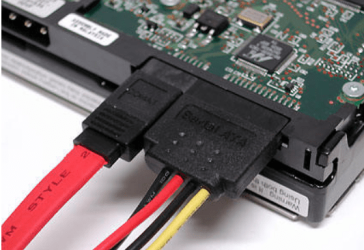
On your hard drive. Do you have 2 cables connected to it. Looking at the pictures where you show the hard drive, maybe I'm looking at it wrong, but it appears that there is a power cable connected but no data cable. The data cable is a flat red cable in the clamp above the hard drive in the picture. When you start the computer you can gently put your hand on the hard drive and feel it spin up. This is what it should look like.

sata.PNG
 

My Computers My Computers

System One System Two

  • Computer type
    PC/Desktop
    Computer Manufacturer/Model Number
    ALWAYS UNDER CONSTRUCTION
    OS
    Windows 11 Pro
    CPU
    Ryzen 9 5900X
    Motherboard
    Asus X570 Crosshair Viii Hero
    Memory
    32GB G Skill DDR4-3600
    Graphics Card(s)
    EVGA RTX 3080 FTW 3 Ultra
    Sound Card
    On Board/Sennheiser PC37X Headset
    Monitor(s) Displays
    3 X Asus 27"
    Screen Resolution
    2560x1440
    Hard Drives
    2 X 1 TB NVME drives
    PSU
    EVGA 850
    Case
    Phanteks Eclipse P400A
    Cooling
    EVGA 280 AIO
    Keyboard
    Logitech G510s/ Logitech G13
    Mouse
    Logitech G502
    Internet Speed
    24/1
    Antivirus
    ESET/MBAM Pro/SAS Pro
    Browser
    Chrome/ Firefox/ Edge
  • Computer type
    Laptop
    System Manufacturer/Model Number
    Dell 16 Plus
    OS
    Windows 11 Pro
    CPU
    Intel Ultra 9 288V
    Memory
    32 GB LPDDR5X 8533
    Monitor(s) Displays
    16" Mini-LED HDR600 Touch 90 Hz
    Screen Resolution
    2560X1600
    Hard Drives
    1 TB NVME
Also double check your HD Sata connection at the motherboard side itself.

Being as you installed a new PSU, and rewired everything, theres a very high probability you accidently pulled something loose (such as a SATA cable) and just didnt realize it.
 

My Computer My Computer

Computer Manufacturer/Model Number
Custom (Self Build)
OS
Windows 7 Home Premium 64bit
CPU
Intel Core i7 2700k
Motherboard
eVGA P67 SLI
Memory
8GB Mushkin Redline Ridgebacks @1866
Graphics Card(s)
EVGA GTX570 SC
Sound Card
XiFi Titanium HD
Monitor(s) Displays
LG W2453V
Screen Resolution
1920x1080
Hard Drives
Intel 320 80GB -- Intel X25-V 40GB --WD Black 1TB x2 -- WD Blue 640GB
PSU
Seasonic x750
Case
Corsair 600T SE White
Cooling
eVGA Superclocked CPU Cooler
Keyboard
Saitek Cyborg
Antivirus
Kaspersky
Browser
IE
Other Info
LG BD/DVD
On your hard drive. Do you have 2 cables connected to it. Looking at the pictures where you show the hard drive, maybe I'm looking at it wrong, but it appears that there is a power cable connected but no data cable. The data cable is a flat red cable in the clamp above the hard drive in the picture. When you start the computer you can gently put your hand on the hard drive and feel it spin up. This is what it should look like.

View attachment 178035

OMG you're right. I didnt have my data cable connected. I feel so gosh darn silly right now. :o Everything works fine now.

Thank you all so much, you guys are always helping out so much.
 

My Computer My Computer

Computer Manufacturer/Model Number
HP DV7-2185dx
OS
Microsoft Windows 7 Ultimate 64-bit 7600 Multiprocessor Free
CPU
Intel(R) Core(TM)2 Quad CPU Q9000 @ 2.00GHz
Motherboard
Quanta 3624
Memory
DDR-2 2.00 GB/ DDR-2 4.00 GB
Graphics Card(s)
ATI Mobility Radeon HD 4650
Sound Card
(1) AMD High Definition Audio Device (2) High Definition A
Hard Drives
FUJITSU MJA2500BH G2 ATA Device 465.76 GB
Glad you have it working right. Thanks for letting us know the results.
 

My Computers My Computers

System One System Two

  • Computer type
    PC/Desktop
    Computer Manufacturer/Model Number
    ALWAYS UNDER CONSTRUCTION
    OS
    Windows 11 Pro
    CPU
    Ryzen 9 5900X
    Motherboard
    Asus X570 Crosshair Viii Hero
    Memory
    32GB G Skill DDR4-3600
    Graphics Card(s)
    EVGA RTX 3080 FTW 3 Ultra
    Sound Card
    On Board/Sennheiser PC37X Headset
    Monitor(s) Displays
    3 X Asus 27"
    Screen Resolution
    2560x1440
    Hard Drives
    2 X 1 TB NVME drives
    PSU
    EVGA 850
    Case
    Phanteks Eclipse P400A
    Cooling
    EVGA 280 AIO
    Keyboard
    Logitech G510s/ Logitech G13
    Mouse
    Logitech G502
    Internet Speed
    24/1
    Antivirus
    ESET/MBAM Pro/SAS Pro
    Browser
    Chrome/ Firefox/ Edge
  • Computer type
    Laptop
    System Manufacturer/Model Number
    Dell 16 Plus
    OS
    Windows 11 Pro
    CPU
    Intel Ultra 9 288V
    Memory
    32 GB LPDDR5X 8533
    Monitor(s) Displays
    16" Mini-LED HDR600 Touch 90 Hz
    Screen Resolution
    2560X1600
    Hard Drives
    1 TB NVME
Back
Top