SSD or HD won't boot but it does if....

pintree3

Mich
Member
VIP
Local time
6:35 PM
Messages
394
Location
Canada
Installed a PCIe card in my 5-year old computer (Asus[FONT=&quot] P7P55D-E LX MB[/FONT][FONT=&quot]) [/FONT]to take advantage of the Samsung EVO 840 SSD.
There was panic at first since windows would not boot with either the original HD nor with the SSD. Now I can let my SSD boot if I remove one of my hard drives and my CD-r player.
The thing is, once the PC is on if I then go and plug the other HD on, nothing happens as far as Windows is concerned BUT then I go to Device Manager, click on "Scan for hardware changes" and it is seen again and can be used.
There were 2 optical drives and 3 physical disks (HDs) on it. Now one optical disk one HD and one SSD.
My power supply is 800 W so it can definitely handle it. Asus is closed for the week-end so I'm hoping I can get an answer here.
So what can be done in order to have my windows boot normally with all drives?
 

My Computer My Computer

Computer type
PC/Desktop
Computer Manufacturer/Model Number
OEM Designed by me :-)
OS
Windows 7 Home Premium 64
CPU
Intel Core i5 760 @ 2800MHz
Motherboard
Asus P7P55D-E LX
Memory
12288MB
Graphics Card(s)
AMD Radeon HD 7800 Series
Sound Card
ASUS Xonar DG
Monitor(s) Displays
ViewSonic VX2453 Series, HDMI 1080p Full HD
Screen Resolution
1920X1080
Hard Drives
Samsung SSD 840 EVO 250GB& two others
PSU
Tagan BZ Series, TG800-BZ 800W
Keyboard
Logitech MK250
Mouse
Logitech M310
Internet Speed
toppest, mostest :-) <-- bad, but fun English
Browser
Firefox, Crrome, IE
are you plugging all of your drives into the pci card or just the ssd?
the reason i ask is not all mobos suppport booting from a pci card,and yours may just be an odd issue causing it to "semi work".
it could also be a conflict between the new card and the sata controller on the mobo if the rest are plugged into that.
 

My Computer My Computer

Computer type
PC/Desktop
Computer Manufacturer/Model Number
Built by badgers!!!
OS
Windows 7 Ultimate x64, & Mac OS X 10.9.2
CPU
Intel Core i5 2500k
Motherboard
Asus P8z68 LE
Memory
Corsair Vengence 8gb 1866mhz
Graphics Card(s)
Nvidia GTX 770 OC
Monitor(s) Displays
2x ASUS LED 22" IPS
Screen Resolution
3840x1080
Hard Drives
240GB Crucial M500 SSD
120gb Corsair Force 3 SSD
1TB Western Digital
PSU
Corsair HX650w Modular
Case
Corsair Air 540
Cooling
Corsair H60 Push/Pull
Keyboard
Corsair K70/ Logitech G27 wheel
Mouse
Saitek R.A.T 9
Internet Speed
Too slow!
Other Info
AMD fusion E350N Home server-Windows Home Server 2011 (also made by badgers!)
2011 Macbook 2.4ghz Core2Duo, 4gb ddr3, 120gb Ocz Vertex SSD
thanks badger. No, the PCIe card has only 1 slot (where the cable plugs in) so the SSD is the only thing plugged to it--the SSD as you know has a thing, a space, for the red cable which goes to the PCIe card and another longer space for the power. the power cable of the PC is plugged into it--this same power cable shares it with another (There's a big power cable that comes out of the power bar and this cable has 2 plugs).
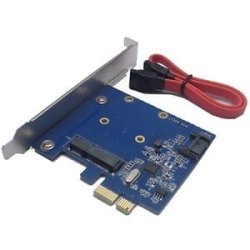
The card is this one: mSATA SATA III 3.0 HDD SSD to PCI-e HyperDuo Raid Controller Card Adapter 6Gbps
and looks like this
2Q==
(See attachment)..
 

Attachments

  • 60_35.JPG
    60_35.JPG
    9.4 KB · Views: 32
Last edited:

My Computer My Computer

Computer type
PC/Desktop
Computer Manufacturer/Model Number
OEM Designed by me :-)
OS
Windows 7 Home Premium 64
CPU
Intel Core i5 760 @ 2800MHz
Motherboard
Asus P7P55D-E LX
Memory
12288MB
Graphics Card(s)
AMD Radeon HD 7800 Series
Sound Card
ASUS Xonar DG
Monitor(s) Displays
ViewSonic VX2453 Series, HDMI 1080p Full HD
Screen Resolution
1920X1080
Hard Drives
Samsung SSD 840 EVO 250GB& two others
PSU
Tagan BZ Series, TG800-BZ 800W
Keyboard
Logitech MK250
Mouse
Logitech M310
Internet Speed
toppest, mostest :-) <-- bad, but fun English
Browser
Firefox, Crrome, IE
do you have another spare sata power rail (the thing with 2 plugs) on your power supply? just to rule out an under volting or rail instability issue.
 

My Computer My Computer

Computer type
PC/Desktop
Computer Manufacturer/Model Number
Built by badgers!!!
OS
Windows 7 Ultimate x64, & Mac OS X 10.9.2
CPU
Intel Core i5 2500k
Motherboard
Asus P8z68 LE
Memory
Corsair Vengence 8gb 1866mhz
Graphics Card(s)
Nvidia GTX 770 OC
Monitor(s) Displays
2x ASUS LED 22" IPS
Screen Resolution
3840x1080
Hard Drives
240GB Crucial M500 SSD
120gb Corsair Force 3 SSD
1TB Western Digital
PSU
Corsair HX650w Modular
Case
Corsair Air 540
Cooling
Corsair H60 Push/Pull
Keyboard
Corsair K70/ Logitech G27 wheel
Mouse
Saitek R.A.T 9
Internet Speed
Too slow!
Other Info
AMD fusion E350N Home server-Windows Home Server 2011 (also made by badgers!)
2011 Macbook 2.4ghz Core2Duo, 4gb ddr3, 120gb Ocz Vertex SSD
thanks badger. No, the PCIe card has only 1 slot (where the cable plugs in) so the SSD is the only thing plugged to it--the SSD as you know has a thing, a space, for the red cable which goes to the PCIe card and another longer space for the power. the power cable of the PC is plugged into it--this same power cable shares it with another (There's a big power cable that comes out of the power bar and this cable has 2 plugs).
The card is this one: mSATA SATA III 3.0 HDD SSD to PCI-e HyperDuo Raid Controller Card Adapter 6Gbps

We need the exact model of the card if possible please. and your hdd will not show up unless clicking scan for devices because your sata port your using is not set up to be hot swapable. in bios it will say something like make this an external device then in windows you can make that port set up for quick removal.
 

My Computer My Computer

Computer type
PC/Desktop
Computer Manufacturer/Model Number
Custom
OS
10 Pro x64
CPU
Ryzen 9 3900X
Motherboard
Asrock x370 Tachi
Memory
64GB(4x16GB) DDR4
Graphics Card(s)
EVGA 1080ti FTW3
Sound Card
ASUS Xonar Essence STX (V4 Bursons), ODAC rev B, NFB-11, O2
Monitor(s) Displays
3xASUS PB278Q/R, Optoma HD142X
Screen Resolution
3x1440p, 1080p
Hard Drives
512GB 850 EVO(OS, Programs)
4TB (Movies)
3TB (Downloads)
3TB (Programs)
1TB HDD (Games)
2x6TB R1 (videos)
PSU
AX760
Case
Fractal Define R5
Cooling
NH-D15S
Keyboard
Massdrop Ctrl with Box Navy's
Mouse
G903, Alioth XXL Mat
Internet Speed
280/40
Antivirus
MBAM, ESET
Browser
Canary 64 Bit
Other Info
I also own a Thinkpad P50 Xeon 4K, X220T, X1C5
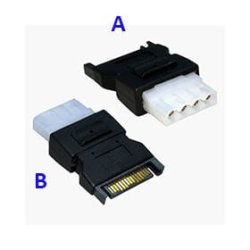
If you see the photo attached here I wrote A and B. On my PC there are 3 'A' which are unused knowing they are not made for the SATA and one 'B'. and I think this is what you meant. As to the exact model of the card (assuming it's the PCIe card since the MB was given is as I wrote it above. There is absolutely nothing written on the card itself--it is not a name brand. If it helps I've added a Belarc Advisor report showing my specs. (Oh except the photo shows the sata as male and what I have is female--the one originally attached to my HD where the OS was)
 

Attachments

  • Belarc.doc
    Belarc.doc
    62 KB · Views: 0
  • power.jpg
    power.jpg
    20.6 KB · Views: 28

My Computer My Computer

Computer type
PC/Desktop
Computer Manufacturer/Model Number
OEM Designed by me :-)
OS
Windows 7 Home Premium 64
CPU
Intel Core i5 760 @ 2800MHz
Motherboard
Asus P7P55D-E LX
Memory
12288MB
Graphics Card(s)
AMD Radeon HD 7800 Series
Sound Card
ASUS Xonar DG
Monitor(s) Displays
ViewSonic VX2453 Series, HDMI 1080p Full HD
Screen Resolution
1920X1080
Hard Drives
Samsung SSD 840 EVO 250GB& two others
PSU
Tagan BZ Series, TG800-BZ 800W
Keyboard
Logitech MK250
Mouse
Logitech M310
Internet Speed
toppest, mostest :-) <-- bad, but fun English
Browser
Firefox, Crrome, IE
are you plugging all of your drives into the pci card or just the ssd?
the reason i ask is not all mobos suppport booting from a pci card,and yours may just be an odd issue causing it to "semi work".

How can you tell if a motherboard supports booting from a PCIe SATA controller? Would there be an option in the BIOS?
 

My Computer My Computer

Computer type
PC/Desktop
OS
Windows 7 x64
CPU
Intel Core2 Extreme Q6850 3.00GHz
Motherboard
EVGA 132-CK-NF79
Memory
8 GB
Graphics Card(s)
Radeon R7 260X
Sound Card
Xonar DS
Hard Drives
Hitachi Deskstar 1 tb
Hi victek in re to: "How can you tell if a motherboard supports booting from a PCIe SATA controller? Would there be an option in the BIOS?"
You obviously may know more than I do. Such a question never occured to me--I thought it was an automatic thing. Seeing that it has been booting from the PCIe card I'm assuming it may be BUT when the boot screen pops up it does mention the PCIe card and the option for me to skip it. Maybe this does say something since I have done absolutely nothing to change settings on my BIOS. All I know is I imaged the SSD externally before installation. Then originally used the optical drive port to boot in and all worked well and then nothing did the first time I used the PCIe card--and now it is as described above.
 

My Computer My Computer

Computer type
PC/Desktop
Computer Manufacturer/Model Number
OEM Designed by me :-)
OS
Windows 7 Home Premium 64
CPU
Intel Core i5 760 @ 2800MHz
Motherboard
Asus P7P55D-E LX
Memory
12288MB
Graphics Card(s)
AMD Radeon HD 7800 Series
Sound Card
ASUS Xonar DG
Monitor(s) Displays
ViewSonic VX2453 Series, HDMI 1080p Full HD
Screen Resolution
1920X1080
Hard Drives
Samsung SSD 840 EVO 250GB& two others
PSU
Tagan BZ Series, TG800-BZ 800W
Keyboard
Logitech MK250
Mouse
Logitech M310
Internet Speed
toppest, mostest :-) <-- bad, but fun English
Browser
Firefox, Crrome, IE
update to above: With the exception of me possibly having to do something to the BIOS, which I haven't done so in any way so far, I was thinking originally of changing the port where the PCIe card now sits to another one. But since it seems to be doing fine, based on the fact that it is being recognized, I would assume that this won't change anything. Next choice would be to use another power cable, perhaps the one that is attached to the original OS-holding hard drive (now with the sata unattached). But, coming to think of it I don't see how this would change anything making me think it may be a BIOS issue.
 

My Computer My Computer

Computer type
PC/Desktop
Computer Manufacturer/Model Number
OEM Designed by me :-)
OS
Windows 7 Home Premium 64
CPU
Intel Core i5 760 @ 2800MHz
Motherboard
Asus P7P55D-E LX
Memory
12288MB
Graphics Card(s)
AMD Radeon HD 7800 Series
Sound Card
ASUS Xonar DG
Monitor(s) Displays
ViewSonic VX2453 Series, HDMI 1080p Full HD
Screen Resolution
1920X1080
Hard Drives
Samsung SSD 840 EVO 250GB& two others
PSU
Tagan BZ Series, TG800-BZ 800W
Keyboard
Logitech MK250
Mouse
Logitech M310
Internet Speed
toppest, mostest :-) <-- bad, but fun English
Browser
Firefox, Crrome, IE
go into the bios with both devices in the motherboard and make sure your pci-e is the first boot device when both are plugged in. it may not show up under sata but in the boot order location under HDD priority it should say something like pci device, make it that then under normal the normal order menu make it before the optical and other HDD's.

rvcjew
 

My Computer My Computer

Computer type
PC/Desktop
Computer Manufacturer/Model Number
Custom
OS
10 Pro x64
CPU
Ryzen 9 3900X
Motherboard
Asrock x370 Tachi
Memory
64GB(4x16GB) DDR4
Graphics Card(s)
EVGA 1080ti FTW3
Sound Card
ASUS Xonar Essence STX (V4 Bursons), ODAC rev B, NFB-11, O2
Monitor(s) Displays
3xASUS PB278Q/R, Optoma HD142X
Screen Resolution
3x1440p, 1080p
Hard Drives
512GB 850 EVO(OS, Programs)
4TB (Movies)
3TB (Downloads)
3TB (Programs)
1TB HDD (Games)
2x6TB R1 (videos)
PSU
AX760
Case
Fractal Define R5
Cooling
NH-D15S
Keyboard
Massdrop Ctrl with Box Navy's
Mouse
G903, Alioth XXL Mat
Internet Speed
280/40
Antivirus
MBAM, ESET
Browser
Canary 64 Bit
Other Info
I also own a Thinkpad P50 Xeon 4K, X220T, X1C5
A strange thing is happening

Thanks rvcjew. A strange is happening. As mentioned above the PC would not boot getting instead the black DOS screen stating there was no OS. This happened 6 or 7 times as I was trying to figure things out.
This went on numerous times and forgetting to remove the other HD meant it would not start again-- this happened perhaps 2 or 3 more times.
Then while working I updated a software which had nothing to do with hardware or anything else mentioned here. I was asked to reboot and so I did. Once the reboot process had started I suddenly remembered, "Oh no my other drive is connected" meaning it was not going to boot and I would have to wait to shut it down BUT somehow it did boot. How could this be? I was always but always getting the black screen message. So for the fun of it I did it again I rebooted with the 2nd drive still attached and yup it booted fine. Then I turned it off and tried it that way and once again it booted fine.
Mind you though it seems to be booting fine I still don't trust it. How could I?
I also set my PC to hibernate instead of sleep seeing that both the lifehacker website and PC mag seemed to say it cone be done with an SSD and the difference would be minimal and yet getting the PC to wakeup again after gibernation took an extra 40 seconds telling me the SSD is defnitely not working the way it is supposed to.
 

My Computer My Computer

Computer type
PC/Desktop
Computer Manufacturer/Model Number
OEM Designed by me :-)
OS
Windows 7 Home Premium 64
CPU
Intel Core i5 760 @ 2800MHz
Motherboard
Asus P7P55D-E LX
Memory
12288MB
Graphics Card(s)
AMD Radeon HD 7800 Series
Sound Card
ASUS Xonar DG
Monitor(s) Displays
ViewSonic VX2453 Series, HDMI 1080p Full HD
Screen Resolution
1920X1080
Hard Drives
Samsung SSD 840 EVO 250GB& two others
PSU
Tagan BZ Series, TG800-BZ 800W
Keyboard
Logitech MK250
Mouse
Logitech M310
Internet Speed
toppest, mostest :-) <-- bad, but fun English
Browser
Firefox, Crrome, IE
to get the pc to instantly wake up from hibernation you need to use something like Intel Rapid Start and your system has to be setup in RAID for this to work and normally its slow unless used in windows 8 with uefi. i don't think iv ever had windows 7 boot up pretty quick from hibernate. It sounds like windows finished installing drivers for your PCI-e device.
 

My Computer My Computer

Computer type
PC/Desktop
Computer Manufacturer/Model Number
Custom
OS
10 Pro x64
CPU
Ryzen 9 3900X
Motherboard
Asrock x370 Tachi
Memory
64GB(4x16GB) DDR4
Graphics Card(s)
EVGA 1080ti FTW3
Sound Card
ASUS Xonar Essence STX (V4 Bursons), ODAC rev B, NFB-11, O2
Monitor(s) Displays
3xASUS PB278Q/R, Optoma HD142X
Screen Resolution
3x1440p, 1080p
Hard Drives
512GB 850 EVO(OS, Programs)
4TB (Movies)
3TB (Downloads)
3TB (Programs)
1TB HDD (Games)
2x6TB R1 (videos)
PSU
AX760
Case
Fractal Define R5
Cooling
NH-D15S
Keyboard
Massdrop Ctrl with Box Navy's
Mouse
G903, Alioth XXL Mat
Internet Speed
280/40
Antivirus
MBAM, ESET
Browser
Canary 64 Bit
Other Info
I also own a Thinkpad P50 Xeon 4K, X220T, X1C5
to get the pc to instantly wake up from hibernation you need to use something like Intel Rapid Start and your system has to be setup in RAID for this to work and normally its slow unless used in windows 8 with uefi. i don't think iv ever had windows 7 boot up pretty quick from hibernate. It sounds like windows finished installing drivers for your PCI-e device.
What the lifehacker site says after exaplining hibernation is, "with an SSD in your system, it should wake up fairly quickly, so the big downside of hibernation isn't as much of an issue."
And it says to do so this way, "open up Command Prompt as an administrator (by right clicking on it) and type powercfg /hibernate on. Then, open up the start menu and type in "power options" and hit enter. Click the link on the left that says "Change when the computer sleeps""
And that's what I did so since I had also read this in PC magazine I thought it a good thing. So either what they are saying as having an SSD, makes the problem ''no longer an issue'' is true and therefore mine taking so long shows there is something wrong. OR their meaning of ''no longer an issue'' and taking 40 seconds is short for them but isn't really short.
 

My Computer My Computer

Computer type
PC/Desktop
Computer Manufacturer/Model Number
OEM Designed by me :-)
OS
Windows 7 Home Premium 64
CPU
Intel Core i5 760 @ 2800MHz
Motherboard
Asus P7P55D-E LX
Memory
12288MB
Graphics Card(s)
AMD Radeon HD 7800 Series
Sound Card
ASUS Xonar DG
Monitor(s) Displays
ViewSonic VX2453 Series, HDMI 1080p Full HD
Screen Resolution
1920X1080
Hard Drives
Samsung SSD 840 EVO 250GB& two others
PSU
Tagan BZ Series, TG800-BZ 800W
Keyboard
Logitech MK250
Mouse
Logitech M310
Internet Speed
toppest, mostest :-) <-- bad, but fun English
Browser
Firefox, Crrome, IE
Oh about: "It sounds like windows finished installing drivers for your PCI-e device."
That would be odd. The PCI-e device was installed weeks before I even received the SSD. So it would have plenty of time to install drivers. And also since the SSD installation nothing new has been installed--no new drivers visibly shown on the bottom right of the desktop. Windows did add drivers but that was for my new Samsung phone--so I would assume not related
 

My Computer My Computer

Computer type
PC/Desktop
Computer Manufacturer/Model Number
OEM Designed by me :-)
OS
Windows 7 Home Premium 64
CPU
Intel Core i5 760 @ 2800MHz
Motherboard
Asus P7P55D-E LX
Memory
12288MB
Graphics Card(s)
AMD Radeon HD 7800 Series
Sound Card
ASUS Xonar DG
Monitor(s) Displays
ViewSonic VX2453 Series, HDMI 1080p Full HD
Screen Resolution
1920X1080
Hard Drives
Samsung SSD 840 EVO 250GB& two others
PSU
Tagan BZ Series, TG800-BZ 800W
Keyboard
Logitech MK250
Mouse
Logitech M310
Internet Speed
toppest, mostest :-) <-- bad, but fun English
Browser
Firefox, Crrome, IE
If you boot up your pc from off with the ssd in how fast is it to the login screen?
 

My Computer My Computer

Computer type
PC/Desktop
Computer Manufacturer/Model Number
Custom
OS
10 Pro x64
CPU
Ryzen 9 3900X
Motherboard
Asrock x370 Tachi
Memory
64GB(4x16GB) DDR4
Graphics Card(s)
EVGA 1080ti FTW3
Sound Card
ASUS Xonar Essence STX (V4 Bursons), ODAC rev B, NFB-11, O2
Monitor(s) Displays
3xASUS PB278Q/R, Optoma HD142X
Screen Resolution
3x1440p, 1080p
Hard Drives
512GB 850 EVO(OS, Programs)
4TB (Movies)
3TB (Downloads)
3TB (Programs)
1TB HDD (Games)
2x6TB R1 (videos)
PSU
AX760
Case
Fractal Define R5
Cooling
NH-D15S
Keyboard
Massdrop Ctrl with Box Navy's
Mouse
G903, Alioth XXL Mat
Internet Speed
280/40
Antivirus
MBAM, ESET
Browser
Canary 64 Bit
Other Info
I also own a Thinkpad P50 Xeon 4K, X220T, X1C5
With nothing open on my PC I rebooted. It took 17 seconds to shut down and from there I continued the count, 17, 18, 19.... Windows was seen again (The windows sound, since no log in is required) at 75 seconds (and then an additional 15 seconds or so for Skype and other services to load).
As to the Speccy file I was not sure if you wanted a snapshot (.speccy extension-now as a zip file) or text file so I added both.
 

Attachments

My Computer My Computer

Computer type
PC/Desktop
Computer Manufacturer/Model Number
OEM Designed by me :-)
OS
Windows 7 Home Premium 64
CPU
Intel Core i5 760 @ 2800MHz
Motherboard
Asus P7P55D-E LX
Memory
12288MB
Graphics Card(s)
AMD Radeon HD 7800 Series
Sound Card
ASUS Xonar DG
Monitor(s) Displays
ViewSonic VX2453 Series, HDMI 1080p Full HD
Screen Resolution
1920X1080
Hard Drives
Samsung SSD 840 EVO 250GB& two others
PSU
Tagan BZ Series, TG800-BZ 800W
Keyboard
Logitech MK250
Mouse
Logitech M310
Internet Speed
toppest, mostest :-) <-- bad, but fun English
Browser
Firefox, Crrome, IE
the speccy unfortunately does not show the device its connected to but that sounds very slow for a ssd boot. on page 2-23 of your manual for the board it should explain how to set the boot priority you want to make sure fast boot and that card is the first option. also is your storage set to AHCI, or IDE?
 

My Computer My Computer

Computer type
PC/Desktop
Computer Manufacturer/Model Number
Custom
OS
10 Pro x64
CPU
Ryzen 9 3900X
Motherboard
Asrock x370 Tachi
Memory
64GB(4x16GB) DDR4
Graphics Card(s)
EVGA 1080ti FTW3
Sound Card
ASUS Xonar Essence STX (V4 Bursons), ODAC rev B, NFB-11, O2
Monitor(s) Displays
3xASUS PB278Q/R, Optoma HD142X
Screen Resolution
3x1440p, 1080p
Hard Drives
512GB 850 EVO(OS, Programs)
4TB (Movies)
3TB (Downloads)
3TB (Programs)
1TB HDD (Games)
2x6TB R1 (videos)
PSU
AX760
Case
Fractal Define R5
Cooling
NH-D15S
Keyboard
Massdrop Ctrl with Box Navy's
Mouse
G903, Alioth XXL Mat
Internet Speed
280/40
Antivirus
MBAM, ESET
Browser
Canary 64 Bit
Other Info
I also own a Thinkpad P50 Xeon 4K, X220T, X1C5
go into the bios with both devices in the motherboard and make sure your pci-e is the first boot device when both are plugged in. it may not show up under sata but in the boot order location under HDD priority it should say something like pci device, make it that then under normal the normal order menu make it before the optical and other HDD's.

rvcjew
In the BIOS what it had as 1st boot device was external device which meant it can not boot from there, the 2nd choice was the SSD (the 3d the dvd).
I swtiched it making the SSD 1st, DVD 2nd. On booting now, there is the same msg as before. Press any key to exit the PCi2-SSD.
Anyhow after the BIOS change I rebooted 3X. Below is the average
11 seconds Shut down :
17 seconds (added to above) Black screen:
28 sec Beep:
35 sec Black screen:
42 sec "Starting Windows'' black screen with spinning logo
63 sec Welcome screen
66 sec Windows starting sound
After this Services and things like Skype load.
So it seems I save 9 seconds but possibly still slower than it should be, correct?
And why the ''Press any key to exit" thing? This is probably why it isn't working as it should and obviously if I did press any key it wouldn't start since that is the booting choice.
 

My Computer My Computer

Computer type
PC/Desktop
Computer Manufacturer/Model Number
OEM Designed by me :-)
OS
Windows 7 Home Premium 64
CPU
Intel Core i5 760 @ 2800MHz
Motherboard
Asus P7P55D-E LX
Memory
12288MB
Graphics Card(s)
AMD Radeon HD 7800 Series
Sound Card
ASUS Xonar DG
Monitor(s) Displays
ViewSonic VX2453 Series, HDMI 1080p Full HD
Screen Resolution
1920X1080
Hard Drives
Samsung SSD 840 EVO 250GB& two others
PSU
Tagan BZ Series, TG800-BZ 800W
Keyboard
Logitech MK250
Mouse
Logitech M310
Internet Speed
toppest, mostest :-) <-- bad, but fun English
Browser
Firefox, Crrome, IE
Back
Top