Installing MSI packages

It depends on how you move them. It's been noted on sevenforums that using the location property to move personal folders presents issues - I think you discovered THE issue that causes other issues.

There are tutorials on changing user folder/files and changing user profiles - but I don't want to send you chasing a different course right now. Try what's been suggested and if there are still issues or new issues, I'll probably suggest reading the tutorial and following those instructions. But for now......

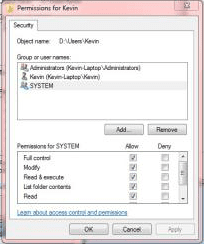
D:\Users\Kevin has no security setting to allow Administrators or System access. give both full access

I noticed that I have both C:\Users and D:\Users and both C:\Users\Kevin and D:\Users\Kevin because not all folders were moved to drive D:. In that case, can I just copy the security settings of the two C folders to the two D folders, respectively? If so, is there a DOS command that can exactly replicate the security settings between two folders?

Thanks.
 

My Computer

Computer Manufacturer/Model Number
Sager NP8130
OS
Windows 7 Ultimate x6
CPU
i5 2670QM
Memory
2x4GB RAM Kingston HyperX Memory DDR3 1600 MHz Sticks
Graphics Card(s)
Nvidia GeForce GTX 560M
Sound Card
Realtek HD Audio (Built-in)
Screen Resolution
1920x1080
Hard Drives
128GB Crucial M4 SSD
500GB Seagate 7200RPM HDD
Internet Speed
12Mbps down/4Mbps up
Sorry, I should have thought of that. You only changed the location of some of your folders, not your entire user profile. So, i should have just said - look at c:\users\kevin to compare.... good thinking on your side.

I don't know of any easy security copy - that doesn't mean there isn't one. There are only a few settings that need to be checked/changed so it isn't that difficult to do by hand.

The easiest by hand method is to have both properties up and simply change D:\Users\Kevin to match C:\Users\Kevin.

tip: I keep the reference properties on the left side (c:\) and the one I'm modifying on the right side (d:\) of my monitor since I read left to right.
 

My Computer

Computer type
Laptop
Computer Manufacturer/Model Number
HP Pavilion dv6-6c10us
OS
x64 (6.3.9600) Win8.1 Pro & soon dual boot x64 (6.1.7601) Win7_SP1 HomePrem
CPU
AMD A6-3420M APU with Radeon(tm) HD Graphics
Motherboard
Hewlett-Packard 1805
Memory
6.00 GB
Graphics Card(s)
AMD Radeon(TM) HD 6520G
Sound Card
(1) AMD High Definition Audio Device (2) IDT High Definiti
Monitor(s) Displays
HP W2072a 20" LCD (1600 x 900) @ 60 Hz
Screen Resolution
1366 x 768 x 32 bits (4294967296 colors) @ 60 Hz
Hard Drives
ST640LM0 00 HM641JI SATA Disk Device
Keyboard
Logitech k520 wireless KB
Mouse
Logitech m320 wireless mouse (bundled with KB)
Internet Speed
15/5 | 54 MB Wireless 'n'
Antivirus
Realtime: Defender or Avast | On-demand: Malwarebytes, ESET
Browser
IE 11 on Win8, IE 10 on win 7
Other Info
Media: [Gimp, Audacity, VLC] || Comm: [WEmail 2012, Skype] || Productivity: [OpenOffice,| Textpad] || Utils: [Sysinternals, cCleaner, Speccy, Defraggler]
Sorry, I should have thought of that. You only changed the location of some of your folders, not your entire user profile. So, i should have just said - look at c:\users\kevin to compare.... good thinking on your side.

I don't know of any easy security copy - that doesn't mean there isn't one. There are only a few settings that need to be checked/changed so it isn't that difficult to do by hand.

The easiest by hand method is to have both properties up and simply change D:\Users\Kevin to match C:\Users\Kevin.

tip: I keep the reference properties on the left side (c:\) and the one I'm modifying on the right side (d:\) of my monitor since I read left to right.

Thanks for the compliment. And it worked!

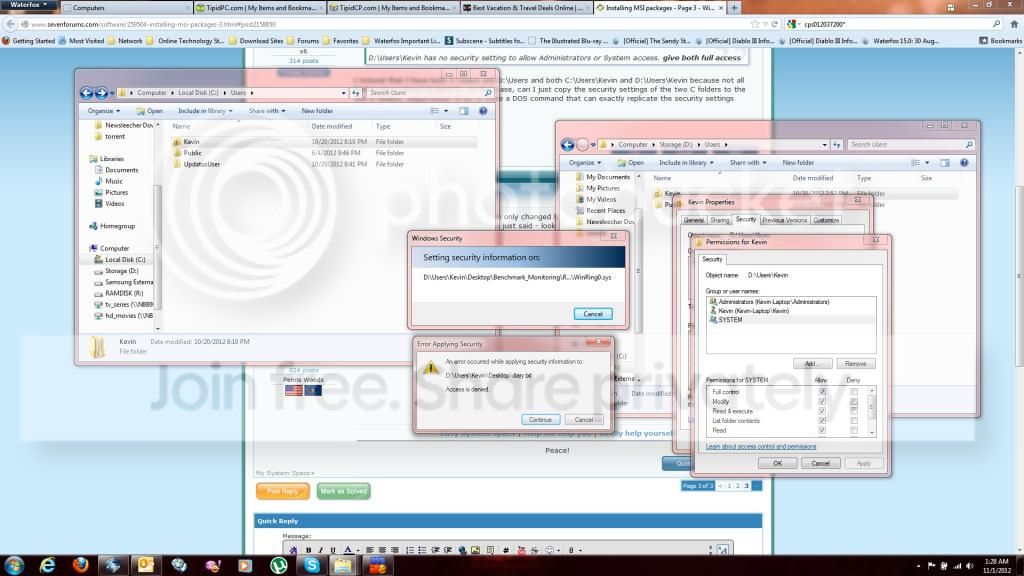
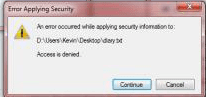
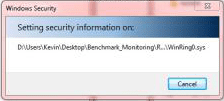
But there is one thing that concerns. While the system is setting the security permissions of D:\Users\Kevin it skips some text files that are saved in my desktop saying that access is denied. These text files are not being accessed by any program (100% sure on that) but still this error occurs. This picture shows what I mean:

capture1.jpg


Is this something that I need to worry about?
 

My Computer

Computer Manufacturer/Model Number
Sager NP8130
OS
Windows 7 Ultimate x6
CPU
i5 2670QM
Memory
2x4GB RAM Kingston HyperX Memory DDR3 1600 MHz Sticks
Graphics Card(s)
Nvidia GeForce GTX 560M
Sound Card
Realtek HD Audio (Built-in)
Screen Resolution
1920x1080
Hard Drives
128GB Crucial M4 SSD
500GB Seagate 7200RPM HDD
Internet Speed
12Mbps down/4Mbps up
I'm glad you were able to resolve the issue. Run this way for a few days and if you're satisfied that things are copesetic, please return, post an all-clear update and mark the thread as solved.

Short answer: no I wouldn't be concerned.


I get those types of dialog warnings too - normally on NTUSER files. I'm not familiar with references Benchtop monitoring and diary files so I can't say for sure.

Some OS and App files are protected in the registry. The dialog is only telling you that it can't access the file, not what the security already is - so it might already be set to the appropriate sec level.

If you weren't experiencing issues with the App associated with those files before, then since you could not change the security, I wouldn't expect any difficulty going forward. To ease your mind, run whatever App(s) access those files and if you have trouble - post something.

PS: for future reference. It's great that you post screenshots, but it would be very helpful if they were a little more readable. Try posting individual screenshots that are pertinent to the issue. The forum automatically manages images and large ones become too small to read. luckily I know about magnifiers - lol

Thanks,

Bill
.
 

My Computer

Computer type
Laptop
Computer Manufacturer/Model Number
HP Pavilion dv6-6c10us
OS
x64 (6.3.9600) Win8.1 Pro & soon dual boot x64 (6.1.7601) Win7_SP1 HomePrem
CPU
AMD A6-3420M APU with Radeon(tm) HD Graphics
Motherboard
Hewlett-Packard 1805
Memory
6.00 GB
Graphics Card(s)
AMD Radeon(TM) HD 6520G
Sound Card
(1) AMD High Definition Audio Device (2) IDT High Definiti
Monitor(s) Displays
HP W2072a 20" LCD (1600 x 900) @ 60 Hz
Screen Resolution
1366 x 768 x 32 bits (4294967296 colors) @ 60 Hz
Hard Drives
ST640LM0 00 HM641JI SATA Disk Device
Keyboard
Logitech k520 wireless KB
Mouse
Logitech m320 wireless mouse (bundled with KB)
Internet Speed
15/5 | 54 MB Wireless 'n'
Antivirus
Realtime: Defender or Avast | On-demand: Malwarebytes, ESET
Browser
IE 11 on Win8, IE 10 on win 7
Other Info
Media: [Gimp, Audacity, VLC] || Comm: [WEmail 2012, Skype] || Productivity: [OpenOffice,| Textpad] || Utils: [Sysinternals, cCleaner, Speccy, Defraggler]
I'm glad you were able to resolve the issue. Run this way for a few days and if you're satisfied that things are copesetic, please return, post an all-clear update and mark the thread as solved.

Short answer: no I wouldn't be concerned.


I get those types of dialog warnings too - normally on NTUSER files. I'm not familiar with references Benchtop monitoring and diary files so I can't say for sure.

Some OS and App files are protected in the registry. The dialog is only telling you that it can't access the file, not what the security already is - so it might already be set to the appropriate sec level.

If you weren't experiencing issues with the App associated with those files before, then since you could not change the security, I wouldn't expect any difficulty going forward. To ease your mind, run whatever App(s) access those files and if you have trouble - post something.

PS: for future reference. It's great that you post screenshots, but it would be very helpful if they were a little more readable. Try posting individual screenshots that are pertinent to the issue. The forum automatically manages images and large ones become too small to read. luckily I know about magnifiers - lol

Thanks,

Bill
.

Alright.

Hmmm, actually those text files are my personal text files. I mean them myself, hence the name diary.txt. The Benchmark Monitoring you saw is just a folder that I made that contains all the desktop shortcuts of programs for benchmarking the computer. I would understand this access denied error if they were system files but these aren't? But I can open them without any problems. Weird though.

Lol ok. Are you saying that I should just directly upload them here instead of going through photobucket?
 

My Computer

Computer Manufacturer/Model Number
Sager NP8130
OS
Windows 7 Ultimate x6
CPU
i5 2670QM
Memory
2x4GB RAM Kingston HyperX Memory DDR3 1600 MHz Sticks
Graphics Card(s)
Nvidia GeForce GTX 560M
Sound Card
Realtek HD Audio (Built-in)
Screen Resolution
1920x1080
Hard Drives
128GB Crucial M4 SSD
500GB Seagate 7200RPM HDD
Internet Speed
12Mbps down/4Mbps up
Nah, after I posted, I realized the files were in/on your desktop. The Desktop has special characteristics that I never bothered to fully understand. Sure you own the files but SYSTEM or TrustedInstaller controls the security simply because of where the file reside. If it ain't broke......

It's not a matter of where you post it, it's the resulting image. Sorry, I didn't pay close enough attention to where the image was hosted.

Take a look at one of your posted images. See all of that "extra" stuff around the images that pertain to the issue? the images I grabbed from your big image and posted here, really focus my attention on what you're trying to tell me. Plus I can read them <older w/ eyesight getting worse every year =;>
edit: the images are blurry because i grabbed them from your larger image :doh:
so I added a Alt+PrtSc, paste in Paint example from my machine. big difference, eh?

To only capture the active window instead of the full screen, you can Alt+PrtSc and paste the clipboard in Paint, save and post. Or you can use the window capture option in the Snipping tool.

Thanks, it was great working with you.

Bill
.
 

Attachments

  • kevwrn1.png
    kevwrn1.png
    8.9 KB · Views: 27
  • kevwrn2.png
    kevwrn2.png
    8.3 KB · Views: 28
  • kevsec2.png
    kevsec2.png
    8.1 KB · Views: 3
  • kevsec.png
    kevsec.png
    14.6 KB · Views: 27

My Computer

Computer type
Laptop
Computer Manufacturer/Model Number
HP Pavilion dv6-6c10us
OS
x64 (6.3.9600) Win8.1 Pro & soon dual boot x64 (6.1.7601) Win7_SP1 HomePrem
CPU
AMD A6-3420M APU with Radeon(tm) HD Graphics
Motherboard
Hewlett-Packard 1805
Memory
6.00 GB
Graphics Card(s)
AMD Radeon(TM) HD 6520G
Sound Card
(1) AMD High Definition Audio Device (2) IDT High Definiti
Monitor(s) Displays
HP W2072a 20" LCD (1600 x 900) @ 60 Hz
Screen Resolution
1366 x 768 x 32 bits (4294967296 colors) @ 60 Hz
Hard Drives
ST640LM0 00 HM641JI SATA Disk Device
Keyboard
Logitech k520 wireless KB
Mouse
Logitech m320 wireless mouse (bundled with KB)
Internet Speed
15/5 | 54 MB Wireless 'n'
Antivirus
Realtime: Defender or Avast | On-demand: Malwarebytes, ESET
Browser
IE 11 on Win8, IE 10 on win 7
Other Info
Media: [Gimp, Audacity, VLC] || Comm: [WEmail 2012, Skype] || Productivity: [OpenOffice,| Textpad] || Utils: [Sysinternals, cCleaner, Speccy, Defraggler]
Nah, after I posted, I realized the files were in/on your desktop. The Desktop has special characteristics that I never bothered to fully understand. Sure you own the files but SYSTEM or TrustedInstaller controls the security simply because of where the file reside. If it ain't broke......

It's not a matter of where you post it, it's the resulting image. Sorry, I didn't pay close enough attention to where the image was hosted.

Take a look at one of your posted images. See all of that "extra" stuff around the images that pertain to the issue? the images I grabbed from your big image and posted here, really focus my attention on what you're trying to tell me. Plus I can read them <older w/ eyesight getting worse every year =;>

To only capture the active window instead of the full screen, you can Alt+PrtSc and paste the clipboard in Paint, save and post. Or you can use the window capture option in the Snipping tool.

Thanks, it was great working with you.

Bill
.

Ok, got you.

Wow, another thing that I've learned from you is the Alt+PrtSc shortcut, I didn't know that :cool:

Yeah, thanks too man. I will monitor my computer for a few days.
 

My Computer

Computer Manufacturer/Model Number
Sager NP8130
OS
Windows 7 Ultimate x6
CPU
i5 2670QM
Memory
2x4GB RAM Kingston HyperX Memory DDR3 1600 MHz Sticks
Graphics Card(s)
Nvidia GeForce GTX 560M
Sound Card
Realtek HD Audio (Built-in)
Screen Resolution
1920x1080
Hard Drives
128GB Crucial M4 SSD
500GB Seagate 7200RPM HDD
Internet Speed
12Mbps down/4Mbps up
Stick around, there's lots to learn here. Everyone is great sharing their time and knowledge.

You're Welcome
 

My Computer

Computer type
Laptop
Computer Manufacturer/Model Number
HP Pavilion dv6-6c10us
OS
x64 (6.3.9600) Win8.1 Pro & soon dual boot x64 (6.1.7601) Win7_SP1 HomePrem
CPU
AMD A6-3420M APU with Radeon(tm) HD Graphics
Motherboard
Hewlett-Packard 1805
Memory
6.00 GB
Graphics Card(s)
AMD Radeon(TM) HD 6520G
Sound Card
(1) AMD High Definition Audio Device (2) IDT High Definiti
Monitor(s) Displays
HP W2072a 20" LCD (1600 x 900) @ 60 Hz
Screen Resolution
1366 x 768 x 32 bits (4294967296 colors) @ 60 Hz
Hard Drives
ST640LM0 00 HM641JI SATA Disk Device
Keyboard
Logitech k520 wireless KB
Mouse
Logitech m320 wireless mouse (bundled with KB)
Internet Speed
15/5 | 54 MB Wireless 'n'
Antivirus
Realtime: Defender or Avast | On-demand: Malwarebytes, ESET
Browser
IE 11 on Win8, IE 10 on win 7
Other Info
Media: [Gimp, Audacity, VLC] || Comm: [WEmail 2012, Skype] || Productivity: [OpenOffice,| Textpad] || Utils: [Sysinternals, cCleaner, Speccy, Defraggler]
Sorry for bringing up an old thread but I'm wondering why some people don't experience the same thing as I did when relocating some of the folders in the user folder?
 

My Computer

Computer Manufacturer/Model Number
Sager NP8130
OS
Windows 7 Ultimate x6
CPU
i5 2670QM
Memory
2x4GB RAM Kingston HyperX Memory DDR3 1600 MHz Sticks
Graphics Card(s)
Nvidia GeForce GTX 560M
Sound Card
Realtek HD Audio (Built-in)
Screen Resolution
1920x1080
Hard Drives
128GB Crucial M4 SSD
500GB Seagate 7200RPM HDD
Internet Speed
12Mbps down/4Mbps up
Back
Top