Solved Installing new SSD & keeping Win7 on HDD

I just wanted to know if deleting the E: & F: partitions using DM will remove all traces of the boot & system files completely & then extend them into G: instead of backing up the G: part & using the clean command, etc. then copying everything back.
 

My Computer My Computer

Computer type
PC/Desktop
Computer Manufacturer/Model Number
custom bulid
OS
Windows 7 HP x64
CPU
AMD Phenom II X6 1100T BE
Motherboard
ECS A890GXM-A v2.0 Black Series
Memory
Corsair XMS3 12GB (4x2GB) (2x2GB) DC DDR3 1333Hz
Graphics Card(s)
EVGA Geforce GTX 950 FTW
Sound Card
Realtek ALC892 8-Channel HD Audio
Monitor(s) Displays
Viewsonic VX2253 - 22" Flat panel - 144Hz
Screen Resolution
1920x1080 (native)
Hard Drives
Samsung 850 Pro 512GB
WD Caviar Black 1TB SATA 7200rpm
PSU
500w Thermaltake TR2
Case
Thermaltake Armor A90
Cooling
2 x 20" Walmart Wind Machines on HIGH
Internet Speed
Spectrum 300/30
Antivirus
Norton 360
Browser
IE 11
Deleting partitions will delete the partitions. Nothing more.

Some code outside of the partitions will remain.

If you are worried about that code, use clean all. Clean very occasionally isn't enough.

It's a matter of how anxious it makes you to not do a clean all and worry about something left behind.

Even with clean all, a forensic specialist may well find something left behind. More anxiety.

There are tools that will do a Department Of Defense level cleansing, which may take days to complete. If that isn't enough, you'd have to just discard the drive and use another one.

Choose the one that let's you sleep well.
 

My Computer My Computer

Computer type
PC/Desktop
Computer Manufacturer/Model Number
Ignatz Special; 4 speed manual gearbox; factory air conditioning; one of one
OS
Windows 7 Home Premium SP1, 64-bit
CPU
Intel Skylake i5-6600K, not overclocked
Motherboard
AsRock Z170M Extreme 4, micro ATX
Memory
8 GB HyperX DDR4-2666 (2 x 4 GB)
Graphics Card(s)
none; graphics are integrated on CPU
Sound Card
onboard: Realtek ALC1150; external: USB Behringer UF0-202
Monitor(s) Displays
Dell S2340M 23 inch IPS
Screen Resolution
1600 x 900
Hard Drives
System: Crucial MX100 series SSD, 128 GB;
Data: Samsung Spinpoint 103SJ, 1 TB;
Backup: WD Caviar Green WD30EZRX-00D8PB0, 3 TB
PSU
Rosewill SilentNight 500 watt fanless, semi-modular
Case
Antec Solo II
Cooling
Noctua NH-U12S; Noctua F12 intake, Noctua S12A exhaust
Keyboard
Microsoft 200 6JH-00001 USB
Mouse
Dell or Microsoft optical wired; USB
Antivirus
Microsoft Security Essentials and Malwarebytes Premium
Browser
Pale Moon
Other Info
All fans PWM; speeds at idle: CPU circa 500 rpm; intake circa 600 rpm; exhaust circa 600 rpm; CPU temps 27 idle and 47 C load in a warm room (27 C/81 F) when running Intel Extreme Tuning Utility stress test.
CLEAN ALL is not needed. That is overkill unless you are doing something illegal.
CLEAN ALL will wipe the HD and over-write every sector with zeroes.

The CLEAN command will delete the MBR (bootloader) on that HD.
You can't do that with a normal partition delete, or format.

When I reuse a HD, I always do a CLEAN.

That way I know there is no old bootloader code remaining on the HD that MIGHT cause problems someday/somehow.
 

My Computer My Computer

Computer type
PC/Desktop
Computer Manufacturer/Model Number
home built
OS
Multi-Boot W7_Pro_x64 W8.1_Pro_x64 W10_Pro_x64 +Linux_VMs +Chromium_VM
CPU
AMD Athlon II x4 620
Motherboard
Gigabyte GA-MA785G-UD3H
Memory
6GB GSkill DDR2 800
Graphics Card(s)
AMD 4670 GPU + AMD 4200 IGP
Sound Card
on board Realtek ALC889A
Monitor(s) Displays
RCA 40" LCD TV, Insignia 32" LCD TV, HP 15" LCD monitor
Screen Resolution
1680 x 1050
Hard Drives
OCZ Vertex 3 120GB,
Samsung F3 1TB (3),
Several others - WD, Seagate, Hitachi, ...
PSU
Corsair 500 W
Case
Rosewill mid tower
Cooling
CM 90mm rifle
Keyboard
Gyration wireless, Logitech wireless, Dell USB wired
Mouse
Gyration wireless, Logitech wireless, V7 USB wired
Internet Speed
Spectrum - 100Mbps D / 10Mbps U
Antivirus
Avast, MBAM3, EMET, WinPatrol
Browser
Pale Moon, Firefox, IE
Other Info
2 multi-boot PC's
Mainly HTPC/Office/Gen purpose (no gaming).
Trendnet USB KVM.
LG DVD burner/Blue Ray Player.
Tray system for removable SATA backup drives.

Not currently OCd, under-volted.
I use Hybrid sleep, rarely re-boot or shutdown.

Hauppauge HD-PVR, Avermedia PCIe TV Tuner, Hauppauge PCI TV Tuner.
:ditto:

Just making those partitions unallocated space is enough, you don`t have to worry about it. As long as you don`t have government secrets on your hard drive, you`ll be fine.

Your idea of deleting E and F and expanding G is fine, but I`m pretty sure you`ll have to do it with Partition Wizard, because those partitions are to the left of G.

Cross that bridge when you come to it.

But Ignatz is also correct, a drive can never actually be truly wiped, data just gets written over.

You can not use the clean command on that drive or you will loose the data on your G partition, just delete E and F and combine the space with G, there`s nothing more to worry about.
 

My Computer My Computer

Computer type
PC/Desktop
Computer Manufacturer/Model Number
Skylake Special #666
OS
Windows 10 Pro x64
CPU
Intel Core i7 6700K
Motherboard
Asus Sabertooth Z170 Mark 1
Memory
GSkill TridentZ RGB 16GB 3600 16-16-16-36
Graphics Card(s)
EVGA GTX 980 Ti SC x2
Sound Card
Realtek High Definition
Monitor(s) Displays
AOC G2460PG
Screen Resolution
1920 x 1080 144Hz
Hard Drives
Samsung 860 Pro 256GB, Seagate Barracuda 4TB x2
PSU
EVGA 1000 P2, EVGA White Custom Braided Cables
Case
Corsair Vengeance C70 Gunmetal Black
Cooling
Corsair H100i v2, Corsair ML120 x2, Thermal Grizzly Kryonaut
Keyboard
Logitech G910 Orion Spectrum
Mouse
Logitech G700s
Internet Speed
Verizon Fios Quantum Gateway 75/75
Antivirus
Windows Defender, Malwarebytes Free 3.8.3
Browser
Chrome
Other Info
Corsair SP120 x4, LG Blu-ray Drive, Durabrand HT-395 100 Watt Dolby Digital Amp, Corsair H2100 Wireless 7.1 Headset
Done deal

Disk manager would allow me to extend the deleted parts, but is said it would change the disk from simple to dynamic, which I'm unfamiliar with, so I just used the diskpart clean command & reformatted/parted it and all is good to go. SSD is outstanding. Thanks for all the help everyone, very much appreciated. :party:
 

Attachments

  • Clean_1TB.png
    Clean_1TB.png
    73.4 KB · Views: 6

My Computer My Computer

Computer type
PC/Desktop
Computer Manufacturer/Model Number
custom bulid
OS
Windows 7 HP x64
CPU
AMD Phenom II X6 1100T BE
Motherboard
ECS A890GXM-A v2.0 Black Series
Memory
Corsair XMS3 12GB (4x2GB) (2x2GB) DC DDR3 1333Hz
Graphics Card(s)
EVGA Geforce GTX 950 FTW
Sound Card
Realtek ALC892 8-Channel HD Audio
Monitor(s) Displays
Viewsonic VX2253 - 22" Flat panel - 144Hz
Screen Resolution
1920x1080 (native)
Hard Drives
Samsung 850 Pro 512GB
WD Caviar Black 1TB SATA 7200rpm
PSU
500w Thermaltake TR2
Case
Thermaltake Armor A90
Cooling
2 x 20" Walmart Wind Machines on HIGH
Internet Speed
Spectrum 300/30
Antivirus
Norton 360
Browser
IE 11
That's great you got it working and are happy :)

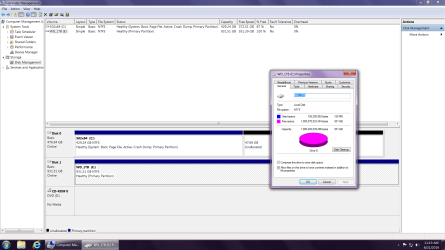
Are you saying (DM screen print) you now have 47.69 GB unallocated (unusable) space on Disk 0 and can't add it to C without converting to Dynamic ?

Don't convert to Dynamic, that can cause problems !

I wouldn't want 47.69 GB unusable, but that's me and my "attitude", I'd want to figure out why and how :p
 

My Computer My Computer

Computer type
PC/Desktop
Computer Manufacturer/Model Number
home built
OS
Multi-Boot W7_Pro_x64 W8.1_Pro_x64 W10_Pro_x64 +Linux_VMs +Chromium_VM
CPU
AMD Athlon II x4 620
Motherboard
Gigabyte GA-MA785G-UD3H
Memory
6GB GSkill DDR2 800
Graphics Card(s)
AMD 4670 GPU + AMD 4200 IGP
Sound Card
on board Realtek ALC889A
Monitor(s) Displays
RCA 40" LCD TV, Insignia 32" LCD TV, HP 15" LCD monitor
Screen Resolution
1680 x 1050
Hard Drives
OCZ Vertex 3 120GB,
Samsung F3 1TB (3),
Several others - WD, Seagate, Hitachi, ...
PSU
Corsair 500 W
Case
Rosewill mid tower
Cooling
CM 90mm rifle
Keyboard
Gyration wireless, Logitech wireless, Dell USB wired
Mouse
Gyration wireless, Logitech wireless, V7 USB wired
Internet Speed
Spectrum - 100Mbps D / 10Mbps U
Antivirus
Avast, MBAM3, EMET, WinPatrol
Browser
Pale Moon, Firefox, IE
Other Info
2 multi-boot PC's
Mainly HTPC/Office/Gen purpose (no gaming).
Trendnet USB KVM.
LG DVD burner/Blue Ray Player.
Tray system for removable SATA backup drives.

Not currently OCd, under-volted.
I use Hybrid sleep, rarely re-boot or shutdown.

Hauppauge HD-PVR, Avermedia PCIe TV Tuner, Hauppauge PCI TV Tuner.
Hey David, on the HDD partitions i deleted & tried to expand is when I got the Windows prompt about changing to dynamic. That's when I used the clean command to start over from scratch. The 47Gb of unallocated on the SSD is the over-provisioning (10%) that the Samsung Magician software allows you to use (it's all optional) to optimize & improve performance of the SSD.
 

My Computer My Computer

Computer type
PC/Desktop
Computer Manufacturer/Model Number
custom bulid
OS
Windows 7 HP x64
CPU
AMD Phenom II X6 1100T BE
Motherboard
ECS A890GXM-A v2.0 Black Series
Memory
Corsair XMS3 12GB (4x2GB) (2x2GB) DC DDR3 1333Hz
Graphics Card(s)
EVGA Geforce GTX 950 FTW
Sound Card
Realtek ALC892 8-Channel HD Audio
Monitor(s) Displays
Viewsonic VX2253 - 22" Flat panel - 144Hz
Screen Resolution
1920x1080 (native)
Hard Drives
Samsung 850 Pro 512GB
WD Caviar Black 1TB SATA 7200rpm
PSU
500w Thermaltake TR2
Case
Thermaltake Armor A90
Cooling
2 x 20" Walmart Wind Machines on HIGH
Internet Speed
Spectrum 300/30
Antivirus
Norton 360
Browser
IE 11
Over provisioning is fine, but as long as you always have plenty of free space, you are fine.

Mine
 

Attachments

  • DM.JPG
    DM.JPG
    33.9 KB · Views: 3

My Computer My Computer

Computer type
PC/Desktop
Computer Manufacturer/Model Number
Skylake Special #666
OS
Windows 10 Pro x64
CPU
Intel Core i7 6700K
Motherboard
Asus Sabertooth Z170 Mark 1
Memory
GSkill TridentZ RGB 16GB 3600 16-16-16-36
Graphics Card(s)
EVGA GTX 980 Ti SC x2
Sound Card
Realtek High Definition
Monitor(s) Displays
AOC G2460PG
Screen Resolution
1920 x 1080 144Hz
Hard Drives
Samsung 860 Pro 256GB, Seagate Barracuda 4TB x2
PSU
EVGA 1000 P2, EVGA White Custom Braided Cables
Case
Corsair Vengeance C70 Gunmetal Black
Cooling
Corsair H100i v2, Corsair ML120 x2, Thermal Grizzly Kryonaut
Keyboard
Logitech G910 Orion Spectrum
Mouse
Logitech G700s
Internet Speed
Verizon Fios Quantum Gateway 75/75
Antivirus
Windows Defender, Malwarebytes Free 3.8.3
Browser
Chrome
Other Info
Corsair SP120 x4, LG Blu-ray Drive, Durabrand HT-395 100 Watt Dolby Digital Amp, Corsair H2100 Wireless 7.1 Headset
Back
Top