Solved Installing win 7

Ken -

After reading your reply to Deacon's thoughful question asking why you want to Dual Boot, it's clear you'll want 64 bit after you compare the difference.

For this and other reasons, your best approach is to unplug the HD with your old WIn7, plug it's cable into the target HD, boot the Win7 DVD, select Custom Install, use Drive options to delete all partitions, Create new one(s) as you wish, format before installing Win7 to first partition which will be immediately after a 100mb System Reserved partition Win7 creates when formatting the HD.

Once you complete the install you can plug back in the other HD, set preferred one to boot first in BIOS setup, boot the other one using one-time BIOS BOot menu key at boot. This keeps the HD's independent so they can come and go as you please, whereas configuring the Windows Boot Manager interlocks them requiring surgery to remove one.

However if you want the Windows Dual Boot, install EasyBCD to the new install to add the old one which will make the old one easy to remove by just formatting when the time comes.
 
Ken -

After reading your reply to Deacon's thoughful question asking why you want to Dual Boot, it's clear you'll want 64 bit after you compare the difference.

For this and other reasons, your best approach is to unplug the HD with your old WIn7, plug it's cable into the target HD, boot the Win7 DVD, select Custom Install, use Drive options to delete all partitions, Create new one(s) as you wish, format before installing Win7 to first partition which will be immediately after a 100mb System Reserved partition Win7 creates when formatting the HD.

Once you complete the install you can plug back in the other HD, set preferred one to boot first in BIOS setup, boot the other one using one-time BIOS BOot menu key at boot. This keeps the HD's independent so they can come and go as you please, whereas configuring the Windows Boot Manager interlocks them requiring surgery to remove one.

However if you want the Windows Dual Boot, install EasyBCD to the new install to add the old one which will make the old one easy to remove by just formatting when the time comes.

Many thanks for that, I was able to follow your line of information and the detail stopped me worrying about screwing up my pc. Will have to catch up on some work for a couple of days, once completed I will try again and up date you.
 

My Computer My Computer

At a glance

Win7 Ultimate 64bitAMD Phenom (tm) 945oe Quad Core 2.10 GHz2gbonboard
Computer Manufacturer/Model Number
Home made
OS
Win7 Ultimate 64bit
CPU
AMD Phenom (tm) 945oe Quad Core 2.10 GHz
Motherboard
Sapphire PE-AM2RS740G2 - PURE Element 740G
Memory
2gb
Graphics Card(s)
onboard
Sound Card
onboard
Monitor(s) Displays
Technika 26"
Hard Drives
Sata 500gb onboard
Several USB external HD
PSU
600watt
Case
Pass
Cooling
four fans
Internet Speed
sluggish
I disconnected all but the drive I wanted to install on, booted on o/s disk went through to custom install, tried to use drive options for removing partitions, no way, so I followed it through got to putting in key again no way, tried with out key and this time it carried on and I completed install.

Shut down and reconnected drives one internal and my main external storage, booted up and had two choices but not quite as I was expecting.

First option was win 7 which fired up the 64bit o/s no problems at all.

Second option Vista (recovered) the Acer was running on Vista, I fired up and it booted into win 7 32bit. My program was working OK.

The info on that disk is stubborn to say the least, but it is working which is the main thing. I will ditch it at a later date and install a new clean disk.

many thanks for your advise.
 

My Computer My Computer

At a glance

Win7 Ultimate 64bitAMD Phenom (tm) 945oe Quad Core 2.10 GHz2gbonboard
Computer Manufacturer/Model Number
Home made
OS
Win7 Ultimate 64bit
CPU
AMD Phenom (tm) 945oe Quad Core 2.10 GHz
Motherboard
Sapphire PE-AM2RS740G2 - PURE Element 740G
Memory
2gb
Graphics Card(s)
onboard
Sound Card
onboard
Monitor(s) Displays
Technika 26"
Hard Drives
Sata 500gb onboard
Several USB external HD
PSU
600watt
Case
Pass
Cooling
four fans
Internet Speed
sluggish
Hello Ken.


Try booting to diskpart and using the command below for each partition to see if that helps.
diskpart

select disk # = # target disk number

list partition

select partition 1 and each in turn for all partitions

delete partition override

when finished exit 2 times to close the command window and continue the installation.
 

My Computer My Computer

At a glance

W 7 64-bit UltimateIntel Q9550 Yorkfield8GB Dominator 8500C5DATI : XFX 5870
Computer Manufacturer/Model Number
* BFK Customs *
OS
W 7 64-bit Ultimate
CPU
Intel Q9550 Yorkfield
Motherboard
ASUS P5Q Pro
Memory
8GB Dominator 8500C5D
Graphics Card(s)
ATI : XFX 5870
Sound Card
Realtek HD Audio 7-1
Monitor(s) Displays
1x 47" LCD HDMI & 3x 26" LCD HDMI
Screen Resolution
1920x1080P & 1920x1200
Hard Drives
1x 80GB Intel X25-M G2 SSD : 1x 500GB & 1x 640GB WD Caviar Black(s)
PSU
Corsair 620HX
Case
Cooler Master RC-690
Cooling
Tuniq Tower 120, 2x 140mm and 3x 120mm case fans
Keyboard
Microsoft 500
Mouse
Razer Diamondback 3G
Internet Speed
14 Mb/s
Other Info
1x Koutech 3Gb/s SATA HDD Hot Swap Rack
If there was no OS on the target HD, the installer refuses Upgrade version key. After install do the quick registry workaround given here to activate Win7 when XP/Vista isn't on the same HD: Clean Install with a Upgrade Windows 7 Version

Was there an error message when Custom>Drive options refused to delete, create an/or Format partitions? I've never heard of that before. If you'll post back a screenshot of your full Disk Mgmt drive map using Snipping Tool in Start Menu, we can help you arrange your partitioning and disks as you please.
 
Capture.png
 

My Computer My Computer

At a glance

Win7 Ultimate 64bitAMD Phenom (tm) 945oe Quad Core 2.10 GHz2gbonboard
Computer Manufacturer/Model Number
Home made
OS
Win7 Ultimate 64bit
CPU
AMD Phenom (tm) 945oe Quad Core 2.10 GHz
Motherboard
Sapphire PE-AM2RS740G2 - PURE Element 740G
Memory
2gb
Graphics Card(s)
onboard
Sound Card
onboard
Monitor(s) Displays
Technika 26"
Hard Drives
Sata 500gb onboard
Several USB external HD
PSU
600watt
Case
Pass
Cooling
four fans
Internet Speed
sluggish
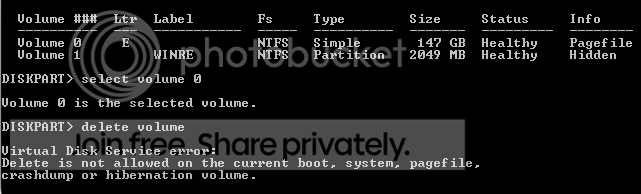
Been in diskpart and this is what I keep arriving at using "clean" or "format"

c2.png


I knew this disk was stubborn :mad:
 

My Computer My Computer

At a glance

Win7 Ultimate 64bitAMD Phenom (tm) 945oe Quad Core 2.10 GHz2gbonboard
Computer Manufacturer/Model Number
Home made
OS
Win7 Ultimate 64bit
CPU
AMD Phenom (tm) 945oe Quad Core 2.10 GHz
Motherboard
Sapphire PE-AM2RS740G2 - PURE Element 740G
Memory
2gb
Graphics Card(s)
onboard
Sound Card
onboard
Monitor(s) Displays
Technika 26"
Hard Drives
Sata 500gb onboard
Several USB external HD
PSU
600watt
Case
Pass
Cooling
four fans
Internet Speed
sluggish

My Computer My Computer

At a glance

Windows 7 Ultimate SP1 64-BitIntel Core i7 870 @ 2.93GHz8Gb Dual-Channel DDR3 @ 664MHznVidia GeForce GTX 460 1024MB dedicated RAM
Computer Manufacturer/Model Number
HP Pavilion Elite 495UK
OS
Windows 7 Ultimate SP1 64-Bit
CPU
Intel Core i7 870 @ 2.93GHz
Motherboard
MSI 2A9C (CPU1)
Memory
8Gb Dual-Channel DDR3 @ 664MHz
Graphics Card(s)
nVidia GeForce GTX 460 1024MB dedicated RAM
Sound Card
Realtek HD Audio
Monitor(s) Displays
HP2310i
Screen Resolution
1920 x 1080
Hard Drives
1x1954GB Hitachi HDS22020ALA 330 (RAID), 1x1954GB Hitachi External for backup and storage
PSU
460W
Case
HP Elite
Cooling
Air cooled
Keyboard
Logitech K750 solar-powered keyboard
Mouse
Logitech Wireless M180 mouse
Internet Speed
2Mb
Other Info
Pure Avanti Flow Internet Radio with iPod Dock, 64Gb iPod, HP USB Speakers, Sony MDR-V500 Headphones, Sony Vaio F-Series Laptop
I have tried so many ways :o

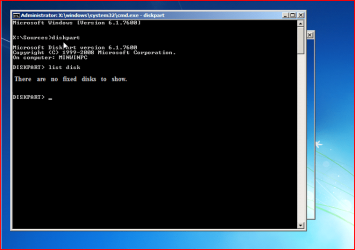
This is my last result in diskpart
c3.png
 

My Computer My Computer

At a glance

Win7 Ultimate 64bitAMD Phenom (tm) 945oe Quad Core 2.10 GHz2gbonboard
Computer Manufacturer/Model Number
Home made
OS
Win7 Ultimate 64bit
CPU
AMD Phenom (tm) 945oe Quad Core 2.10 GHz
Motherboard
Sapphire PE-AM2RS740G2 - PURE Element 740G
Memory
2gb
Graphics Card(s)
onboard
Sound Card
onboard
Monitor(s) Displays
Technika 26"
Hard Drives
Sata 500gb onboard
Several USB external HD
PSU
600watt
Case
Pass
Cooling
four fans
Internet Speed
sluggish
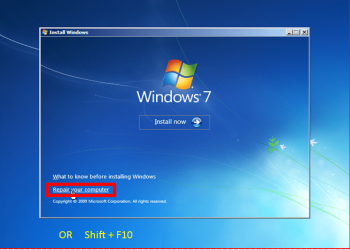
hello ken.


Try booting to diskpart and using the command below for each partition to see if that helps.
diskpart

select disk # = # target disk number

list partition

select partition 1 and each in turn for all partitions

delete partition override

when finished exit 2 times to close the command window and continue the installation.

Shift F10.PNG

Shift F10 001.PNG
 

My Computer My Computer

At a glance

ME/XP/Vista/Win7
OS
ME/XP/Vista/Win7
Maybe I am being extra thick here, I booted in c: my 64bit win 7 o/s and I am trying from that point to work on drive e: containing my 32bit system.

Do I need to boot in e: to be able to convert to basic?
 

My Computer My Computer

At a glance

Win7 Ultimate 64bitAMD Phenom (tm) 945oe Quad Core 2.10 GHz2gbonboard
Computer Manufacturer/Model Number
Home made
OS
Win7 Ultimate 64bit
CPU
AMD Phenom (tm) 945oe Quad Core 2.10 GHz
Motherboard
Sapphire PE-AM2RS740G2 - PURE Element 740G
Memory
2gb
Graphics Card(s)
onboard
Sound Card
onboard
Monitor(s) Displays
Technika 26"
Hard Drives
Sata 500gb onboard
Several USB external HD
PSU
600watt
Case
Pass
Cooling
four fans
Internet Speed
sluggish
Are you reading the posts?

Can you read post 24 & post 30.
 

My Computer My Computer

At a glance

ME/XP/Vista/Win7
OS
ME/XP/Vista/Win7
I have succeeded in converting it to a basic disk again, I formatted and reloaded win 7 32bit, the key was accepted this time round.

I went back to boot with disk in got through to language and from there to command prompt, I went the list partitions and override route to start with no joy, I then went the volume route convert basic and it did, so just to be sure I run a clean plus a format, then exit and continued loading and it went smoothly.

I have learned a bit more and in the future I will check any cannibalised disk to make sure they are basic and usable.

Many thanks again.
 

My Computer My Computer

At a glance

Win7 Ultimate 64bitAMD Phenom (tm) 945oe Quad Core 2.10 GHz2gbonboard
Computer Manufacturer/Model Number
Home made
OS
Win7 Ultimate 64bit
CPU
AMD Phenom (tm) 945oe Quad Core 2.10 GHz
Motherboard
Sapphire PE-AM2RS740G2 - PURE Element 740G
Memory
2gb
Graphics Card(s)
onboard
Sound Card
onboard
Monitor(s) Displays
Technika 26"
Hard Drives
Sata 500gb onboard
Several USB external HD
PSU
600watt
Case
Pass
Cooling
four fans
Internet Speed
sluggish
You're very welcome, pleased to hear things are up and running.
 

My Computer My Computer

At a glance

Windows 7 Ultimate SP1 64-BitIntel Core i7 870 @ 2.93GHz8Gb Dual-Channel DDR3 @ 664MHznVidia GeForce GTX 460 1024MB dedicated RAM
Computer Manufacturer/Model Number
HP Pavilion Elite 495UK
OS
Windows 7 Ultimate SP1 64-Bit
CPU
Intel Core i7 870 @ 2.93GHz
Motherboard
MSI 2A9C (CPU1)
Memory
8Gb Dual-Channel DDR3 @ 664MHz
Graphics Card(s)
nVidia GeForce GTX 460 1024MB dedicated RAM
Sound Card
Realtek HD Audio
Monitor(s) Displays
HP2310i
Screen Resolution
1920 x 1080
Hard Drives
1x1954GB Hitachi HDS22020ALA 330 (RAID), 1x1954GB Hitachi External for backup and storage
PSU
460W
Case
HP Elite
Cooling
Air cooled
Keyboard
Logitech K750 solar-powered keyboard
Mouse
Logitech Wireless M180 mouse
Internet Speed
2Mb
Other Info
Pure Avanti Flow Internet Radio with iPod Dock, 64Gb iPod, HP USB Speakers, Sony MDR-V500 Headphones, Sony Vaio F-Series Laptop
Hello Ken, good to see you got it running and thanks for the update.
 

My Computer My Computer

At a glance

W 7 64-bit UltimateIntel Q9550 Yorkfield8GB Dominator 8500C5DATI : XFX 5870
Computer Manufacturer/Model Number
* BFK Customs *
OS
W 7 64-bit Ultimate
CPU
Intel Q9550 Yorkfield
Motherboard
ASUS P5Q Pro
Memory
8GB Dominator 8500C5D
Graphics Card(s)
ATI : XFX 5870
Sound Card
Realtek HD Audio 7-1
Monitor(s) Displays
1x 47" LCD HDMI & 3x 26" LCD HDMI
Screen Resolution
1920x1080P & 1920x1200
Hard Drives
1x 80GB Intel X25-M G2 SSD : 1x 500GB & 1x 640GB WD Caviar Black(s)
PSU
Corsair 620HX
Case
Cooler Master RC-690
Cooling
Tuniq Tower 120, 2x 140mm and 3x 120mm case fans
Keyboard
Microsoft 500
Mouse
Razer Diamondback 3G
Internet Speed
14 Mb/s
Other Info
1x Koutech 3Gb/s SATA HDD Hot Swap Rack
Back
Top