Solved Installing Windows 7 on an SSD

MrrX

New member
Local time
6:56 AM
Messages
8
I have had nothing but trouble trying to install onto an SSD for the first time. I bought a Samsung 840 EVO 500 GB SSD, and have spent most of the day troubleshooting. I'm pretty sure it's a Windows Vs Samsung compatibility problem.

Issue #1 - Can't format. Error code 0x80070057.
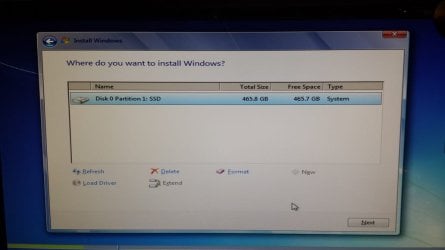
So many people all over the internet have had this error. Nobody's posted a solution that worked for me. Many on this forum recommend Diskpart and formatting the SSD prior to installation. This didn't work. I successfully created the partition, but formatting it results in an I/O error which I couldn't get past.

However - I read something about a success if formatting the drive was successful, in windows 7, and then doing the clean install. I did that with my new hardware - installed windows on the HDD instead of the SSD. I then found a utility called EASEUS Partition Manager, installed this, and successfully formatted the partition in Windows 7.

I deleted the partitions on the HDD, and attempted to reinstall. I got past this error, and got a new one.

Issue #2 - Expanding Files. Error code 0x800745D.
I found that Windows took Disk 0 (the HDD) and created that 100MB partition on it. It then threw this error. What's that about exactly - I would think the recovery partition would need to be part of the SSD. Shut down, disconnected the HDD, restarted the install DVD, at this point brings me back again to 0x8007057.

Suggestions appreciated. Thank you.

Windows 7 64 Bit Ultimate at release (No SP)
Asus H97M Plus Mobo
WD 2TB 7200 RPM SATA 3
ASUS DRW-24B1ST 24X SATA

I am restarting the HDD windows install now, and will disconnect the HDD after formatting the SSD and see if that works.
 

My Computer My Computer

Computer type
PC/Desktop
OS
Win 7 Ultimate x64
Believe I've tried everything in Post 2's linked articles.

Attempted to format the SSD with IDE enabled instead of AHCI. Yeah, that didn't work at all.

Successfully installed windows again, on the HDD. Haven't been able to format the SSD successfully this time. What tempermental hardware, I think I'll be satisfied just to use it as a disk - I found out tonight I cannot send it back :( .
 

My Computer My Computer

Computer type
PC/Desktop
OS
Win 7 Ultimate x64
Can`t you format it from Windows ?
 

My Computer My Computer

Computer type
PC/Desktop
Computer Manufacturer/Model Number
Skylake Special #666
OS
Windows 10 Pro x64
CPU
Intel Core i7 6700K
Motherboard
Asus Sabertooth Z170 Mark 1
Memory
GSkill TridentZ RGB 16GB 3600 16-16-16-36
Graphics Card(s)
EVGA GTX 980 Ti SC x2
Sound Card
Realtek High Definition
Monitor(s) Displays
AOC G2460PG
Screen Resolution
1920 x 1080 144Hz
Hard Drives
Samsung 860 Pro 256GB, Seagate Barracuda 4TB x2
PSU
EVGA 1000 P2, EVGA White Custom Braided Cables
Case
Corsair Vengeance C70 Gunmetal Black
Cooling
Corsair H100i v2, Corsair ML120 x2, Thermal Grizzly Kryonaut
Keyboard
Logitech G910 Orion Spectrum
Mouse
Logitech G700s
Internet Speed
Verizon Fios Quantum Gateway 75/75
Antivirus
Windows Defender, Malwarebytes Free 3.8.3
Browser
Chrome
Other Info
Corsair SP120 x4, LG Blu-ray Drive, Durabrand HT-395 100 Watt Dolby Digital Amp, Corsair H2100 Wireless 7.1 Headset
No. Windows is giving an error when I try to format/partition it.
 

My Computer My Computer

Computer type
PC/Desktop
OS
Win 7 Ultimate x64
I would say the SSD is ready for RMA. I have never seen such a SSD behavior and I have installed Win 7 on a dozen SSDs.
 

My Computer My Computer

Computer Manufacturer/Model Number
HP, Dell, Gateway, Toshiba - 4 laptops and 2 desktops
OS
Vista, Windows7, Mint Mate, Zorin, Windows 8
CPU
from 1.6GHz Duo to i7
Monitor(s) Displays
2x HP w2207
Hard Drives
5x HDD, 7x SSD, 12x Externals
Keyboard
with trackball - no mices
Mouse
Trackball mice
Internet Speed
DSL 6000
Unlucky me, Newegg will not accept the drive for return. Apparently I have to work with Samsung warranty.

I hesitate because one time, I did manage to get a functioning drive formatted. Then, I tried to install windows on it, after deleting all partitions on the HDD, got Issue #2, and now it's not behaving. That makes it sound like there's a software solution.
 

My Computer My Computer

Computer type
PC/Desktop
OS
Win 7 Ultimate x64
The manufacturer must make it right or replace it within the first year.

Did you unplug the HD during all steps in tutorial?

Are there UEFI settings in BIOS setup for UEFI, CSM, Legacy BIOS or EFI items in the boot order?
 
The manufacturer must make it right or replace it within the first year.

Thanks, I reread it all. Newegg will only replace it, no refund.

After trying a different software (Partition magic), then EaseUS again, I managed to get the SSD to a state that Windows would format it. I have formatted it successfully as a 500GB drive and it works under windows. I really don't understand why it worked.

Did you unplug the HD during all steps in tutorial?

No. That might be what I did wrong before. Previous install was like this :

  1. Used EASEUS and formatted the SSD. Exited windows.
  2. Rebooted from DVD and started the Windows Installer
  3. Deleted partitions from the HDD via DISKPART
  4. Tried to install on SSD

I'm unsure about reinstalling on the SSD since I don't have a consistent solution for partitioning and formatting the thing.

Are there UEFI settings in BIOS setup for UEFI, CSM, Legacy BIOS or EFI items in the boot order?
Yes.

CSM is enabled. The DVD drive doesn't work without it.

Boot order is :
P1 ASUS DRW-24
P3 WDC WD 2003 (HDD)

SSD does not appear there.
 

My Computer My Computer

Computer type
PC/Desktop
OS
Win 7 Ultimate x64
New Egg is not the manufacturer. If they will replace it then I would do that first. Or you can call the manufacturer's tech support to have them help you test it, update firmware, or see if this is a known issue they can resolve. If not allowing them to RMA is another option.

The correct way to install an OS is to delete, create and format the partitions during install during Steps 7/8 of Clean Install Windows 7.

Are you booting the installer as an EFI device or installing to Legacy BIOS? What are the exact settings choices for CSM? Is there a setting for UEFI or Legacy boot first?

The tutorial says clearly that all other drives are to be unplugged during install. What else did you skip? The skipped step is often the fix.
 
Last edited:
From that guide, maybe I should follow 186875 guide for UEFI devices.

Are you booting the installer as an EFI device or installing to Legacy BIOS? What are the exact settings choices for CSM? Is there a setting for UEFI or Legacy boot first?

This is ASUS UEFI BIOS Utility.
Under boot, I have a CSM subsection with these choices

Launch CSM (* Enabled, Auto, Disabled)
Boot Device Control (*UEFI and Legacy OPROM, Legacy OPROM only, UEFI only)
Boot from Network Devices (*Legacy OPROM first, UEFI Driver first, ignore)
Boot from storage devices (*Legacy OPROM first, UEFI Driver first, ignore, Both-Legacy OPROM first, Both-UEFI First)
Boot from PCI-E (*Legacy OPROM first, UEFI driver first)

Thanks for helping.
 

My Computer My Computer

Computer type
PC/Desktop
OS
Win 7 Ultimate x64

Attachments

  • 2014-11-02 08.52.44.jpg
    2014-11-02 08.52.44.jpg
    42.8 KB · Views: 1
  • 2014-11-02 08.53.46.jpg
    2014-11-02 08.53.46.jpg
    87.9 KB · Views: 1

My Computer My Computer

Computer type
PC/Desktop
OS
Win 7 Ultimate x64
I would accept the Newegg offer to replace the drive. It is unlikely that the next drive is also faulty. The Samsung SSDs are generally regarded as good SSDs.

One other thing you could try (to exclude a Windows problem). Use a live Linux CD and format with that. The program you use in Linux is GParted > Partition tab.
 

My Computer My Computer

Computer Manufacturer/Model Number
HP, Dell, Gateway, Toshiba - 4 laptops and 2 desktops
OS
Vista, Windows7, Mint Mate, Zorin, Windows 8
CPU
from 1.6GHz Duo to i7
Monitor(s) Displays
2x HP w2207
Hard Drives
5x HDD, 7x SSD, 12x Externals
Keyboard
with trackball - no mices
Mouse
Trackball mice
Internet Speed
DSL 6000
Thanks for the idea. Ubuntu installed from a Live USB with no problem, and Gparted formatted the SSD without a hiccup. Trying to install, again, on the SSD produced the same error shown previously - even with HDD physically disconnected. So this confirms the problem is a Windows conflict.

But I'm giving up, I'll just use the HDD as a boot device. I now have a Ubuntu install on the SSD, and can use the SSD for whatever else needs fast loading. Thank you all for the help.
 

My Computer My Computer

Computer type
PC/Desktop
OS
Win 7 Ultimate x64
You can try an EFI install by booting the installer as an EFI device, delete all partitions again during install, create and format new.

Your BIOS settings appear to allow either EFI or Legacy installs.
 
Back
Top